


TL;DR; A newcomer tried Haiku for the first time and found it amazing, especially compared to the environments available on Linux.
I have already shared my thoughts (as well as frustrations) about #LinuxUsability (, , , , , ). In this review, I will describe my first impressions of , an open-source operating system for personal computers. First impressions can be useful, but since you only get them once — I have preserved mine here.
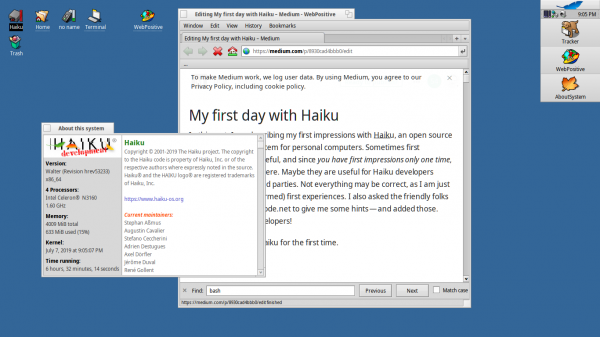
The system on which I am writing this review
may be helpful for Haiku developers and other interested parties.
I might be mistaken somewhere, as I am just describing my personal (read: naïve) first experience. Also, friendly people in the #haiku channel on irc.freenode.net helped me with suggestions — I will publish those as well. Thank you, Haiku developers!
What I wanted to say: Haiku is not 100% perfect yet, but it already has a solid working environment.
Installation
The Haiku project provides images for download from CD or DVD, . I used a USB-3 flash drive. I was told that booting from USB-3 might not work, but on my two Intel-based test systems, it worked flawlessly.
I started the installation process by downloading the 64-bit image, which I then wrote to the flash drive using the program . Booting works both with and without it — my applause for providing such an image.
Haiku uses its own for the boot partition, although support for FAT32 and NTFS is also claimed. Overall, the system requires about 600MB, but more space is needed for additional applications.
By default, a 600MB BeFS partition and a 3GB FAT32 partition are created. The FAT32 partition has a file /EFI/BOOT/BOOTx64.EFI, indicating the possibility of booting on EFI-supported systems. Unfortunately, I didn't find programs to increase the size of BeFS, and I hope that in the future, a different disk partitioning scheme will be implemented because the size of the partition image is fixed and might not provide enough free space for additional software. It would be nice if additional software packages could be stored on the second FAT32 partition.
This solution would be advantageous for those who wish to access files directly from other systems. Under Linux, there is already support for reading BeFS, and there are read-write implementations of BeFS for .
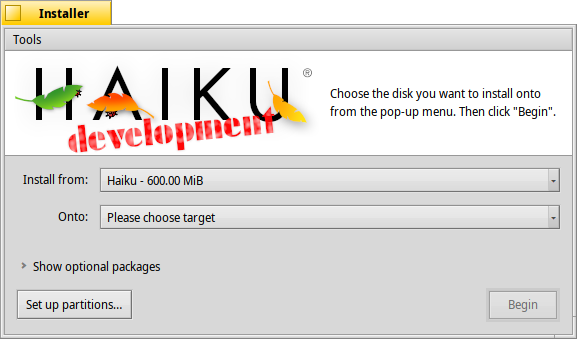
Haiku Installer
I was advised: if you want to use a larger partition — install Haiku on another flash drive.
For me, this step is essentially unnecessary, as the Haiku installer does not partition disks but simply launches the DriveSetup program, where you have to manually partition the disk, add a partition that will then be formatted in BeFS, after which control returns to the installer. You will also have to manually install the bootloader using a separate program. Unfortunately, I couldn't boot from EFI with such partitioning since there is no FAT32 partition with the boot files for EFI. An installer that can automatically partition including EFI features would be helpful.
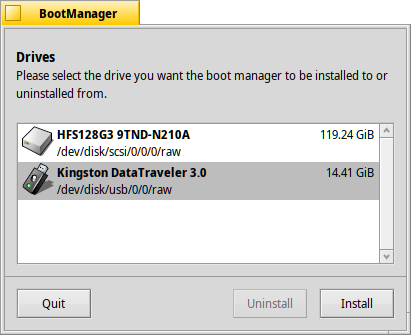
BootManager installs the bootloader onto the disk
The installation process takes just under three minutes, which is quite fast. The entire system, which consists of "only" 4751 files, is copied. This is because most software is packaged as hpkg files (somewhat similar to Snap packages in Linux systems), which are never installed but simply mounted. Interestingly, there are quite a few "free" files, such as png. Why aren't they packaged?
As I mentioned, even the operating system kernel is delivered as an hpkg file. (I referenced the 4751 files because I ran HaikuDepot before the installation, which downloaded a bunch of stuff. A clean installation apparently doesn't include all of them and can be installed faster with about 200 packages. Cool! As I was told, the fact that downloaded files are not ignored during installation is . Wow, and it seems like this is the first bug report I've written).
First Boot
The system boots, displaying a nice splash screen, and then halts: after booting, my graphics card (Radeon) shows a black screen.
I was advised to boot in safe mode with a resolution of 1024x768 on a FullHD monitor. In principle, it could have been complicated with the bootloader to work with FullHD, but on another computer with an Intel graphics card, everything worked flawlessly.
The system responds smoothly from a USB drive, apparently because nothing is written to the drive during operation, so I hope to use the USB drive as my main working system. You get a real system when booting from USB, unlike the sluggish "live" Linux images.
During boot, the screen doesn't flicker, there are no kernel messages, and it doesn't feel like Xorg is glued to the kernel with blue tape. Unlike typical Linux distributions, the kernel and GUI here are designed to work seamlessly together!
There’s no login prompt, as the system is meant for a single user. Everything is straightforward, just what’s needed for a personal computer.
Need to support multiple users? Give them each a USB drive, each costing no more than $5.
First impressions of the desktop environment
If you compare the first feeling, it resembles a Mac more than, say, Linux with Gnome. The "command" key works just like on a Mac. Good!
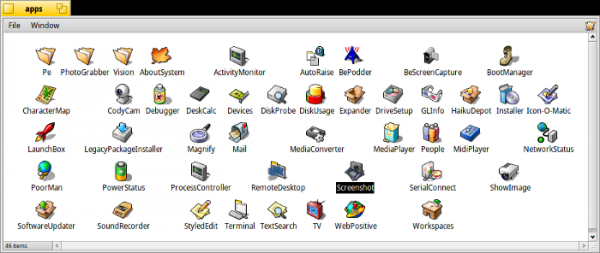
Nothing compares to the spatial file manager, it feels like the good old Mac!
(like Macintosh System 1.0), unfortunately, each window doesn't remember its settings (for example, view as a list or as icons). As I was told — it's a bug that I believe can be easily fixed. (Unfortunately, is difficult — it uses an original system not based on GitLab or GitHub, and you also can't log in using those). Files get their icons, and there are no issues with individual files on the desktop and icons.
Good! Much better than the desktop environments for Linux, you can feel the simplicity.
Performance
The operating system runs smoothly even on low-power devices like a netbook with Atom. There’s no feeling of bloated software layers. Good!
said that LibreOffice feels faster than on other operating systems, but I haven't checked that yet.

Bryan Lunduke. Haiku OS Beta — review and impressions
Command line
It comes with a terminal. Overall, despite some small differences from Linux, I quickly got used to it; it's actually just regular bash, which was quite pleasing.
Welcome to the Haiku shell.
In it, you can easily launch applications that are on the $PATH:
~> Touchpad
~> echo $PATH
.: /boot/home/config/non-packaged/bin: /boot/home/config/bin: /boot/system/non-packaged/bin: /bin: /boot/system/apps: /boot/system/preferences
Wow! “.” in $PATH! This means you can run commands directly from the current directory (Linux users once told me that the world would explode if I tried to do this). Awesome!
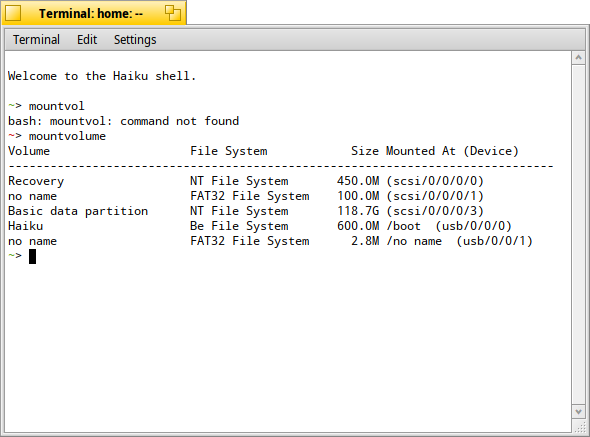
bash, running in the Haiku terminal
What's really cool about the terminal is that you can press ctrl + c to copy, just like in other apps, unlike Linux environments where you need to press ctrl + shift + c in the terminal.
Little things that show the integrity of the entire system.
File system structure
The section from which the boot occurs is mounted at /boot. How simple!
No clutter /etc, /usr, /bin... Just /home and /system. Clean, simple, clear. Great! (Not quite: they exist, but are hidden. Why? Because /bin this /system/bin, there's no need to display this in Tracker, but scripts still use it. I think developers should get rid of outdated things made for compatibility, as it only complicates understanding.)
packagefs
I already mentioned earlier about hpkg files, which are somewhat similar to packages in Linux, but they don’t get installed, they are simply mounted (like snap packages). The file system that does this magic is called packagefs. It mounts hpkg files over others, creating the entire catalog /system.
The mount command, unfortunately, does not show what is mounted.
~> mount
usage: mount [-ro] [-t fstype] [-p parameter] [device] directory
-ro mounts the volume read-only
-t specifies the file system to use (defaults to automatic recognition)
-p specifies parameters to pass to the file system (-o also accepted)
if device is not specified, NULL is passed (for in-memory filesystems)
I was recommended to try mountvolume, which will show the mounted partitions, but unfortunately, it also doesn’t show the mount points with packagefs (it will only show those related to partitions or disk images). [Fortunately, if you run mount or df somewhere on a host with docker, you can scroll a couple of screens! — translator's note] But you can pull a trick with df:
~> df -h

Mount Type Total Free Flags Device
----------------------------------
/boot bfs 600.0 MiB 6.0 KiB QAM-P-W /dev/disk/usb/0/0/0
/boot/system packagefs 4.0 KiB 4.0 KiB QAM-P -
/boot/home/config packagefs 4.0 KiB 4.0 KiB QAM-P -
/no name fat 2.8 MiB 2.3 MiB - M-PRW /dev/disk/usb/0/0/1
As you can see, /system and /home/config inside /boot this is precisely packagefs.
People who know me are aware that I’m a fan of drag-and-drop support in file managers: for example, I use NeXT-style application sets, or .
In any case, there are drawbacks to this format of software distribution. Can packagefs combine the best of both worlds?
As can be seen, in my case (the system partition is full, but I want to install applications) it would be more elegant to download applications somewhere using the browser, just like I do with files. .dmg for Mac or AppImage. packagefs lives in the kernel, so it is not a file system for FUSE (although I know that FUSE is also available in Haiku). I was also told that additional 'packagefs zones' might be created in the future, which likely means I could specify packagefs to save packages, for instance, on separate disk partitions. I like that idea—if the disk partition is on a removable drive, I could sit at another computer and have working applications there.
I was also told that drag-and-drop method works for installing packages: just drag a file to it /system/packages or in /home/config/packages to install, and if you drag a file out of there, it will be deleted. If you drag a package with unsatisfied dependencies, the system will ask for their prior installation.
Initially, I was unclear how packagefs handles multiple versions of the same package; what will happen if I want to install, for example, different versions of gcc, or other GUI programs? (One of the developers said, quote: 'packagefs itself does not contain anything that prevents the installation of multiple packages with the same name, but since libsolv from OpenSuse is used for dependency resolution and does not allow that to happen, it was forbidden for HaikuDepot settings as well.' I can explain why I like the idea of .app, AppDir, and AppImages packages.)
Dynamic libraries
Is there technology for dynamic libraries? Yes, this is evident, for instance, when you run an application with missing libraries by double-clicking:
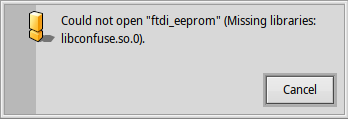
Can you imagine this in gnome, kde, or xfce?
In Linux, such a launch would not show anything. Let's see how long it takes in different environments:
- GNOME:
- KDE:
- XFCE:
- MATE:
What about checks?
~> ldd
bash: ldd: command not found
You have to use the alternative:
~> objdump -x /bin/bash | grep NEEDED
NEEDED libreadline.so.7
NEEDED libhistory.so.7
NEEDED libncurses.so.6
NEEDED libintl.so.8
NEEDED libroot.so
In principle ldd it would be better since it additionally shows the paths from which the libraries will be loaded.
But where are they actually loaded from?
~> echo $LIBRARY_PATH
%A/lib:/boot/home/config/non-packaged/lib:/boot/home/config/lib:/boot/system/non-packaged/lib:/boot/system/lib
This allows libraries to be placed next to the executable file, and it will "just work." How cool is that! You can simply link individual libraries to the application without fiddling with rpath or setting the LD_LIBRARY_PATH variable like on Linux. Nice!
There is a library (terrible on Linux) /boot/system/lib/libstdc++.so.6.0.24.
What if the application requires a newer version than what is available in /boot/system/lib?
An ordinary user will probably upgrade to the latest version because there is no "Administrator" user with a root password in this system [the author hints at the simplicity — translator's note].
Well, at least that's how it looks. (In reality, the "user" acts as root. You can set a password using the command passwd, after which specify PermitRootLogin=yes downward API support (simultaneously with this in sshd_config, and then you'll be able to connect from outside via ssh. The developers told me that by default, all applications run as root. Eventually, they might refine this... But I'm not sure I would like it.)
Since there are no Haiku distributions, application developers also do not have access to newer versions than those available for download in your system. The result: fewer disappointments, things "just work." Great simplification! I like it.
Resources and registrars
As mentioned above, applications receive a type and an icon, so you don't have to deal with files on the desktop and similar tasks. I was told that there is a special service registrar that is aware of applications, file types, and icons. It is always notified when a package is installed or a file is marked for execution (using the program chmod or mimeset).
Somewhat reminiscent of on Mac. And this is what . Excellent!
Binary files get built-in icons as resources, so you don't need a separate icon in addition to the files on the desktop. Almost like it was on Macintosh System 1. Cool!
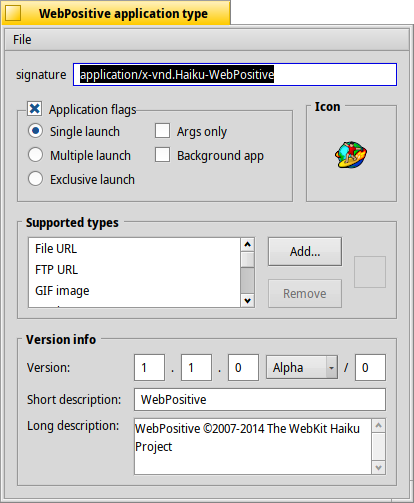
Supported application types, supported document types, embedded resources, and version information
Tracker (file manager) automatically marks binary files as executable. This is what I've been waiting for from desktop environments on Linux for over 10 years.
All of this is quite delightful. It's so cool! Life is becoming so simple. It's more refined and resembles Mac more than on Linux. Or like this...
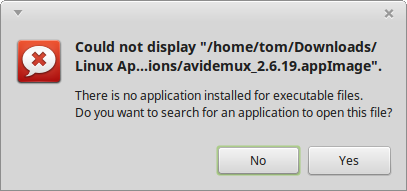
Linux application without the executable bit set
In Gnome there's an option to launch executable files from the file manager, but the community raised a fuss — and everything was reverted.
I was also told that applications use the function find_paths() instead of hard-coded paths /usr/bin and /usr/share (a common feature of Linux working environments), which allows them to be moved around the filesystem. Standing ovation! .
What surprised me
- I was puzzled by the fact that
/bootthis is the mount point for the partition from which the system loads. Why isn’t it "/"? Or/Haiku? (Пояснение: действительно,/bootthis is always the boot partition, displayed on the desktop as "Haiku" because that's its name. Think of "/" as analogous to the desktop in Mac System 1, the root of the hierarchy that doesn’t actually exist on disks). - The mount point for user-installed packages is
/home/configWhy not just/home? (Один из разработчиков пояснил мне, что они не хотят засорять домашний каталог, но мне кажется, config — название неудачное, потому что внутри есть подкаталогbin/, so it's not just storing settings). - What is the license for everything? For instance, in when viewing "About", there is no explicit indication. In the "About this system" field, it states that the Haiku code is under the MIT license. Great! (I was also told that WebPositive comes with the operating system under the same license, but its WebKit engine is mostly under the two-clause BSD).
What didn’t work as I expected
First of all, I was struck by the level of hardware support. Everything worked on my Atom-based netbook, including WLAN. But there are some quirks in the operation.
- Total non-functionality on Macintosh hardware, regardless of EFI mode or BIOS emulation ("Windows"). The system simply hangs if you select an icon in the Mac bootloader. I was told that this is a and you can boot using , but those settings are too complicated for me.
- Graphics acceleration. It seems that using Radeon is not possible yet (I had a black screen), but even on Intel, it’s not smooth. Video acceleration in WebPositive is purely software-based, including H.264. It's surprising, given the initial direction towards video. One of the developers clarified that video in WebPositive works using slowdown hacks.
- No sound? "Drivers for sound cards are still lacking," said the developer. Someone probably needs to support the HDA driver similar to USB-3. Currently, getting sound requires a hot reboot from another operating system, and I believe this will be fixed eventually.
- Brightness and volume control buttons aren't working. (There is a base in the form of the Shortcuts app: you can bind any keyboard combination to any desired function, but so far Haiku can't work with media keys. Any volunteers?)
- Two-finger touchpad control. Doesn't work out of the box. There is a settings panel that reported, "No touchpad found, the settings will have no effect." ( with ELAN Input Device, ACPI ETD050A).
- With the existing application for reading files from digital cameras and smartphones on Android, I couldn't get synchronization in MTP and PTP modes. It would be great if they mounted like other partitions in the system.
- Closing the laptop lid does not seem to be processed. (I know that Haiku still does not work with ACPI: support has been implemented but is not enabled by default; there is no reinitialization of the driver)
- I couldn't create an account in the bug tracker because does not work in WebPositive.
Applications
The main purpose of the operating system is to run applications. I was afraid that there wouldn't be applications for real work under Haiku. Luckily, I was mistaken, as there is hope for improvement — when Haiku is used more frequently.
(a desktop publishing application) is available, and it's a quite complex application based on Qt. Also available are (IDE).
I became curious if native Be applications for Haiku are being written today, using native tools (if they exist), or if it's sufficient to use QtCreator (which would ease the porting of cross-platform applications). The developers' stance on Haiku is a "clear" preference for native applications for Haiku. Is that true? I doubt that applications for real work are not cross-platform (all the applications I use for work are cross-platform).
Support for WxWindows applications is claimed.
The lack of Gtk+ support is disappointing. This means that there won't be Gimp on Haiku any time soon (well, that's my guess), but there is a substitute in Krita!
I also think there needs to be a simple and clear way to create applications for Haiku, — using Travis CI and GitLab CI.
Where are we headed?
Will Haiku get stuck in the BeOS UX concept? I believe that to be appealing, it needs to carefully refine new UX schemes when adopting them, while remaining true to its foundations.
For example:
- Staying simple, without those 100500 options that make Linux "complicated."
- Using an arrow cursor for the mouse instead of a strange hand.
- Will there be a Dock? (I know there is something like a Dock called , which is even closer to a Dock , but the original BeOS already had a Dock back in 1998!)
- Global menu? (Obviously not since sees no particular benefit).
- Quick window switching? (They said it might be possible to activate "", by holding the Windows key while dragging a window, but it's not intuitive, moreover — it doesn't work for me).
- Animation for opening and closing windows?
- Shadows behind windows?
- Support for themes like in Aqua? (Yes, it's possible, there is infrastructure and tools, for example, , but someone needs to create the themes. I would try it myself, I was told there is documentation in /xref/haiku/headers/os/interface/ControlLook.h, но не сейчас).
These are subtle nuances, taking into account which the system shouldn't lose its unique individuality.
Conclusion
Haiku really opened my eyes, showing me how a desktop environment "just works."
More than 10 years ago, I switched from Mac to Linux and have been looking for the same level of refinement and beauty, and Haiku matches it in many ways.
Honestly, there are shortcomings, but surprisingly many things, including hardware components, like WLAN or printers, "just work."
However, primarily, the system has a desktop environment concept that is absent in desktop environments on Linux.
Having a cohesive system (not just a kernel and various competing user environments) makes everything simple and consistent.
The absence of different builds (distributions) makes everything even simpler.
Relying on a single user operating in the system further reduces complexity.
The result: a very simple, refined, minimalist system in many ways, created for "regular users," not UNIX system administrators.
There is hope that when this system becomes more popular (which is inevitable), its complexity will not increase.
I already wrote about #LinuxUsability in the previous article series. It's nice to know that Haiku addresses many of the issues raised. .
It took me just one day to realize: I want to use this environment for my daily work and I'm also looking for ways to contribute to the system's development.
Try it yourself! After all, the Haiku project offers images for download via DVD or USB. . To install, simply download the image and write it to a flash drive using .
From the translation author: this is only the first article in the Haiku series, the others are awaiting translation and will be published later.
Source: habr.com
