

Real database globals are well-known but still, few know how to use this superweapon effectively.
By using globals for the tasks they excel at, impressive results can be achieved, either in performance or in simplifying the solution., ).
Globals are a special way of storing and processing data, fundamentally different from tables in SQL. They appeared in 1966 in the language (an evolutionary development — , later COS) in medical databases and are still , as well as penetrating some other areas requiring reliability and high performance: finance, trading, etc.
Modern DBMS support transactions, logging, replication, and partitioning for globals. That is, they can be built into modern, reliable, distributed, and fast systems.
Globals do not constrain you within the limits of the relational model. They provide freedom to develop data structures optimized for specific tasks. For many applications, the judicious use of globals can be a truly secret weapon, delivering performance that relational application developers can only dream of.
Data storage via globals can be used in many modern programming languages, both high-level and low-level. Therefore, in this article, I will focus specifically on globals, not on the language from which they originated.
2. How globals work
Let's first understand how globals work and what their strengths are. Globals can be viewed from different perspectives. In this section of the article, we will look at them as trees or hierarchical data storage.
Simply put, a global is a persistent array. An array that is automatically saved to disk.
It's hard to imagine anything simpler for data storage. In the code (in COS/M languages), it differs from an ordinary associative array only by the symbol ^ before the name.
To store data in a global, you don't need to learn SQL query language; the commands to work with them are very simple. They can be learned in an hour.
Let's start with the simplest example. A single-level tree with 2 branches. The examples are written in COS.
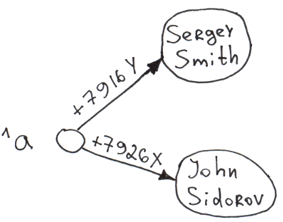
Set ^a("+7926X") = "John Sidorov"
Set ^a("+7916Y") = "Sergey Smith"
When inserting information into a global (Set command), three things happen automatically:
- Data is saved to disk.
- Indexing. What is in the parentheses serves as the key (in English literature - "subscript"), and what is to the right of the equals sign is the value ("node value").
- Sorting. Data is sorted by key. Thus, during traversal of the array, the first element will be "Sergey Smith", and the second will be "John Sidorov". When retrieving a user list from the global, the database does not spend time sorting. Moreover, a sorted list can be requested starting from any key, even a non-existent one (the output will start with the first real key that follows the non-existent one).
All these operations occur incredibly quickly. On a home computer, I was achieving values of up to 750,000 inserts/sec in a single process. On multi-core processors, values can reach inserts/sec.
Of course, the insert speed itself doesn't say much. For example, you can record information very quickly in text files — that’s how the Visa processing works. But in the case of globals, we get a structured, indexed storage that can be easily and quickly worked with in the future.

- The strongest aspect of globals is the speed of inserting new nodes.
- Data in the global is always indexed. Their traversal, both at the same level and down the tree, is always fast.
Let's add a few more branches at the second and third levels to the global.
Set ^a("+7926X", "city") = "Moscow"
Set ^a("+7926X", "city", "street") = "Req Square"
Set ^a("+7926X", "age") = 25
Set ^a("+7916Y", "city") = "London"
Set ^a("+7916Y", "city", "street") = "Baker Street"
Set ^a("+7916Y", "age") = 36 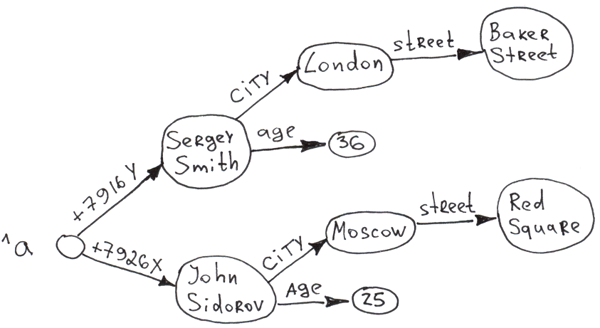
It is clear that based on globals, multi-level trees can be built. Moreover, access to any node is practically instantaneous due to auto-indexing during insertion. And at any level of the tree, all branches are sorted by key.
As can be seen, information can be stored both in the key and in the value. The total length of the key (the sum of the lengths of all indices) can reach , while the values for Caché. The number of levels in the tree (number of dimensions) is 31.
Another interesting point. You can build a tree without specifying the values of the upper-level nodes.
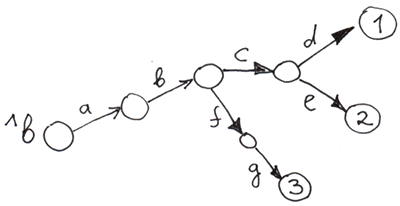
Set ^b("a", "b", "c", "d") = 1
Set ^b("a", "b", "c", "e") = 2
Set ^b("a", "b", "f", "g") = 3
Empty nodes are those that have no assigned value.
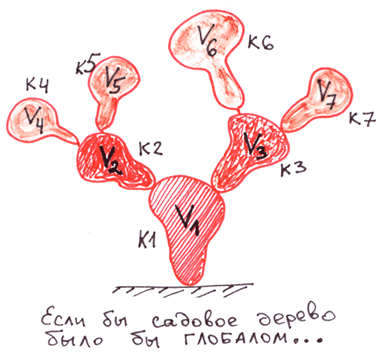
To better understand globals, let's compare them to other trees: garden trees and file system trees.
Let's compare the trees in globals with the most familiar hierarchical structures: ordinary trees that grow in gardens and fields, as well as file systems.
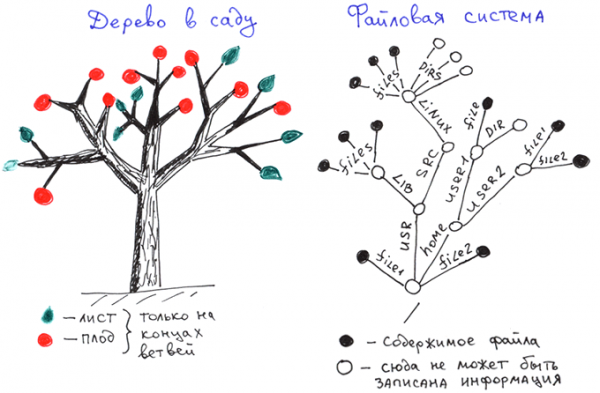
As we see in garden trees, leaves and fruits are located only at the ends of the branches.
In file systems, information is stored only at the ends of branches, which are complete file names.
Here is the data structure of a global.
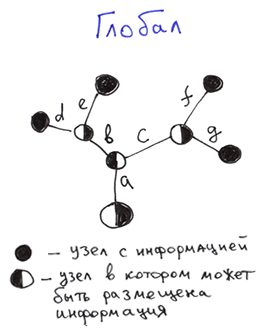 Differences:
- Internal nodes: Information in a global can be stored in each node, not just at the ends of the branches.
- External nodes: A global must have defined values at the ends of the branches, while file system and garden trees do not.
In terms of internal nodes, we can say that the structure of a global is a superset of the structure of file system name trees and garden trees. That is, it is more flexible.
In general, a global represents an ordered tree that allows data storage at each node..
To better understand how globals work, let's imagine what it would be like if the creators of file systems used an approach similar to globals for data storage.
- When deleting a single file in a directory, the directory would automatically be deleted, as well as all parent directories containing only the just deleted directory.
- The need for directories would disappear. There would simply be files with subfiles and files without subfiles. If we compare this with an ordinary tree, each branch would become a fruit.

- Things like README.txt files might have disappeared. Everything that needed to be said about the contents of a directory could be recorded in the directory file itself. In path space, a file name is indistinguishable from a directory name, so we could manage with files alone.
- The speed of deleting directories with nested subdirectories and files would have increased dramatically. Many times articles have appeared on Habr about how long and difficult it is to delete millions of small files (, ). However, creating a pseudo-file system on a global level would take seconds or fractions of a second. When I tested the deletion of subtrees on my home computer, I was able to delete 96-341 million nodes from a two-tier tree on an HDD (not SSD) in just 1 second. This refers to deleting part of the tree, not just the entire file with globals.

Deleting subtrees is another strong point of globals. Recursion is not needed for this. It happens incredibly fast.
In our tree, this could be done with the command Kill.
Kill ^a("+7926X") 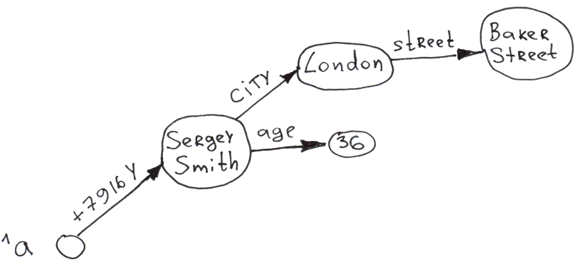
To better understand the actions available for globals, here is a brief table.
Main commands and functions for working with globals in COS
Setting branches up to a node (if not defined yet) and the node's value
Copying a subtree
Deleting a subtree
Deleting the value of a specific node. The subtree coming from the node remains untouched.
Full traversal of the tree with deep access
Traversing the branches of a specific node
Checking if the node is defined
Atomic increment of the node's value. To avoid reads and writes for ACID. Recently, it is recommended to change to
Thank you for your attention, we are ready to answer your questions.
Disclaimer: This article and my comments on it reflect my opinion and do not represent the official position of InterSystems.
Continued . You will learn what types of data can be displayed on globals and in which tasks they provide the maximum benefit.
Source: habr.com
