

Our Turkish clients asked us to set up backup properly for the data center. We do similar projects in Russia, but here the story was more about exploring the best way to do it.
Given: there is a local S3 storage, there is Veritas NetBackup, which has gained new advanced functionality for moving data to object storage now with deduplication support, and there is a problem with free space in this local storage.
Task: to ensure that the backup storage process is fast and inexpensive.
Previously, in S3 everything was stored simply as files, and these were full copies of critical data center machines. So it wasn’t very optimized, but it worked right from the start. Now it’s time to sort things out and do it correctly.
In the picture, here is what we achieved:

As you can see, the first backup was done slowly (70 MB/s), while subsequent backups of the same systems were significantly faster.
Here are a few more details about the specific features.
Backup logs for those who are ready to read half a page of dumpsFull with rescan
Dec 18, 2018 12:09:43 PM — Info bpbkar (pid=4452) accelerator sent 14883996160 bytes out of 14883994624 bytes to server, optimization 0.0%
Dec 18, 2018 12:10:07 PM — Info NBCC (pid=23002) StorageServer=PureDisk_rhceph_rawd:s3.cloud.ngn.com.tr; Report=PDDO Stats (multi-threaded stream used) for (NBCC): scanned: 14570817 KB, CR sent: 1760761 KB, CR sent over FC: 0 KB, dedup: 87.9%, cache disabled
Full
Dec 18, 2018 12:13:18 PM — Info bpbkar (pid=2864) accelerator sent 181675008 bytes out of 14884060160 bytes to server, optimization 98.8%
Dec 18, 2018 12:13:40 PM — Info NBCC (pid=23527) StorageServer=PureDisk_rhceph_rawd:s3.cloud.ngn.com.tr; Report=PDDO Stats for (NBCC): scanned: 14569706 KB, CR sent: 45145 KB, CR sent over FC: 0 KB, dedup: 99.7%, cache disabled
Incremental
Dec 18, 2018 12:15:32 PM — Info bpbkar (pid=792) accelerator sent 9970688 bytes out of 14726108160 bytes to server, optimization 99.9%
Dec 18, 2018 12:15:53 PM — Info NBCC (pid=23656) StorageServer=PureDisk_rhceph_rawd:s3.cloud.ngn.com.tr; Report=PDDO Stats for (NBCC): scanned: 14383788 KB, CR sent: 15700 KB, CR sent over FC: 0 KB, dedup: 99.9%, cache disabled
Full
Dec 18, 2018 12:18:02 PM — Info bpbkar (pid=3496) accelerator sent 171746816 bytes out of 14884093952 bytes to server, optimization 98.8%
Dec 18, 2018 12:18:24 PM — Info NBCC (pid=23878) StorageServer=PureDisk_rhceph_rawd:s3.cloud.ngn.com.tr; Report=PDDO Stats for (NBCC): scanned: 14569739 KB, CR sent: 34120 KB, CR sent over FC: 0 KB, dedup: 99.8%, cache disabled
What is the problem?
Customers want to back up as often as possible and store it as cheaply as possible. The best way to store them inexpensively is in object storage like S3, as they are the most cost-effective in terms of maintenance per megabyte from which backups can be restored in a reasonable timeframe. When there are many backups, it becomes less economical, as most of the storage is filled with copies of the same data. In the case of HaaS, our Turkish colleagues can compress storage by about 80-90%. This clearly pertains to their specifics, but I would definitely expect at least 50% deduplication.
To address this issue, the major vendors have long since created gateways to Amazon's S3. All their methods are compatible with local S3 if they support the Amazon API. In the Turkish data center, backups are made to our S3, just like in T-III 'Compressor' in Russia, as this operational scheme has proven effective for us.
Our S3 is fully compatible with backup methods in Amazon S3. That is, all backup tools that support these methods allow copying everything to a similar storage 'out of the box.'
In Veritas NetBackup, they implemented a feature called CloudCatalyst:
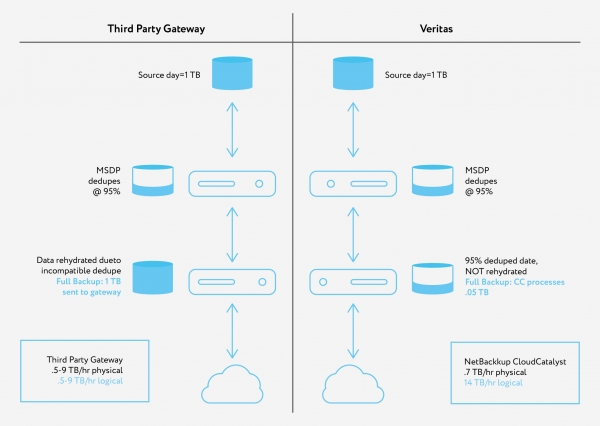
That is, between the machines that need to be backed up and the gateway, an intermediate Linux server stands, through which backup traffic from SRK agents passes and their deduplication is done 'on the fly' before being sent to S3. If there used to be 30 backups of 20 GB with compression, now (due to the similarity of machines) their total volume is 90% less. The same deduplication engine is used as when storing on regular disks with NetBackup tools.
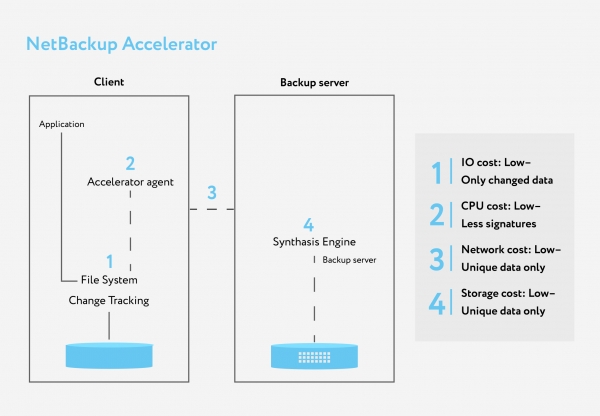
Here's what happens before the intermediate server:
We tested and concluded that implementing this in our data centers offers storage savings in S3 for us and for customers. As the owner of commercial data centers, we naturally charge according to the occupied volume, but this is still very beneficial for us too—because we begin to earn on more scalable software spaces rather than on hardware rental. Plus, it reduces internal costs.
Logs228 Jobs (0 Queued 0 Active 0 Waiting for Retry 0 Suspended 0 Incomplete 228 Done — 13 selected)
(Filter Applied [13])
Job Id Type State State Details Status Job Policy Job Schedule Client Media Server Start Time Elapsed Time End Time Storage Unit Attempt Operation Kilobytes Files Pathname % Complete (Estimated) Job PID Owner Copy Parent Job ID KB/Sec Active Start Active Elapsed Robot Vault Profile Session ID Media to Eject Data Movement Off-Host Type Master Priority Deduplication Rate Transport Accelerator Optimization Instance or Database Share Host
— 1358 Snapshot Done 0 VMware — NGNCloudADC NBCC Dec 18, 2018 12:16:19 PM 00:02:18 Dec 18, 2018 12:18:37 PM STU_DP_S3_****backup 1 100% root 1358 Dec 18, 2018 12:16:27 PM 00:02:10 Instant Recovery Disk Standard WIN-*********** 0
1360 Backup Done 0 VMware Full NGNCloudADC NBCC Dec 18, 2018 12:16:48 PM 00:01:39 Dec 18, 2018 12:18:27 PM STU_DP_S3_****backup 1 14,535,248 149654 100% 23858 root 1358 335,098 Dec 18, 2018 12:16:48 PM 00:01:39 Instant Recovery Disk Standard WIN-*********** 0 99.8% 99%
1352 Snapshot Done 0 VMware — NGNCloudADC NBCC Dec 18, 2018 12:14:04 PM 00:02:01 Dec 18, 2018 12:16:05 PM STU_DP_S3_****backup 1 100% root 1352 Dec 18, 2018 12:14:14 PM 00:01:51 Instant Recovery Disk Standard WIN-*********** 0
1354 Backup Done 0 VMware Incremental NGNCloudADC NBCC Dec 18, 2018 12:14:34 PM 00:01:21 Dec 18, 2018 12:15:55 PM STU_DP_S3_****backup 1 14,380,965 147 100% 23617 root 1352 500,817 Dec 18, 2018 12:14:34 PM 00:01:21 Instant Recovery Disk Standard WIN-*********** 0 99.9% 100%
1347 Snapshot Done 0 VMware — NGNCloudADC NBCC Dec 18, 2018 12:11:45 PM 00:02:08 Dec 18, 2018 12:13:53 PM STU_DP_S3_****backup 1 100% root 1347 Dec 18, 2018 12:11:45 PM 00:02:08 Instant Recovery Disk Standard WIN-*********** 0
1349 Backup Done 0 VMware Full NGNCloudADC NBCC Dec 18, 2018 12:12:02 PM 00:01:41 Dec 18, 2018 12:13:43 PM STU_DP_S3_****backup 1 14,535,215 149653 100% 23508 root 1347 316,319 Dec 18, 2018 12:12:02 PM 00:01:41 Instant Recovery Disk Standard WIN-*********** 0 99.7% 99%
1341 Snapshot Done 0 VMware — NGNCloudADC NBCC Dec 18, 2018 12:05:28 PM 00:04:53 Dec 18, 2018 12:10:21 PM STU_DP_S3_****backup 1 100% root 1341 Dec 18, 2018 12:05:28 PM 00:04:53 Instant Recovery Disk Standard WIN-*********** 0
1342 Backup Done 0 VMware Full_Rescan NGNCloudADC NBCC Dec 18, 2018 12:05:47 PM 00:04:24 Dec 18, 2018 12:10:11 PM STU_DP_S3_****backup 1 14,535,151 149653 100% 22999 root 1341 70,380 Dec 18, 2018 12:05:47 PM 00:04:24 Instant Recovery Disk Standard WIN-*********** 0 87.9% 0%
1339 Snapshot Done 150 VMware — NGNCloudADC NBCC Dec 18, 2018 11:05:46 AM 00:00:53 Dec 18, 2018 11:06:39 AM STU_DP_S3_****backup 1 100% root 1339 Dec 18, 2018 11:05:46 AM 00:00:53 Instant Recovery Disk Standard WIN-*********** 0
1327 Snapshot Done 0 VMware — *******.********.cloud NBCC Dec 17, 2018 12:54:42 PM 05:51:38 Dec 17, 2018 6:46:20 PM STU_DP_S3_****backup 1 100% root 1327 Dec 17, 2018 12:54:42 PM 05:51:38 Instant Recovery Disk Standard WIN-*********** 0
1328 Backup Done 0 VMware Full *******.********.cloud NBCC Dec 17, 2018 12:55:10 PM 05:29:21 Dec 17, 2018 6:24:31 PM STU_DP_S3_****backup 1 222,602,719 258932 100% 12856 root 1327 11,326 Dec 17, 2018 12:55:10 PM 05:29:21 Instant Recovery Disk Standard WIN-*********** 0 87.9% 0%
1136 Snapshot Done 0 VMware — *******.********.cloud NBCC Dec 14, 2018 4:48:22 PM 04:05:16 Dec 14, 2018 8:53:38 PM STU_DP_S3_****backup 1 100% root 1136 Dec 14, 2018 4:48:22 PM 04:05:16 Instant Recovery Disk Standard WIN-*********** 0
1140 Backup Done 0 VMware Full_Scan *******.********.cloud NBCC Dec 14, 2018 4:49:14 PM 03:49:58 Dec 14, 2018 8:39:12 PM STU_DP_S3_****backup 1 217,631,332 255465 100% 26438 root 1136 15,963 Dec 14, 2018 4:49:14 PM 03:49:58 Instant Recovery Disk Standard WIN-*********** 0 45.2% 0%
The accelerator reduces traffic from agents because only data changes are transmitted. This means even full backups are not fully transferred, as the media server collects subsequent full backups from incremental backups.
The intermediate server has its own storage where it writes the data cache and maintains a base for deduplication.
In full architecture, it looks like this:
- The master server manages configurations, updates, and more, and is located in the cloud.
- The media server (an intermediate *nix machine) should be located as close as possible to the systems being backed up in terms of network accessibility. This is where deduplication of backups from all the systems being backed up occurs.
- On the backed-up machines, there are agents that generally send to the media server only what is not present in its storage.
Everything starts with a full scan — that's a complete full backup. At this moment, the media server takes everything, performs deduplication, and transfers it to S3. The speed to the media server is low, while from it — higher. The main limitation is the server's computing power.
Subsequent backups are considered full from the perspective of all systems, but in reality, they resemble synthetic full backups. This means that the actual transmission and recording to the media server occur only for those data blocks that have not been encountered in the VM backups before. The transmission and recording to S3 occur only for those data blocks whose hashes are not in the media server's deduplication database. Simply put — anything that hasn't been seen in any backup of any VM before.
During a restore, the media server requests the necessary deduplicated objects from S3, rehydrates them, and transfers them to the CRK agents, meaning one must consider the volume of traffic during the restore, which will equal the actual volume of data being restored.
Here’s what it looks like:

And here's another piece of logs169 Jobs (0 Queued 0 Active 0 Waiting for Retry 0 Suspended 0 Incomplete 169 Done — 1 selected)
Job Id Type State State Details Status Job Policy Job Schedule Client Media Server Start Time Elapsed Time End Time Storage Unit Attempt Operation Kilobytes Files Pathname % Complete (Estimated) Job PID Owner Copy Parent Job ID KB/Sec Active Start Active Elapsed Robot Vault Profile Session ID Media to Eject Data Movement Off-Host Type Master Priority Deduplication Rate Transport Accelerator Optimization Instance or Database Share Host
— 1372 Restore Done 0 nbpr01 NBCC Dec 19, 2018 1:05:58 PM 00:04:32 Dec 19, 2018 1:10:30 PM 1 14,380,577 1 100% 8548 root 1372 70,567 Dec 19, 2018 1:06:00 PM 00:04:30 WIN-*********** 90000
Data integrity is ensured by the protection of S3 itself — it has good redundancy to guard against hardware failures like a failed hard disk spindle.
Media-server 4 TB of cache is required — this is Veritas's recommendation for the minimum volume. More is better, but this is how we did it.
Summary
When the partner uploaded 20 GB to our S3, we stored 60 GB because we provide triple geo-redundancy for data. Now, the traffic is much lower, which is good for both the channel and storage billing.
In this case, the routes are closed off from the 'big Internet', but we can route traffic through VPN L2 over the Internet, but it's better to place the media server before the provider's entrance.
If you're interested in learning about these features in our Russian data centers or have any questions about implementation on your end, feel free to ask in the comments or email ekorotkikh@croc.ru.
Source: habr.com
