

Hello everyone. This is Sergey Omelnitsky. Not long ago, I held a stream on reactive programming where I discussed asynchronous behavior in JavaScript. Today, I would like to summarize this material.
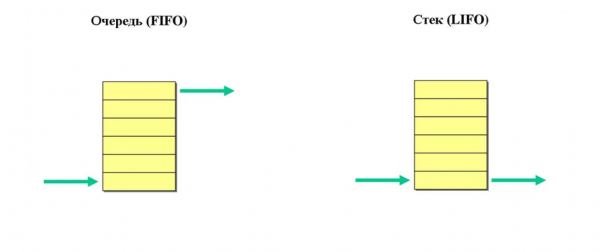
But before we dive into the main content, we need to make an introduction. So, let's start with definitions: what are a stack and a queue?
Stack — is a collection where elements are accessed based on the "last in, first out" principle (LIFO).
Queue — is a collection where elements are accessed based on the "first in, first out" principle (FIFO).
Okay, let's continue.
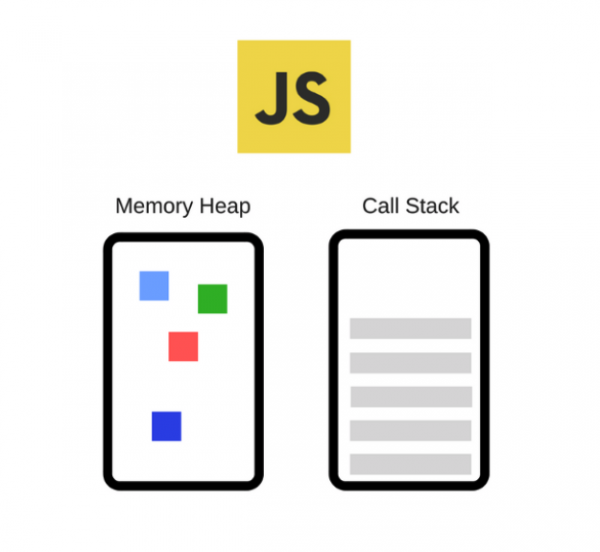
JavaScript is a single-threaded programming language. This means that it has only one execution thread and one stack where functions are queued for execution. Consequently, at any given moment, JavaScript can only perform one operation, while other operations will wait in the stack until they are called.
Call Stack — is a data structure that, in simple terms, records information about where we are in the program. When we enter a function, we place a record about it at the top of the stack. When we return from the function, we remove the top element from the stack and end up back where we called that function. That's all a stack can do. Now, here's a very interesting question. How does asynchronous behavior work in JavaScript then?
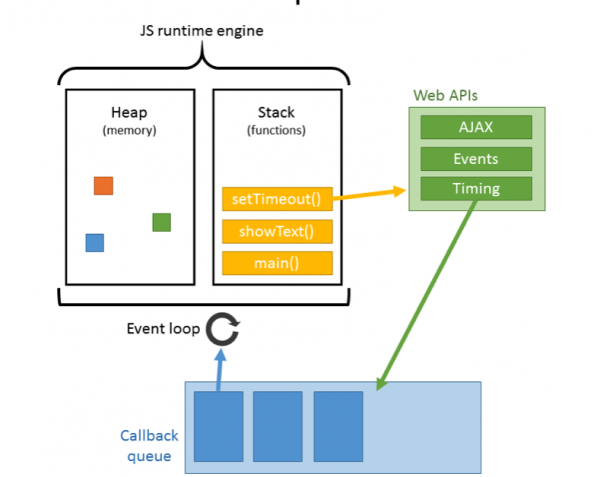
In fact, in addition to the stack, browsers have a special queue for working with what's known as WebAPI. Functions from this queue will only be executed in order after the stack is completely cleared. Only then do they move from the queue to the stack for execution. If there's at least one element in the stack, they cannot access the stack. This is precisely why function calls through setTimeout are often inaccurate in timing, as the function cannot move from the queue to the stack while it's occupied.
Let's consider the following example and go through its step-by-step "execution". We'll also check what happens in the system during this process.
console.log('Hi');
setTimeout(function cb1() {
    console.log('cb1');
}, 5000);
console.log('Bye');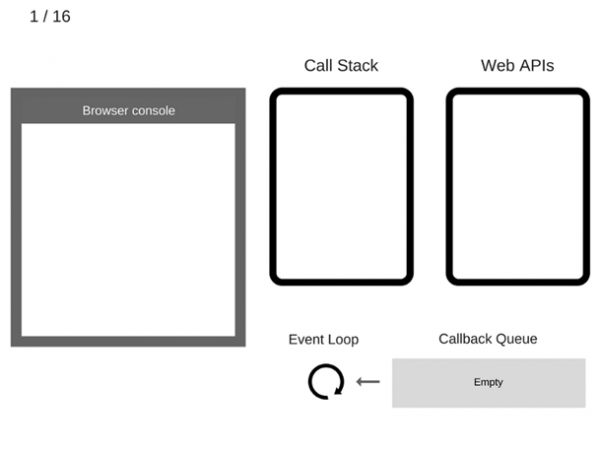
1) Nothing is happening yet. The browser console is clean, and the call stack is empty.
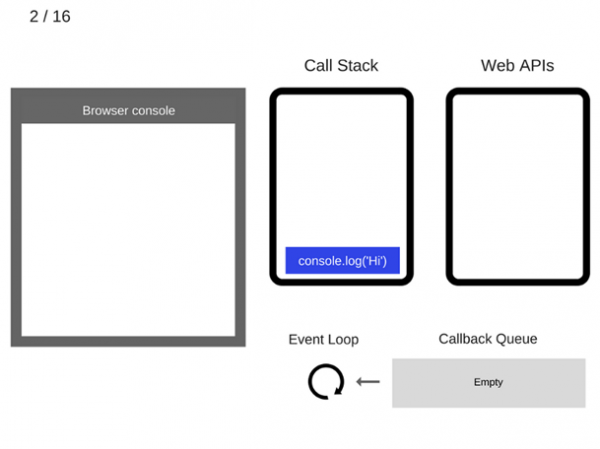
2) Then the command console.log('Hi') is added to the call stack.
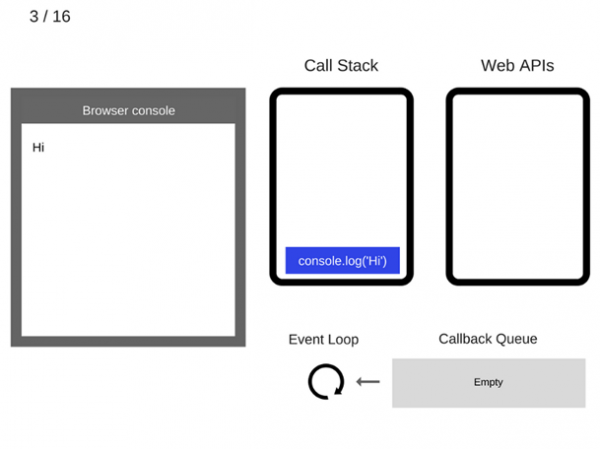
3) And it gets executed.
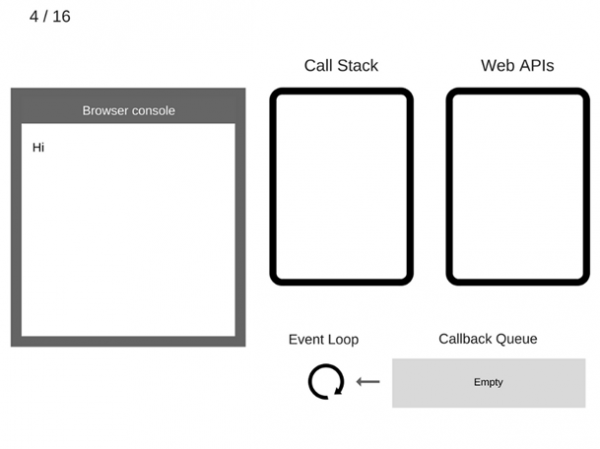
4) Then console.log('Hi') is removed from the call stack.
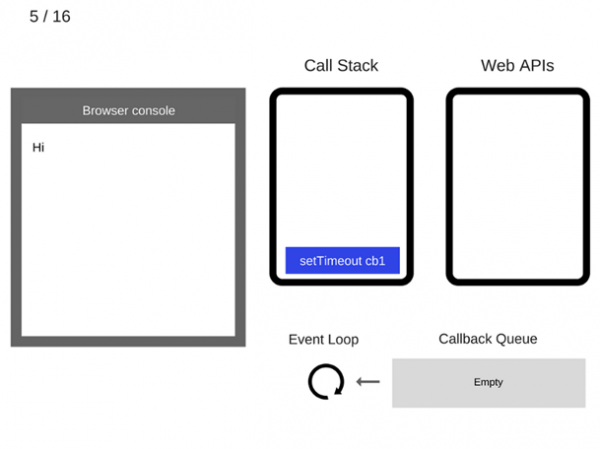
5) Now we move to the command setTimeout(function cb1() {… }). It is added to the call stack.
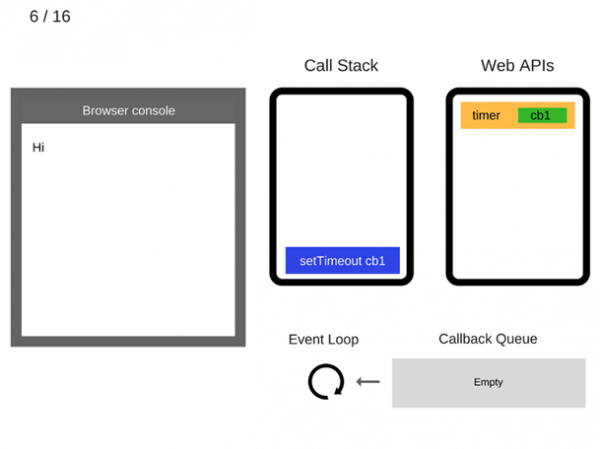
6) The command setTimeout(function cb1() {… }) is executed. The browser creates a timer, which is part of the Web API. It will perform a countdown.
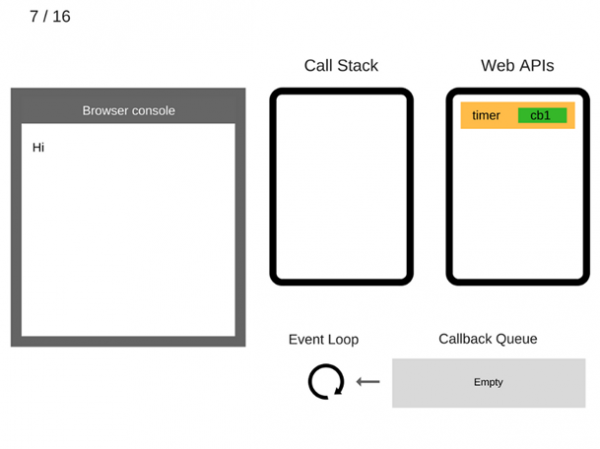
7) The command setTimeout(function cb1() {… }) has finished executing and is removed from the call stack.
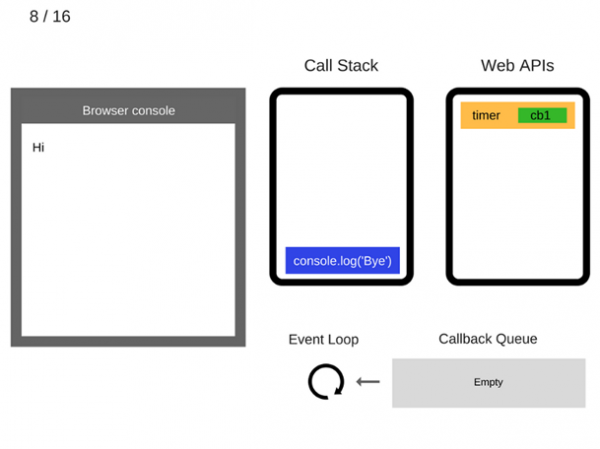
8) The command console.log('Bye') is added to the call stack.
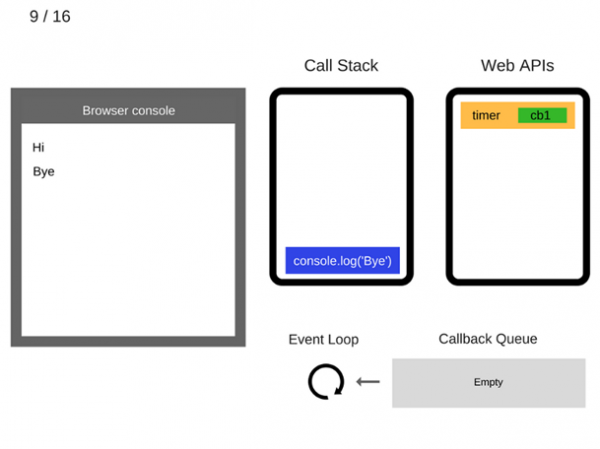
9) The command console.log('Bye') is executed.
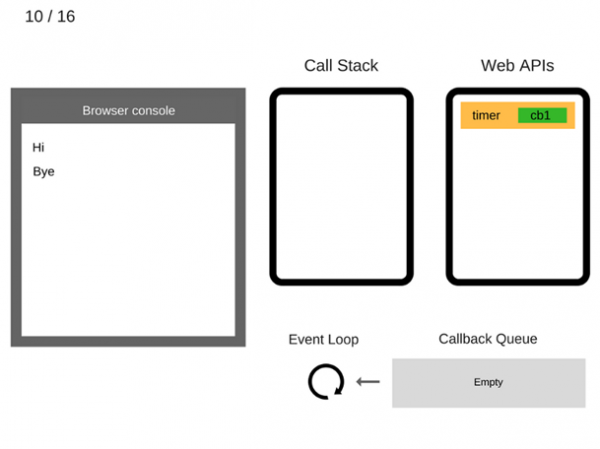
10) The command console.log('Bye') is removed from the call stack.
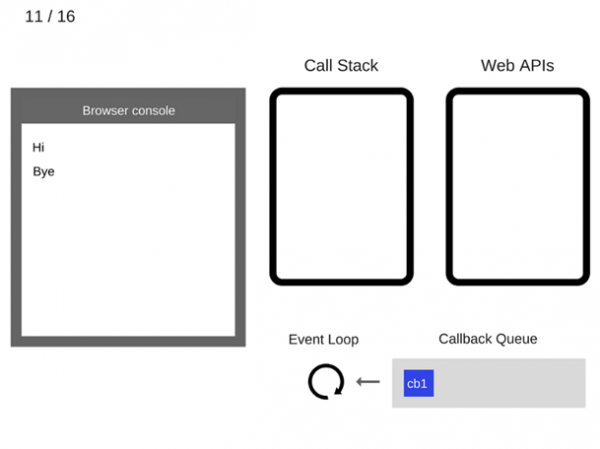
11) After at least 5000 ms have passed, the timer completes and puts the callback cb1 into the callback queue.
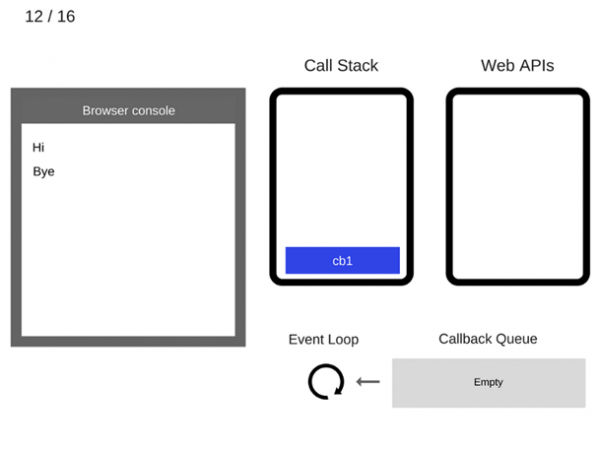
12) The event loop takes the function cb1 from the callback queue and places it in the call stack.
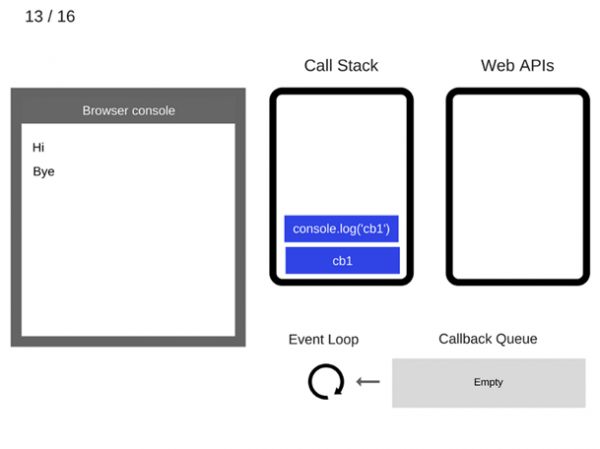
13) The function cb1 is executed and adds console.log('cb1') to the call stack.
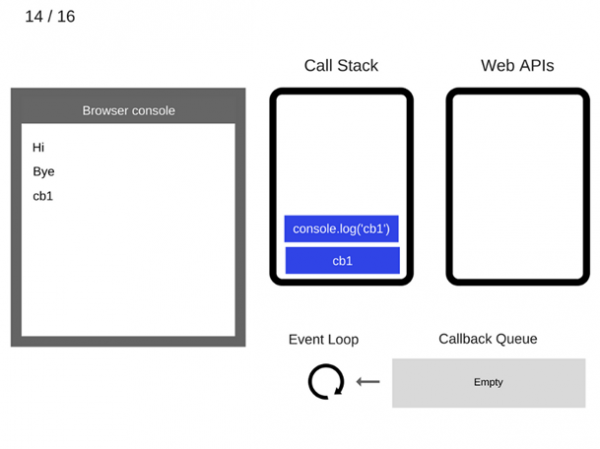
14) The command console.log('cb1') is executed.
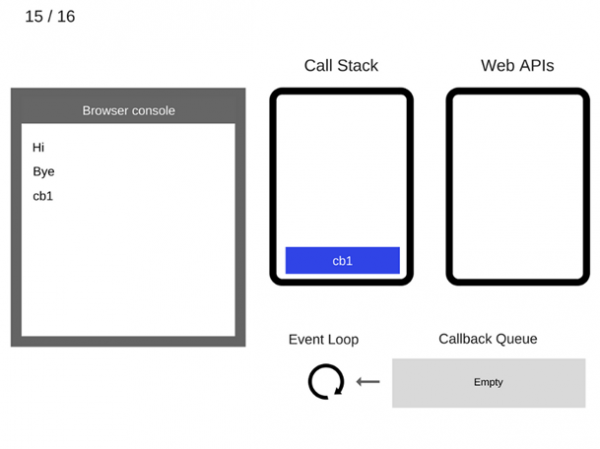
15) The command console.log('cb1') is removed from the call stack.
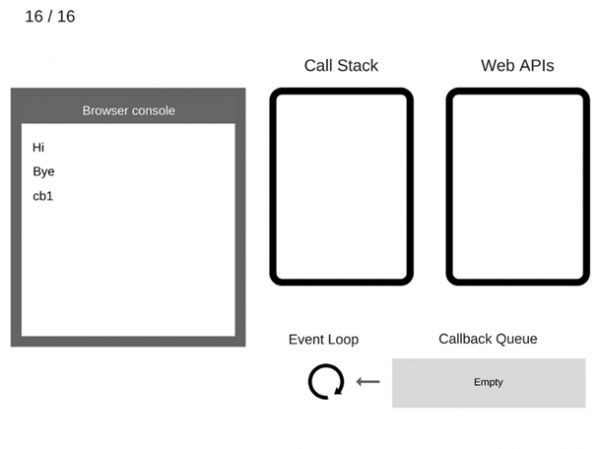
16) The function cb1 is removed from the call stack.
Let's look at an example in action:
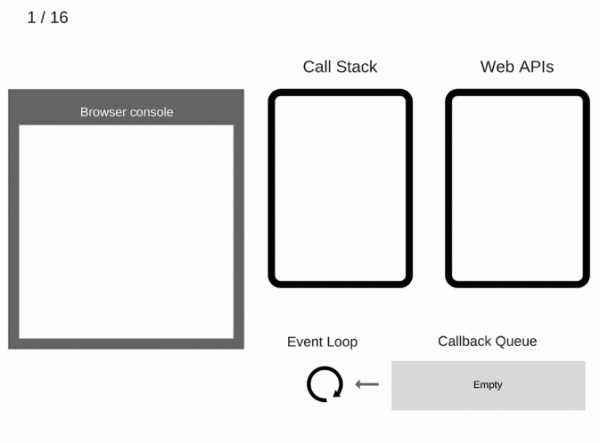
Well, we've covered how asynchronous behavior is implemented in JavaScript. Now let's briefly discuss the evolution of asynchronous code.
The evolution of asynchronous code.
a(function (resultsFromA) {
    b(resultsFromA, function (resultsFromB) {
        c(resultsFromB, function (resultsFromC) {
            d(resultsFromC, function (resultsFromD) {
                e(resultsFromD, function (resultsFromE) {
                    f(resultsFromE, function (resultsFromF) {
                        console.log(resultsFromF);
                    })
                })
            })
        })
    })
});
Asynchronous programming, as we know it in JavaScript, can only be realized through functions. They can be passed like any other variable to other functions. This is how callbacks were born. And it's fun, exciting, and engaging until it turns into sadness, gloom, and despair. Why? It's simple:
- As the complexity of the code grows, the project quickly turns into incomprehensible deeply nested blocks — 'callback hell'.
- Error handling can easily be overlooked.
- You cannot return expressions with return.
With the emergence of Promises, things got a bit better.
new Promise(function(resolve, reject) {
    setTimeout(() => resolve(1), 2000);

}).then((result) => {
    alert(result);
    return result + 2;

}).then((result) => {
    throw new Error('FAILED HERE');
    alert(result);
    return result + 2;

}).then((result) => {
    alert(result);
    return result + 2;

}).catch((e) => {
    console.log('error: ', e);
});- Promise chaining appeared, which improved code readability.
- A separate method for error interception was introduced.
- The ability for parallel execution has emerged with Promise.all
- We can resolve nested async with async/await
But a promise has its limitations. For example, a promise cannot be canceled without some effort, and most importantly — it works with a single value.
Well, we've smoothly approached reactive programming. Tired? Fortunately, you can go brew some tea, think it over, and come back to read on. I'll continue.

Reactive Programming— is a programming paradigm focused on data streams and the propagation of changes. Let's delve into what a data stream is in more detail.
// Получаем ссылку на элемент
const input = ducument.querySelector('input');

const eventsArray = [];

// Пушим каждое событие в массив eventsArray
input.addEventListener('keyup',
    event => eventsArray.push(event)
);
Let's say we have an input field. We create an array, and on each keyup event of the input, we will save the event in our array. It's worth noting that our array is sorted by time — that is, the index of later events is greater than the index of earlier ones. This array represents a simplified model of a data stream, but it is not yet a stream. For this array to confidently be called a stream, it must somehow inform subscribers that new data has arrived. Thus, we've come to the definition of a stream.
Data Stream
const { interval1 } = Rx;
const { take } = RxOperators;

interval(1000).pipe(
    take(4)
)
A stream— is an array of data sorted by time that can notify when the data has changed. Now imagine how convenient it becomes to write code, where one action requires triggering multiple events in different parts of the code. We simply subscribe to the stream and it will inform us when changes occur. This is what the RxJs library can do.

RxJS — is a library for working with asynchronous and event-based programs using observable sequences. The library provides the main type Observable, several auxiliary types (Observer, Schedulers, Subjects) and operators for working with events as collections (map, filter, reduce, every and similar ones from JavaScript Array).
Let's clarify the main concepts of this library.
Observable, Observer, Producer
Observable — is the first basic type we will consider. This class contains the core implementation of RxJs. It is linked to the observable stream, which you can subscribe to using the subscribe method.
In Observable, a helper mechanism for creating updates is implemented, known as Observer. The source of values for the Observer is called Producer. This could be an array, an iterator, a web socket, some event, etc. So, we can say that observable serves as a conduit between the Producer and the Observer.
Observable handles three types of events for the Observer:
- next – new data
- error – an error if the sequence is completed due to an exceptional situation. This event also indicates the end of the sequence.
- complete – a signal that the sequence is completed. This means that there will be no more new data
Let's look at the demo:
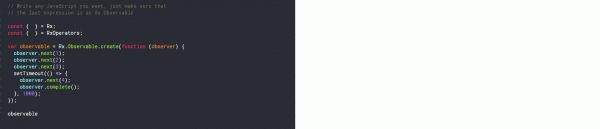
At first, we will process values 1, 2, 3, and after 1 second, we will receive 4 and complete our stream.
Thinking out loud
And then I realized that telling this was more interesting than writing about it. 😀
Subscription
When we subscribe to a stream, we create a new class subscription, which allows us to unsubscribe using the method unsubscribe. We can also group subscriptions using the method add. And logically, we can ungroup streams using remove. The add and remove methods take another subscription as input. It's worth noting that when we unsubscribe, we unsubscribe from all child subscriptions as if we called the unsubscribe method on them. Let's move on.
Types of Streams
| HOT | COLD |
|---|---|
| Producer is created outside the observable | Producer is created inside the observable |
| Data is passed at the moment of observable creation | Data is communicated at the moment of subscription |
| Additional logic is needed for unsubscription | The stream ends by itself |
| Uses one-to-many relationship | Uses one-to-one relationship |
| All subscriptions share a single value | Subscriptions are independent |
| Data can be lost if there is no subscription | Reissues all values of the stream for a new subscription |
If I were to draw an analogy, I would picture a hot stream like a movie in a theater. At whatever time you arrive, that’s when the viewing starts. I would compare a cold stream to a call to tech support. Anyone calling listens to the auto-message from the beginning to the end, but you can hang up using unsubscribe.
It's worth noting that there are so-called warm streams (this definition is rarely encountered and only in foreign communities) — a stream that transforms from a cold stream into a hot one. The question arises — where to use it)) I'll give an example from practice.
I work with Angular. It actively uses RxJS. To obtain data from the server, I expect a cold stream and use this stream in the template with the asyncPipe. If I use this pipe multiple times, referring back to the cold stream definition, each pipe will request data from the server, which is somewhat strange. But if I convert the cold stream into a warm stream, the request will occur just once.
Overall, understanding the types of streams is quite challenging for beginners but essential.
Operators
return this.http.get(`${environment.apiUrl}/${this.apiUrl}/trade_companies`)
    .pipe(
        tap(({ data }: TradeCompanyList) => this.companies$$.next(cloneDeep(data))),
        map(({ data }: TradeCompanyList) => data)
    );
Operators provide us with expanded capabilities for working with streams. They help control events flowing in the Observable. We'll examine a couple of the most popular ones, and you can find more details about operators in the useful information links.
Operators — of
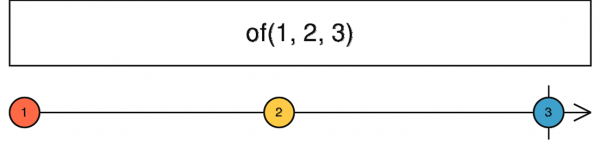
Let's start with the utility operator of. It creates an Observable based on a simple value.
Operators — filter
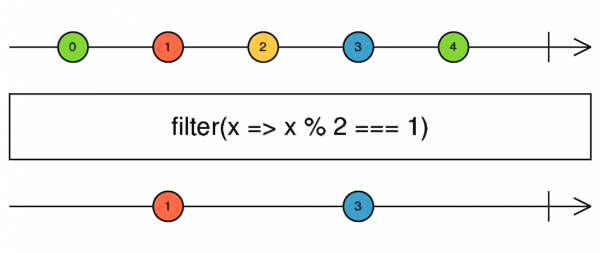
The filter operator, as the name suggests, filters the stream signal. If the operator returns true, it passes the value further.
Operators — take
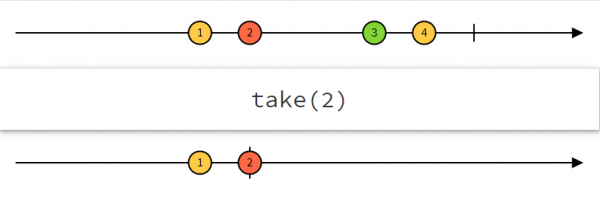
take — Takes a specified number of emissions after which it completes the stream.
Operators — debounceTime
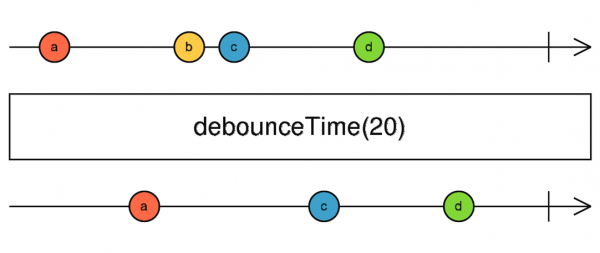
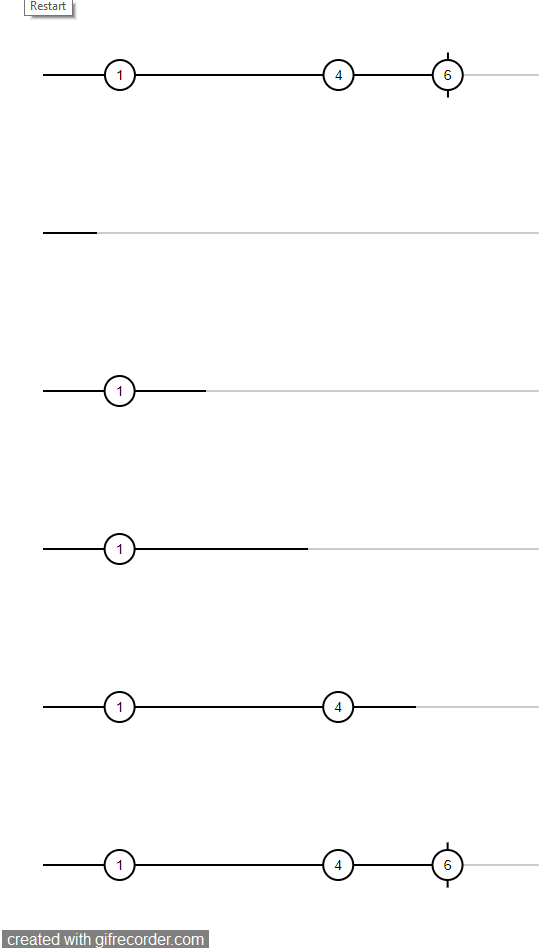
debounceTime — Discards emitted values that fall within the specified time interval between outputs — after the time interval, it emits the last value.
const { Observable } = Rx;
const { debounceTime, take } = RxOperators;

Observable.create((observer) => {
  let i = 1;
  observer.next(i++);
  // Emit value every 1000ms
  setInterval(() => {
    observer.next(i++)
  }, 1000);

  // Emit value every 1500ms
  setInterval(() => {
    observer.next(i++)
  }, 1500);
}).pipe(
  debounceTime(700),  // Wait 700ms before processing values
  take(3)
); 
Operators — takeWhile
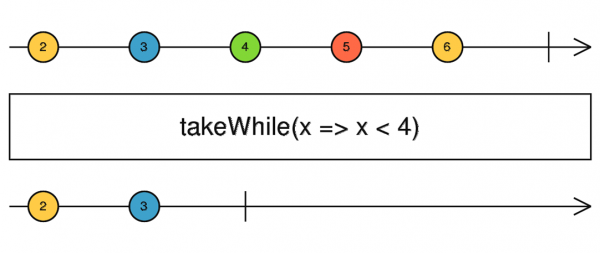
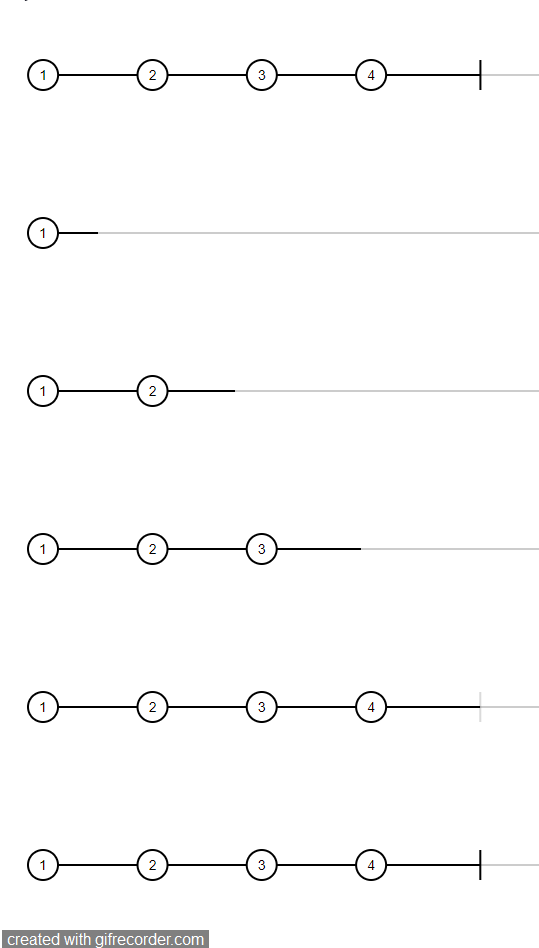
Emits values until takeWhile returns false, after which it unsubscribes from the stream.
const { Observable } = Rx;
const { debounceTime, takeWhile } = RxOperators;

Observable.create((observer) => {
  let i = 1;
  observer.next(i++);
  // Emit value every 1000ms
  setInterval(() => {
    observer.next(i++)
  }, 1000);
}).pipe(
  takeWhile(producer => producer < 5)
); 
Operators — combineLatest
The combineLatest operator is somewhat similar to promise.all. It combines multiple streams into one. Once each stream emits at least once, we get the latest values from each in the form of an array. Subsequently, after any emission from the combined streams, it will return new values.
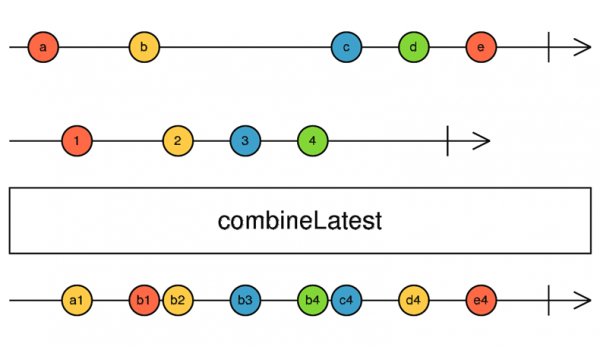
const { combineLatest, Observable } = Rx;
const { take } = RxOperators;

const observer_1 = Observable.create((observer) => {
  let i = 1;
  // Emit value every 1000ms
  setInterval(() => {
    observer.next('a: ' + i++);
  }, 1000);
});

const observer_2 = Observable.create((observer) => {
  let i = 1;
  // Emit value every 750ms
  setInterval(() => {
    observer.next('b: ' + i++);
  }, 750);
});

combineLatest(observer_1, observer_2).pipe(take(5));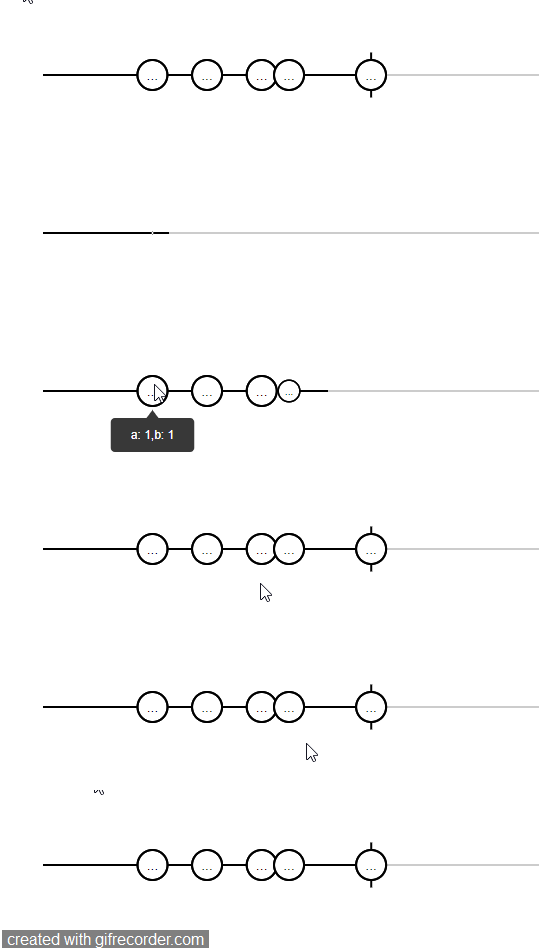
Operators — zip
Zip waits for a value from each stream and forms an array based on these values. If a value does not come from any stream, then the group will not be formed.
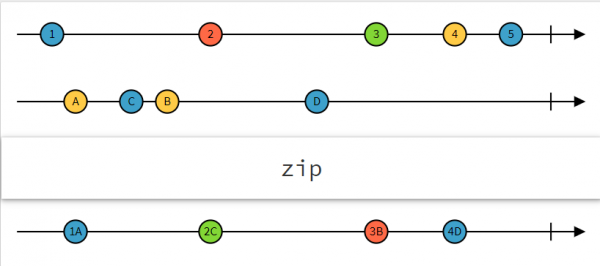
const { zip, Observable } = Rx;
const { take } = RxOperators;

const observer_1 = Observable.create((observer) => {
  let i = 1;
  // Emit value every 1000ms
  setInterval(() => {
    observer.next('a: ' + i++);
  }, 1000);
});

const observer_2 = Observable.create((observer) => {
  let i = 1;
  // Emit value every 750ms
  setInterval(() => {
    observer.next('b: ' + i++);
  }, 750);
});

const observer_3 = Observable.create((observer) => {
  let i = 1;
  // Emit value every 500ms
  setInterval(() => {
    observer.next('c: ' + i++);
  }, 500);
});

zip(observer_1, observer_2, observer_3).pipe(take(5));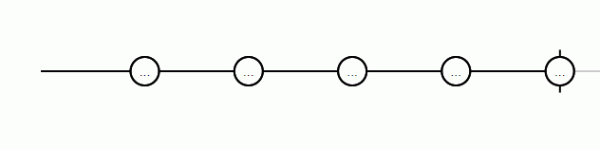
Operators — forkJoin
forkJoin also combines streams, but it only emits a value when all streams are completed.
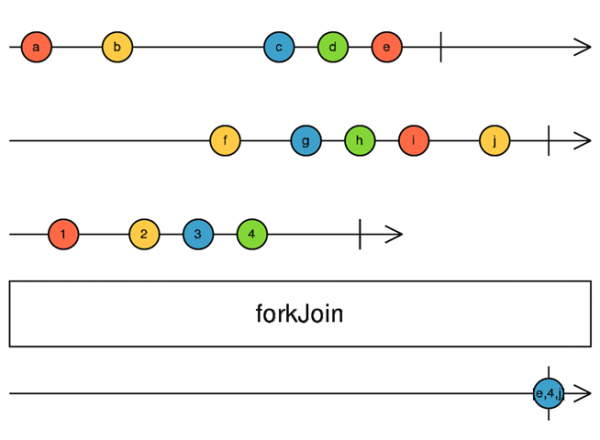
const { forkJoin, Observable } = Rx;
const { take } = RxOperators;

const observer_1 = Observable.create((observer) => {
  let i = 1;
  // Emit value every 1000ms
  setInterval(() => {
    observer.next('a: ' + i++);
  }, 1000);
}).pipe(take(3));

const observer_2 = Observable.create((observer) => {
  let i = 1;
  // Emit value every 750ms
  setInterval(() => {
    observer.next('b: ' + i++);
  }, 750);
}).pipe(take(5));

const observer_3 = Observable.create((observer) => {
  let i = 1;
  // Emit value every 500ms
  setInterval(() => {
    observer.next('c: ' + i++);
  }, 500);
}).pipe(take(4));

forkJoin(observer_1, observer_2, observer_3);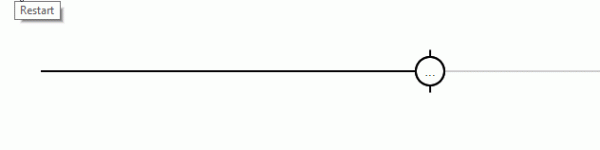
Operators — map
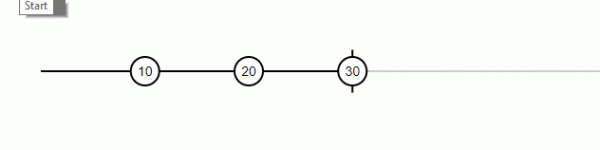
The map transformation operator transforms the emitted value into a new one.
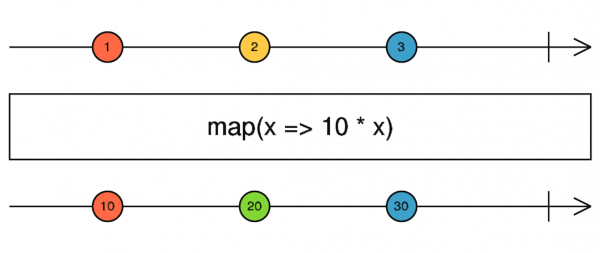
const { Observable } = Rx;
const { take, map } = RxOperators;

Observable.create((observer) => {
  let i = 1;
  // Emit value every 1000ms
  setInterval(() => {
    observer.next(i++);
  }, 1000);
}).pipe(
  map(x => x * 10),
  take(3)
);
Operators – share, tap
The tap operator allows for side effects, meaning any actions that do not affect the sequence.
The share utility operator can turn a cold stream into a hot one.
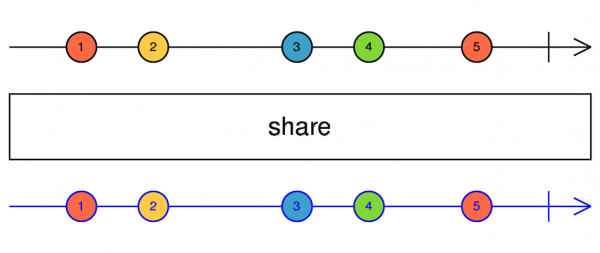
We've finished with operators. Let's move on to Subject.
Thinking out loud
And that's when I went to have some tea. Those examples wore me out 😀
Family of subjects
The family of subjects is a prime example of hot streams. These classes are a kind of hybrid, acting as both observable and observer. Since a subject is a hot stream, it is necessary to unsubscribe from it. Speaking of the main methods, they are:
- next – passing new data to the stream
- error – error and stream completion
- complete – completing the stream
- subscribe – subscribe to the stream
- unsubscribe – unsubscribe from the stream
- asObservable – transform into an observer
- toPromise – transforms into a promise
There are about 4 to 5 types of subjects.
Thinking out loud
I mentioned 4 in the stream, but it turns out they added another one. As they say, live and learn.
Simple Subject new Subject()– the simplest type of subject. Created without parameters. It emits values received only after subscription.
BehaviorSubject new BehaviorSubject(defaultData) – in my opinion, the most common type of subjects. It takes a default value as input. Always retains the latest emitted data, which it emits upon subscription. This class also has a useful method value that returns the current value of the stream.
ReplaySubject new ReplaySubject(bufferSize?: number, windowTime?: number) — It can optionally take the buffer size of values to retain as the first argument, and the duration for which we need the changes as the second.
AsyncSubject new AsyncSubject() — upon subscription, nothing happens, and the value will only be returned upon complete. Only the last value of the stream will be returned.
WebSocketSubject new WebSocketSubject(urlConfigOrSource: string | WebSocketSubjectConfig | Observable, destination?: Observer) — The documentation is silent about it, and this is my first time seeing it. If anyone knows what it does, please share, and we'll add to it.
Phew. So, we've covered everything I wanted to discuss today. I hope this information was helpful. You can review the list of literature in the useful information tab.
Useful Information
- — link to the stream
- — How JS Works: engine overview, runtime mechanisms, call stack
- — How JS Works: Event Loop, Asynchronicity, and Five Ways to Improve Code with async / await
- — How the Event Loop Works in JavaScript
- — The Evolution of Asynchronous JavaScript
- — What is RxJS and Why It's Useful to Know
- — Practical Applications of RxJS
- — RxJS Observables Tutorial — Creating & Subscribing to Observables
- — RXJS: Hot and Cold Observables
- — Classes, Functions for Creating Observable. Operators.
- — RxJS Operators By Example
- — API List
- — Types of Subject and Scheduling in RxJS
Source: habr.com
