

Hello, Habr! In this article, I want to share information about a remarkable tool for developing batch data processing workflows, for example, within a corporate DWH infrastructure or your DataLake. We will discuss Apache Airflow (hereafter referred to as Airflow). It is unfairly overlooked on Habr, and in the main part, I will try to convince you that Airflow is at least worth considering when choosing a scheduler for your ETL/ELT processes.
Previously, I wrote a series of articles on the topic of DWH when I worked at Tinkoff Bank. Now I am part of the Mail.Ru Group team and am involved in developing a data analytics platform for the gaming sector. As news and interesting solutions emerge, my team and I will share information about our data analytics platform here.
Prologue
So, let's get started. What is Airflow? It is a library (or ) for developing, scheduling, and monitoring workflows. The main feature of Airflow is that processes are described (developed) using Python code. This offers numerous advantages for organizing your project and development: essentially, your (for example) ETL project is just a Python project, and you can organize it as you see fit, considering infrastructure specifics, team size, and other requirements. The tooling is straightforward. For instance, use PyCharm + Git. It's excellent and very convenient!
Now let's look at the core entities of Airflow. By understanding their essence and purpose, you will optimally organize the architecture of workflows. Perhaps the primary entity is the Directed Acyclic Graph (hereafter DAG).
DAG
A DAG is a meaningful grouping of tasks you want to execute in a strictly defined sequence according to a specific schedule. Airflow provides a user-friendly web interface for working with DAGs and other entities:
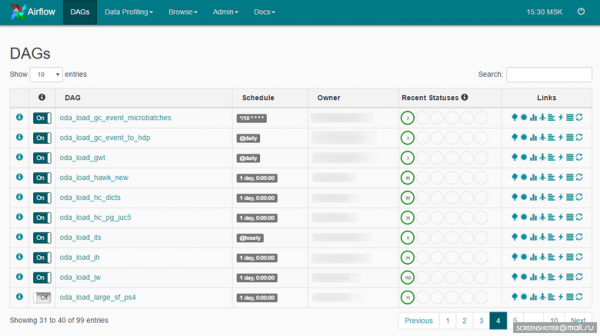
A DAG can look like this:
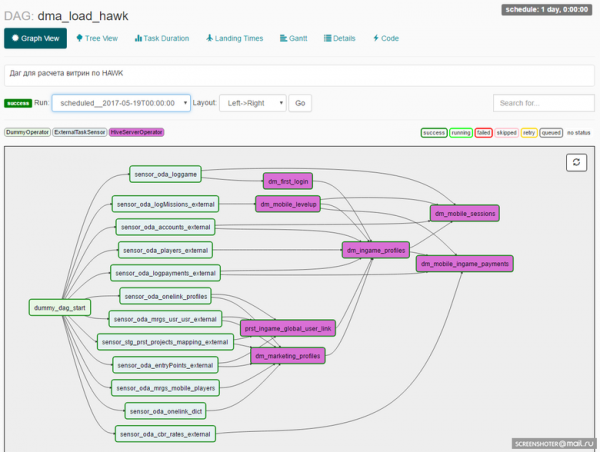
When designing a DAG, the developer embeds a set of operators upon which tasks within the DAG will be built. Here we encounter another important entity: the Airflow Operator.
Operators
An operator is an entity based on which task instances are created, describing what will happen during the execution of the task instance. already include a set of ready-to-use operators. Examples:
- BashOperator — an operator for executing bash commands.
- PythonOperator — an operator for invoking Python code.
- EmailOperator — an operator for sending emails.
- HTTPOperator — an operator for handling HTTP requests.
- SqlOperator — an operator for executing SQL code.
- Sensor — an operator that waits for an event (such as the right time, the appearance of a required file, a string in a database, a response from an API, etc.).
There are more specific operators: DockerOperator, HiveOperator, S3FileTransferOperator, PrestoToMysqlOperator, SlackOperator.
You can also develop operators tailored to your needs and use them in a project. For example, we created MongoDBToHiveViaHdfsTransfer, an operator for exporting documents from MongoDB to Hive, and several operators for working with : CHLoadFromHiveOperator and CHTableLoaderOperator. Essentially, whenever frequently used code built on basic operators arises in a project, you might consider bundling it into a new operator. This will simplify further development and enrich your library of operators in the project.
Next, all these task instances need to be executed, and now we will talk about the scheduler.
Scheduler
The task scheduler in Airflow is built on . Celery is a Python library that allows you to organize a queue plus asynchronous and distributed task execution. From Airflow’s perspective, all tasks are divided into pools. Pools are created manually. Typically, their purpose is to limit the load on working with a source or to categorize tasks within DWH. Pools can be managed through the web interface:
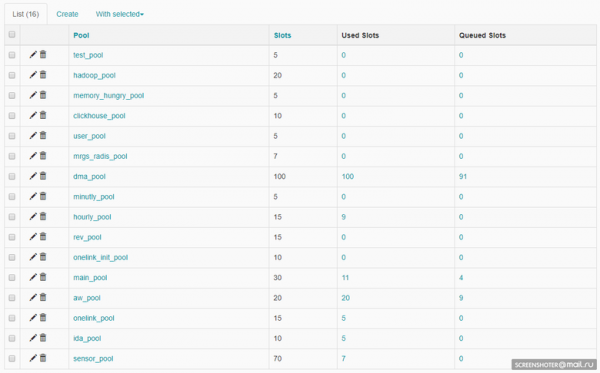
Each pool has a limit on the number of slots. When creating a DAG, it is assigned a pool:
ALERT_MAILS = Variable.get("gv_mail_admin_dwh")
DAG_NAME = 'dma_load'
OWNER = 'Vasya Pupkin'
DEPENDS_ON_PAST = True
EMAIL_ON_FAILURE = True
EMAIL_ON_RETRY = True
RETRIES = int(Variable.get('gv_dag_retries'))
POOL = 'dma_pool'
PRIORITY_WEIGHT = 10

start_dt = datetime.today() - timedelta(1)
start_dt = datetime(start_dt.year, start_dt.month, start_dt.day)

default_args = {
    'owner': OWNER,
    'depends_on_past': DEPENDS_ON_PAST,
    'start_date': start_dt,
    'email': ALERT_MAILS,
    'email_on_failure': EMAIL_ON_FAILURE,
    'email_on_retry': EMAIL_ON_RETRY,
    'retries': RETRIES,
    'pool': POOL,
    'priority_weight': PRIORITY_WEIGHT
}
dag = DAG(DAG_NAME, default_args=default_args)
dag.doc_md = __doc__
The pool assigned at the DAG level can be overridden at the task level.
The Scheduler is responsible for planning all tasks in Airflow. Essentially, the Scheduler handles all the mechanics of queuing tasks for execution. Before a task can be executed, it goes through several stages:
- In the DAG, previous tasks have been completed, and a new task can be queued.
- The queue is sorted based on task priorities (which can also be managed), and if there is a free slot in the pool, the task can be picked up for execution.
- If there is a free Celery worker, the task is sent to it; the work you programmed in the task begins, using a specific operator.
It's quite simple.
The Scheduler operates across all DAGs and all tasks within those DAGs.
For the Scheduler to start working with a DAG, the DAG needs to be given a schedule:
dag = DAG(DAG_NAME, default_args=default_args, schedule_interval='@hourly')There is a set of predefined presets: @once, @hourly, workflow(), @weekly, @monthly, @yearly.
You can also use cron expressions:
dag = DAG(DAG_NAME, default_args=default_args, schedule_interval='*\/10 * * * *')Execution Date
To understand how Airflow works, it is important to know what Execution Date means for a DAG. In Airflow, a DAG has an Execution Date dimension, which means that based on the DAG's schedule, task instances are created for each Execution Date. Tasks can be executed repeatedly for each Execution Date—or, for instance, a DAG can run concurrently across multiple Execution Dates. This is visually represented here:
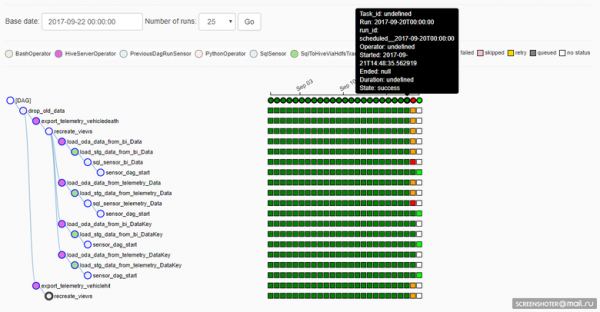
Unfortunately (or perhaps fortunately, depending on the situation), if the implementation of a task in the DAG is modified, the execution in previous Execution Dates will then take into account the adjustments. This is beneficial if you need to recalculate data from past periods using a new algorithm but problematic because it loses the reproducibility of the results (of course, nothing prevents reverting to the necessary version from Git and calculating what is needed as it should be done).
Task Generation
Implementing a DAG is done using Python code, so we have a very convenient way to reduce the amount of code when working, for example, with sharded data sources. Suppose you have three MySQL shards as a source; you need to access each and fetch some data. This should be done independently and in parallel. The Python code in the DAG could look like this:
connection_list = lv.get('connection_list')

export_profiles_sql = '''
SELECT
  id,
  user_id,
  nickname,
  gender,
  {{params.shard_id}} as shard_id
FROM profiles
'''

for conn_id in connection_list:
    export_profiles = SqlToHiveViaHdfsTransfer(
        task_id='export_profiles_from_' + conn_id,
        sql=export_profiles_sql,
        hive_table='stg.profiles',
        overwrite=False,
        tmpdir='\/data\/tmp',
        conn_id=conn_id,
        params={'shard_id': conn_id[-1:], },
        compress=None,
        dag=dag
    )
    export_profiles.set_upstream(exec_truncate_stg)
    export_profiles.set_downstream(load_profiles)
The DAG looks like this:
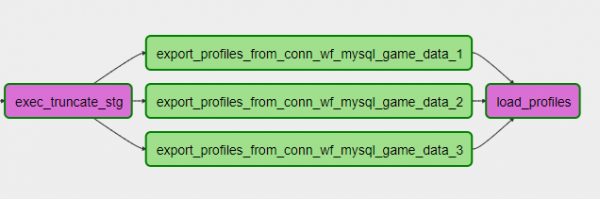
You can add or remove a shard simply by adjusting the settings and updating the DAG. Convenient!
You can also use more complex code generation, for example, working with sources in the form of a database or describing the table structure, the algorithm for working with the table, and generating the process of loading N tables into your storage considering the peculiarities of the DWH infrastructure. Or, for instance, if you're working with an API that does not support list parameters, you can generate N tasks in the DAG from this list, limit the parallelism of API requests with a pool, and extract the necessary data from the API. Flexible!
Repository
Airflow has its own backend repository, a database (which can be MySQL or Postgres; we use Postgres) that stores the states of tasks, DAGs, connection settings, global variables, etc. It's worth mentioning that the repository in Airflow is quite simple (about 20 tables) and convenient if you want to build your own process over it. It reminds me of the numerous tables in the Informatica repository that took a long time to understand before figuring out how to structure a query.
Monitoring
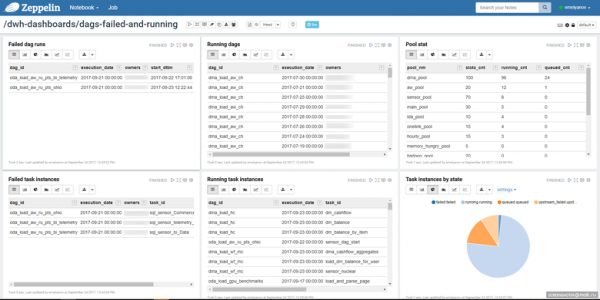
Considering the simplicity of the repository, you can build a monitoring process for tasks that suits you. We use a notebook in Zeppelin to view the task statuses:
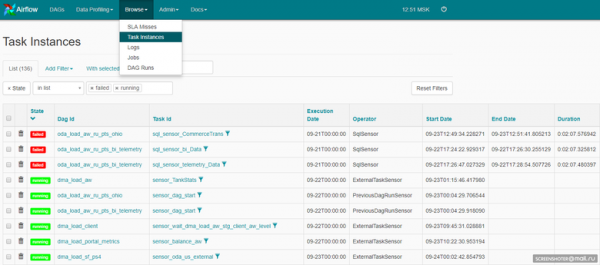
This can also be the web interface of Airflow itself:
The Airflow code is open source, so we've added alerting via Telegram. Each active task instance that encounters an error sends spam to a group in Telegram where the entire development and support team is present.
We receive rapid responses through Telegram (if needed) and an overall view of the tasks in Airflow via Zeppelin.
Total
Airflow is primarily open source, and you shouldn't expect miracles from it. Be prepared to invest time and effort to build a functioning solution. The goal is achievable, trust me, it's worth it. The speed of development, flexibility, and ease of adding new processes will impress you. Of course, a lot of attention must be paid to project organization and the stability of Airflow itself: miracles don't happen.
Currently, Airflow processes daily around 6,500 tasks. They vary significantly in nature. There are tasks for loading data into the main DWH from numerous different and very specific sources, there are tasks for calculating views within the main DWH, there are tasks for publishing data to a fast DWH, and many more diverse tasks — and Airflow manages all of them day after day. To put it in numbers, that’s 2,300 ELT tasks of varying complexity within the DWH (Hadoop), about 250 databases sources, and a team of four ETL developers, who are divided between ETL processing of data in the DWH and ELT processing of data within the DWH, along with one admin, who manages the service infrastructure.
Plans for the future
The number of processes is inevitably growing, and our main focus regarding the Airflow infrastructure will be on scaling. We aim to build an Airflow cluster, allocate a couple of nodes for Celery workers, and create a self-replicating head with task scheduling processes and a repository.
Epilogue
This is certainly not everything I wanted to share about Airflow, but I have tried to cover the main points. Appetite comes with eating, give it a try — you'll like it 🙂
Source: habr.com
