

Welcome, Habr!
In due time, we were the first to introduce the topic and continue to develop it. In particular, we found the interaction between Kafka and . An overview (and quite cautious) on this subject was published in the blog of Confluent back in October last year, authored by Gwen Shapiro. Today, we would like to draw your attention to a more recent article from April by Johann Gyger, who, although he did not shy away from a question mark in the title, considers the topic in a more substantive way, accompanying the text with interesting links. Please forgive us for the loose translation of 'chaos monkey' if you can!
Introduction
Kubernetes is designed to work with stateless workloads. Usually, these workloads are represented in the form of microservice architecture, they are lightweight, easily scalable horizontally, adhere to the principles of 12-factor applications, and allow working with circuit breakers and chaos monkeys.
Kafka, on the other hand, essentially acts as a distributed database. Thus, when working with it, you have to deal with state, which is much more burdensome than a microservice. Kubernetes supports stateful workloads, but as Kelsey Hightower points out in two of his tweets, they should be handled with care:
Some believe that if you apply Kubernetes to a stateful workload, it becomes a fully managed database capable of competing with RDS. This is not the case. Perhaps with enough effort, adding extra components, and involving a team of SRE engineers, you could set up RDS on top of Kubernetes.
I always recommend exercising extreme caution when deploying stateful workloads on Kubernetes. Most of those who ask, 'Can I run stateful workloads on Kubernetes?' lack sufficient experience with Kubernetes, and often even with the workload they are inquiring about.
So, should Kafka be run on Kubernetes? The counter-question is: will Kafka perform better without Kubernetes? This is why I want to emphasize in this article how Kafka and Kubernetes complement each other, as well as the pitfalls that may arise when combining them.
Runtime
Let's talk about a basic thing — the runtime environment as such.
Process
Kafka brokers are CPU-friendly. TLS can introduce some overhead. At the same time, Kafka clients can put a heavier load on the CPU if they use encryption, but this does not affect the brokers.
Memory
Kafka brokers consume memory. The JVM heap size is typically limited to 4–5 GB, but you'll also need a lot of system memory because Kafka heavily utilizes the page cache. In Kubernetes, be sure to set appropriate resource limits and requests for the container.
Data storage
Data storage in containers is ephemeral – data is lost during reboot. For Kafka data, you can use a volume. emptyDir, and the effect will be similar: your broker's data will be lost after termination. Your messages may still be preserved on other brokers as replicas. Therefore, after restarting, the failed broker must first replicate all the data, and this process can take a significant amount of time.
This is why you should use persistent data storage. Let it be non-local persistent storage with an XFS filesystem or, more precisely, ext4. Do not use NFS. I warned you. NFS versions v3 or v4 will not work. In short, the Kafka broker will crash if it cannot delete the data directory due to problems with 'stupid renames,' which are relevant in NFS. If I haven’t convinced you by now, pay very close attention. Data storage must be non-local so that Kubernetes can more flexibly choose a new node after a restart or relocation.
Network
As with most distributed systems, the performance of Kafka heavily relies on keeping network latency to a minimum and maximizing bandwidth. Do not attempt to place all brokers on the same node, as this will reduce availability. If a Kubernetes node fails, the entire Kafka cluster will fail as well. Additionally, do not scatter the Kafka cluster across entire data centers. The same applies to the Kubernetes cluster. A good compromise in this case is to choose different availability zones.
Configuration
Standard manifests
The Kubernetes website has on how to set up ZooKeeper using manifests. Since ZooKeeper is part of Kafka, this is a convenient place to start familiarizing yourself with the applicable Kubernetes concepts. Once you understand this, you can apply the same concepts to the Kafka cluster.
- Under: a Pod is the smallest deployable unit in Kubernetes. A pod contains your workload, and the pod corresponds to a process in your cluster. A pod can contain one or more containers. Each ZooKeeper server in the ensemble and each broker in the Kafka cluster will operate in a separate pod.
- StatefulSet: A StatefulSet is a Kubernetes object that manages multiple stateful workloads, which require coordination. StatefulSets provide guarantees about the ordering and uniqueness of pods.
- Headless services: Services allow pods to be decoupled from clients through a logical name. Kubernetes is responsible for load balancing in this case. However, when dealing with stateful workloads, like ZooKeeper and Kafka, clients need to exchange information with specific instances. This is where headless services come in handy: clients will have a logical name, but there’s no need to directly address the pod.
- Volume for persistent storage: such volumes are needed for the configuration of non-local block persistent storage mentioned above.
At provides a comprehensive set of manifests that make it easy to get started with Kafka on Kubernetes.
Helm charts
Helm is a package manager for Kubernetes that can be compared to package managers for operating systems like yum, apt, Homebrew, or Chocolatey. It helps to conveniently install predefined software packages described in Helm charts. A well-prepared Helm chart simplifies the complex task of correctly configuring all parameters for using Kafka on Kubernetes. There are several Kafka charts: the official one is , there is one from , another one from .
Operators
Due to certain drawbacks associated with Helm, another tool is gaining significant popularity: Kubernetes operators. An operator not only packages software for Kubernetes but also allows you to deploy and manage that software.
In the list of two operators for Kafka are mentioned. One of them is With Strimzi, setting up a Kafka cluster takes just a few minutes. Little configuration is required, and the operator provides some nice features such as point-to-point TLS encryption within the cluster. Confluent also provides .
Performance
It is crucial to test performance by supplying control points for your installed Kafka instance. Such tests will help you identify potential bottlenecks before problems arise. Fortunately, Kafka already provides two tools for performance testing: kafka-producer-perf-test.sh and kafka-consumer-perf-test.sh.Make active use of them. For reference, you can refer to the results described by Jay Kreps, or look at of Amazon MSK by Stéphane Maarek.
Operations
Monitoring
Transparency in the system is very important – otherwise, you won’t understand what is happening within it. Today, there is a solid set of tools providing cloud-native style metric-based monitoring. Two popular tools for this purpose are Prometheus and Grafana. Prometheus can collect metrics from all Java processes (Kafka, Zookeeper, Kafka Connect) using the JMX exporter in the simplest way. If you also incorporate cAdvisor metrics, you will have a fuller picture of how resources are utilized in Kubernetes.
Strimzi offers a very handy Grafana dashboard example for Kafka. It visualizes key metrics, such as under-replicated partitions or those that are offline. Everything is very clear. These metrics are supplemented with resource usage and performance information, as well as stability indicators. Thus, you get basic monitoring of your Kafka cluster for free!
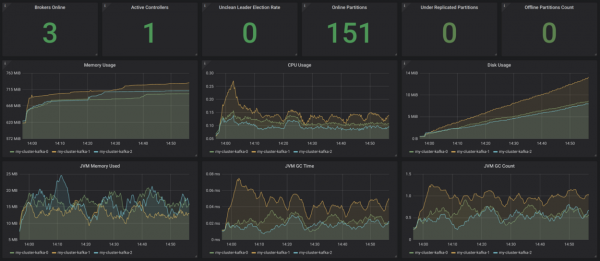
Source:
It would be worthwhile to complement this with client monitoring (metrics for consumers and producers), as well as latency monitoring (for which there is ) and end-to-end monitoring – for this, use .
Logging
Logging is another crucial task. Ensure that all containers in your Kafka installation are logging to stdout and stderr, and also ensure that your Kubernetes cluster aggregates all logs into a central logging infrastructure, such as .
Check functionality.
Kubernetes uses liveness and readiness probes to check if your pods are operating normally. If the liveness check fails, Kubernetes will stop that container and then automatically restart it if the restart policy is set accordingly. If the readiness check fails, Kubernetes will isolate that pod from handling requests. Thus, in such cases, no manual intervention is required, which is a significant advantage.
Rolling out updates
StatefulSets support automatic updates: when the RollingUpdate strategy is chosen, each Kafka pod will be updated sequentially. This can minimize downtime to zero.
Scaling
Scaling the Kafka cluster is not a trivial task. However, in Kubernetes, it is very simple to scale pods to a specific number of replicas, meaning you can declare as many Kafka brokers as you want. The most challenging part in this case is reassigning partitions after scaling up or before scaling down. Again, Kubernetes can assist you with this task.
Administration
Tasks related to the administration of your Kafka cluster, such as creating topics and reassigning partitions, can be accomplished using existing shell scripts by opening the command-line interface in your pods. However, this solution is not very elegant. Strimzi supports topic management through another operator, which leaves room for improvement.
Backup and Recovery
Now the availability of Kafka will also depend on the availability of Kubernetes. If your Kubernetes cluster goes down, the Kafka cluster may also fail under worst-case scenarios. According to Murphy's Law, this is bound to happen, and you risk losing data. To mitigate this risk, carefully develop your backup strategy. You can use MirrorMaker, or alternatively, leverage S3 for this purpose, as described in this. from Zalando.
Conclusion
When working with small or medium Kafka clusters, it certainly makes sense to use Kubernetes, as it provides additional flexibility and simplifies operations with operators. If you face very serious non-functional requirements regarding latency and/or throughput, you might want to consider another deployment option.
Source: habr.com
