

The "dark mode" in applications is no longer surprising anyone. This feature is available in all current operating systems, browsers, and many mobile and desktop applications. However, many websites still do not support this option, but it seems this isn't necessary.
Developers from Google added a flag in the Canary version of the browser that activates the corresponding styling on different sites. You can find this flag in the chrome://flags section, named Force Dark Mode for Web Contents. As in other cases, it needs to be enabled by changing the Default option to Enabled, after which you must restart the browser.
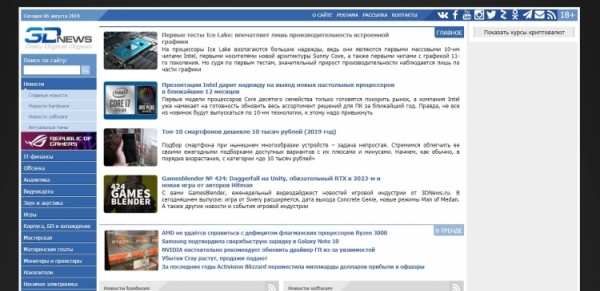
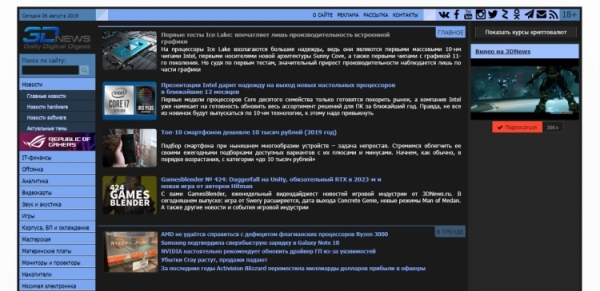
There are several options available:
- Simple inversion based on HSL;
- Simple inversion based on CIELAB;
- Selective inversion of images;
- Selective inversion of non-image elements;
- Selective inversion of everything.
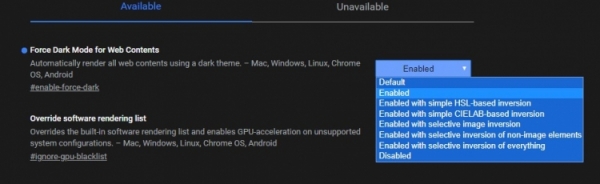
These options are available on Mac, Windows, Linux, Chrome OS, and Android. To enable them, you need Chrome Canary version 78.0.3873.0 or higher. Restarting the browser after selecting each option is necessary. However, the system will prompt you about that.
And although this looks quite good, some may reasonably think that Google is taking too much upon itself by changing the design and interface of websites. However, for those with vision issues, this feature may be quite helpful. It is still unclear when this feature will be available in the stable version and how it will differ from the current iteration. Nonetheless, the very fact that such an option is emerging is quite interesting.
Source: 3dnews.ru
