

System Purpose
Support for remote access to files on computers within the network. The system 'virtually' supports all major file operations (creation, deletion, reading, writing, etc.) through the exchange of transactions (messages) via the TCP protocol.
Application Areas
The system's functionality is effective in the following cases:
- in native applications for mobile and embedded devices (smartphones, onboard control systems, etc.) that require quick access to files on remote servers in conditions with likely intermittent connectivity (going offline);
- in heavily loaded databases if request processing occurs on one server while data storage is on another;
- in distributed corporate networks for data collection and processing that require high-speed data exchange, redundancy, and reliability;
- in complex systems with microservice architecture where delays in information exchange between modules are critically important.
Structure
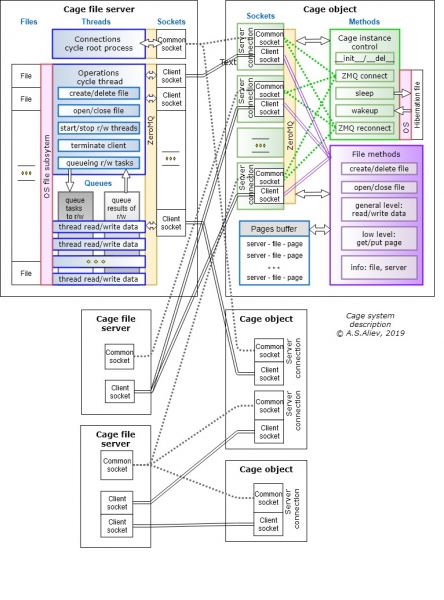
The Cage system (a beta version implemented in Python 3.7 for Windows) consists of two main parts:
- Cageserver — a file server program (function package) that runs on computers within the network, to which remote access to files is needed;
- class Cage with a library of methods for client software that simplifies interaction with servers.
Using the system on the client side
The methods of the Cage class replace standard, 'routine' file system operations: creating, opening, closing, deleting files, as well as reading/writing data in binary format (specifying the position and size of data). Conceptually, these methods are close to file functions in the C language, where opening/closing files is done 'over input-output channels.'
In other words, the programmer works not with methods of 'file' objects (class _io in Python), but with methods of the Cage class.
When creating an instance of the Cage object, it establishes an initial connection with the server (or multiple servers), undergoes authorization by client Id, and receives confirmation with the assigned port number for all file operations. When the Cage object is deleted, it issues a command to the server to terminate the connection and close the files. The servers can also initiate disconnection.
The system enhances read/write performance by buffering frequently accessed file fragments in the cache (RAM buffer) of client programs.
Client software can utilize any number of Cage objects with various configurations (buffer size, block size for server communication, etc.).
A single Cage object can exchange data with multiple files across several servers. Connection parameters (IP address or DNS of the server, primary authorization port, path, and file name) are specified when creating the object.
Since each Cage object can simultaneously work with many files, a shared memory space is used for buffering. The cache size — the number of pages and their size — is set dynamically when creating the Cage object. For example, a 1 GB cache can consist of 1000 pages of 1 MB each, or 10,000 pages of 100 KB, or 1 million pages of 1 KB. The choice of size and number of pages is a specific task for each application case.
Multiple Cage objects can be used simultaneously to establish different buffer memory settings according to the access patterns of various files. A simple buffering algorithm is applied as the basis: once the set memory volume is exhausted, new pages replace old ones based on a principle of evicting with the least number of accesses. Buffering is particularly effective in cases of uneven (statistically speaking) concurrent access, firstly to different files, and secondly to fragments of each file.
The Cage class supports input/output not only by data addresses (specifying position and length of the array, 'replacing' file system operations) but also at a lower 'physical' level — by page numbers in the buffer memory.
Original functionality is supported for Cage objects ‘hibernation’ ("suspend") – they can be "folded" (for example, in the event of a disconnection from the servers, or when stopping the application, etc.) into a local dump file on the client-side and quickly restored from this file (after connection resumes, when the application is restarted). This significantly reduces traffic when activating the client program after a temporary "offline" period, as frequently used file segments will already be in the cache.
Cage consists of about 3600 lines of code.
Principles of server architecture
Cage file servers can be run on any number of ports, one of which (the "main") is used solely for authorizing all clients, while the others are for data exchange. The Cage server program requires only Python. Concurrently, the computer with the file server can perform any other tasks.
The server initially starts as a combination of two main processes:
- "Connections" – a process for establishing and terminating connections with clients at the server's initiative;
- "Operations" – a process for executing client tasks (operations) related to file handling, as well as for closing communication sessions upon client commands.
Both processes are unsynchronized and organized as infinite loops for receiving and sending messages based on multiprocess queues, proxy objects, locks, and sockets.
The "Connections" process allocates a port for each client for data transmission. The number of ports is specified when the server starts. The correspondence between ports and clients is stored in shared proxy memory.
The "Operations" process supports file resource sharing, allowing multiple different clients to simultaneously (quasi-parallel, as access is managed by locks) read data from a single file, if this was permitted upon its initial opening by the "first" client.
Commands for creating/deleting/opening/closing files on server are processed in the "Operations" process strictly sequentially using the server's OS file subsystem.
To enhance read/write operations, these processes are carried out in threads created by the 'Operations' process. The number of threads typically equals the number of open files. Read/write requests from clients are submitted to a common queue, and the first available thread takes the task from the head of the queue. Special logic prevents data overwriting in the server's RAM.
The 'Operations' process monitors client activity and stops servicing them either by their commands or when the inactivity timeout is exceeded.
To ensure reliability, Cageserver maintains logs of all transactions. One general log contains copies of messages from clients regarding tasks for creating/opening/renaming/deleting files. For each working file, a separate log is created, which records copies of messages for reading and writing data in that working file, as well as arrays of written (new) data and arrays of data that were lost due to overwriting (writing new data 'over' old data).
These logs provide the ability to restore new changes from backups and to 'roll back' from the current content to a desired point in the past.
Cageserver consists of about 3100 lines of code.
Launching the Cageserver file server program
On launch, the following must be defined:
— the main port for authorization;
— the number of ports for transaction exchange with authorized clients (from 1 and more, the pool of numbers starts from the next number after the main port number).
Using the Cage class
class cage.Cage( cage_name="", pagesize=0, numpages=0, maxstrlen=0, server_ip={}, wait=0, awake=False, cache_file="" )
Objects are created from this class that interact with file servers and contain buffer memory.
Parameters
- cage_name(str) — a conditional name for the object used for client identification on the server-side
- pagesize(int) — the size of one page of buffer memory (in bytes)
- numpages(int) — the number of pages of buffer memory
- maxstrlen(int) — the maximum length of a byte string in read and write operations
- server_ip(dict) — a dictionary containing the addresses used servers, where the key is the server's conditional name (server ID within the application), and the value is a string with the address: “ip address:port” or “DNS:port” (the mapping of names and real addresses is temporary and can be changed)
- wait(int) — response time from the server when receiving ports (in seconds)
- awake(boolean) — flag indicating the method of object creation (False — if a new object is being created, True — if the object is created from a previously “suspended” state — using the “hibernation” operation, defaults to False)
- cache_file(str) — filename for hibernation
Methods
Cage.file_create( server, path ) – create a new file
Cage.file_rename( server, path, new_name ) – rename a file
Cage.file_remove( server, path) – delete a file
Cage.open( server, path, mod ) – open a file
Returns fchannel channel number. The parameter mod — is the file opening mode: “wm” — exclusive (read/write), “rs” — read-only, and shared read-only by other clients, “ws” — read/write, and shared read-only by other clients.
Cage.close (fchannel) – close a file
Cage.exit (fchannel, begin, data ) – write a byte string to a file
Cage.write (fchannel, begin, len_data ) – read a byte string from a file
Cage.put_pages ( fchannel ) – “pushes” from the buffer to the server all pages of the specified channel that have been modified. Used in algorithm points where it’s necessary to ensure that all operations on the channel are physically saved in the file on the server.
Cage.push_all () – “pushes” from the buffer to the server all pages of all channels for an instance of the Cage class that have been modified. Used when it’s necessary to ensure that all operations on all channels are saved on the server.
Source: habr.com
