

Some time ago, I developed a system to evaluate the viability of office UPS units. The evaluation is based on long-term monitoring. As a result of my findings, I refined the system and learned a lot of interesting things, which I will share – welcome to the details.
Overall, the concept turned out to be correct. From a one-time request to the UPS, you can only learn that life is pain. Some parameters are only relevant when 220 V is disconnected, others turn out to be outright nonsense based on my analysis, and some need to be recalculated manually, cross-checking with reality.
Looking ahead, I tried to incorporate these nuances into the system. After all, we are automators and not just counting by hand.
For example, the parameter "battery charge in percent". As a singular value, it conveys nothing and is usually equal to 100. What really matters is how quickly the battery discharges, how fast it charges, and how often it has been discharged to critical levels. Surprisingly, some of this work is done by the UPS itself, albeit using very strange formulas; more on that below.
The parameter "load on the UPS" is quite good and useful. But when viewed dynamically, it turns out that sometimes it's nonsense, while other times it provides interesting information about the connected equipment.
«Battery voltage". Practically a Grail, if it weren't for one fact: the vast majority of the time, the battery is charging, and the parameter displays the charging voltage instead of the actual battery voltage. Wait, shouldn't the self-test procedure handle this..?
«Self-test". It should, but its results are not communicated anywhere. In the case of a failed self-test, the UPS will turn off and scream like it's been cut; this is the only available result. Also, not all UPS units report the fact that a self-test was conducted.
And "nice try vendor" – the most interesting of the available parameters is "battery runtime". It is supposed to predict how long the battery will last under the current load. Additionally, it is tied to the internal logic of the UPS's behavior. In reality, it shows rosy dreams, especially when fully charged.
There are also organizational nuances to consider.
For example, all the UPS devices I've encountered have information about the battery date (two fields, in fact). However, I could only record this data (after replacing the battery, of course) for products from APC, and even then it was a hassle. In Powercom, there's simply no way to input this information, at least not under Windows.
The same Powercom distinguished itself with identical values in the 'serial number' field. It does not allow for any record.
The calculation "battery runtime" seems to include values from the periods when the UPS is connected to 220 V, and therefore the battery data is blatantly incorrect. In reality, the battery runtime can confidently be divided by 2, or even 3. And even then, it will still remain purely a synthetic value. Furthermore, it is based on 'battery load', which has also shown strange behavior: on some units, it does not reset for a long time after high loads, while on others, it tends to drop to zero.
Despite such a mix, it is evident that all parameters are still subject to some form of algorithmization. Thus, it is possible not just to view the data (and certainly not to manually sift through all the existing records), but to input the entire array into an analyzer and base recommendations on them. This has been implemented in the new version of the software.
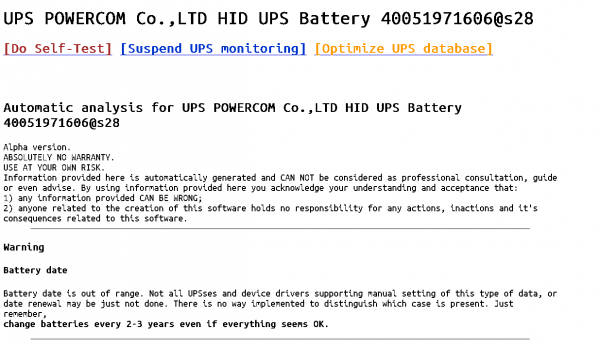
The UPS information page will issue warnings and recommendations:
- at least one self-test failure has been logged (if the UPS provides such functionality)
- the need to replace the battery
- unusual load values on the UPS
- absence of battery data
- unusual input voltage values
- recommendations for data utilization and UPS maintenance
(all possible options can be found in ups_additional.php)
A necessary condition for accurate analytics, of course, is the collection of data to the fullest extent possible.
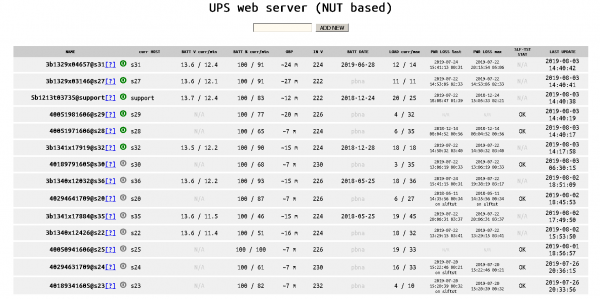
On the main page, you can immediately see the maximum and critical values as well as the adjusted prediction of runtime.
Additionally:
- the maximum power outage time is now calculated correctly
- current information from the UPS is marked in green, outdated data in gray, and critical data in red and orange
- a procedure for optimizing the database has been added (manual activation with automatic backup creation)
- unnecessary information has been removed from the main screen, and useful content has been added 🙂
Disclaimer:
Of course, this is not really enterprise. Almost the entire setup is manual. There were not enough tests, and errors pop up here and there. Nevertheless, I find it useful and wish you the same.
Thank you for your attention!
Only registered users can participate in the survey. , please.
Do we need to add anything else to the software?
Polish it up to enterprise level!
It would be nice to have setups, so we don't have to do it manually.
No, this is fine.
Burn the gasoline.
I need a bunch of things; I'll write them in the comments.
34 users voted. 13 users abstained.
Source: habr.com
