


All an attacker needs is time and motivation to infiltrate your network. Our task is to prevent this or, at the very least, make it as difficult as possible. It is essential to start by identifying the weaknesses in Active Directory (AD) that an attacker might exploit to gain access and move through the network undetected. In this article, we will discuss the risk indicators that reflect existing vulnerabilities in your organization's cybersecurity, using the Varonis AD monitoring dashboard as an example.
Attackers exploit specific configurations within the domain.
They use numerous clever tricks and vulnerabilities to breach corporate networks and escalate privileges. Some of these vulnerabilities are domain configuration settings that can be easily modified once identified.
The AD monitoring dashboard will immediately alert you (or your system administrators) if you haven’t changed the KRBTGT password in the last month, or if someone has authenticated with the default built-in Administrator account. These two accounts provide unlimited access to your network: attackers will try to access them to bypass any restrictions on privileges and access permissions. As a result, they can access any data that interests them.
Of course, you can discover these vulnerabilities on your own: for example, by setting a calendar reminder to check or running a PowerShell script to collect this information.
The Varonis dashboard updates of automatically , providing a quick view and analysis of key metrics that highlight potential vulnerabilities so you can take immediate action to address them.
3 Key Risk Indicators at the Domain Level
Below is a series of widgets available on the Varonis dashboard that will significantly enhance the security of your corporate network and IT infrastructure as a whole.
1. The number of domains for which the Kerberos account password has not been changed for a significant period.
The KRBTGT account is a special account in AD that signs all Threat actors who gain access to the domain controller (DC) can use this account to create , which will give them unlimited access to virtually any system within the corporate network. We have encountered situations where, after successfully obtaining a Golden Ticket, an attacker had access to the organization's network for two years. If the password for the KRBTGT account in your company has not been changed in the last forty days, the widget will alert you to this.
Forty days is more than enough time for an attacker to gain access to the network. However, if you establish and standardize the process of changing this password regularly, it will significantly complicate the task for an attacker trying to penetrate the corporate network.
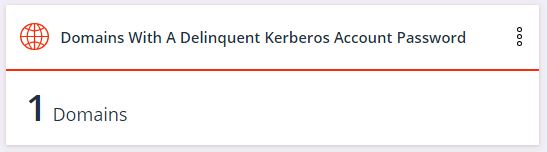
Remember that according to Microsoft's implementation of the Kerberos protocol, you need to From then on, this AD widget will remind you when it's time to change the KRBTGT password for all domains in your network.
2. The number of domains where the built-in administrator account (Administrator) has been recently used
according to the principle of least privilege
According to The built-in administrator account is often used to simplify system administration. This can lead to a bad habit, the result of which could be a breach. If this is happening in your organization, it will be difficult to distinguish proper use of this account from potentially malicious access.
If the widget shows anything other than zero, it means someone is improperly handling administrative accounts. In this case, corrective action must be taken to restrict access to the built-in administrator account.
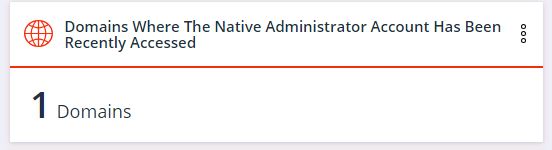
If the widget shows anything other than zero, it means that someone is improperly handling administrative accounts. In this case, corrective measures should be taken to restrict access to the embedded administrator account.
Once you have achieved a zero value for the widget and the system administrators no longer use this account for their work, any subsequent change will indicate a potential cyberattack.
3. The number of domains that lack a group of Protected Users
Older versions of AD supported a weak encryption type — RC4. Hackers have cracked RC4 many years ago, making it trivial for an attacker to compromise an account that still uses RC4. In the version of Active Directory introduced in Windows Server 2012, a new type of user group called the Protected Users group was created. It provides additional protective tools and prevents user authentication using RC4 encryption.
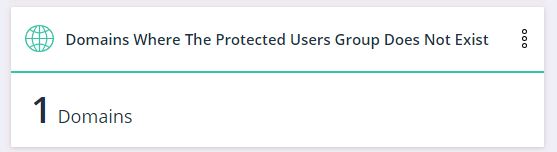
This widget will indicate if such a group is absent in any domain of the organization, so you can address it by enabling the Protected Users group and using it to secure your infrastructure.
Easy targets for attackers
User accounts are the number one target for attackers — from initial infiltration attempts to ongoing privilege escalation and concealing their activities. Malicious actors look for easy targets in your network using basic PowerShell commands, which are often hard to detect. Remove as many of these easy targets from AD as possible.
Attackers are looking for users with unlimited password lifetimes (or those not requiring passwords), technological accounts that are administrators, and accounts using old RC4 encryption.
Any of these accounts are either easy to access or generally not monitored. Attackers can take over these accounts and move freely within your infrastructure.
Once attackers penetrate the security perimeter, they will likely gain access to at least one account. Will you be able to stop them from accessing sensitive data before you detect and neutralize the attack?
The Varonis AD dashboard will highlight vulnerable user accounts so you can address issues proactively. The harder it is to breach your network, the better your chances of neutralizing an attacker before they cause serious damage.
4 Key Risk Indicators for User Accounts
Below are examples of widgets on the Varonis AD dashboard that identify the most vulnerable user accounts.
1. The number of active users with passwords that never expire
For any attacker, gaining access to such an account is always a significant advantage. Since the password never expires, the attacker has a permanent foothold within the network, which can then be used for or lateral movement within the infrastructure.
Attackers have lists with millions of 'username-password' combinations that they use in credential stuffing attacks, and the probability that
the combination for a user with an 'eternal' password is on one of those lists is much greater than zero.
Accounts with non-expiring passwords are convenient to manage, but they are not secure. Use this widget to find all accounts with such passwords. Change this setting and update the password.
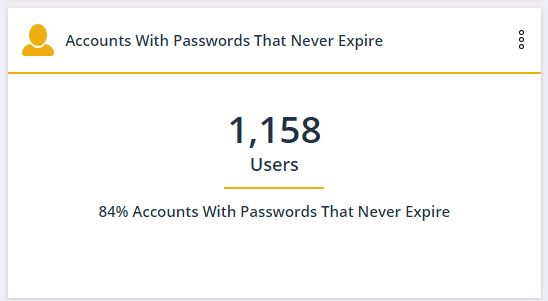
Once the value of this widget reaches zero, any new accounts created with such a password will appear on the dashboard.
2. The number of administrative accounts with SPN
SPN (Service Principal Name) is a unique identifier for a service instance. This widget shows how many service accounts have full administrator rights. The value on the widget should be zero. SPNs with administrative rights occur because granting such rights is convenient for software vendors and application administrators, but this poses a security risk.
Providing a service account with administrative rights allows an attacker to gain full access to an unused account. This means that attackers with access to SPN accounts can freely operate within the infrastructure while avoiding detection of their actions.
You can resolve this issue by modifying the permissions for service accounts. Such accounts should adhere to the principle of least privilege and have only the access necessary for their operation.
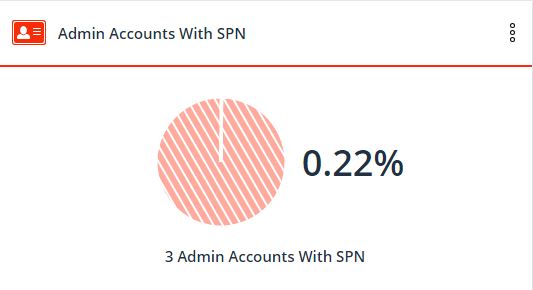
With this widget, you can identify all SPNs with administrative rights, revoke such privileges, and subsequently monitor SPNs in line with the same principle of least privilege.
Newly appearing SPNs will be displayed on the dashboard, allowing you to monitor this process.
3. The number of users who do not require Kerberos pre-authentication.
Ideally, Kerberos encrypts the authentication ticket using AES-256 encryption, which remains unbroken to this day.
However, older versions of Kerberos used RC4 encryption, which can now be cracked in a matter of minutes. This widget shows which user accounts are still using RC4. Microsoft continues to support RC4 for backward compatibility, but that does not mean you should use it in your AD.
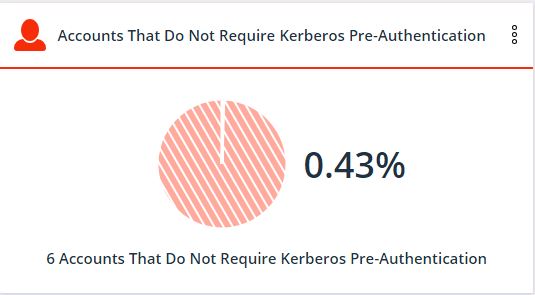
Once you have identified such accounts, you need to uncheck the 'pre-authorization Kerberos not required' box in AD to ensure that the accounts use more robust encryption.
Manually discovering these accounts without the Varonis AD dashboard is time-consuming. In reality, being timely informed of all accounts that have been modified to use RC4 encryption is an even more challenging task.
If the value on the widget changes, it may indicate illicit activity.
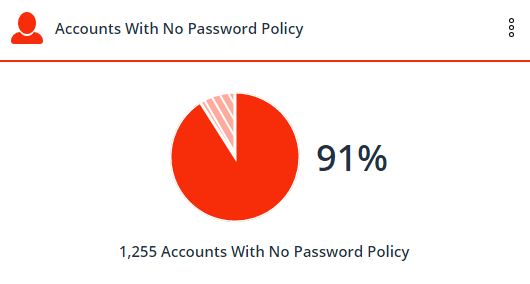
4. The number of users without a password.
Threat actors utilize basic PowerShell commands to read the 'PASSWD_NOTREQD' flag in the account properties from AD. The use of this flag indicates that there are no requirements for a password to be present or complex.
How easy is it to steal an account with a simple or empty password? Now imagine one of these accounts is an administrator.
What if one of the thousands of sensitive files available to everyone is an upcoming financial report?
Ignoring the mandatory password input requirement is yet another shortcut in system administration that was often used in the past, but today it is unacceptable and unsafe.
Resolve this issue by updating passwords for such accounts.
Monitoring this widget in the future will help you avoid the emergence of accounts without passwords.
Varonis levels the playing field
In the past, the work of collecting and analyzing the metrics discussed in the article took many hours and required deep knowledge of PowerShell: security specialists had to allocate resources for such tasks every week or month. However, manual collection and processing of this information gives threat actors a head start for infiltration and data theft.
C You will spend one day to deploy the AD monitoring dashboard and additional components, collecting all the discussed and many other vulnerabilities. Subsequently, during operation, the dashboard will automatically update as the state of the infrastructure changes.
Conducting cyberattacks is always a race between attackers and defenders, with the threat actor's aim to steal data before security professionals can close off access to it. Early detection of threat actors and their illegal activities, combined with robust cyber defenses, is key to ensuring the security of your data.
Source: habr.com
