

A few words from our translation bureau: usually, everyone strives to translate the latest materials and publications, and we are no exception. However, terminals are not something that gets updated weekly. Therefore, we translated for you the article by Antoine Bopre, published in the spring of 2018: despite its considerable 'age' by today's standards, we believe the material remains completely relevant. Moreover, the original is a series of two articles, but we decided to combine them into one large post.
Terminals occupy a special place in computer history, but in recent decades they have been ‘forced’ to literally survive alongside the command line in the face of widespread graphical interfaces. have replaced their , which, in turn, were a modification of systems using punch cards and switches. Modern distributions come with a plethora of terminal emulators in all shapes and colors. While many are content with the standard terminal provided by their working environment, some proudly use distinctly exotic software to run their favorite shell or text editor. But as we will see from this article, not all terminals were created equal: they vary greatly in functionality, size, and performance.
Some terminals have quite astonishing security vulnerabilities, plus, most have a completely different set of features, from tabbed interface support to scripting. Although we , this article is an update of the previous material that will help readers decide which terminal to use in 2018. In the first half of the article, features are compared, while in the second half, performance is evaluated.
Here are the terminals I reviewed:
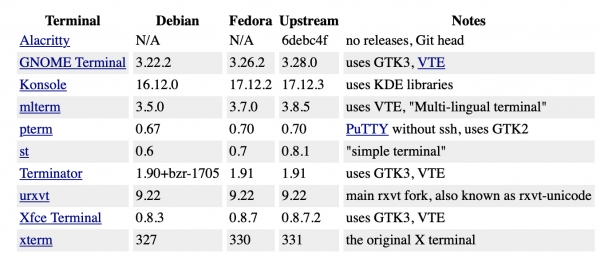
These may not be the latest versions, as I limited myself to stable builds at the time of writing, which I was able to deploy on Debian 9 or Fedora 27. The only exception is Alacritty. It is a descendant of GPU-accelerated terminals and is written in an unusual and new language for this task—Rust. I excluded web terminals (including those on ) because preliminary tests showed their extremely low performance.
Unicode Support
I began my tests with Unicode support. The first test for the terminals was rendering a Unicode string from : "é, Δ, Й, ק, م, ๗, あ, 叶, 葉, and 말". This simple test shows whether the terminal can correctly operate worldwide. The xterm terminal does not display the Arabic character in the default configuration:
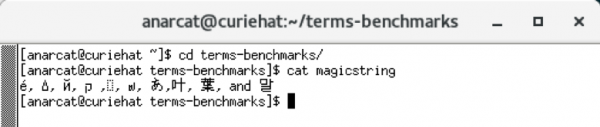
By default, xterm uses a classic "fixed" font, which, according to , has "significant Unicode coverage since 1997." In this font, something causes the character to be displayed as an empty box, and only when increasing the text size to 20+ points does the character finally start displaying correctly. However, this "fix" breaks the display of other Unicode characters:

These screenshots were taken on Fedora 27, as it provided better results than Debian 9, where some older terminal versions (specifically—mlterm) could not work properly with fonts. Fortunately, this was fixed in later versions.
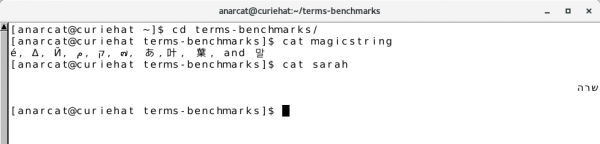
Now, pay attention to the display of the string in xterm. It turns out that the Mem character and the next one, Semitic , belong to RTL () scripts, so technically they should be displayed right to left. Web browsers, such as Firefox 57, handle the above string correctly. A simpler example of RTL text is the word "" in Hebrew (). states the following:
"Many computer programs cannot properly display bidirectional text. For example, the Hebrew name 'Sara' consists of the characters shin (ש) (which appears on the right), then resh (ר), and finally he (ה) (which should appear on the left)."
Many terminals fail this test: Alacritty, Gnome and XFCE derivative terminals, urxvt, st, and xterm display "Sara" in reverse, as if we wrote this name as "Aras."
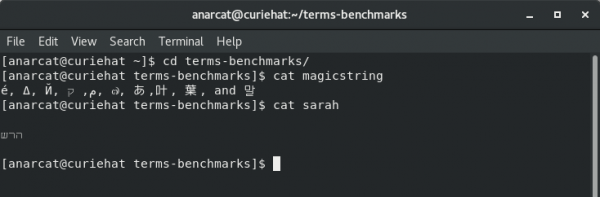
Another issue with bidirectional texts is that they need to be aligned somehow, especially when it comes to mixing RTL and LTR texts. RTL scripts should start from the right side of the terminal window, but what should happen for terminals that operate with LTR English by default? Most of them do not have any special mechanisms and align all text to the left (including in Konsole). The exceptions are pterm and mlterm, which adhere to standards and align such lines to the right.
Protection against paste
The next critical feature I have identified is protection against paste. While it is widely known that spells like:
$ curl http://example.com/ | share push commands for executing code, few know that hidden commands can infiltrate the console when copying and pasting from a web browser, even after careful inspection. brilliantly shows how an innocuous-looking command:
git clone git://git.kernel.org/pub/scm/utils/kup/kup.gitturns into this unpleasant surprise when pasted from Horn's site into the terminal:
git clone /dev/null;
    clear;
	echo -n "Hello ";
	whoami|tr -d 'n';
	echo -e '!nThat was a bad idea. Don'"'"'t copy code from websites you don'"'"'t trust!
	Here'"'"'s the first line of your /etc/passwd: ';
	head -n1 /etc/passwd
	git clone git://git.kernel.org/pub/scm/utils/kup/kup.git
How does this work? The malicious code is extracted into a block , which is moved out of the user's line of sight by means of CSS.
is explicitly designed to neutralize such attacks. In this mode, terminals wrap the pasted text in a pair of special escape sequences to inform the shell about the origin of this text. This way, the shell receives a signal that it can ignore any special characters that the pasted text might contain. All terminals, even the venerable xterm, support this function, but pasting in Bracketed mode requires support from the shell or application running in the terminal. For example, software using (the same Bash), requires a file ~/.inputrc:
set enable-bracketed-paste onUnfortunately, Horn's test site also demonstrates how to bypass this protection through text formatting and prematurely terminate the application of the Bracketed mode. This works because some terminals incorrectly filter escape sequences before adding their own. For example, I was unable to successfully complete the tests in Konsole even with the correct configuration. .inputrc file. This means that you can easily incur system configuration damage due to unsupported applications or misconfigured shells. This is especially dangerous when logging into remote servers, where careful configuration is less common, especially if you have many such remote machines.
A good solution to this issue is the paste confirmation plugin for the terminal urxvt, which simply asks for permission to paste any text containing new lines. I haven’t found a more secure option for the text attack described by Horn.
Tabs and Profiles
A currently popular feature is tabbed interface support, which we will define as a single terminal window containing multiple terminals. This feature varies across different terminals; while traditional terminals like xterm do not support tabs at all, more modern incarnations such as Xfce Terminal, GNOME Terminal, and Konsole do support this feature. Urxvt also supports tabs, but only with the use of a plugin. However, in terms of tab support, the undisputed leader is Terminator: it not only supports tabs but can also arrange terminals in arbitrary order (see the image below).
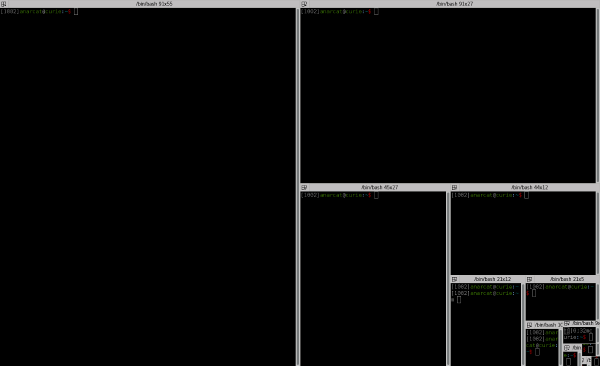
Another feature of Terminator is the ability to "group" these tabs together and send the same key presses to multiple terminals simultaneously, providing a rough tool for performing bulk operations on several servers at once. A similar function is also implemented in Konsole. To use this feature in other terminals, third-party software is required, such as , or .
Tabs work particularly well in conjunction with profiles: for instance, you can have one tab for email, another for chat, and so on. This is well supported by the Konsole and GNOME Terminal. Both allow each tab to automatically launch its own profile. Terminator also supports profiles, but I couldn't find a way to automatically run specific programs when opening a certain tab. Other terminals have no concept of 'profile' at all.
Ruffles
The last thing I will discuss in the first part of this article is the appearance of terminals. For example, GNOME, Xfce, and urxvt support transparency, but they recently dropped support for background images, which led some users to switch to a different terminal. . Personally, I'm okay with just Xresources, which sets a basic color background for urxvt. However, non-standard color themes can also create problems. For instance, with applications and , as they already use their own colors.
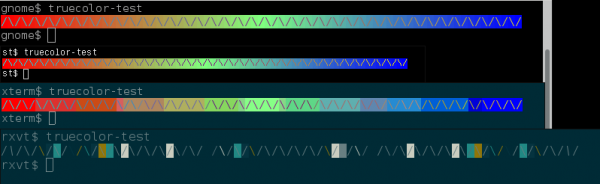
did not support colors, and new ones often limited to a 256-color palette. For experienced users who style their terminals in complex ways, shell prompts or status lines can become unpleasant limitations. tracks which terminals support 'True Color'. My tests confirm that st, Alacritty, and VTE-based terminals support True Color very well. Other terminals do not fare well in this regard and, in fact, do not even display 256 colors. Below, you can see the difference in True Color support among GNOME, st, and xterm terminals, which handle this task adequately with their 256-color palette, and urxvt, which not only fails the test but also shows some flickering symbols instead.
Some terminals also scan text for URL patterns to make links clickable. This applies to all VTE-derived terminals, while urxvt requires a special plug-in module to transform URLs on click or with a keyboard shortcut. Other terminals I tested display URLs in different ways.
Finally, the new trend in terminals is optional scroll buffers. For example, st does not have a scroll buffer; it is assumed that the user will use a terminal multiplexer like tmux. .
Alacritty also lacks reverse scroll buffers, but due to "extensive feedback" on this topic from users. Aside from these exceptions, every terminal I reviewed supports reverse scrolling.
Intermediate Results
In the second part of the material (originally, these were two separate articles, — ed. note) we will compare performance, memory usage, and latency. But we already see that some of the terminals under consideration have serious drawbacks. For example, users regularly working with RTL scripts may want to consider mlterm and pterm, as they handle such tasks better than others. Konsole has also performed well. Users not working with RTL scripts may choose something else.
In terms of protection against the insertion of malicious code, urxvt stands out due to its unique implementation of security against this type of attack, which I find definitely convenient. Those looking for some bells and whistles should check out Konsole. Finally, it's worth mentioning that VTE is an excellent basis for terminals, ensuring support for colors, URL recognition, and so on. At first glance, the default terminal that comes with your favorite environment may meet all requirements, but let’s leave that question open until we examine performance.
Continuing the Discussion
Overall, terminal performance may seem like a contrived issue; however, it turns out that some of them exhibit surprisingly high latency for such fundamental software. We will also examine what is traditionally referred to as "speed" (actually, this is scrolling speed) and the memory usage of the terminal (considering that today this is not as critical as it was decades ago).
Latency
After thorough research into terminal performance, I concluded that the most critical parameter in this regard is latency (ping). In my article Pavel Fatin examined the delay across various text editors and hinted that terminals may, in this regard, operate slower than the fastest text editors. This hint ultimately led me to conduct my own tests and write this article.
But what is delay, and why is it so important? In his article, Fatin defined it as "the delay between pressing a key and the corresponding screen update" and quoted , which states: "The delay in visual feedback on a computer screen significantly affects a typist's behavior and satisfaction."
Fatin explains that this ping has deeper consequences than mere satisfaction: "typing becomes slower, more errors occur, and eye and muscle strain increases." In other words, greater delay can lead to typos and lower code quality, as it imposes additional cognitive load on the brain. But worse still, the ping "increases eye and muscle strain," which seemingly suggests in the future (presumably, the author means issues with eye muscles, back, hands, and of course, vision — translator's note.) due to repetitive strain.
Some of these effects have been known for a long time, and the results of , published back in 1976 in the journal Ergonomics, indicate that a delay of 100 milliseconds "significantly impairs typing speed." Recently, the GNOME user guide included an of 10 milliseconds, and going further, shows that the ideal is 1 millisecond.
Fatin conducted his tests on text editors; he created a portable tool called , which I used to check ping in terminal emulators. Keep in mind that the test was conducted in simulation mode: in reality, we also need to consider input latency (keyboard, USB controllers, etc.) and output latency (graphics card buffer, monitor). According to Fatin, in typical configurations it is about 20 ms. With gaming equipment, it can reach just 3 milliseconds. Since we already have such fast equipment, the application should not add its own latency. Fatin's goal is to reduce application latency to 1 millisecond, or even achieve input without , like in .
Here are the results of my measurements, along with some of Fatin's results to show that my experiment aligns with his tests:
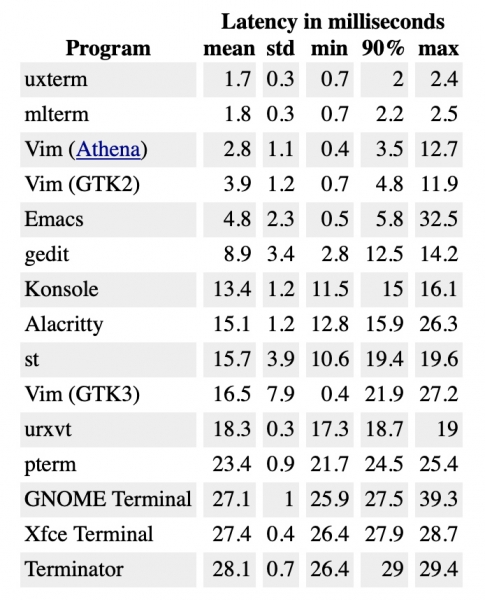
The first thing that struck me was the better response time of older programs like xterm and mlterm. With the worst registration latency (2.4 ms), they showed a better result than the fastest modern terminal (10.6 ms for st). No modern terminal drops below the 10-millisecond threshold. In particular, Alacritty does not meet the requirement of being "the fastest of all existing terminal emulators," although its results have improved since the first check in 2017. Indeed, the authors of the project and are working on improving performance. It should also be noted that Vim, which uses GTK3, is significantly slower than its GTK2 counterpart. This suggests that GTK3 introduces additional latency, which affects all other terminals that utilize it (Terminator, Xfce4 Terminal, and GNOME Terminal).
However, the differences may be imperceptible to the eye. As Fatin explains: "it is not necessary to be aware of the latency for it to affect you." Fatin also warns about standard deviation: "any variations in the duration of latency (jitter) create additional load due to their unpredictability."
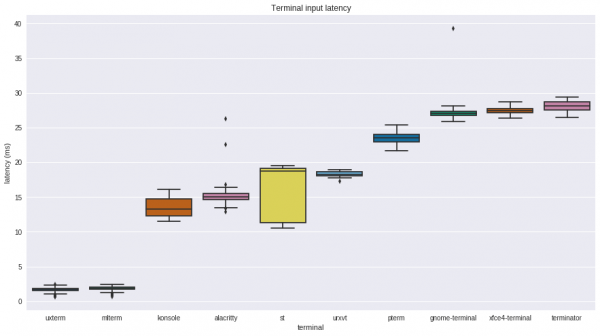
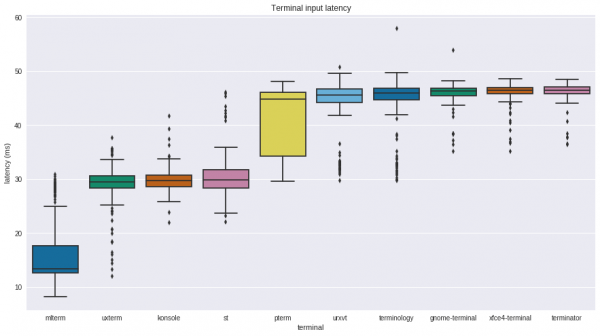
The chart above was obtained on a clean Debian 9 (stretch) with This environment yields the best results in latency detection tests. It turns out that GNOME adds an additional ping of 20 ms to all measurements. A possible explanation for this is the presence of programs that synchronously process input events. Fatin gives an example of such a case. , which adds latency by processing all input events synchronously. By default, GNOME is also equipped with a window manager. , which creates an additional level of buffering, affecting ping and adding at least 8 milliseconds of delay.
Scroll speed
The next test is the traditional check of 'speed' or 'bandwidth', which measures how quickly the terminal can scroll a page displaying a large amount of text on the screen. The mechanics of the test vary; the original test involved simply generating the same line of text using the seq command. Other tests include checking Thomas E. Dickey's test (accompanying xterm), where a file terminfo.src is repeatedly unloaded. In another review of terminal performance, uses a string of random bytes in base32 encoding, which is output to the terminal using cat. Luu considers such a test 'as useless a benchmark as one could imagine' and suggests using terminal responsiveness as the primary measure instead. Dickey also describes his test as misleading. However, both authors acknowledge that terminal window bandwidth can be an issue. Luu found Emacs Eshell hanging when displaying large files, while Dickey optimized the terminal to eliminate visual lag in xterm. Therefore, there is still some merit in this test, but since the rendering process differs significantly from terminal to terminal, it can also be used as a testing component to verify other parameters.
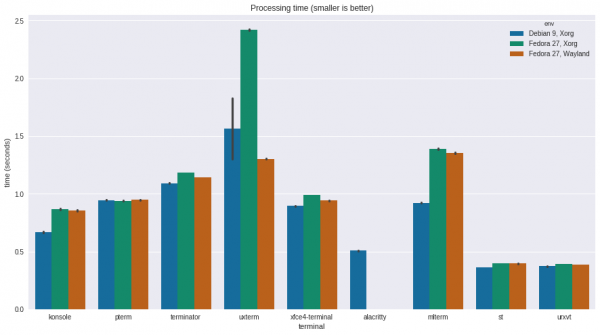
Here we see that rxvt and st are pulling ahead of the competition, followed by the much newer Alacritty, which is developed with a focus on performance. Next are Xfce (the VTE family) and Konsole, which operate nearly twice as fast. Last is xterm, which is five times slower than rxvt. During the test, xterm also displayed severe flickering, making the text difficult to read, even if it was the same line. Konsole proved fast, but it sometimes 'cheated': the display would occasionally hang, showing partial text or not rendering it at all. Other terminals, including st, Alacritty, and rxvt, displayed lines clearly.
Dickey explains that the performance differences stem from the design of scrolling buffers in different terminals. In particular, he blames rxvt and other terminals for 'not following common rules':
"Unlike xterm, rxvt did not attempt to display all updates. If it falls behind, it will drop some updates to catch up. This had a greater impact on perceived scrolling speed than on memory organization. One downside was that ASCII animation was somewhat inaccurate."
To address the seeming sluggishness of xterm, Dickey recommends using the resource , which allows xterm to drop some screen updates to keep up with the flow. My tests confirm that fastScroll improves performance and brings xterm to par with rxvt. However, this is quite a rough workaround, as Dickey himself explains: "sometimes xterm — like konsole — seems to stop, as it waits for a new set of screen updates after some have been dropped." In this regard, it seems that other terminals have found the best compromise between speed and display integrity.
Resource Consumption
Regardless of the relevance of considering scrolling speed as a metric of performance, this test allows simulating load on the terminals, which in turn allows us to measure other parameters such as memory or disk usage. The metrics were obtained by running the specified test seq under Python process monitoring. It collected data from the counters for ru_maxrss, the sum of ru_oublock and ru_inblock and a simple time timer.
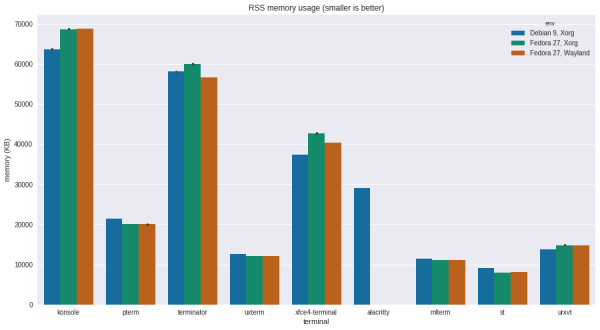
In this test, ST ranks first with the lowest average memory consumption at 8 MB, which is not surprising considering that the main idea of the project is simplicity. mlterm, xterm, and rxvt consume a bit more — about 12 MB. Another notable result is Alacritty, which requires 30 MB for operation. Then come the VTE family terminals with figures ranging from 40 to 60 MB, which is quite a lot. This usage can be explained by the fact that these terminals utilize higher-level libraries, such as GTK. Konsole comes last with a massive memory consumption of 65 MB during tests, although this can be justified by its extensive feature set.
Compared to previous results obtained ten years ago, all programs have noticeably increased their memory consumption. Previously, Xterm required 4 MB, and now it needs 15 MB just to start. A similar increase is seen in rxvt, which now requires 16 MB out of the box. Xfce Terminal takes up 34 MB, which is three times more than before, while GNOME Terminal requires only 20 MB. Of course, all previous tests were conducted on a 32-bit architecture. At LCA 2012, Rusty Russell , there are many subtler reasons that can explain the increase in memory consumption. Despite this, we now live in an era where we have whole gigabytes of memory, so we'll manage somehow.
However, I can't shake the feeling that allocating more memory for such fundamental software as a terminal is a waste of resources. These programs should be the smallest of the small, capable of running on any 'box', even a shoe box, should we ever reach a point where they need to be equipped with Linux systems (and you know it will happen). But with these figures, memory usage will become an issue in any environment when running multiple terminals, except for scenarios with a few of the lightest and most limited options. To mitigate this, GNOME Terminal, Konsole, urxvt, Terminator, and Xfce Terminal have a Daemon mode that allows management of multiple terminals through a single process, thereby limiting their memory consumption.
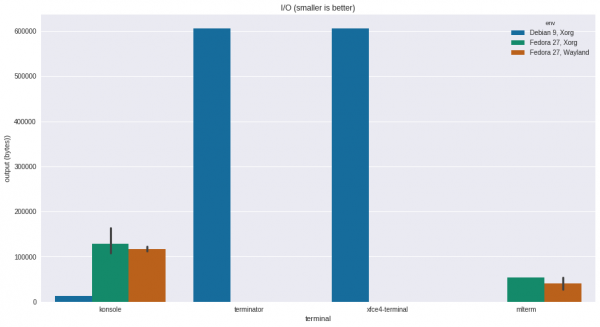
During my tests, I came across another unexpected result regarding disk read-write: I expected to see nothing here at all, but it turned out that some terminals write the largest data to disk. For instance, the VTE library actually keeps the scroll buffer stored on disk (this feature , and it is still happening now). However, unlike older implementations, now at least this data is encrypted using AES256 GCM (). But a reasonable question arises: what is so special about the VTE library that it requires such an unconventional approach to implementation…
Conclusion
In the first part of the article, we found that VTE-based terminals have a good set of features, but now we see that this comes at some cost to ensure their performance. Currently, memory is not an issue, as all VTE terminals can be managed through a daemon process that limits their appetite. Nevertheless, older systems with physical limitations on the amount of RAM and kernel buffer may still require earlier versions of terminals, as they consume significantly fewer resources. Although VTE terminals have performed well in bandwidth tests (scrolling), their data display latency exceeds the threshold set in the GNOME user documentation. Perhaps VTE developers should take this into account. Considering that even for novice Linux users, encountering the terminal is inevitable, they could make it more user-friendly. For experienced geeks, switching from the default terminal might even reduce eye strain and help avoid professional injuries and ailments in the future due to prolonged working sessions. Unfortunately, only old xterm and mlterm bring us to the magical ping threshold of 10 milliseconds, which is unacceptable for many.
Control measurements also showed that due to the development of graphical environments in Linux, developers had to make a number of compromises. Some users should consider regular window managers, as they provide a significant reduction in ping. Unfortunately, it was not possible to measure latency for Wayland: the Typometer program I used was designed to prevent what Wayland aims to stop — spying on other windows. I hope that Wayland's compositing performance is better than X.org, and I also hope that in the future someone will find a way to assess latency levels in this environment.
Source: habr.com
