

I came across yet another list of “10 reasons to switch from Windows 10 to Linux” and decided to create my own list of what I don’t like about Windows 10 — the OS I use today. I’m not planning to switch to Linux in the foreseeable future, but that doesn’t mean I’m satisfied. with everything, that changes in the operating system.
I’ll answer the question right away: “Why not continue using Windows 7 if you dislike 10?”
My job involves technical support, including for computers running Windows 10. So it's more beneficial to stay updated with the latest OS version rather than making excuses like “I don’t use your Windows 10.” I lived with Windows 7; I remember and know it well, and not much has changed since then. However, Windows 10 is constantly evolving; if you delay updates, settings shift to other locations, the logic of operation changes, etc. Therefore, to not fall behind, I use Windows 10 daily.
Now, let me share what I dislike about it. Since I'm not only a user but also an admin, my dislike comes from two perspectives. Those who only administer without using the system encounter only half the issues, while regular users encounter the other half.
Updates
Updates that install without consent — during shutdown, startup, while working, or when the computer is idle — are a nuisance. Home users of Windows have no official control over updates whatsoever. Some semblance of control exists for corporate users — “working hours,” “postpone for a month,” “install updates only for business” — but sooner or later, they too are hit by updates. And if you delay for too long, it tends to happen at the worst possible moment.
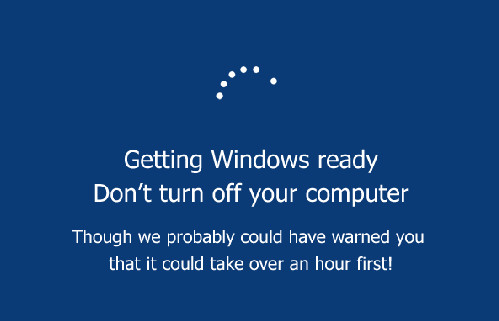
There are plenty of stories about how 'I went to a presentation, turned on my laptop — and it spent a whole hour installing updates' or 'I left calculations overnight, and my computer installed updates and restarted.' From recent personal experience — last Friday, an employee of ours turned off his computer (with Windows 10 Home), which said 'installing updates, do not turn off.' Well, he didn't turn it off and left. The computer finished, turned off. On Monday morning, he came in, turned it on — and the update installation continued. It's an old Atom, so the installation took at least two hours, maybe even longer. And if you interrupt the installation, Windows will roll back the updates, but it won't do that longer than it installs. That's why I never advise interrupting the installation, unless it shows 30% for an hour and isn't moving. Updates really shouldn't be that slow even on an Atom.
The ideal option was the previous version of Windows Update, where you could see exactly what was being installed, completely disable updates, turn off unnecessary ones, and configure only manual installation, etc.
Of course, there are ways to disable updates even today. The simplest way is to restrict access to update servers on the router. But this is like treating a headache with a guillotine, and it may come back to haunt you sooner or later when some critical update isn't installed.
Disabling safe mode by pressing F8 during boot
Who was troubled by this? Now, to access safe mode, you need to boot into the OS, press a special button, and only after rebooting will you get where you need.
And if the system won't boot, you have to wait until Windows figures out that it can't start — and only then will it offer a choice of safe mode. However, it doesn't always realize that.
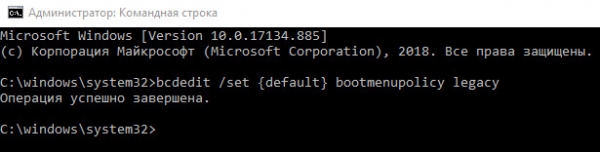
The magic command that restores F8: bcdedit /set {default} bootmenupolicy legacy
Type this in cmd after running it as an administrator.
Unfortunately, this can only be done in advance on your own computers; if you have someone else's non-booting one, you have to find another way to get into safe mode.
Telemetry
Collecting system information and sending it to Microsoft. In general, I'm not particularly keen on privacy and mostly live by the principle of the Uncatchable Joe — who needs me? Although, of course, that doesn't mean I post scans of my passport on the Internet.
Telemetry in MS is supposedly anonymous, and I’m not too bothered by its mere existence. However, the resources it consumes can be quite noticeable. Not long ago, I switched from an i5-7500 (4 cores, 3.4GHz) to an AMD A6-9500E (2 cores, 3 GHz, but an older, slower architecture) — and this has had a significant impact on performance. Besides the fact that background processes consume about 30% of CPU time (they were negligible on the i5, hanging on some distant core without interfering), the process of building and sending telemetry data has started to take up nearly 100% of the CPU.
Changes in the Interface
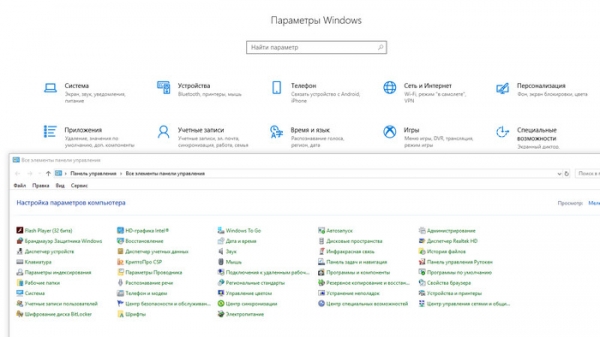
When the interface changes from version to version — that’s fine. But when within the same OS version buttons and settings migrate from section to section, and there are several places where adjustments can be made, with only weak overlap — it’s frustrating. Especially when the new 'Settings' look nothing like the old 'Control Panel'.
Start Menu
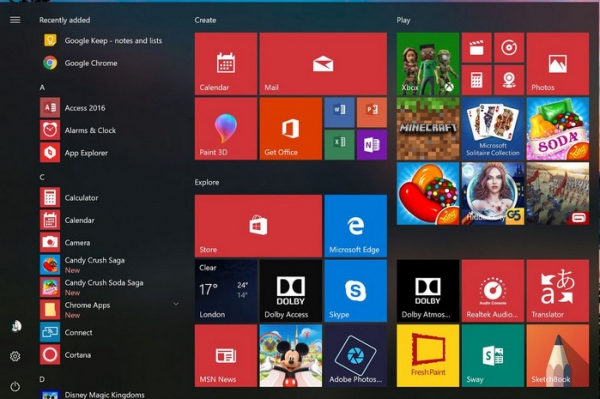
In general, I rarely used it as a menu. I didn’t use it at all in XP, creating alternative menus on the taskbar and using win+r for quick program launches. With the release of Vista, you could simply press Win and access the search bar. The only issue is that this search is inconsistent — it’s never clear where it will search next. Sometimes it searches everywhere, sometimes only in files, and it doesn’t think to search among installed programs. Sometimes it’s the other way around. Its file search is a complete disaster.
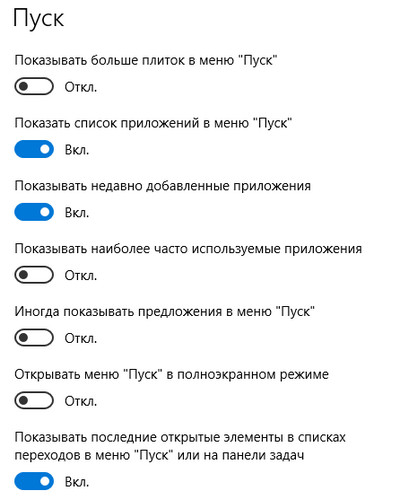
And in Windows 10, there’s this 'great' feature called 'suggestions' — it pushes various programs from the app store into your menu. For instance, if you often launch office and graphics applications, Windows will observe and analyze your habits for a while — and suggest you Candy Crush Saga or Disney Magic Kingdoms.
Yes, this can be turned off — Settings > Personalization > Start:
But I don’t like the fact that Microsoft is changing something in my offline menu. Even if I use it rarely.
Notifications
Again — does anyone even use them? The little number in the corner can bring up some useless information when clicked. Occasionally, messages pop up for a couple of seconds in the corner, and clicking on them performs an action rather than providing additional information. For example, a message stating that the firewall is off will turn it back on when clicked. Yes, it's mentioned — but the message is displayed for a short time, and you might not manage to read the last sentence.
But the real mockery is the messages saying you are in full-screen mode and Windows won't bother you. Only in full-screen mode are these messages transparent, yet they still linger in the corner. And when you click in that corner — suppose you're playing and there are some buttons in the game — you get booted to the desktop. Where the message no longer appears — after all, you're on the desktop. And upon returning to the game, you face that transparent message again on top of the buttons.
The idea was good at the outset — to collect notifications from all programs in one place, but the implementation is severely lacking. Plus, 'all programs' aren't rushing to pile their notifications in there; instead, they stick to the old ways.
Microsoft Store
Who even needs it? Only the minesweeper, solitaire, and add-ons for Edge, which will soon become Chrome and will have add-ons installed from the appropriate place. And there are plenty of decent solitaires available elsewhere, considering that most of these casual games have moved to social networks (and got monetized).
I'm not against having an app store per se; overall, judging by mobile phones, it's a good thing. But it needs to be convenient. No matter how people criticize Apple and Google's stores for poor search, Microsoft is much worse. With Google and Apple, useful programs appear in search results along with the junk, while in MS's store, it's all just rubbish.
Though, of course, this point is subjective. Remove the shortcut, don’t install programs from there — and you can forget about the Store.
Epilogue
Well, that's probably everything. Of course, one could mention viruses, antivirus software, Internet Explorer, the bloating of the distribution and the installed system... But these have always been issues, Windows 10 hasn't brought anything new in that regard. It has just started to bloat faster, which is only noticeable on budget devices with very limited disk space.
In other respects, Windows still has no competitors; with version 10, they made a decent shot, but the system is bandaged and continues to struggle forward.
Source: habr.com
