


TL;DR: A newcomer saw Haiku for the first time and is trying to port some programs from the Linux world.
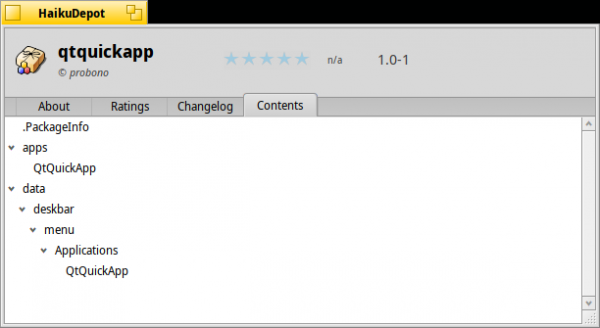
My first ported program for Haiku, packaged in its hpkg format.
I discovered Haiku, an unexpectedly good operating system for PCs.
Today I will learn how to port new programs to this operating system. The main focus is to describe my first experience transitioning to Haiku from a developer's perspective for Linux. I apologize for any silly mistakes made along the way, as it's been less than a week since I first booted Haiku.
I want to achieve three goals:
- Port a simple CLI application
- Port a GUI application using Qt
- Then package them in hpkg format (since I'm still considering adapting AppDir and AppImage for Haiku...)
Let's get started. In the sections and , as well as in the from HaikuPorts, I found the right direction. There's even an online PDF book. .
467 pages—and this is from 1997! It's a bit daunting to look inside, but I hope for the best. Encouraging words from the developer: 'long, because BeOS was not POSIX-compliant,' but Haiku is 'mostly' compliant now.
Porting a simple CLI application
The first thought was to port the application , but it turns out that's already been done long ago.
First attempt: nothing to look at
What I can't seem to understand is that applications have been ported to Haiku for over 10 years Second attempt: need to rewrite
So, I will use
ptouch-770 I print various labels on it, and you may have seen it in the previous article. Earlier, I wrote a small wrapper program with a GUI in Python (since it's on Gtk+ — I will need to rewrite it, which is a good opportunity to learn).
Brother P-Touch 770 label printer. Will it work under Haiku?

The Haiku package manager is aware of libraries and commands, so if I get a 'can’t find libintl' message when launching
— I just run configure pkgman install devel:libintl and the necessary package will be found. Similarly, pkgman install cmd:rsync . Well, and so on.Except in cases where it doesn't work:
Perhaps udev is too Linux-specific, and thus does not exist for Haiku. This means I will have to modify the source code I'm trying to compile.
/Haiku/home> git clone https://github.com/probonopd/ptouch-770
Cloning into 'ptouch-770'...
remote: Enumerating objects: 134, done.
remote: Total 134 (delta 0), reused 0 (delta 0), pack-reused 134
Receiving objects: 100% (134/134), 98.91 KiB | 637.00 KiB/s, done.
Resolving deltas: 100% (71/71), done./Haiku/home> cd ptouch-770//Haiku/home/ptouch-770> make
gcc -Wall -O2 -c -o ptouch-770-write.o ptouch-770-write.c
ptouch-770-write.c:28:10: fatal error: libudev.h: No such file or directory
 #include <libudev.h>
          ^~~~~~~~~~~
compilation terminated.
Makefile:16: recipe for target 'ptouch-770-write.o' failed
make: *** [ptouch-770-write.o] Error 1/Haiku/home/ptouch-770> pkgman install devel:libudev
100% repochecksum-1 [65 bytes]
Validating checksum for Haiku...done.
100% repochecksum-1 [64 bytes]
Validating checksum for HaikuPorts...done.
*** Failed to find a match for "devel:libudev": Name not found/Haiku/home/ptouch-770> pkgman install devel:udev
100% repochecksum-1 [65 bytes]
Validating checksum for Haiku...done.
100% repochecksum-1 [64 bytes]
Validating checksum for HaikuPorts...done.
*** Failed to find a match for "devel:udev": Name not found
Sigh, you can't jump higher than your own head, and I don't even know where to start.
It would be nice to have
Third attempt
It would be nice to have tmate for Haiku, I would allow the Haiku developers to connect to my terminal session — in case something goes wrong. The instructions are simple enough:
./autogen.sh
./configure
make
make install
Looks good, so why not try this on Haiku?
/Haiku/home> git clone https://github.com/tmate-io/tmate/Haiku/home> cd tmate//Haiku/home/tmate> ./autogen.sh
(...)/Haiku/home/tmate> ./configure
(...)
checking for libevent... no
checking for library containing event_init... no
configure: error: "libevent not found"/Haiku/home/tmate> pkgman install devel:libevent
(...)
The following changes will be made:
  in system:
    install package libevent21-2.1.8-2 from repository HaikuPorts
    install package libevent21_devel-2.1.8-2 from repository HaikuPorts
Continue? [yes/no] (yes) :
100% libevent21-2.1.8-2-x86_64.hpkg [965.22 KiB]
(...)
[system] Done.checking for ncurses... no
checking for library containing setupterm... no
configure: error: "curses not found"/Haiku/home/tmate> pkgman install devel:libcurses
(...)
*** Failed to find a match for "devel:libcurses": Name not found/Haiku/home/tmate> pkgman install devel:curses
(...)
*** Failed to find a match for "devel:curses": Name not found
At this step, I open HaikuDepot and search for curses.
Something was found, which gave me a clue for a more accurate query:
/Haiku/home/tmate> pkgman install devel:libncurses
(...)
100% ncurses6_devel-6.1-1-x86_64.hpkg [835.62 KiB]
(...)./configure
(...)
checking for msgpack >= 1.1.0... no
configure: error: "msgpack >= 1.1.0 not found"/Haiku/home/tmate> pkgman install devel:msgpack
(...)
*** Failed to find a match for "devel:msgpack": Name not found/Haiku/home/tmate> pkgman install devel:libmsgpack
(...)
*** Failed to find a match for "devel:libmsgpack": Name not found
I went back to HaikuDepot, and of course, I found devel:msgpack_c_cpp_devel. What are these strange names?
/Haiku/home/tmate> pkgman install devel:msgpack_c_cpp_devel
100% repochecksum-1 [65 bytes]
Validating checksum for Haiku...done.
100% repochecksum-1 [64 bytes]
Validating checksum for HaikuPorts...done.
*** Failed to find a match for "devel:msgpack_c_cpp_devel": Name not found# Why is it not finding it? To hell with the "devel:".../Haiku/home/tmate> pkgman install msgpack_c_cpp_devel
(...)
The following changes will be made:
  in system:
    install package msgpack_c_cpp-3.1.1-1 from repository HaikuPorts
    install package msgpack_c_cpp_devel-3.1.1-1 from repository HaikuPorts
Continue? [yes/no] (yes) :
(...)/Haiku/home/tmate> ./configure
(...)
checking for libssh >= 0.8.4... no
configure: error: "libssh >= 0.8.4 not found"/Haiku/home/tmate> pkgman install devel:libssh/Haiku/home/tmate> make
(...)
In file included from /boot/system/develop/headers/msgpack.h:22,
                 from tmate.h:5,
                 from cfg.c:29:
/boot/system/develop/headers/msgpack/vrefbuffer.h:19:8: error: redefinition of struct iovec'
 struct iovec {
        ^~~~~
In file included from tmux.h:27,
                 from cfg.c:28:
/boot/system/develop/headers/posix/sys/uio.h:12:16: note: originally defined here
 typedef struct iovec {
                ^~~~~
Makefile:969: recipe for target 'cfg.o' failed
make: *** [cfg.o] Error 1
At this point, I realized that porting the program to Haiku requires significantly more knowledge than needed for a simple rebuild.
I talked to the friendly Haiku developers, and it turned out there was a bug in msgpack, and after a few minutes, I saw a patch in HaikuPorts. I witnessed the fixed package (buildslave — virtual machines).
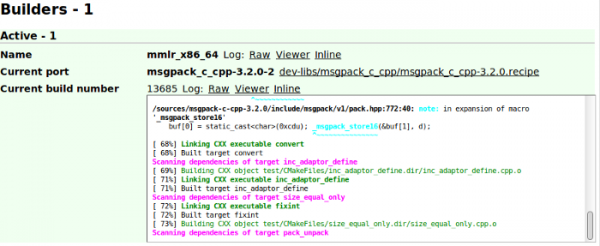
Building the patched msgpack on buildmaster
In the meantime, I submit a patch upstream .
Five minutes later, the updated msgpack is already available in Haiku:
/Haiku/home/tmate> pkgman update
(...)
The following changes will be made:
  in system:
    upgrade package msgpack_c_cpp-3.1.1-1 to 3.2.0-2 from repository HaikuPorts
    upgrade package msgpack_c_cpp_devel-3.1.1-1 to 3.2.0-2 from repository HaikuPorts
Continue? [yes/no] (yes) : y
100% msgpack_c_cpp-3.2.0-2-x86_64.hpkg [13.43 KiB]
(...)
[system] Done.
Unexpectedly good. Did I say that?!
I return to the original task:
/Haiku/home/tmate> make
(...)
In file included from tmux.h:40,
                 from tty.c:32:
compat.h:266: warning: "AT_FDCWD" redefined
 #define AT_FDCWD -100

In file included from tty.c:25:
/boot/system/develop/headers/posix/fcntl.h:62: note: this is the location of the previous definition
 #define AT_FDCWD  (-1)  /* CWD FD for the *at() functions */

tty.c: In function 'tty_init_termios':
tty.c:278:48: error: 'IMAXBEL' undeclared (first use in this function); did you mean 'MAXLABEL'?
  tio.c_iflag &= ~(IXON|IXOFF|ICRNL|INLCR|IGNCR|IMAXBEL|ISTRIP);
                                                ^~~~~~~
                                                MAXLABEL
tty.c:278:48: note: each undeclared identifier is reported only once for each function it appears in
Makefile:969: recipe for target 'tty.o' failed
make: *** [tty.o] Error 1
Now, it seems msgpack is not to blame. I comment IMAXLABEL downward API support (simultaneously with this in tty.c as follows:
tio.c_iflag &= ~(IXON|IXOFF|ICRNL|INLCR|IGNCR|/*IMAXBEL|*/ISTRIP);Result:
osdep-unknown.c: In function 'osdep_get_cwd':
osdep-unknown.c:32:19: warning: unused parameter 'fd' [-Wunused-parameter]
osdep_get_cwd(int fd)
               ~~~~^~
make: *** No rule to make target 'compat/forkpty-unknown.c', needed by 'compat/forkpty-unknown.o'.  Stop.
Well, there it goes again... By the way:
/Haiku/home/tmate> ./configure | grep -i OPENAT
checking for openat... nohints where to dig:
/Haiku/home/tmate> ./configure LDFLAGS="-lbsd"
(...)/Haiku/home/tmate> make
(...)
In file included from tmux.h:40,
                 from window.c:31:
compat.h:266: warning: "AT_FDCWD" redefined
 #define AT_FDCWD -100

In file included from window.c:22:
/boot/system/develop/headers/posix/fcntl.h:62: note: this is the location of the previous definition
 #define AT_FDCWD  (-1)  /* CWD FD for the *at() functions */

make: *** No rule to make target 'compat/forkpty-unknown.c', needed by 'compat/forkpty-unknown.o'.  Stop.
Here I posted .
I was told that with libresolv on Haiku there is something else in libnetwork. Apparently, the code needs further fixing. I need to think...
find . -type f -exec sed -i -e 's|lresolv|lnetwork|g' {} ;The eternal question: what is happening.
/Haiku/home/tmate> ./configure LDFLAGS="-lbsd"
(...)/Haiku/home/tmate> make
(...)
# Success!# Let's run it:/Haiku/home/tmate> ./tmate
runtime_loader: /boot/system/lib/libssh.so.4.7.2: Could not resolve symbol '__stack_chk_guard'
resolve symbol "__stack_chk_guard" returned: -2147478780
runtime_loader: /boot/system/lib/libssh.so.4.7.2: Troubles relocating: Symbol not found
The same, but in profile. I Googled it and . If you add -lssp it 'sometimes' helps, trying it:
/Haiku/home/tmate> ./configure LDFLAGS="-lbsd -lssp"
(...)/Haiku/home/tmate> make
(...)/Haiku/home/tmate> ./tmate
Wow! It runs! But...
[tmate] ssh.tmate.io lookup failure. Retrying in 2 seconds (non-recoverable failure in name resolution)I will try to debug, :
/Haiku/home/tmate> strace -f ./tmate >log 2>&1"Bad port ID" — this is like a business card . Maybe someone has an idea of what is wrong and how to fix it? If so, I will update the article. Link to .
Porting a GUI application to Qt.
I choose a simple QML application.
/> cd /Haiku/home//Haiku/home> git clone https://github.com/probonopd/QtQuickApp
/Haiku/home/QtQuickApp> qmake .
/Haiku/home/QtQuickApp> make
/Haiku/home/QtQuickApp> ./QtQuickApp # Works!
Really simple. Less than a minute!
Packaging applications into hpkg using haikuporter and haikuports.
Where to start? There is no simple documentation, I go to the #haiku channel on irc.freenode.net and hear:
- The command
package— a low-level way to create packages. Mostly, you just need PackageInfo, as described in the section "Making it into a proper .hpkg package" - I need to do something
- You can use (I'm crashing, )
I don't know what to do. I believe I need a beginner's guide like 'Hello, World!', ideally a video. It would also be good to have an easy introduction to HaikuPorter, similar to what is done in GNU hello.
I read the following:
haikuporteris a tool for creating general packaging projects for Haiku. It uses the HaikuPorts repository as a base for all packages. Haikuporter uses recipes to create packages.
Additionally, I learn that:
There is no need to keep the recipes in the HaikuPorts repository. You can create another repository, put the recipes in it, and then point haikuporter to it.
That's exactly what I need — unless you are looking for a way to host the package publicly. But that's a topic for another post.
Installing haikuporter and haikuports
cd /boot/home/
git clone https://github.com/haikuports/haikuporter --depth=50
git clone https://github.com/haikuports/haikuports --depth=50
ln -s /boot/home/haikuporter/haikuporter /boot/home/config/non-packaged/bin/ # make it runnable from anywhere
cd haikuporter
cp haikuports-sample.conf /boot/home/config/settings/haikuports.conf
sed -i -e 's|/mydisk/haikuports|/boot/home/haikuports|g' /boot/home/config/settings/haikuports.conf
Writing a recipe
SUMMARY="Demo QtQuick application"
DESCRIPTION="QtQuickApp is a demo QtQuick application for testing Haiku porting and packaging"
HOMEPAGE="https://github.com/probonopd/QtQuickApp"
COPYRIGHT="None"
LICENSE="MIT"
REVISION="1"
SOURCE_URI="https://github.com/probonopd/QtQuickApp.git"
#PATCHES=""
ARCHITECTURES="x86_64"
PROVIDES="
    QtQuickApp = $portVersion
"
REQUIRES="
    haiku
"
BUILD_REQUIRES="
    haiku_devel
    cmd:qmake
"BUILD()
{
    qmake .
    make $jobArgs
}INSTALL()
{
    make install
}
Building a recipe
I save the file as QtQuickApp-1.0.recipe, after which I run haikuporter -S ./QuickApp-1.0.recipe. Dependencies for all packages in the repository are being checked , which takes some time. I think I'll grab a coffee.
And why should this check be done on my local machine instead of centrally on the server once for everyone?
According to Mr. waddlesplash:
Because you can overwrite any file in the repository 😉 You can slightly optimize this by computing the necessary information when needed, since the last made changes are quite rare.
~/QtQuickApp> haikuporter QtQuickApp-1.0.recipe
Checking if any dependency-infos need to be updated ...
Looking for stale dependency-infos ...
Error: QtQuickApp not found in repository
It turns out there isn't a regular recipe file that contains your application's source code. You need to keep it in the repository in HaikuPorts format.
~/QtQuickApp> mv QtQuickApp-1.0.recipe ../haikuports/app-misc/QtQuickApp/
~/QtQuickApp> ../haikuport
~/QtQuickApp> haikuporter -S QtQuickApp-1.0.recipe
This fact makes the assembly bulkier. I don't particularly like it, but I think it's necessary for all open-source software to eventually appear in HaikuPorts.
I'm getting the following:
~\/QtQuickApp> haikuporter -S QtQuickApp-1.0.recipe
Checking if any dependency-infos need to be updated ...
        updating dependency infos of QtQuickApp-1.0
Looking for stale dependency-infos ...
Error: QtQuickApp-1.0.recipe not found in tree.
What's wrong? After reading the IRC, I do:
~\/QtQuickApp> haikuporter -S QtQuickApp
Checking if any dependency-infos need to be updated ...
        updating dependency infos of QtQuickApp-1.0
Looking for stale dependency-infos ...
----------------------------------------------------------------------
app-misc::QtQuickApp-1.0
        \/boot\/home\/haikuports\/app-misc\/QtQuickApp\/QtQuickApp-1.0.recipe
----------------------------------------------------------------------Downloading: https:\/\/github.com\/probonopd\/QtQuickApp.git ...
--2019-07-14 16:12:44--  https:\/\/github.com\/probonopd\/QtQuickApp.git
Resolving github.com... 140.82.118.3
Connecting to github.com|140.82.118.3|:443... connected.
HTTP request sent, awaiting response... 301 Moved Permanently
Location: https:\/\/github.com\/probonopd\/QtQuickApp [following]
--2019-07-14 16:12:45--  https:\/\/github.com\/probonopd\/QtQuickApp
Reusing existing connection to github.com:443.
HTTP request sent, awaiting response... 200 OK
Length: unspecified [text\/html]
Saving to: ‘\/boot\/home\/haikuports\/app-misc\/QtQuickApp\/download\/QtQuickApp.git’
     0K .                                                     1.34M=0.06s
2019-07-14 16:12:45 (1.34 MB\/s) - ‘\/boot\/home\/haikuports\/app-misc\/QtQuickApp\/download\/QtQuickApp.git’ saved [90094]
Validating checksum of QtQuickApp.git
Warning: ----- CHECKSUM TEMPLATE -----
Warning: CHECKSUM_SHA256="cf906a65442748c95df16730c66307a46d02ab3a12137f89076ec7018d8ce18c"
Warning: -----------------------------
Error: No checksum found in recipe!
An interesting question arose. If I add a checksum to the recipe, will it match the latest Git commit for continuous integration? (The developer confirms: “Nothing will happen. Recipes are designed to be relatively stable.”)
Just for fun, they add to the recipe:
CHECKSUM_SHA256="cf906a65442748c95df16730c66307a46d02ab3a12137f89076ec7018d8ce18c"Still not satisfied:
~\/QtQuickApp> haikuporter -S QtQuickApp
Checking if any dependency-infos need to be updated ...
        updating dependency infos of QtQuickApp-1.0
Looking for stale dependency-infos ...
----------------------------------------------------------------------
app-misc::QtQuickApp-1.0
        \/boot\/home\/haikuports\/app-misc\/QtQuickApp\/QtQuickApp-1.0.recipe
----------------------------------------------------------------------
Skipping download of source for QtQuickApp.git
Validating checksum of QtQuickApp.git
Unpacking source of QtQuickApp.git
Error: Unrecognized archive type in file \/boot\/home\/haikuports\/app-misc\/QtQuickApp\/download\/QtQuickApp.git
What's he on about? It's a Git repository; the code is already there directly, nothing to unpack. From my point of view, the tool should be smart enough not to look for an unpacker when given a URL from GitHub.
Maybe the git:// URI will work
SOURCE_URI="git:\/\/github.com\/probonopd\/QtQuickApp.git"Now it complains like this:
Downloading: git://github.com/probonopd/QtQuickApp.git ...
Error: Downloading from unsafe sources is disabled in haikuports.conf!
Hmm, why is everything so complicated, why can’t we just 'work'? After all, it’s not too uncommon to assemble something from GitHub. I prefer tools that work right away without the hassle, or what I call 'fiddling around'.
Maybe this will work:
SOURCE_URI="git+https://github.com/probonopd/QtQuickApp.git"Nope. Still getting that annoying error and doing it as outlined here.
I'm getting a bit further along, but why is it still yelling at me (GitHub isn't safe!) and still trying to unpack something?Well yes, the reason is the desire to check the integrity of the data received for building. One option is to verify the checksum of the archive, but you can also hash individual files, which won’t be implemented, as it takes much more time. This is part of why git and other VCS are considered 'unsafe'. It’s likely to always be this way since creating an archive on GitHub is quite easy and often faster. And in the future, perhaps the error message won’t be so alarming... (we no longer merge such recipes in HaikuPorts).
According to :
~QtQuickApp> haikuporter -S QtQuickApp Checking if any dependency-infos need to be updated ... Looking for stale dependency-infos ... ---------------------------------------------------------------------- app-misc::QtQuickApp-1.0 /boot/home/haikuports/app-misc/QtQuickApp/QtQuickApp-1.0.recipe ----------------------------------------------------------------------Downloading: git+https://github.com/probonopd/QtQuickApp.git ... Warning: UNSAFE SOURCES ARE BAD AND SHOULD NOT BE USED IN PRODUCTION Warning: PLEASE MOVE TO A STATIC ARCHIVE DOWNLOAD WITH CHECKSUM ASAP! Cloning into bare repository '/boot/home/haikuports/app-misc/QtQuickApp/download/QtQuickApp.git'... Unpacking source of QtQuickApp.git tar: /boot/home/haikuports/app-misc/QtQuickApp/work-1.0/sources/QtQuickApp-1.0: Cannot open: No such file or directory tar: Error is not recoverable: exiting now Command 'git archive HEAD | tar -x -C "/boot/home/haikuports/app-misc/QtQuickApp/work-1.0/sources/QtQuickApp-1.0"' returned non-zero exit status 2
Out of habit, I go ask kind folks on the #haiku channel on irc.freenode.net. And where would I be without them? After a hint, I realized that I need to use:srcGitRev="d0769f53639eaffdcd070bddfb7113c04f2a0de8" SOURCE_URI="https://github.com/probonopd/QtQuickApp/archive/$srcGitRev.tar.gz" SOURCE_DIR="QtQuickApp-$srcGitRev" CHECKSUM_SHA256="db8ab861cfec0ca201e9c7b6c0c9e5e828cb4e9e69d98e3714ce0369ba9d9522"
Alright, it's clear what it does now — it downloads an archive with the source code of a specific revision. It seems silly from my perspective, and not quite what I wanted, which is to download the latest revision from the master branch.Alright, it’s clear what it does — it downloads an archive with the source files of a specific revision. From my perspective, it’s somewhat silly and not quite what I wanted, specifically — to download the latest revision from the master branch.
One of the developers explained it this way:
We have our own CI, so everything that goes into the haikuports repository will be packaged for all users, and we don’t want to risk building and delivering ‘the latest version from upstream’.
Got it! In any case, it turned out like this:
waiting for build package QtQuickApp-1.0-1 to be activated
waiting for build package QtQuickApp-1.0-1 to be activated
waiting for build package QtQuickApp-1.0-1 to be activated
waiting for build package QtQuickApp-1.0-1 to be activated
waiting for build package QtQuickApp-1.0-1 to be activated
(...)
It repeats like this indefinitely. Apparently, this is a bug (is there a ticket? I couldn't find one).
C haikuporter and the repository It doesn’t feel like a ‘just works’ level, but as a developer, I do enjoy some aspects of working with Haiku. For the most part, it resembles the Open Build Service — a powerful toolset for building Linux packages: extremely capable, with a system-oriented approach, but overly complex for my small ‘hello world’ level application.
Again, according to Mr. waddlesplash:
Indeed, HaikuPorter is quite strict by default (plus there are lint mode and strict mode, making it even more stringent!), but only because it creates packages that will work, not just any packages. That’s why it complains about undeclared dependencies, improperly imported libraries, incorrect versions, etc. The goal is to catch every single issue, including future ones, before the user encounters them (that’s why it failed to install avrdude, as a dependency was actually specified in the recipe). Libraries are not just separate packages and not even specific SO versions. HaikuPorter ensures compliance of all this within the recipes themselves to avoid runtime errors.
In principle, such a level of strictness is justified when creating an operating system, but it seems excessive to me for a ‘hello world’ application. I decided to try something else.
Building applications in hpkg format using the ‘package create’ command
Maybe, a simple instruction would suit me better?
mkdir -p apps/
cp QtQuickApp apps/cat >  .PackageInfo <<EOF
name QtQuickApp
version 1.0-1
architecture x86_64

summary "Demo QtQuick application"
description "QtQuickApp is a demo QtQuick application for testing Haiku porting and packaging"

packager "probono"
vendor "probono"

copyrights "probono"
licenses "MIT"

provides {
  QtQuickApp = 1.0-1
}requires {
  qt5
}
EOFpackage create -b QtQuickApp.hpkg
package add QtQuickApp.hpkg apps# See below if you also want the application
# to appear in the menu
Surprisingly fast, surprisingly simple, surprisingly effective. Just the way I like it, amazing!
Installation — what and where?
I moved the file QtQuickApp.hpkg to ~/config/packages, using the file manager, after which QtQuickApp magically appeared in ~/config/apps.
Once again surprisingly fast, simple, and effective. Amazing, incredible!
But… (where would we be without them!)
The application is still missing from the application menu and QuickLaunch. I think I know how to fix this. In the file manager, I am moving QtQuickApp.hpkg from ~/config/packages to /system/packages.
Nope, still missing. Apparently, I (and the instructions) missed something.
After examining the 'Contents' tab in HaikuDepot for some other applications, I noticed that there are files like /data/mimedb/application/x-vnd... what's even more noteworthy, /data/deskbar/menu/Applications/….
Well, what should I place there? Let's see...
mkdir -p data/deskbar/menu/Applications/
( cd data/deskbar/menu/Applications ; ln -s ../../../../apps/QtQuickApp . )
package add QtQuickApp.hpkg apps data
I'm quite sure this trick will work, but questions remain: why is this necessary, for what purpose? It seems to me that this undermines the overall impression that the system is so sophisticated.
As mr. waddlesplash explained:
Sometimes there are applications that are needed by other applications, but not in the menu. For instance, the LegacyPackageInstaller in your screenshot, which handles .pkg archives in BeOS format. We want users to install them, but having them in the menu would cause confusion.
I have a feeling there's a simpler solution, for example, Hidden=true in the files .desktop on Linux. Why not make 'hidden' information a resource and a file system attribute?
What is particularly unrefined is the name of (some) application that shows the menu, deskbar, is hard-coded into the path.
mr. waddlesplash clarifies on this:
'Deskbar' in this case should be understood as a general term (somewhat like 'taskbar', which refers to both the Windows application and the general concept). And since this is
deskbar, not 'Deskbar', this can also be understood similarly.
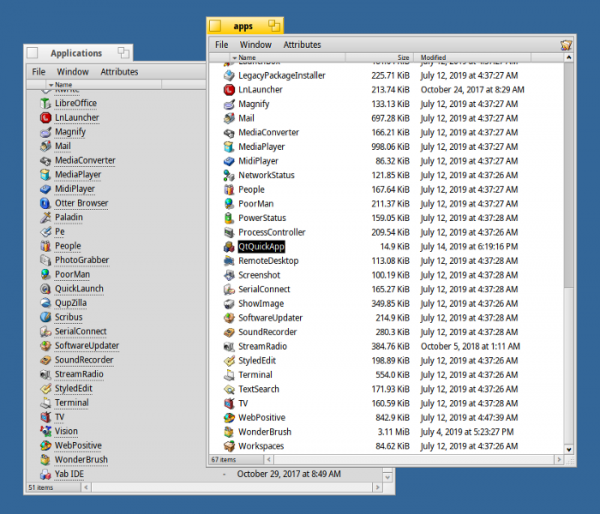
2 'almost identical' directories with applications in them
Why are there 2 application directories, and why is my QtQuickApplication in one but not in the other? (After all, this is not one system one, but rather a user one, which would personally make sense to me).
I’m really confused and think we need to unify this.
comment from mr. waddlesplash
The Apps directory contains applications that are not needed in the menu. However, the situation with the menu truly needs improvement to make it more customizable.
An application, or it won't happen 😉
I was thinking: is it really necessary to place applications in /system/apps, if it’s undesirable for users to see them there? Wouldn’t it be better to place them elsewhere, where users won’t encounter them? Just like in Mac OS X, where the contents of packages .app, which should not be visible to the user in /Applications, are hidden deep in /System/Library/…‘.
What about dependencies?
I think we should somehow indicate dependencies, right? Can Qt be considered a mandatory part of the Haiku installation by default? No! Qt is not installed by default. Can the package build program automatically determine dependencies by checking ELF files? I was told that HaikuPorter indeed does this, but package no. That’s because it’s just a "package builder," which by itself simply creates files. hpkg.
Should we make Haiku more sophisticated by adding a policy that a package should not have dependencies on packages not included in haikuports? (Мне бы так хотелось, поскольку подобная политика значительно облегчает задачу — система смогла бы автоматически разрешить зависимости каждого пакета, загружаемого откуда угодно, без возни с дополнительными источниками пакетов).
mr. waddlesplash explains:
We wouldn’t want to restrict developers' freedom so much, as it’s clear that if CompanyX wants to support its own set of software with dependencies (and thus a repository) — they can do so freely.
In that case, it might be worth recommending that third-party packages avoid dependencies on anything not included in haikuports, by fully packaging everything needed with the application. But I think that’s a topic for a future article in this series. [Is the author hinting at AppImage? — translator’s note]
Adding an application icon
What if I want to add one of the neat built-in icons to the resources of my freshly created application? It turns out, this is quite an intriguing topic, so it will be the focus of the next article.
How to organize continuous application builds?
Imagine a project like Inkscape (yes, I’m aware that it’s not currently in Haiku, but it serves well for illustration). They have a source code repository. https://gitlab.com/inkscape/inkscape.
Every time someone commits their changes to the repository, build pipelines are triggered, after which the modifications are automatically tested, built, and the application is packaged into various formats, including AppImage for Linux (a standalone application package that can be downloaded for local testing regardless of what may or may not be installed on the system. [I knew it! — translator's note]). Similarly, this happens with every merge request, allowing you to download the application built from the code proposed in the merge request before the merge occurs.
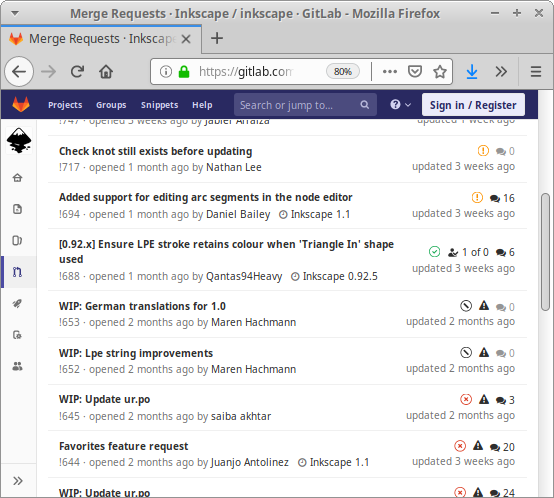
Merge requests with build statuses and the ability to download built binaries in case of a successful build (marked in green)
The build runs in Docker containers. GitLab offers free runners on Linux, and I think it's possible to connect your own runners (by the way, I can't imagine how this would work for systems like Haiku, which I know don’t have Docker or an equivalent, but FreeBSD also lacks Docker, so this issue is not unique to Haiku).
Ideally, building applications for Haiku could be done within a Docker container for Linux. In that case, building for Haiku could be integrated into existing pipelines. Are there cross-compilers? Or do we need to emulate the entire Haiku inside a Docker container, using something like QEMU/KVM (if it will actually work within Docker)? By the way, many projects employ similar principles. For instance, Scribus does this — it is already available for Haiku. One day, I will be able to submit merge requests to other projects to add support for Haiku.
One of the developers explains:
For other projects that wish to build packages themselves, the standard CMake/CPack method is supported. Other build systems may be supported if you call the package build program directly, which is good if people are interested in that. Experience shows: there hasn't been much interest so far, so haikuporter has worked as convenient for us, but in the end, both methods should work together. We should provide a set of tools for cross-compiling software from Linux or any other server operating system (Haiku is not designed to run on servers).
I applaud standing. Ordinary Linux users bear all this additional load and baggage (security, strict control, etc.) necessary for server operating systems, but not for personal ones. Therefore, I completely agree that the ability to compile applications for Haiku on Linux is the right approach.
Conclusion
Porting POSIX applications to Haiku is possible, but it may require more effort than a straightforward rebuild. I would definitely have struggled with this for a long time if it weren't for the help from people on the #haiku channel on irc.freenode.net. But even they didn't always immediately see what was wrong.
Applications written in Qt are a slight exception. I compiled a simple demo application without much trouble.
Building a package for simple applications is also quite easy, but only for those 'released traditionally,' i.e. having versioned source code archives intended for support in haikuports. For continuous builds (building on each commit) from GitHub, it doesn't seem to be that easy. Here, Haiku feels more akin to a Linux distribution than to a result on Mac, where pressing the 'Build' button in XCode produces a package .app, ready to be inserted into a disk image. .dmg, prepared for upload to my website.
Continuous builds of applications based on a 'server' operating system, such as Linux, are likely to become feasible if there is demand from developers, but at this point, the Haiku project has other, more pressing tasks.
Try it yourself! After all, the Haiku project provides images for download from DVD or USB, created . To install, simply download the image and write it to a flash drive using
Have questions? We invite you to our Russian-speaking .
Error Overview:
From Translation: this is the fifth article in a series about Haiku.
List of Articles:
Source: habr.com
