

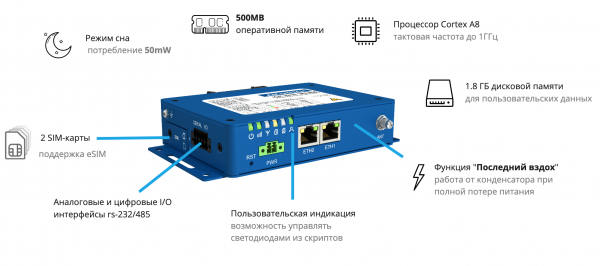
Series Routers are designed to replace the traditional setup of a single-board computer + modem + router. Now you can run all necessary logic directly on the router. Thanks to the powerful ARM processor, 512 MB of RAM, and ~2GB of built-in flash memory, you can even run a nodejs server on the router!
RS-232/485 serial interfaces are also built into the router and are available directly in the operating system with full root access. An open environment for building your own programs and C/C++ libraries for working with low-level hardware APIs is also available.
The deep sleep function allows for energy savings when operating on battery: the router can be activated only when a connection is truly needed.
In this article, we will explore the interesting features of the device and try to work practically with the input-output interface from shell scripts.
Technical Specifications
Series Routers executed on a unified hardware platform and presented in five models, differing by LTE frequency ranges, Wi-Fi availability, and geolocation (GNSS). The devices are positioned as a replacement for a single-board computer and router setup. A powerful processor and a large amount of RAM allow for running resource-intensive user applications directly on the router.
- Cortex-A8 Processor — clock frequency of 1 GHz, 32-bit architecture
- 512 MB RAM
- Flash memory from 1.5 to 4 GB — for storing user data
- Input-output ports — RS-232/485 interfaces and digital input-output ports are available for user programs
A notable model is , operating under the LTE Cat. M1 standard (). The LTE Cat. M1 protocol was specifically designed for M2M solutions, featuring low data transfer speeds (375 kb/s), as well as greater range and enhanced stability in challenging indoor communication conditions. The router has a built-in , allowing the device to operate for a short time after a complete power failure.
Deep sleep mode
Deep sleep mode allows the router to enter a state where all processes are frozen and the hardware is powered down to save energy, making it appear completely off from the outside. The power consumption in this mode is no more than 10 mW.
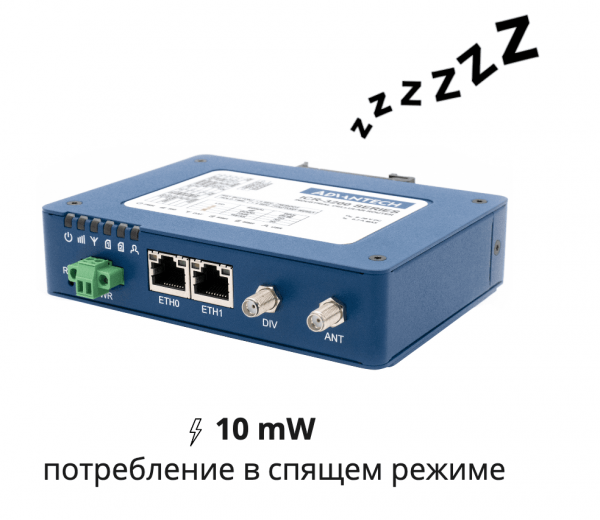
In sleep mode, the router consumes almost no energy and wakes up in 3 seconds
When you need to wake the router for data transmission, it will wake up in about 3 seconds. Of course, additional time will be needed for the modem to register on the cellular network, but this is significantly faster than booting the router from scratch. This option is useful for standalone power systems that are mostly idle and activate occasionally to perform active tasks like signaling or backup blocking.
Wake and Sleep
Wake and sleep management occurs through the module .
There are two ways to control sleep mode:
- Through a digital input — in this mode, the router is controlled by an external device, such as a microcontroller. Upon receiving a LOW signal on the digital input, the router goes to sleep, and when it receives a HIGH signal, it wakes up, or vice versa. A timeout can also be set for accidental switching protection.
- Through an internal timer — the router counts down time and wakes up/goes to sleep at the specified times. This is convenient for carrying out one-time operations or downloading data over a specific period.
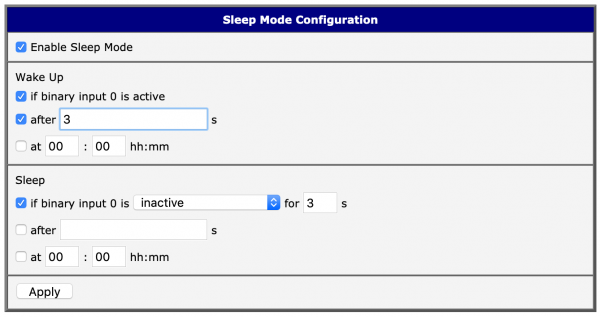
Deep Sleep Mode Configuration Interface
Last Breath Function
Power failure at a remote site can be particularly problematic, as it is unclear why communication with the site is lost. The 'Last Breath' feature allows the router to continue operating for some time after a complete power shutdown and send a message indicating that a failure has occurred and backup power did not activate. Thanks to the built-in supercapacitor, which has a much longer lifespan than battery packs, it requires no maintenance or replacement. This is useful for backup power systems where failures may occur and tracking the moment of total voltage loss is crucial.
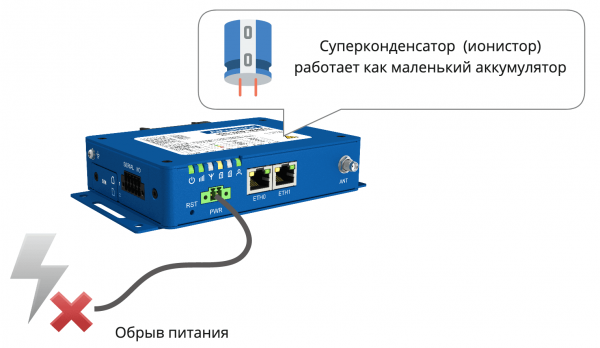
The router will send a power failure signal even after complete power shutdown
To properly respond to a power loss event, it is necessary to somehow obtain this information.
The current supply voltage can be obtained either via a shell command. status sys:
$ status sys
Firmware Version : 6.1.10 (2019-07-02)
Serial Number    : ACZ1100000623519
Profile          : Standard
RTC Battery      : Ok
Supply Voltage   : 12.3 V # ← supply voltage
Temperature      : 37 C   # ← internal temperature
Time             : 2019-08-16 16:21:18
Uptime           : 0 days, 11 hours, 43 minutes
Or using hardware Unix I/O control (ioctl) and a program in C/C++ or another language.
The table shows the addresses of the required hardware registers. The current supply voltage is returned as an integer in millivolts. Using a low-level API is preferable to shell scripts in this case for faster response. Detailed information on working with hardware can be found in
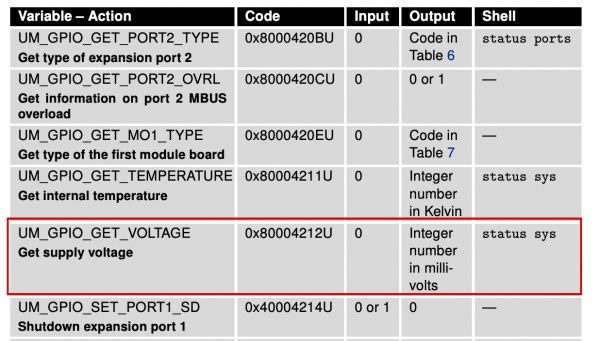
Ioctl request that returns the current supply voltage.
Serial Interfaces
The router has two built-in serial interfaces: RS-232 and RS-485. They allow peripheral devices to be connected directly to the router without additional wiring. A full Node-RED or Node.js server can run on the router, making it possible to use one device to deploy a simple automation system without additional computers or controllers.
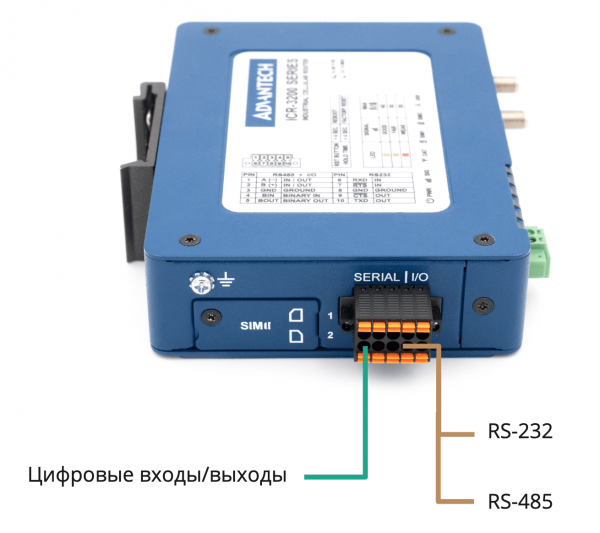
By default, both interfaces are accessible as standard serial devices in Linux:
ls -la /dev/ttyS*
crw-------    1 root     root      251,   0 Jan  1  1970 /dev/ttyS0 # ← rs-232 port
crw-------    1 root     root      251,   1 Jan  1  1970 /dev/ttyS1 # ← rs-485 port
crw-------    1 root     root      251,   5 Jan  1  1970 /dev/ttyS5 # ← not wired
All standard libraries will support these devices without additional settings, including the module and others.
Custom Modules
The device's functionality can be extended with custom modules: this is a simplified version of packages, only without a package manager. A complete list of available modules can be found on the website. .
Modules are installed manually by uploading the package file through the web interface:
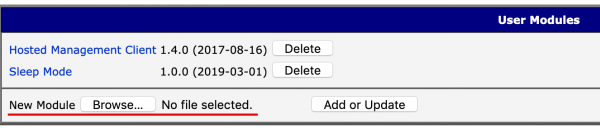
Currently, 73 modules are available. Here are some interesting ones:
- — a popular tool for integrating various industrial protocols into a cohesive system.
- — a full-fledged nodejs server. A large amount of RAM and a powerful processor allows you to run resource-intensive applications directly on the router!
- — allows working in the console through the browser.
- — a toolkit for developing applications for Microsoft Azure IoT Hub.
Since the router firmware is open, developers can write their own modules, including those with a web interface. Reference materials are available in and on the company's website. For convenience in package assembly, a ready-made .
Hardware resources through shell scripts
For simple automation tasks, it's convenient to use shell scripts, through which you can control light indicators and read/set the state of digital pins.
Light indicators can conveniently show the current state of executing commands. For example, data transmission indication — frequent blinking, connection attempt — rare blinking, idle — continuously on. Let's consider the command led. It takes only one argument — the type of LED blinking.
# led
led on|off|fast|slow
Here's how it looks in real life:
Demonstration of the user indicator operating modes through shell commands
To work with digital pins, the command is used io.
$ io
Usage: io [get ] | [set  ]

io set out0 1 # Set digital output OUT0 to state 1 (LOW)
io get bin0   #  Get value of digital input BIN0
It's important to remember that the logic in this case is inverted. Therefore, 1=LOW, 0=HIGH. Using the command io we can easily work with digital pins from bash scripts and build simple logic for automation and control.
As a demonstration of the simplicity of working with digital inputs and indications, let's write a pointless script that shows the status of a digital input using an LED.
#!/bin/bash
while true
do
	[ $(io get bin0) -eq 0 ] && led fast || led on
done
The principle of the script is simple: if BIN0 is in state 0, the diode blinks frequently; otherwise, it stays continuously on. Here's how it looks live:
Demonstration of a bash script showing the status of a digital input with an indicator.
Despite the simplicity of this script, it clearly demonstrates how to receive input from digital inputs and respond to them in a single line, without additional software, libraries, or configurations.
Links
- This article does not cover network functions of routers, such as load balancing, failover, VPN, and others, as all these topics have already been discussed in another article of ours: .
- An example of router application can be found in our first article: .
- You can check product prices in the general . A dedicated Russian site is still under development.
We invite you to the Advantech partner forum

The Advantech forum will be a unique platform for discussing local and global trends in the Internet of Things. Here you can share experiences in utilizing new technological solutions and products, and find new clients and partners. You will have the chance to see products we described in articles and more. Industry leaders and representatives of key partners – NVidia, Intel, and other companies actively participating in the development of industrial IoT over the coming years – will speak at our event. We look forward to seeing all specialists in industrial automation and the Internet of Things at this event. Participation is free! Seats are limited. .
Source: habr.com
