

Not long ago, we launched Kubernetes 1.9 on AWS using Kops. Yesterday, during a smooth rollout of new traffic on our largest Kubernetes clusters, I began noticing unusual DNS resolution errors logged by our application.
This has been discussed on GitHub for quite a while, . The most interesting and new aspect for me was the reason behind the significant increase in DNS query traffic. This, along with what to do about it, is the topic of my post. Modifying podNetwork and dnsmasqDNS resolution within a container—just like in any Linux system—is determined by the configuration file
. By default, Kubernetes uses /etc/resolv.confClusterFirst dnsPolicy this , which means that any DNS query will be redirected to, running in a pod dnsmasqinside the cluster, which in turn redirects the request to the application Modifying podNetwork , if the name ends with the cluster suffix; otherwise, it goes to a higher-level DNS server. Modifying podNetworkInside each container, the default configuration looks like this:
File /etc/resolv.conf nameserver 100.64.0.10 search namespace.svc.cluster.local svc.cluster.local cluster.local eu-west-1.compute.internal options ndots:5
As you can see, there are three directives:The nameserver is the IP of the service.
- Four local search domains are specified.
Modifying podNetwork - There's an option
: defines the search path for a specific domain. Interestingly, - ndots:5
An interesting part of this configuration is how local search domains and settings
coexist. To understand this, you need to grasp how DNS resolution works for incomplete names. An interesting part of this configuration is how local search domains and settings What is a fully qualified name?
A fully qualified name is one for which local search will not be performed, and the name will be regarded as absolute during name resolution. By convention, DNS software considers a name fully qualified if it ends with a dot (.), and not fully qualified otherwise. That is,
is fully qualified, while google.com. is not. mrkaran.dev How is an incomplete name handled?
When an application connects to a remote host indicated by a name, DNS name resolution is typically performed using a system call, such as
getaddrinfo() . However, if the name is incomplete (does not end with a .), it is interesting to see whether the system call attempts to resolve the name as absolute first or goes through local search domains first. This depends on the optionFrom the manual on ndots.
From the manual on contains the following information::
ndots:n

sets the threshold for the number of dots that must appear in a name before an initial absolute query is made. The default value for n is 1, meaning that if there are any dots in the name, the name will first be attempted as an absolute name before any search list elements are added.
This means that if ndots a value of 5 is set and the name contains fewer than 5 dots, the system call will try to resolve it sequentially, first going through all local search domains, and upon failure, eventually resolve it as an absolute name.
So why An interesting part of this configuration is how local search domains and settings can it negatively impact application performance?
As you understand, if your application uses a lot of external traffic, for each established TCP connection (or rather, for each resolved name), it will issue 5 DNS queries before the name is correctly resolved, because it will first go through 4 local search domains and ultimately issue a resolution query for the absolute name.
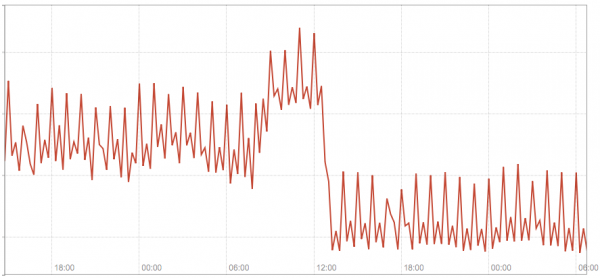
The following diagram shows the total traffic across our 3 kube-dns modules before and after we switched several hostnames configured in our application to fully qualified ones.
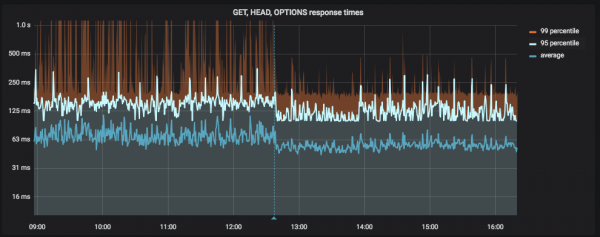
The following diagram shows the application latency before and after we switched several hostnames configured in our application to fully qualified ones (the vertical blue line indicates deployment):
Solution #1 — use fully qualified names
If you have few static external names (i.e., defined in the application configuration) to which you create a large number of connections, perhaps the simplest solution is to switch them to fully qualified by simply adding.
This is not a final solution, but it helps quickly, albeit not elegantly, improve the situation. This patch we applied to resolve our issue, the results of which were shown in the screenshots above.
Solution #2 — customization ndots downward API support (simultaneously with this in dnsConfig
In Kubernetes 1.9, an alpha feature (beta version v1.10) appeared that allows better control over DNS parameters via pod properties in dnsConfig. Among other things, it allows you to configure the value ndots for a specific pod, i.e.
apiVersion: v1
kind: Pod
metadata:
  namespace: default
  name: dns-example
spec:
  containers:
    - name: test
      image: nginx
  dnsConfig:
    options:
      - name: ndots
        value: "1"
file — continuous reading of events from one or more local files;
Also, read other articles in our blog:
Source: habr.com
