

This trivial task came up on one of those Friday days and was supposed to take 2-3 minutes of time. As usual, it took longer.
A colleague asked me to fix a script on his server. I did it, handed it over, and accidentally remarked, 'Time is running 5 minutes fast.' It's his server, let him deal with the synchronization. Half an hour, an hour passed, and he's still puffing and quietly cursing.
'What a fool! — I thought, switching to the console. server — Well, I'll take a couple more minutes.'
Let's check, ntp, rdate, sdwdate not installed, timesyncd is disabled and not running.
# timedatectl
      Local time: Sun 2019-08-25 20:44:39 +03
  Universal time: Sun 2019-08-25 17:44:39 UTC
        RTC time: Sun 2019-08-25 17:39:52
       Time zone: Europe/Minsk (+03, +0300)
     NTP enabled: no
NTP synchronized: no
 RTC in local TZ: no
      DST active: n/a
Here I should note that the hardware time is correct: it will be easier to navigate from there.
And from there began a series of errors.
The first mistake. Overconfidence
Click-click…
# systemctl enable systemd-timesyncd.service && systemctl start systemd-timesyncd.service && ntpdate 0.ru.pool.ntp.org && timedatectl set-ntp on && timedatectl
25 Aug 21:00:10 ntpdate[28114]: adjust time server 195.210.189.106 offset -249.015251 sec
      Local time: Sun 2019-08-25 21:00:10 +03
  Universal time: Sun 2019-08-25 18:00:10 UTC
        RTC time: Sun 2019-08-25 18:00:10
       Time zone: Europe/Minsk (+03, +0300)
     NTP enabled: yes
NTP synchronized: yes
 RTC in local TZ: no
      DST active: n/a
Everything is great, the time is synchronized, the system matches the hardware. 'Take it,' I said and returned to my business.
'What take? — My colleague exclaimed. — The time is the same!'
The more standardized tasks you solve, the more narrow-minded you become, not thinking that the hundredth or thousandth situation will be different, but not this time.
# timedatectl
      Local time: Sun 2019-08-25 21:09:15 +03
  Universal time: Sun 2019-08-25 18:09:15 UTC
        RTC time: Sun 2019-08-25 18:05:04
       Time zone: Europe/Minsk (+03, +0300)
     NTP enabled: yes
NTP synchronized: no
 RTC in local TZ: no
      DST active: n/a
The system time is incorrect again.
Let's try again:
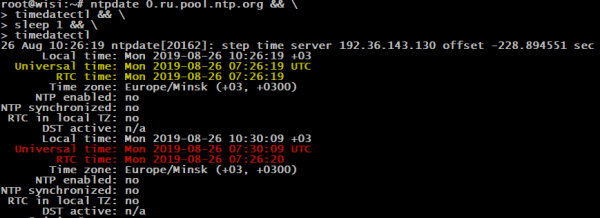
# ntpdate 0.ru.pool.ntp.org && timedatectl && sleep 1 && timedatectl
25 Aug 21:07:37 ntpdate[30350]: step time server 89.175.20.7 offset -249.220828 sec
      Local time: Sun 2019-08-25 21:07:37 +03
  Universal time: Sun 2019-08-25 18:07:37 UTC
        RTC time: Sun 2019-08-25 18:07:37
       Time zone: Europe/Minsk (+03, +0300)
     NTP enabled: yes
NTP synchronized: yes
 RTC in local TZ: no
      DST active: n/a
      Local time: Sun 2019-08-25 21:11:46 +03
  Universal time: Sun 2019-08-25 18:11:46 UTC
        RTC time: Sun 2019-08-25 18:07:37
       Time zone: Europe/Minsk (+03, +0300)
     NTP enabled: yes
NTP synchronized: no
 RTC in local TZ: no
      DST active: n/a
Let's do it differently:
# date -s "2019-08-25 21:10:30" && date && sleep 1 && timedatectl
Sun Aug 25 21:10:30 +03 2019
Sun Aug 25 21:10:30 +03 2019
      Local time: Sun 2019-08-25 21:14:36 +03
  Universal time: Sun 2019-08-25 18:14:36 UTC
        RTC time: Sun 2019-08-25 18:10:30
       Time zone: Europe/Minsk (+03, +0300)
     NTP enabled: yes
NTP synchronized: no
 RTC in local TZ: no
      DST active: n/a
And like this:
# hwclock --hctosys && timedatectl && sleep 1 && timedatectl
      Local time: Sun 2019-08-25 21:11:31 +03
  Universal time: Sun 2019-08-25 18:11:31 UTC
        RTC time: Sun 2019-08-25 18:11:31
       Time zone: Europe/Minsk (+03, +0300)
     NTP enabled: yes
NTP synchronized: yes
 RTC in local TZ: no
      DST active: n/a
      Local time: Sun 2019-08-25 21:15:36 +03
  Universal time: Sun 2019-08-25 18:15:36 UTC
        RTC time: Sun 2019-08-25 18:11:32
       Time zone: Europe/Minsk (+03, +0300)
     NTP enabled: yes
NTP synchronized: no
 RTC in local TZ: no
      DST active: n/a
The time is set for a fraction of a second, and then it starts to 'run fast' again.
Meanwhile, in the logs, at the time of this manual change, we see only system reports indicating that the time has changed, accordingly in the correct/incorrect directions and occasionally Resyncing from systemd-timesyncd.
Aug 25 21:18:51 wisi systemd[1]: Time has been changed
Aug 25 21:18:51 wisi systemd-timesyncd[29258]: System time changed. Resyncing.
Aug 25 21:18:51 wisi systemd[1187]: Time has been changed
Aug 25 21:18:51 wisi systemd[1]: Time has been changed
Aug 25 21:18:51 wisi systemd[1187]: Time has been changed
here
# ps afx | grep "[1]187"
 1187 ?        Ss     0:02 /lib/systemd/systemd --user
At this point, I should have looked for the cause, but after 18 years of administration, my brain had built a 'time' error statistic and habitually blamed synchronization again.
I disabled it completely.
# timedatectl set-ntp off && systemctl stop systemd-timesyncd.service
# hwclock --hctosys && timedatectl && sleep 1 && timedatectl
      Local time: Sun 2019-08-25 21:25:40 +03
  Universal time: Sun 2019-08-25 18:25:40 UTC
        RTC time: Sun 2019-08-25 18:25:40
       Time zone: Europe/Minsk (+03, +0300)
     NTP enabled: no
NTP synchronized: no
 RTC in local TZ: no
      DST active: n/a
      Local time: Sun 2019-08-25 21:29:31 +03
  Universal time: Sun 2019-08-25 18:29:31 UTC
        RTC time: Sun 2019-08-25 18:25:41
       Time zone: Europe/Minsk (+03, +0300)
     NTP enabled: no
NTP synchronized: no
 RTC in local TZ: no
      DST active: n/a
and in the logs
Aug 25 21:25:40 wisi systemd[1]: Time has been changed
Aug 25 21:25:40 wisi systemd[1187]: Time has been changed
Aug 25 21:29:30 wisi systemd[1]: Time has been changed
Aug 25 21:29:30 wisi systemd[1187]: Time has been changed
Resyncing it disappeared, and the rest of the logs are pristine.
Checking outputs tcpdump on port 123 on all interfaces. No requests are present, yet the time is still 'running away.'
The second mistake. Haste
There's one hour left until the end of the workweek, and I don't want to leave for the weekend with an unresolved trivial task (don't pay attention to the time in the code, the article was written in the following days).
And once again, instead of looking for the reason, I started trying to come up with an explanation for the result. I say "come up with" because no matter how logical the explanations for the result may be, it's a flawed approach to solving the problem.
This server is a streaming server that converts the DVB-S2 stream to IP. The DVB-S stream contains time stamps, which are often used by receivers, multiplexers, scramblers, and televisions for synchronizing system clocks. The DVB-S drivers are compiled into the kernel, so the fastest way to guarantee the removal of the DVB-S2 stream is to disconnect the cables coming from the "dishes." Fortunately, the server is behind the wall, so that’s how it should be.
Of course, if the logs contained what they should, this would not have happened, but about that, again, at the end of the article.
And since we have already removed all satellite signals, let's also remove the terrestrial ones — while we're at it, let's unplug all the network cables. The server becomes cut off from the outside world and works completely autonomously, but the system clock is still running fast.
The work week is over, and the issue of the date/time is not critical, so I can just go home, but here I make a new blunder.
Error three. The Advisors
Never! Never ask questions on forums and general specialized (like Stack Overflow) websites if the answer requires more than looking at the first page of Google search results and reading one man page.
You will be sent back to Google to read that same man page and will be explained the forum/site rules, but you won’t be given an answer.
Here, there are both objective factors:
- no one but you can understand the problem as well;
- no one can conduct tests under the same conditions as you;
and subjective ones:
- you may not present all the details needed to solve the task because you’ve already thought of a "correct" direction and are focusing the essence of the question on that;
- the senior member (moderator, veteran, admin) is always right; if the senior member is wrong… well, you know…
If in your response comments you managed to stay within the bounds of polite language, it means you have strong nerves.
Solution
Do not categorize tasks as simple and complex.
Let’s stop relying on our experience, statistics, advisors, and instead of "explaining" the final result, let’s systematically look for the cause.
If someone sets the time, then a corresponding system call must occur.
Just as the best documentation for software is the source code, in system administration, the best helper is the audit; in our case, auditd.
A moment of doubtI went through the manuals but wasn't entirely sure that time in Linux can only be set by clock_settime and settimeofday, so for the first test, I chose all 'suitable' calls:
# man syscalls | col | grep -F '(2)' | grep -vE '(:|;)' | grep -E '(time|date|clock)' | sed "s/(2).*//" | xargs -I SYSCALL echo "-S SYSCALL " | xargs echo
-S adjtimex -S clock_adjtime -S clock_getres -S clock_gettime -S clock_nanosleep -S clock_settime -S futimesat -S getitimer -S gettimeofday -S mq_timedreceive -S mq_timedsend -S rt_sigtimedwait -S s390_runtime_instr -S setitimer -S settimeofday -S stime -S time -S timer_create -S timer_delete -S timer_getoverrun -S timer_gettime -S timer_settime -S timerfd_create -S timerfd_gettime -S timerfd_settime -S times -S utime -S utimensat -S utimes
and discarded s390_runtime_instr, stime, timerfd_create, which auditctl did not recognize; I initially ran the audit as follows:
auditctl -a exit,always -S adjtimex -S clock_adjtime -S clock_getres -S clock_nanosleep -S clock_settime -S futimesat -S getitimer -S gettimeofday -S mq_timedreceive -S mq_timedsend -S rt_sigtimedwait -S semtimedop -S setitimer -S settimeofday -S time -S timer_create -S timer_delete -S timer_getoverrun -S timer_gettime -S timer_settime -S timerfd_gettime -S timerfd_settime -S times -S utime -S utimensat -S utimesHaving ensured that there were no other entries in the logs of interest to me, syscalls other than these two, I proceeded to use only them.
Starting the audit of system calls clock_settime and settimeofday and trying to change the date:
# auditctl -a exit,always -S clock_settime -S settimeofday && date -s "2019-08-22 12:10:00" && sleep 5 && auditctl -D
A five-second delay was added to ensure our 'parasite' would definitely adjust the time.
We look at the report:
# aureport -s -i

Syscall Report
=======================================
# date time syscall pid comm auid event
=======================================
Warning - freq is non-zero and incremental flushing not selected.
1. 08/22/2019 12:10:00 settimeofday 3088 chkcache_proces root 479630
2. 08/26/2019 09:37:06 clock_settime 1538 date root 479629
Here we see our date and an unknown to us chkcache_proces. It appeared in the report above because aureport sorted the output by date when converting from binary form, and the event happened at the time we set. date -s '2019-08-22 12:10:00'.
Who spawned it?
# ausearch -sc settimeofday --comm "chkcache_proces"
----
time->Thu Aug 22 12:10:00 2019
type=PROCTITLE msg=audit(1566465000.000:479630): proctitle="/usr/local/bin/oscam"
type=SYSCALL msg=audit(1566465000.000:479630): arch=c000003e syscall=164 success=yes exit=0 a0=7fde0dfc6e60 a1=0 a2=136cf a3=713ba56 items=0 ppid=3081 pid=3088 auid=0 uid=0 gid=0 euid=0 suid=0 fsuid=0 egid=0 sgid=0 fsgid=0 tty=pts20 ses=68149 comm="chkcache_proces" exe="/usr/local/bin/oscam" key=(null)
/usr/local/bin/oscam — our parasite has been found. Despite its 'malicious' behavior, we cannot abandon the conditional access system, but still, I would like to know, oscam, WTF?
The answer was quickly found in :
#if defined(CLOCKFIX)
if (tv.tv_sec > lasttime.tv_sec || (tv.tv_sec == lasttime.tv_sec && tv.tv_usec >= lasttime.tv_usec)) // check for time issues!
{
  lasttime = tv; // register this valid time
}
  else
{
  tv = lasttime;
  settimeofday(&tv, NULL); // set time back to last known valid time
  //fprintf(stderr, "*** WARNING: BAD TIME AFFECTING WHOLE OSCAM ECM HANDLING, SYSTEMTIME SET TO LAST KNOWN VALID TIME **** n");
}
How nice it looks here the commented-out line of the warning…
Source: habr.com
