


In the early days when Kubernetes was still at v1.0.0, there were volume plugins. They were needed for connecting storage systems to Kubernetes for persistent data of containers. The number of these was small, and among the first were storage providers like GCE PD, Ceph, AWS EBS, and others.
The plugins were included with Kubernetes, which is why they were called in-tree. However, many found the existing set of these plugins insufficient. Tinkerers added simple plugins to the Kubernetes core using patches, after which they built their own version of Kubernetes and deployed it on their servers. Over time, Kubernetes developers realized that the problem couldn’t be solved. People needed a fishing rod. Thus, in the release of Kubernetes v1.2.0, it was introduced…
Flexvolume Plugin: A Basic Fishing Rod
The Kubernetes developers created the FlexVolume plugin, which served as a logical wrapping of variables and methods for working with Flexvolume drivers implemented by third-party developers.
Let's pause and take a closer look at what a FlexVolume driver is. It is essentially an executable file (binary file, Python script, Bash script, etc.), which, when executed, takes command-line arguments and returns a message with predefined fields in JSON format. The first command-line argument is conventionally always the method, and the remaining arguments are its parameters.
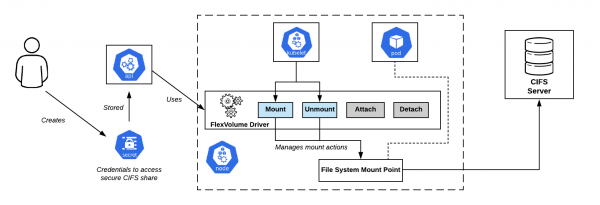
CIFS Shares Connection Schema in OpenShift. The Flexvolume driver is right in the center.
Basic Set of Methods looks like this:
flexvolume_driver mount # responsible for attaching the volume to the pod
# Format of the returned message:
{
  "status": "Success"/"Failure"/"Not supported",
  "message": "The reason for returning this particular status",
}

flexvolume_driver unmount # responsible for detaching the volume from the pod
# Format of the returned message:
{
  "status": "Success"/"Failure"/"Not supported",
  "message": "The reason for returning this particular status",
}

flexvolume_driver init # responsible for initializing the plugin
# Format of the returned message:
{
  "status": "Success"/"Failure"/"Not supported",
  "message": "The reason for returning this particular status",
  // Determines whether the driver uses the attach/detach methods
  "capabilities":{"attach": True/False}
}
Use of Methods attach and detach will determine the scenario that kubelet will follow in the future when invoking the driver. There are also special methods for expandvolume and expandfs, which are responsible for dynamic volume resizing.
As an example of the changes added by the method expandvolume, along with it — and the ability to perform real-time volume resizing, you can refer to in Rook Ceph Operator.
Here is an example of implementing a Flexvolume driver for working with NFS:
usage() {
    err "Invalid usage. Usage: "
    err "t$0 init"
    err "t$0 mount  "
    err "t$0 unmount "
    exit 1
}

err() {
    echo -ne $* 1>&2
}

log() {
    echo -ne $* >&1
}

ismounted() {
    MOUNT=`findmnt -n ${MNTPATH} 2>/dev/null | cut -d' ' -f1`
    if [ "${MOUNT}" == "${MNTPATH}" ]; then
        echo "1"
    else
        echo "0"
    fi
}

domount() {
    MNTPATH=$1

    NFS_SERVER=$(echo $2 | jq -r '.server')
    SHARE=$(echo $2 | jq -r '.share')

    if [ $(ismounted) -eq 1 ] ; then
        log '{"status": "Success"}'
        exit 0
    fi

    mkdir -p ${MNTPATH} >& /dev/null

    mount -t nfs ${NFS_SERVER}:/${SHARE} ${MNTPATH} >& /dev/null
    if [ $? -ne 0 ]; then
        err "{ "status": "Failure", "message": "Failed to mount ${NFS_SERVER}:${SHARE} at ${MNTPATH}"}"
        exit 1
    fi
    log '{"status": "Success"}'
    exit 0
}

unmount() {
    MNTPATH=$1
    if [ $(ismounted) -eq 0 ] ; then
        log '{"status": "Success"}'
        exit 0
    fi

    umount ${MNTPATH} >& /dev/null
    if [ $? -ne 0 ]; then
        err "{ "status": "Failed", "message": "Failed to unmount volume at ${MNTPATH}"}"
        exit 1
    fi

    log '{"status": "Success"}'
    exit 0
}

op=$1

if [ "$op" = "init" ]; then
    log '{"status": "Success", "capabilities": {"attach": false}}'
    exit 0
fi

if [ $# -lt 2 ]; then
    usage
fi

shift

case "$op" in
    mount)
        domount $*
        ;;
    unmount)
        unmount $*
        ;;
    *)
        log '{"status": "Not supported"}'
        exit 0
esac

exit 1
So, after preparing the executable file, it is necessary to deploy the driver in the Kubernetes cluster. The driver should be located on each node of the cluster according to the previously agreed path. By default, the following was chosen:
/usr/libexec/kubernetes/kubelet-plugins/volume/exec/имя_поставщика_хранилища~имя_драйвера/
… but when using different Kubernetes distributions (OpenShift, Rancher…), the path may be different.
Flexvolume Issues: How to Properly Set the Hook?
Deploying the Flexvolume driver to the cluster nodes turned out to be a non-trivial task. After performing the operation manually once, it's easy to encounter a situation where new nodes appear in the cluster: due to the addition of a new node, automatic horizontal scaling, or — what is worse — replacing a node due to failure. In this case, working with storage on those nodes is performed is not possible, until you manually add the Flexvolume driver to them as well.
The solution to this problem was one of the primitives of Kubernetes — DaemonSetWhen a new node appears in the cluster, a pod from our DaemonSet is automatically placed on it, attaching a local volume via the path to locate the Flexvolume drivers. Upon successfully creating the pod, it copies the necessary driver files to the disk.
Here is an example of such a DaemonSet for deploying the Flexvolume plugin:
apiVersion: extensions/v1beta1
kind: DaemonSet
metadata:
  name: flex-set
spec:
  template:
    metadata:
      name: flex-deploy
      labels:
        app: flex-deploy
    spec:
      containers:
        - image:
          name: flex-deploy
          securityContext:
              privileged: true
          volumeMounts:
            - mountPath: /flexmnt
              name: flexvolume-mount
      volumes:
        - name: flexvolume-mount
          hostPath:
            path:
… and an example of a Bash script for deploying the Flexvolume driver:
#!/bin/sh

set -o errexit
set -o pipefail

VENDOR=k8s.io
DRIVER=nfs

driver_dir=$VENDOR${VENDOR:+"~"}${DRIVER}
if [ ! -d "/flexmnt/$driver_dir" ]; then
  mkdir "/flexmnt/$driver_dir"
fi

cp "/$DRIVER" "/flexmnt/$driver_dir/.$DRIVER"
mv -f "/flexmnt/$driver_dir/.$DRIVER" "/flexmnt/$driver_dir/$DRIVER"

while : ; do
  sleep 3600
done
It is important to remember that the copy operation is not atomic. There is a high probability that kubelet will start using the driver before the preparation process is completed, which will cause an error in the system's operation. The correct approach would be to first copy the driver files under a different name, and then use an atomic rename operation.
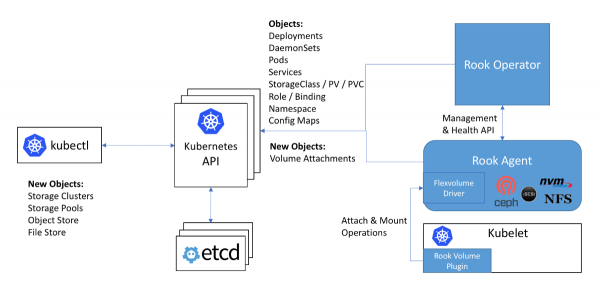
The workflow with Ceph in the Rook operator: the Flexvolume driver is shown in the diagram inside the Rook agent
The next issue with using Flexvolume drivers is that for most storage solutions on the cluster node the necessary software must be installed (for example, the ceph-common package for Ceph). Initially, the Flexvolume plugin was not designed to implement such complex systems.
The original solution for this problem can be seen in the implementation of the Flexvolume driver of the Rook operator:
The driver itself is implemented as an RPC client. The IPC socket for communication is located in the same directory as the driver. As we remember, it is good to use a DaemonSet to copy the driver files that connects a directory with the driver as a volume. After copying the necessary driver files, this pod does not terminate but connects to the IPC socket through the attached volume as a full-fledged RPC server. The ceph-common package is already installed within the pod's container. The IPC socket ensures that kubelet communicates precisely with the pod that is on the same node. Everything genius is simple!...
Goodbye, our beloved… in-tree plugins!
Kubernetes developers discovered that the number of storage plugins within the core amounts to twenty. Each of these undergoes a full release cycle of Kubernetes, one way or another.
It turns out that to use the new version of the storage plugin, you need to update the entire cluster. Additionally, you might be surprised that the new version of Kubernetes suddenly becomes incompatible with the Linux kernel you are using… Consequently, you wipe your tears and, gritting your teeth, coordinate with management and users the timing for updating the Linux kernel and the Kubernetes cluster, potentially causing downtime in service provision.
The situation is more than humorous, isn't it? The entire community has realized that this approach doesn't work. With a decisive action, Kubernetes developers announce that new storage plugins will no longer be accepted into the core. Moreover, as we already know, there were several deficiencies identified in the implementation by the Flexvolume plugin...
The last added plugin for persistent data storage — CSI — was supposed to resolve the issue once and for all. Its alpha version, more fully known as Out-of-Tree CSI Volume Plugins, was announced in the release of .
Container Storage Interface, or spinning up CSI 3000!
First of all, it is important to note that CSI is not just a volume plugin, but a genuine for creating custom components for working with data storage.It was expected that orchestration systems like Kubernetes and Mesos would need to 'learn' how to work with components implemented according to this standard. And Kubernetes has already learned.
What does the CSI plugin architecture look like in Kubernetes? The CSI plugin works with special drivers (CSI drivers), written by third-party developers. A CSI driver in Kubernetes must consist of at least two components (pods):
- Controller — manages external persistent storage. It is released as a gRPC server, using the primitive
StatefulSet. - Node — responsible for mounting persistent storage to the cluster nodes. It is also implemented as a gRPC server, but it uses the primitive
DaemonSet.
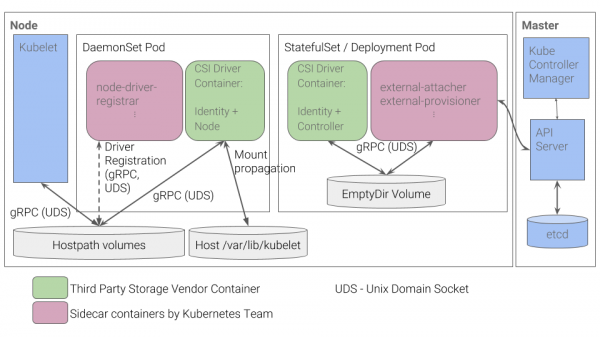
The architecture of the CSI plugin in Kubernetes
You can learn about some other details of CSI operation, for example, from the article '», we published a year ago.
The advantages of this implementation
- For basic tasks — such as registering a driver for a node — Kubernetes developers have implemented a set of containers. There is no longer a need to manually generate a JSON response with capabilities, as was done for the Flexvolume plugin.
- Instead of 'injecting' executable files into nodes, we now deploy pods in the cluster. This is what we initially expect from Kubernetes: all processes occur within containers deployed using Kubernetes primitives.
- To implement complex drivers, there is no longer a need to develop an RPC server and RPC client. The Kubernetes developers have already provided the client for us.
- Passing arguments for operations over the gRPC protocol is much more convenient, flexible, and reliable than passing them through command-line arguments. To understand how to add metric support for volume usage in CSI by adding a standardized gRPC method, you can refer to for the vsphere-csi driver.
- Communication occurs via IPC sockets, so there is no confusion about which pod the kubelet sent the request to.
Does this list remind you of anything? The advantages of CSI are the very solutions to the problemsthat were not considered during the development of the Flexvolume plugin.
Conclusions
CSI as a standard for implementing custom plugins to interact with data storage has been warmly received by the community. Moreover, due to its advantages and versatility, CSI drivers are even being created for storage solutions like Ceph or AWS EBS, plugins for which were added back in the very first version of Kubernetes.
In early 2019, in-tree plugins . Support for the Flexvolume plugin is planned to continue, but no new features will be developed for it.
We already have experience using ceph-csi, vsphere-csi and are ready to expand this list! So far, CSI is handling its tasks excellently, and we shall see how it progresses.
Remember, everything new is just well-reinterpreted old!
P.S.
Also read in our blog:
- «»;
- «»;
- «».
Source: habr.com
