


At Mail.ru Group, we have Tarantool — an application server in Lua that also acts as a database (or vice versa?). It's fast and great, but the capabilities of a single server are still limited. Vertical scaling is not a panacea either, so Tarantool has tools for horizontal scaling — the vshard module. . It allows you to shard data across multiple servers, but you'll need to put in some effort to set it up and integrate the business logic.
Good news: we’ve learned from our mistakes (for example, , ) and developed another framework that significantly simplifies addressing this issue.
— is a new framework for developing complex distributed systems. It allows you to focus on writing business logic instead of solving infrastructure problems. Below, I'll explain how this framework works and how to use it to write distributed services.
So, what’s the problem?
We have Tarantool, we have vshard — what else could we want?
Firstly, it's about convenience. The vshard configuration is set up through Lua tables. For a distributed system made of multiple Tarantool processes to work correctly, the configuration must be uniform everywhere. No one wants to handle this manually. This is where various scripts, Ansible, and deployment systems come into play.
Cartridge manages the vshard configuration itself, basing it on its own distributed configuration. Essentially, this is a simple YAML file, a copy of which is stored in each Tarantool instance. The simplification lies in the fact that the framework takes care of its configuration and ensures consistency across all instances.
Secondly, it’s again about convenience. The vshard configuration has nothing to do with developing business logic and merely distracts developers from their work. When we discuss the architecture of a project, we often talk about individual components and their interactions. It's too early to think about rolling out a cluster across three data centers.
We faced these problems repeatedly, and at some point, we developed an approach that simplifies working with the application throughout its entire lifecycle: creation, development, testing, CI/CD, and maintenance.
The Cartridge introduces the concept of roles for each Tarantool process. Roles are the concept that allows developers to focus on writing code. All roles present in the project can run on a single Tarantool instance, which is sufficient for testing.
Key features of Tarantool Cartridge:
- automated cluster orchestration;
- extension of application functionality using new roles;
- application template for development and deployment;
- built-in automatic sharding;
- integration with the Luatest testing framework;
- cluster management via WebUI and API;
- packaging and deployment tools.
Hello, World!
I can't wait to show the framework itself, so let's leave the discussion about the architecture for later and start with something simple. If we assume that Tarantool is already installed, then we just need to execute
$ tarantoolctl rocks install cartridge-cli
$ export PATH=$PWD/.rocks/bin/:$PATH
These two commands will install the command-line utilities and allow you to create your first application from the template:
$ cartridge create --name myappAnd here’s what we’ll get:
myapp/
├── .git/
├── .gitignore
├── app/roles/custom.lua
├── deps.sh
├── init.lua
├── myapp-scm-1.rockspec
├── test
│   ├── helper
│   │   ├── integration.lua
│   │   └── unit.lua
│   ├── helper.lua
│   ├── integration/api_test.lua
│   └── unit/sample_test.lua
└── tmp/
This is a git repository with a ready-made 'Hello, World!' application. Let's try to run it right away, first installing dependencies (including the framework itself):
$ tarantoolctl rocks make
$ ./init.lua --http-port 8080
So, we have one node of the future sharded application running. The curious user can immediately open the web interface, configure the cluster using the mouse from one node, and enjoy the result, but it's too early to celebrate. For now, the application cannot do anything useful, so I'll talk about deployment later, and now it's time to write code.
Application Development
Imagine we are designing a project that needs to receive data, store it, and generate a report once a day.

We start drawing a diagram and place three components on it: gateway, storage, and scheduler. We further develop the architecture. Since we are using vshard as storage, we add vshard-router and vshard-storage to the diagram. Neither the gateway nor the scheduler will access the storage directly; that's what the router is for.
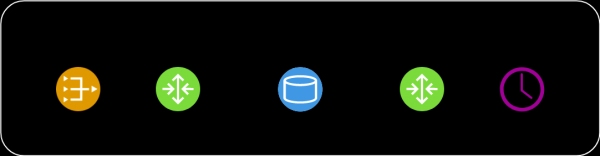
This scheme still doesn’t accurately reflect what we will be creating in the project, as the components appear abstract. We need to consider how this will project onto the actual Tarantool — let's group our components by processes.
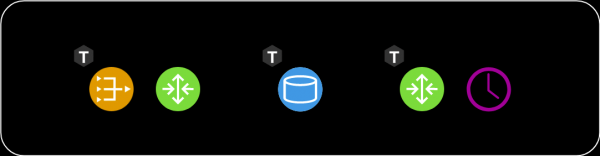
It makes little sense to keep the vshard-router and gateway on separate instances. Why should we make additional network calls when it’s already part of the router's responsibilities? They should be launched within the same process. That is, both the gateway and vshard.router.cfg should be initialized within one process, allowing them to interact locally.
At the design stage, working with three components was convenient, but as a developer, I don't want to think about running three instances of Tarantool while I'm writing code. I need to run tests and check that I've implemented the gateway correctly. Or, perhaps I want to demonstrate a feature to my colleagues. Why should I struggle with deploying three instances? This is how the concept of roles was born. A role is a regular Lua module, with its lifecycle managed by Cartridge. In this example, there are four roles — gateway, router, storage, and scheduler. In another project, there might be more. All roles can run in a single process, and that's sufficient.

When it comes to deployment in staging or production, we will assign each Tarantool process its own set of roles based on hardware capabilities.
Topology Management
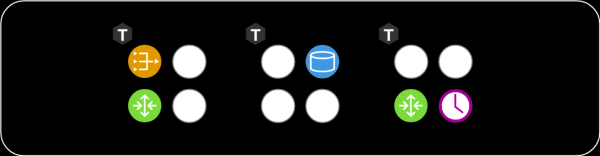
We need to store information about where different roles are running somewhere. And that 'somewhere' is a distributed configuration, which I mentioned above. The most important aspect of it is the cluster topology. Here you can see three replication groups consisting of five Tarantool processes.

We do not want to lose data, so we treat the information about running processes carefully. Cartridge monitors the configuration using a two-phase commit. When we want to update the configuration, it first checks the availability of all instances and their readiness to accept the new configuration. In the second phase, the config is applied. Thus, even if one instance is temporarily unavailable, nothing bad will happen. The configuration simply won't be applied, and you will see an error in advance.
The topology section also specifies an important parameter: the leader of each replication group. Typically, this is the instance where writes occur. The others are often read-only, although exceptions can exist. Sometimes, daring developers are not afraid of conflicts and can write data to several replicas simultaneously, but there are some operations that absolutely should not be performed more than once. This is where the leader attribute comes in.

Role Management
For an abstract role to exist in such an architecture, the framework must manage them in some way. Naturally, management occurs without restarting the Tarantool process. There are 4 callbacks for managing roles. Cartridge will invoke them based on what is defined in the distributed configuration, thereby applying the configuration to specific roles.
function init()
function validate_config()
function apply_config()
function stop()
Each role has a function init. It is called once either when the role is enabled or when Tarantool is restarted. It is convenient to initialize box.space.create there, or the scheduler can launch a background fiber that performs work at certain time intervals.
One function init may not be enough. Cartridge allows roles to make use of the distributed configuration that it uses for topology storage. We can declare a new section in this same configuration and store a fragment of the business configuration there. In my example, this could be a data schema or scheduling settings for the scheduler role.
The cluster invokes validate_config and apply_config whenever there is a change in the distributed configuration. When the configuration is applied via a two-phase commit, the cluster checks that each role is ready to accept this new configuration, and if necessary, informs the user of an error. Once all have agreed that the configuration is valid, the apply_config.
Additionally, roles have a method stop, which is needed to clean up the results of the role's activities. If we say that the scheduler on this server is no longer needed, it can stop the fibers it has started. init.
Roles can interact with each other. We are used to writing function calls in Lua, but it may happen that there is no role we need in this process. To simplify network calls, we use the rpc (remote procedure call) helper module, which is based on the standard netbox built into Tarantool. This can be useful if, for instance, your gateway wants to directly ask the scheduler to perform a task right now instead of waiting a day.
Another important point is ensuring fault tolerance. For health monitoring, the Cartridge uses the SWIM protocol. . To put it briefly, processes exchange 'gossip' with each other over UDP—each process tells its neighbors the latest news, and they respond. If a response doesn't arrive, Tarantool begins to suspect something is amiss, and after a while, it declares death and starts informing all surrounding processes of this news.

Based on this protocol, Cartridge organizes automatic failure handling. Each process monitors its surroundings, and if the leader suddenly stops responding, a replica can take over its role, and Cartridge configures the running roles accordingly.

Here, one must be careful because frequent toggling back and forth can lead to data conflicts during replication. Enabling automatic failover randomly is certainly not advisable. One must clearly understand what is happening and be confident that replication will not break after the leader recovers and is returned its crown.
From all that has been said, it may seem that roles are similar to microservices. In a sense, they are, but as modules within Tarantool processes. However, there are several fundamental differences. Firstly, all project roles must live in the same codebase. All Tarantool processes must be executed from a single codebase to avoid surprises, such as when we try to initialize the scheduler, and it simply does not exist. Also, differences in code versions should be avoided, as the system's behavior in such cases is very difficult to predict and debug.
Unlike Docker, we can't simply take a 'role' image, transfer it to another machine, and run it there. Our roles aren't as isolated as Docker containers. Additionally, we can't run two identical roles on the same instance. A role either exists or it doesn't; in a sense, it's a singleton. Furthermore, within the entire replication group, the roles must be identical, as it would be absurd to have the same data but different configurations.
Deployment Tools
I promised to show how Cartridge helps deploy applications. To simplify things for everyone, the framework packages RPM packages:
$ cartridge pack rpm myapp -- will package for us .\/myapp-0.1.0-1.rpm
$ sudo yum install .\/myapp-0.1.0-1.rpm
The installed package contains almost everything needed: both the application and the installed Lua dependencies. Tarantool will also come to the server as an RPM package dependency, and our service will be ready to launch. This is done via systemd, but first, we need to write a bit of configuration. At a minimum, we need to specify the URI of each process. Three will be enough for example.
$ sudo tee \/etc\/tarantool\/conf.d\/demo.yml <<CONFIG
myapp.router: {"advertise_uri": "localhost:3301", "http_port": 8080}
myapp.storage_A: {"advertise_uri": "localhost:3302", "http_enabled": False}
myapp.storage_B: {"advertise_uri": "localhost:3303", "http_enabled": False}
CONFIG
Here, there's an interesting nuance. Instead of just specifying the binary protocol port, we provide the full public address of the process, including the hostname. This is necessary for the cluster nodes to know how to connect with each other. It's a bad idea to use the address 0.0.0.0 as the advertise_uri; it should be an external IP address, not a bind socket. Without this, nothing will work, so Cartridge simply won't allow a node to start with an incorrect advertise_uri.
Now that the configuration is ready, we can start the processes. Since a regular systemd unit doesn't allow starting more than one process, applications on Cartridge use so-called instantiated units, which work as follows:
$ sudo systemctl start myapp@router
$ sudo systemctl start myapp@storage_A
$ sudo systemctl start myapp@storage_B
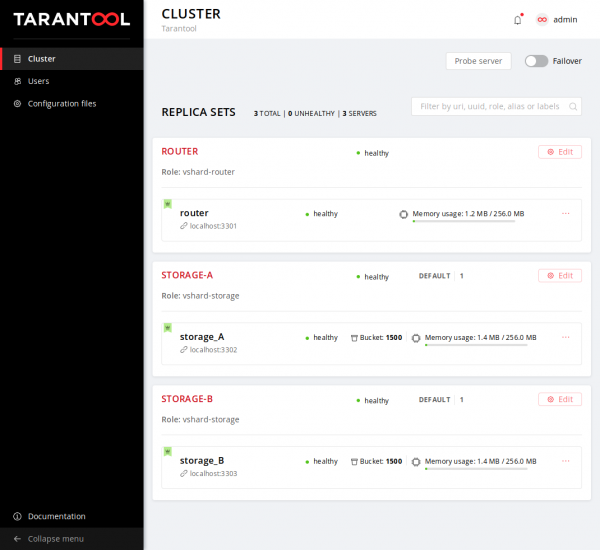
In the configuration, we specified the HTTP port where Cartridge serves the web interface — 8080. Let's visit it and take a look:
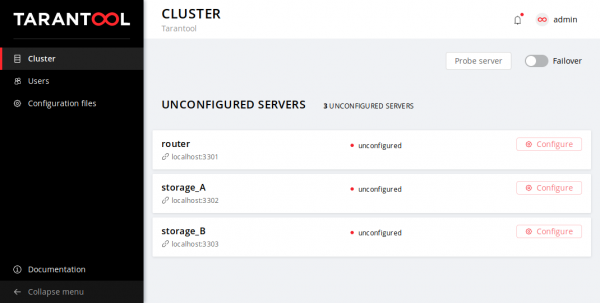
We see that the processes are running, but not yet configured. The cartridge doesn't know which instances should replicate with each other and cannot make decisions on its own, so it waits for our actions. Our options are limited: the life of a new cluster begins with the configuration of the first node. Then we will add the others to the cluster, assign them roles, and at that point, the deployment can be considered successfully completed.
Let's pour ourselves a cup of our favorite drink and relax after a long work week. The application can be deployed.
Summary
What are the results? Try it out, use it, leave feedback, and create tickets on GitHub.
Links
[1]
[2]
[3]
[4]
[5]
[6]
Source: habr.com
