


The topic of monorepositories has been discussed numerous times and typically sparks quite active debates. When creating as an Open Source tool aimed at improving the process of building application code from Git into Docker images (and their subsequent delivery to Kubernetes), we rarely ponder which choice is better. Our primary goal is to provide everything necessary for supporters of different opinions (as long as it doesn't contradict common sense, of course).
The recently introduced support for mono-repo in werf is a good example of this. But first, let's clarify how this support is related to using werf and what Docker Registry has to do with it…
Issues
Imagine this situation. In a company, there are numerous development teams working on independent projects. Most applications operate in Kubernetes, meaning they are containerized. For storing containers and images, a registry is required. The company uses Docker Hub with a single account COMPANY. Similar to most source code management systems, Docker Hub does not allow the creation of a nested hierarchy of repositories, such as COMPANY/PROJECT/IMAGE. In this case… how do you store non-monolithic applications in the registry without creating a separate account for each project?
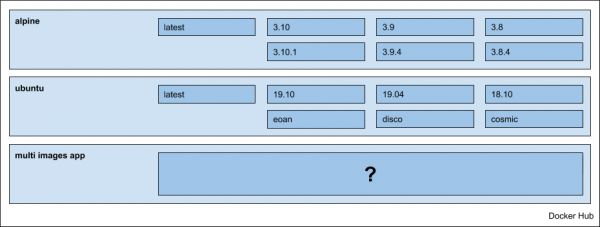
Perhaps the situation described is familiar to some, but let's consider the question of organizing application storage in general, i.e., without tying it to the example and Docker Hub mentioned above.
Solutions
If the application is monolithic, there are no issues, and we simply store the images in the project's container registry.
When the application is represented by several components, microservices, a specific approach is required. Taking the example of a typical web application consisting of two images: frontend and backend — possible options are:
- Store images in separate nested repositories:

- Store everything in one repository, considering the image name in the tag, for example, as follows:

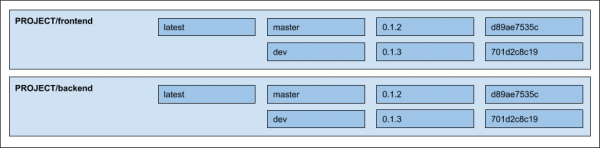
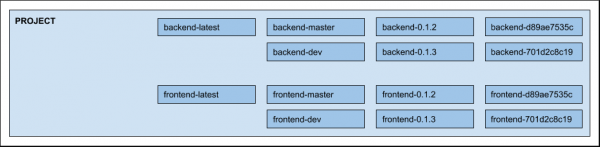
NB: Actually, there is another option for saving in different repositories, PROJECT-frontend and PROJECT-backend, but we will not consider it due to the complexity of support, organization, and distribution of rights among users.
Support in werf
Initially, werf was limited to nested repositories — fortunately, most registries support this feature. Starting from version , support for registries that do not support nesting, including Docker Hub, has been added. From this moment on, users have a choice of how to store application images.
The implementation is available under the option --images-repo-mode=multirepo|monorepo (by default, multirepo, i.e., storage in nested repositories). It defines the patterns by which images are stored in the registry. Simply choose the desired mode when using the main commands, and everything else will remain unchanged.
Since most werf options can be set via environment variables, in CI/CD systems, the storage mode can usually be easily specified globally for the entire project. For example, in the case of GitLab , it is sufficient to add an environment variable in the project settings: Settings -> CI / CD -> Variables: WERF_IMAGES_REPO_MODE: multirepo|monorepo.
When it comes to publishing images and deploying applications (you can read in detail about these processes in the relevant sections of the documentation: and ), the mode merely defines the template for working with the image.
The devil is in the details.
The distinction and primary difficulty in adding a new storage method lies in the process of cleaning the registry (for cleaning capabilities supported in werf, see ).
). When cleaning, werf takes into account the images used in Kubernetes clusters, as well as the policies configured by the user. The policies are based on the categorization of tags into strategies. The currently supported strategies are:
- 3 strategies related to Git primitives such as tag, branch, and commit;
- 1 strategy for arbitrary user-defined tags.
We save information about the tag strategy when publishing the image in the labels of the final image. The value itself — the so-called meta tag — is necessary for applying part of the policies. For example, when deleting a branch or tag from a Git repository, it makes sense to also delete any associated unused images from the registry, which is covered by part of our policies.
When stored in a single repository (monorepo), within the image tag, besides the meta tag, the image name can also be stored: PROJECT:frontend-META-TAG. To separate them, we did not introduce any specific delimiter, but simply added the necessary value to the label of the final image at publication.
NB: If you are interested in seeing everything described in the source code of werf, you can start at .
In this article, we will not focus further on the issues and justification of our approach: regarding tagging strategies, data storage in labels, and the publishing process as a whole—everything about this is detailed in Dmitry Stolyarov's recent report: "».
In summary
The lack of support for registry without nesting was not a blocking factor for us or the known users of werf—since it is always possible to set up a separate image registry (or switch to the hypothetical Container Registry in Google Cloud)… However, removing such a limitation seemed logical in order for the tool to be more convenient for a broader DevOps community. In implementing this, we faced the main challenge of reworking the container registry cleanup mechanism. Now that everything is ready, it’s nice to realize that it has become easier for someone, and we (as the main developers of the project) do not foresee significant difficulties in further supporting this feature.
Stay with us, and soon we will tell you about other innovations in !
P.S.
Also read in our blog:
- «»;
- «».
Source: habr.com
