

Many use specialized tools to create extraction, transformation, and loading procedures for relational databases. The operation of these tools is logged, and errors are recorded.
In case of an error, the log contains information about which tasks the tool failed to execute and which modules (often this is java) where it stopped. In the last lines, you can find the database error, for example, a violation of the unique key of the table.
To address the question of what role error information plays in ETL, I classified all the issues that occurred over the past two years in a sizable warehouse.
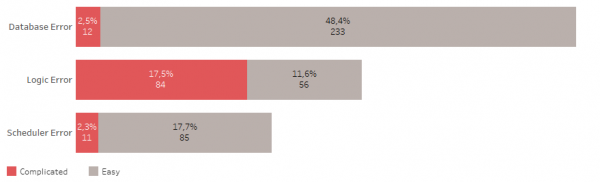
Database errors include issues such as insufficient space, broken connections, session hangs, etc.
Logical errors include violations of table keys, invalid objects, lack of access to objects, etc.
The scheduler may not run on time, may hang, etc.
Simple errors do not require much time to fix. Most of them a good ETL can handle by itself.
Complex errors necessitate opening and checking data processing procedures, investigating data sources. They often lead to the need for testing changes and deployment.
So, half of all problems are related to the database. 48% of all errors are simple errors.
A third of all problems are related to changes in logic or storage model, with more than half of these errors being complex.
And less than a quarter of all problems are related to the task scheduler, of which 18% are simple errors.
Overall, 22% of all occurred errors are complex, their fixing requires the most attention and time. They happen approximately once a week, while simple errors occur almost every day.
It is clear that monitoring of ETL processes will be effective when the log accurately specifies the location of the error and requires minimal time to find the source of the problem.
Effective monitoring
What I would like to see in the ETL monitoring process?
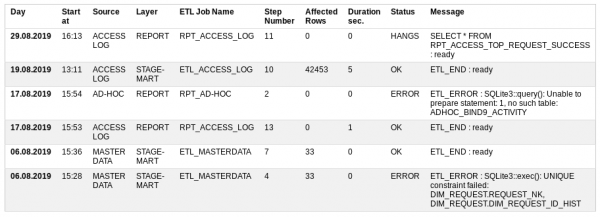
Start at — when the work began,
Source — data source,
Layer — which level of the warehouse is being loaded,
ETL Job Name — a loading procedure consisting of many small steps,
Step Number — the number of the step being executed,
Affected Rows — how much data has already been processed,
Duration sec — how long it takes to execute,
Status — whether everything is alright or not: OK, ERROR, RUNNING, HANGS
Message — the last successful message or error description.
Based on the status of the records, an email can be sent to other participants. If there are no errors, then the email is not necessary.
Thus, in case of an error, the exact location of the incident is indicated.
Sometimes the monitoring tool itself may not work. In such cases, there is an option to directly call the view from the database, based on which the report is generated.
ETL Monitoring Table
To implement ETL process monitoring, only one table and one view are sufficient.
To do this, you can go back to and create a prototype in the sqlite database.
DDL of the table
CREATE TABLE UTL_JOB_STATUS (

/* Table for logging of job execution log. Important that the job has the steps ETL_START and ETL_END or ETL_ERROR */
  UTL_JOB_STATUS_ID INTEGER NOT NULL PRIMARY KEY AUTOINCREMENT,
  SID               INTEGER NOT NULL DEFAULT -1, /* Session Identifier. Unique for every Run of job */
  LOG_DT            INTEGER NOT NULL DEFAULT 0,  /* Date time */
  LOG_D             INTEGER NOT NULL DEFAULT 0,  /* Date */
  JOB_NAME          TEXT NOT NULL DEFAULT 'N/A', /* Job name like JOB_STG2DM_GEO */
  STEP_NAME         TEXT NOT NULL DEFAULT 'N/A', /* ETL_START, ..., ETL_END/ETL_ERROR */
  STEP_DESCR        TEXT,                        /* Description of task or error message */
  UNIQUE (SID, JOB_NAME, STEP_NAME)
);
INSERT INTO UTL_JOB_STATUS (UTL_JOB_STATUS_ID) VALUES (-1);
DDL of the view/report
CREATE VIEW IF NOT EXISTS UTL_JOB_STATUS_V
AS /* Content: Package Execution Log for the last 3 Months. */
WITH SRC AS (
  SELECT LOG_D,
    LOG_DT,
    UTL_JOB_STATUS_ID,
    SID,
	CASE WHEN INSTR(JOB_NAME, 'FTP') THEN 'TRANSFER' /* file transfer */
	     WHEN INSTR(JOB_NAME, 'STG') THEN 'STAGE' /* stage */
	     WHEN INSTR(JOB_NAME, 'CLS') THEN 'CLEANSING' /* cleansing */
	     WHEN INSTR(JOB_NAME, 'DIM') THEN 'DIMENSION' /* dimension */
	     WHEN INSTR(JOB_NAME, 'FCT') THEN 'FACT' /* fact */
		 WHEN INSTR(JOB_NAME, 'ETL') THEN 'STAGE-MART' /* data mart */
	     WHEN INSTR(JOB_NAME, 'RPT') THEN 'REPORT' /* report */
	     ELSE 'N/A' END AS LAYER,
	CASE WHEN INSTR(JOB_NAME, 'ACCESS') THEN 'ACCESS LOG' /* source */
	     WHEN INSTR(JOB_NAME, 'MASTER') THEN 'MASTER DATA' /* source */
	     WHEN INSTR(JOB_NAME, 'AD-HOC') THEN 'AD-HOC' /* source */
	     ELSE 'N/A' END AS SOURCE,
    JOB_NAME,
    STEP_NAME,
    CASE WHEN STEP_NAME='ETL_START' THEN 1 ELSE 0 END AS START_FLAG,
    CASE WHEN STEP_NAME='ETL_END' THEN 1 ELSE 0 END AS END_FLAG,
    CASE WHEN STEP_NAME='ETL_ERROR' THEN 1 ELSE 0 END AS ERROR_FLAG,
    STEP_NAME || ' : ' || STEP_DESCR AS STEP_LOG,
	SUBSTR(SUBSTR(STEP_DESCR, INSTR(STEP_DESCR, '***')+4), 1, INSTR(SUBSTR(STEP_DESCR, INSTR(STEP_DESCR, '***')+4), '***')-2) AS AFFECTED_ROWS
  FROM UTL_JOB_STATUS
  WHERE datetime(LOG_D, 'unixepoch') >= date('now', 'start of month', '-3 month')
)
SELECT JB.SID,
  JB.MIN_LOG_DT AS START_DT,
  strftime('%d.%m.%Y %H:%M', datetime(JB.MIN_LOG_DT, 'unixepoch')) AS LOG_DT,
  JB.SOURCE,
  JB.LAYER,
  JB.JOB_NAME,
  CASE
  WHEN JB.ERROR_FLAG = 1 THEN 'ERROR'
  WHEN JB.ERROR_FLAG = 0 AND JB.END_FLAG = 0 AND strftime('%s','now') - JB.MIN_LOG_DT > 0.5 * 60 * 60 THEN 'HANGS' /* half an hour */
  WHEN JB.ERROR_FLAG = 0 AND JB.END_FLAG = 0 THEN 'RUNNING'
  ELSE 'OK'
  END AS STATUS,
  ERR.STEP_LOG     AS STEP_LOG,
  JB.CNT           AS STEP_CNT,
  JB.AFFECTED_ROWS AS AFFECTED_ROWS,
  strftime('%d.%m.%Y %H:%M', datetime(JB.MIN_LOG_DT, 'unixepoch')) AS JOB_START_DT,
  strftime('%d.%m.%Y %H:%M', datetime(JB.MAX_LOG_DT, 'unixepoch')) AS JOB_END_DT,
  JB.MAX_LOG_DT - JB.MIN_LOG_DT AS JOB_DURATION_SEC
FROM
  ( SELECT SID, SOURCE, LAYER, JOB_NAME,
           MAX(UTL_JOB_STATUS_ID) AS UTL_JOB_STATUS_ID,
           MAX(START_FLAG)       AS START_FLAG,
           MAX(END_FLAG)         AS END_FLAG,
           MAX(ERROR_FLAG)       AS ERROR_FLAG,
           MIN(LOG_DT)           AS MIN_LOG_DT,
           MAX(LOG_DT)           AS MAX_LOG_DT,
           SUM(1)                AS CNT,
           SUM(IFNULL(AFFECTED_ROWS, 0)) AS AFFECTED_ROWS
    FROM SRC
    GROUP BY SID, SOURCE, LAYER, JOB_NAME
  ) JB,
  ( SELECT UTL_JOB_STATUS_ID, SID, JOB_NAME, STEP_LOG
    FROM SRC
    WHERE 1 = 1
  ) ERR
WHERE 1 = 1
  AND JB.SID = ERR.SID
  AND JB.JOB_NAME = ERR.JOB_NAME
  AND JB.UTL_JOB_STATUS_ID = ERR.UTL_JOB_STATUS_ID
ORDER BY JB.MIN_LOG_DT DESC, JB.SID DESC, JB.SOURCE;
SQL Check for the possibility to obtain a new session number
SELECT SUM (
  CASE WHEN start_job.JOB_NAME IS NOT NULL AND end_job.JOB_NAME IS NULL /* existed job finished */
	    AND NOT ( 'y' = 'n' ) /* force restart PARAMETER */
       THEN 1 ELSE 0
  END ) AS IS_RUNNING
  FROM
    ( SELECT 1 AS dummy FROM UTL_JOB_STATUS WHERE sid = -1) d_job
  LEFT OUTER JOIN
    ( SELECT JOB_NAME, SID, 1 AS dummy
      FROM UTL_JOB_STATUS
      WHERE JOB_NAME = 'RPT_ACCESS_LOG' /* job name PARAMETER */
	    AND STEP_NAME = 'ETL_START'
      GROUP BY JOB_NAME, SID
    ) start_job /* starts */
  ON d_job.dummy = start_job.dummy
  LEFT OUTER JOIN
    ( SELECT JOB_NAME, SID
      FROM UTL_JOB_STATUS
      WHERE JOB_NAME = 'RPT_ACCESS_LOG'  /* job name PARAMETER */
	    AND STEP_NAME in ('ETL_END', 'ETL_ERROR') /* stop status */
      GROUP BY JOB_NAME, SID
    ) end_job /* ends */
  ON start_job.JOB_NAME = end_job.JOB_NAME
     AND start_job.SID = end_job.SID
Table Features:
- The beginning and end of the data processing procedure must be accompanied by the steps ETL_START and ETL_END.
- In case of an error, an ETL_ERROR step must be created with its description.
- The number of processed data needs to be highlighted, for example, with asterisks.
- At the same time, the same procedure can be started with the parameter force_restart=y; without it, the session number is issued only to the completed procedure.
- In normal mode, it is not possible to run the same data processing procedure in parallel.
The necessary operations for working with the table are as follows:
- Obtaining the session number of the running ETL procedure.
- Inserting a log entry into the table.
- Retrieving the last successful entry of the ETL procedure.
In databases such as Oracle or Postgres, these operations can be implemented with built-in functions. For sqlite, an external mechanism is required, and in this case, it .
Output
Thus, error messages in data processing tools play a mega-important role. However, they are difficult to call optimal for quickly finding the cause of the problem. When the number of procedures approaches one hundred, monitoring processes becomes a complex project.
The article provides an example of a possible solution to the problem in the form of a prototype. The entire prototype of the small storage is available on GitLab. .
Source: habr.com
