

Although there has already been .
I want to clarify that I am not an expert in this area, but I have repeatedly shown interest in this technology. However, attempts to play around with it often caused some pain. Today, I have once again started experimenting and obtained some results that I would like to share. In short, I will describe the process of installing IPFS and some features (all done on Ubuntu; I haven't tried it on other platforms).
If you missed what IPFS is, it is described in detail here:
Installation
For the sake of a clean experiment, I suggest installing it on some external server, as we will be considering some pitfalls of working in both local and remote modes. Later, if desired, it won't take long to remove it, as it doesn't take much effort.
Installing Go
You can find the latest version at
Note: it is better to install IPFS under the user account that will be used most frequently. The thing is, later on, we will discuss the option of mounting through and there are intricacies.
cd ~
curl -O https://dl.google.com/go/go1.12.9.linux-amd64.tar.gz
tar xvf go1.12.9.linux-amd64.tar.gz
sudo chown -R root:root ./go
sudo mv go /usr/local
rm go1.12.9.linux-amd64.tar.gz
Then you need to update the environment (more details here: ).
echo 'export GOPATH=$HOME/work' >> ~/.bashrc
echo 'export PATH=$PATH:/usr/local/go/bin:$GOPATH/bin' >> ~/.bashrc
source ~/.bashrc
We check that Go has been installed
go versionInstalling IPFS
I preferred the installation method via .
We install it with the command
go get -v -u github.com/ipfs/ipfs-update
After that, you can execute commands like:
ipfs-update versions — to see all available versions for download.
ipfs-update version — to see the currently installed version (since we haven't installed IPFS yet, it will show none).
ipfs-update install latest — to install the latest version of IPFS. Instead of latest, you can specify any desired version from the list of available ones.
Installing IPFS
ipfs-update install latest
Checking
ipfs --versionThat's all regarding the installation in general.
Starting IPFS
Initialization
To begin, you need to initialize it.
ipfs initIn response, you will receive something like this:
 ipfs init
initializing IPFS node at /home/USERNAME/.ipfs
generating 2048-bit RSA keypair...done
peer identity: QmeCWX1DD7HnXXXXXXXXXXXXXXXXXXXXXXXXxxx
to get started, enter:
	ipfs cat /ipfs/QmS4ustL54uo8FzR9455qaxZwuMiUhyvMcX9Ba8nUH4uVv/readme
You can execute the suggested command
ipfs cat /ipfs/QmS4ustL54uo8FzR9455qaxZwuMiUhyvMcX9Ba8nUH4uVv/readmeResult
Hello and Welcome to IPFS!

██╗██████╗ ███████╗███████╗
██║██╔══██╗██╔════╝██╔════╝
██║██████╔╝█████╗  ███████╗
██║██╔═══╝ ██╔══╝  ╚════██║
██║██║     ██║     ███████║
╚═╝╚═╝     ╚═╝     ╚══════╝

If you're seeing this, you have successfully installed
IPFS and are now interfacing with the ipfs merkledag!

 -------------------------------------------------------
| Warning:                                              |
|   This is alpha software. Use at your own discretion! |
|   Much is missing or lacking polish. There are bugs.  |
|   Not yet secure. Read the security notes for more.   |
 -------------------------------------------------------

Check out some of the other files in this directory:

  .\/about
  .\/help
  .\/quick-start     <-- usage examples
  .\/readme          <-- this file
  .\/security-notes
Here, in my opinion, is where it gets interesting. The team begins using their own technologies even during the installation stage. The provided hash QmS4ustL54uo8FzR9455qaxZwuMiUhyvMcX9Ba8nUH4uVv is not generated specifically for you, but embedded in the release. That is, they prepared the welcome text before the release, uploaded it to IPFS, and added the address to the installer. I think that’s really cool. And this file (or rather, the entire folder) can now be viewed not only locally but also on the official gateway. . One can be assured that the contents of the folder have not changed, because if they did, the hash would also change.
By the way, in this case, IPFS has some similarities to a version control server. If changes are made to the original files in the folder and it is uploaded to IPFS again, it will receive a new address. However, the old folder will not just disappear and will remain accessible at its previous address.
Direct Start
ipfs daemonYou should receive something like this in response:
ipfs daemon
Initializing daemon...
go-ipfs version: 0.4.22-
Repo version: 7
System version: amd64/linux
Golang version: go1.12.7
Swarm listening on /ip4/x.x.x.x/tcp/4001
Swarm listening on /ip4/127.0.0.1/tcp/4001
Swarm listening on /ip6/::1/tcp/4001
Swarm listening on /p2p-circuit
Swarm announcing /ip4/127.0.0.1/tcp/4001
Swarm announcing /ip6/::1/tcp/4001
API server listening on /ip4/127.0.0.1/tcp/5001
WebUI: http://127.0.0.1:5001/webui
Gateway (readonly) server listening on /ip4/127.0.0.1/tcp/8080
Daemon is ready
Opening doors to the Internet
Pay attention to these two lines:
WebUI: http://127.0.0.1:5001/webui
Gateway (readonly) server listening on /ip4/127.0.0.1/tcp/8080
So if you have installed IPFS locally, you will access the IPFS interfaces via local addresses and everything will be available to you (For example, :5001/webui/). However, when installed on an external server, by default, the gateways are closed to the internet. There are two gateways:
- WebUI Admin Panel () on port 5001.
- External API on port 8080 (readonly).
For experiments, both ports (5001 and 8080) can be opened, but on the production server, port 5001 should definitely be closed with a firewall. There’s also port 4001, which is needed for other peers to find you. It should remain open for external requests.
Open for editing ~/ipfs/config and find these lines:
"Addresses": {
  "Swarm": [
    "\/ip4\/0.0.0.0\/tcp\/4001",
    "\/ip6\/::\/tcp\/4001"
  ],
  "Announce": [],
  "NoAnnounce": [],
  "API": "\/ip4\/127.0.0.1\/tcp\/5001",
  "Gateway": "\/ip4\/127.0.0.1\/tcp\/8080"
}
Change 127.0.0.1 to your server's IP and save the file, then restart IPFS (stop the running command with Ctrl+C and start it again).
You should get
...
WebUI: http://your_server_ip:5001/webui
Gateway (readonly) server listening on /ip4/your_server_ip/tcp/8080
Now the external interfaces should be accessible.
Check
http://your_domain_or_server_ip:8080/ipfs/QmS4ustL54uo8FzR9455qaxZwuMiUhyvMcX9Ba8nUH4uVv/readmeThe readme file provided above should open.
http://your_domain_or_server_ip:5001/webui/The web interface should open.
If your webUI is working, you can change IPFS settings directly in it, including viewing statistics, but below I will discuss configuration options directly through the config file, which is generally not critical. Just remember where the config is located and what to do with it, because if the web interface doesn't work, it will be harder.
Configuring the web interface for working with your server
Here lies the first pitfall, which took about three hours.
If you installed IPFS on an external server but have not installed or started IPFS locally, when accessing /webui in the web interface you should see a connection error:
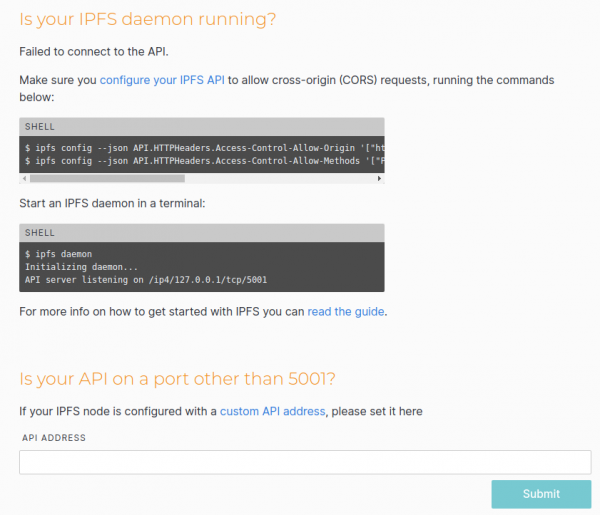
The thing is, in my opinion, the webUI works rather ambiguously. First, it tries to connect to the API of the server where the interface is open (of course, based on the address in the browser). If it fails there, it attempts to connect to the local gateway. And if you have IPFS running locally, your webUI will work fine, but you'll be dealing with local IPFS, not external, even though you opened webUI on the external server. Then you upload files, but for some reason, you don’t see them just like that on the external server...
If it's not running locally either, we get a connection error. In our case, the error is most likely due to CORS, as indicated by the webui, suggesting we add a config.
ipfs config --json API.HTTPHeaders.Access-Control-Allow-Origin '["http://your_server_ip:5001", "http://127.0.0.1:5001", "https://webui.ipfs.io"]'\nipfs config --json API.HTTPHeaders.Access-Control-Allow-Methods '["PUT", "GET", "POST"]'I just specified a wildcard.
ipfs config --json API.HTTPHeaders.Access-Control-Allow-Origin '["*"]'All added headers can be found in the same ~/.ipfs/config. In my case, this is
"API": {\n "HTTPHeaders": {\n "Access-Control-Allow-Origin": [\n "*"\n ]\n }\n },
We restart ipfs and see that the webui successfully connected (at least it should, if you opened the gateways for external requests as described above).
Now we can directly upload folders and files through the web interface, as well as create our own folders.
Mounting the FUSE file system
This is quite an interesting feature.
We can add files (just like folders) not only through the web interface but also directly in the terminal, for example
ipfs add test -r\nadded QmfYuz2gegRZNkDUDVLNa5DXzKmxxxxxxxxxx test/test.txt\nadded QmbnzgRVAP4fL814h5mQttyqk1aURxxxxxxxxxxxx test
The last hash is the hash of the root folder.
Using this hash, we can open the folder on any ipfs node (which can find our node and retrieve its content), either via the web interface on port 5001 or 8080, or locally through ipfs.
ipfs ls QmbnzgRVAP4fL814h5mQttyqk1aUxxxxxxxxxxxxx\nQmfYuz2gegRZNkDUDVLNa5DXzKmKVxxxxxxxxxxxxxx 10 test.txt
But you can also open it like a regular folder.
Let's create two folders at the root and grant permissions to our user.
sudo mkdir /ipfs /ipns\nsudo chown USERNAME /ipfs /ipns
and restart ipfs with the --mount flag.
ipfs daemon --mountYou can create folders in other locations and specify the path using ipfs daemon parameters --mount --mount-ipfs /ipfs_path --mount-ipns /ipns_path
Now, reading from this folder is somewhat unusual.
ls -la /ipfs\nls: reading directory '/ipfs': Operation not permitted\ntotal 0
So there is no direct access to the root of this folder. However, you can retrieve the content by knowing the hash.
ls -la /ipfs/QmbnzgRVAP4fL814h5mQttyqxxxxxxxxxxxxxxxxx\ntotal 0\n-r--r--r-- 1 root root 10 Aug 31 07:03 test.txt
cat /ipfs/QmbnzgRVAP4fL814h5mQttyqxxxxxxxxxxxxxxxxx/test.txt \ntest\ntest
Inside the folder, even autocompletion works when specifying the path.
As I mentioned earlier, there are nuances with this type of mounting: by default, mounted FUSE folders are only accessible to the current user (even root won't be able to read from such a folder, let alone other users on the system). If you want to make these folders accessible to other users, you need to change 'FuseAllowOther': false to 'FuseAllowOther': true in the config. But that's not all. If you're running IPFS as root, everything is fine. However, if you run it as a regular user (even with sudo), you will encounter an error.
mount helper error: fusermount: option allow_other only allowed if 'user_allow_other' is set in /etc/fuse.confIn this case, you need to edit /etc/fuse.conf by uncommenting the line #user_allow_other.
After that, restart IPFS.
Known issues with FUSE
It has often been noticed that after restarting IPFS with mounting (and possibly in other cases), the mount points /ipfs and /ipns become inaccessible. There is no access to them, and ls -la /ipfs shows ???? in the permissions list.
I found this solution:
fusermount -z -u /ipfs
fusermount -z -u /ipns
After which we restart IPFS.
Adding a service
Of course, running in the terminal is only suitable for initial testing. In production mode, the daemon should start automatically on system boot.
Create a file /etc/systemd/system/ipfs.service as sudo and write the following into it:
[Unit]
Description=IPFS Daemon
After=syslog.target network.target remote-fs.target nss-lookup.target

[Service]
Type=simple
ExecStart=/home/USERNAME/work/bin/ipfs daemon --mount
User=USERNAME
Restart=always

[Install]
WantedBy=multi-user.target
Replace USERNAME with your actual user (and possibly the full path to the IPFS program will be different for you (be sure to specify the full path)).
Activate the service.
sudo systemctl enable ipfs.serviceStart the service.
sudo service ipfs startCheck the service status.
sudo service ipfs statusFor the sake of a clean experiment, you can later reboot the server to check that IPFS starts automatically.
Add the known peers.
Let's consider a situation where we have IPFS nodes installed both on an external server and locally. On the external server, we add a file and try to access it via IPFS locally by CID. What will happen? Obviously, the local server most likely knows nothing about our external server and will simply try to find the file by CID, 'asking' all the available IPFS peers it has already managed to 'meet'. Those peers will, in turn, ask others. And so on, until the file is found. Essentially, the same thing happens when we try to retrieve a file through the official gateway. . If we're lucky, the file will be found within seconds. If not, it may take several minutes to find, which greatly affects the comfort of use. But we know where this file will appear first. So why not tell our local server right away, 'Search there first'? Apparently, this can be done.
1. Log into the remote server and in the config ~/.ipfs/config, look for
"Identity": {
    "PeerID": "QmeCWX1DD7HnPSuMHZSh6tFuxxxxxxxxxxxxxxxx",
2. Execute sudo service ipfs status and look for entries in it, such as Swarm:
Swarm announcing /ip4/ip_your_server/tcp/40013. Combine this into a common address of the form '/ip4/ip_your_server/tcp/4001/ipfs/$PeerID'.
4. For reliability, let's try to add this address to the peers through our local webui.
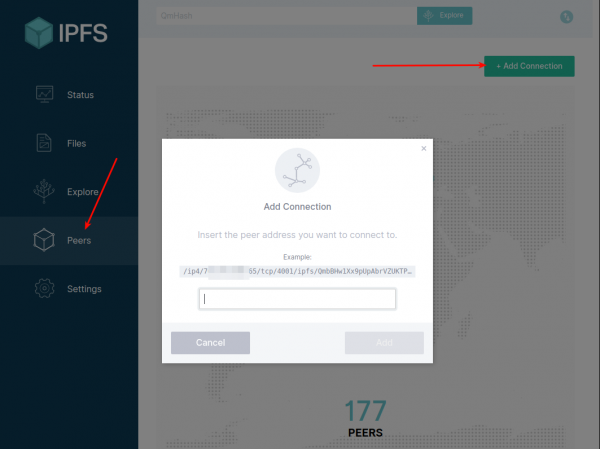
5. If everything is OK, open the local config ~/.ipfs/config, find 'Bootstrap': […
and append the obtained address first in the array.
Restart IPFS.
Now let's add a file to the external server and try to request it locally. It should come through quickly.
However, this functionality is still unstable. As far as I understand, even if we specify the peer's address in Bootstrap, during operation, IPFS changes the list of active connections with peers. In any case, discussions on this and requests for the ability to specify permanent peers are ongoing. And it seems that some functionality will be added in ipfs@5.0+.
The list of current peers can be viewed both in webui and in the terminal.
ipfs swarm peersIn both places, you can manually add your peer.
ipfs swarm connect '/ip4/ip_your_server/tcp/4001/ipfs/$PeerID'Until this functionality is improved, you could write a tool to check for a connection with the required peer and if it doesn't exist, to add the connection.
Thoughts
Among those who are already familiar with IPFS, there are both arguments for and against it. In principle, the discussion from the day before yesterday and prompted me to dig into IPFS once again. Regarding the mentioned discussion: I can't say that I strongly oppose any argument put forth (I only disagree with the notion that one and a half programmers use IPFS). Overall, both sides have their points (especially the makes one ponder). But if we disregard moral and legal evaluations, what technical assessment can be provided for this technology? Personally, I have some internal feeling that "this is definitely needed, it has certain prospects." But I can't formulate exactly why. For instance, if we look at the existing centralized solutions, they outperform significantly in many parameters (stability, speed, manageability, etc.). Nevertheless, I have one thought that seems to make sense and is unlikely to be realized without such decentralized systems. Of course, I'm aiming high, but I would phrase it this way: the principle of information dissemination on the Internet needs to change.
Let me explain. If we think about it, currently our information is spread based on the principle of "I hope that the one to whom I passed it will protect it so that it isn't lost or obtained by someone it wasn't intended for." For example, we can easily consider various email services, cloud storage, etc. And what do we have as a result? On Habr, information security Summer is almost over. There's hardly any leaked data left . In other words, the major internet giants are getting larger, accumulating more information, and such leaks represent a kind of informational atomic explosion. This has never happened before, and here we are again. While many understand the risks, they will continue to trust their data to third-party companies. First, there aren't many alternatives, and second, those companies promise that they have patched all the security holes and that this will never happen again.
What option comes to my mind? I believe that data should initially be shared openly. However, openness in this case does not mean that everything should be easily readable. I am referring to the openness of storage and dissemination, but not total openness in reading. I propose that information should be distributed with open keys. After all, the principle of open/closed keys is as old as the Internet itself. If the information is not confidential and is intended for a wide audience, it is published immediately with an open key (but still encrypted, allowing anyone to decrypt it with the provided key). If it is confidential, it is shared without an open key, and the key is given to those who need access to that information. At the same time, whoever needs to read it should only have the key, and where to get this information should not be a major concern—they simply retrieve it from the network (this is the new principle of distribution based on content, not on address).
Thus, for attackers to launch a mass attack, they would need to obtain a vast number of closed keys, which is unlikely to be achieved in one place. This task, in my view, is more complex than hacking a specific service.
And here another issue arises: confirming authorship. Nowadays, you can find numerous quotes online attributed to our acquaintances. But how can we be sure they wrote them? If each entry were accompanied by a digital signature, it would make things much simpler. It does not matter where this information is stored; the important part is the signature, which is inherently difficult to forge.
And what's interesting here is that IPFS already includes encryption tools (as it is built on blockchain technology). The configuration immediately specifies the private key.
  "Identity": {
    "PeerID": "QmeCWX1DD7HnPSuMHZSh6tFuMxxxxxxxxxxxxxx",
    "PrivKey": "CAASqAkwggSkAgEAAoIBAQClZedVmj8JkPvT92sGrNIQmofVF3ne8xSWZIGqkm+t9IHNN+\/NDI51jA0MRzpBviM3o\/c\/Nuz30wo95vWToNyWzJlyAISXnUHxnVhvpeJAbaeggQRcFxO9ujO9DH61aqgN1m+JoEplHjtc4KS5
pUEDqamve+xAJO8BWt\/LgeRKA70JN4hlsRSghRqNFFwjeuBkT1kB6tZsG3YmvAXJ0o2uye+y+7LMS7jKpwJNJBiFAa\/Kuyu3W6PrdOe7SqrXfjOLHQ0uX1oYfcqFIKQsBNj\/Fb+GJMiciJUZaAjgHoaZrrf2b\/Eii3z0i+QIVG7OypXT3Z9JUS60
KKLfjtJ0nVLjAgMBAAECggEAZqSR5sbdffNSxN2TtsXDa3hq+WwjPp\/908M10QQleH\/3mcKv98FmGz65zjfZyHjV5C7GPp24e6elgHr3RhGbM55vT5dQscJu7SGng0of2bnzQCEw8nGD18dZWmYJsE4rUsMT3wXxhUU4s8\/Zijgq27oLyxKNr9T7
2gxqPCI06VTfMiCL1wBBUP1wHdFmD\/YLJwOjV\/sVzbsl9HxqzgzlDtfMn\/bJodcURFI1sf1e6WO+MyTc3.................
I'm not a security expert and can't say for sure how to use this correctly, but it seems to me that these keys are used at the level of exchange between IPFS nodes. And also and such example projects as , which is based on . This means that theoretically, each device (mobile and otherwise) can be easily equipped with its own encryption and decryption machines. In this case, it will be up to each user to take care of keeping their private keys, and everyone will be responsible for their own security, rather than being at the mercy of the next human factor at some super-popular internet giant.
Only registered users can participate in the survey. , please.
Have you heard about IPFS before?
I've never heard of IPFS, but it seems interesting.
I've never heard and don't want to hear.
I've heard of it, but it didn't interest me.
I've heard of it, but didn't understand it, and now it seems interesting.
I've been actively using IPFS for a long time.
69 users voted. 13 users abstained.
Source: habr.com
