

Migrating data and applications to the cloud presents a new challenge for corporate SOCs, which are not always prepared to monitor external infrastructure. According to Netskope, the average enterprise (seemingly in the U.S.) uses 1,246 different cloud services, which is 22% more than last year. 1,246 cloud services!!! 175 of these concern HR services, 170 are related to marketing, 110 are in the area of communications, and 76 are in finance and CRM. Cisco uses 'only' 700 external cloud services. Therefore, I am somewhat puzzled by these figures. But in any case, the issue isn't with them, but with the fact that clouds are increasingly being adopted by more companies that want the same cloud infrastructure monitoring capabilities as they have in their own networks. This trend is growing—according to by 2023, 1,200 data centers in the U.S. are expected to close (6,250 have already shut down). But moving to the cloud is not just about saying 'let's move our servers to an external provider.' It's a new IT architecture, new software, new processes, new constraints... All of this significantly changes the operations not only of IT but also of information security. And while providers have learned to manage the security of the cloud itself (thanks to ample recommendations), there are significant challenges with cloud monitoring of information security, especially on SaaS platforms, which we will discuss.
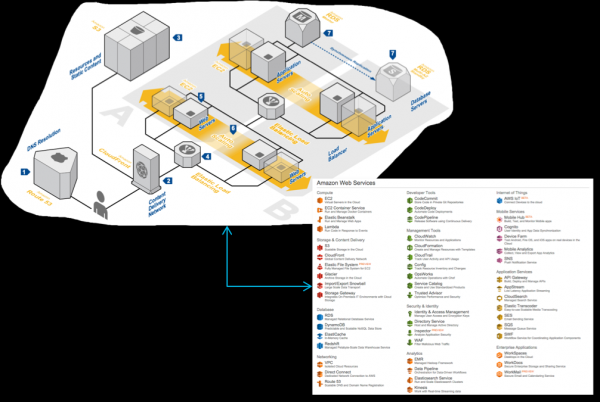
Let's assume your company has migrated part of its infrastructure to the cloud… Stop. Not like that. If the infrastructure has been migrated and you are just now considering how you will monitor it, then you have already lost. Unless it's Amazon, Google, or Microsoft (and even then with caveats), you likely won't have many options for monitoring your data and applications. It's good if you are allowed to work with logs. Sometimes security event data may be available, but you won't have access to it. For example, with Office 365, if you have the cheapest E1 license, security events are not available to you at all. With an E3 license, the data is stored for only 90 days, and only with an E5 license is the log duration available for a year (though there are some nuances here related to needing to separately request certain log functions from Microsoft support). By the way, the E3 license has significantly weaker monitoring capabilities compared to corporate Exchange. To achieve the same level, you need an E5 license or an additional Advanced Compliance license, which may require extra money that was not accounted for in your financial model for transitioning to cloud infrastructure. And this is just one example of underestimating issues related to cloud IB monitoring. In this article, I don't claim completeness, but I want to draw attention to some nuances that should be considered when choosing a cloud provider from a security perspective. At the end of the article, there will be a checklist that you should complete before considering the issue of cloud IB monitoring solved.
Several typical problems lead to incidents in cloud environments that security services cannot react to in time or may not even see at all:
- Security logs do not exist. This is a relatively common situation, especially among newcomers to the cloud solutions market. However, it's not worth completely dismissing them right away. Smaller players, especially domestic ones, are more responsive to customer demands and can quickly implement some sought-after features by altering their approved product roadmap. Yes, it may not be an equivalent to Amazon's GuardDuty or the 'Proactive Protection' module from Bitrix, but it's better than nothing.
- The information security department does not know where the logs are stored or does not have access to them. It is necessary to negotiate with the cloud service provider — they may provide such information if they consider the client significant. Overall, it is not ideal when access to logs is given "by special decision."
- Sometimes, the logs may be available from the cloud provider, but they offer limited monitoring and event logging, which is insufficient for detecting all incidents. For example, you might only receive logs of changes on the website or logs of user authentication attempts, but other events, such as network traffic, might be withheld, concealing a whole layer of incidents that characterize attempts to breach your cloud infrastructure.
- Logs are available, but automating access to them is difficult, which forces them to be monitored not continuously but on a schedule. Moreover, if logs cannot even be downloaded automatically, exporting logs, for example, in Excel format (as some local cloud solution providers do), could lead to corporate information security departments not wanting to deal with them at all.
- There is no log monitoring. This is perhaps the most perplexing reason for the occurrence of information security incidents in cloud environments. It seems that logs are available, and access to them can be automated, yet no one does it. Why?
The concept of shared cloud security.
Moving to the cloud always involves finding a balance between the desire to maintain control over infrastructure and entrusting it to a more professional cloud provider who specializes in its management. This balance is also crucial in the realm of cloud security. Moreover, depending on the model of cloud services provided (IaaS, PaaS, SaaS), this balance will constantly vary. In any case, it is essential to remember that all cloud providers today adhere to the so-called shared responsibility model and shared information security. The cloud is responsible for certain aspects, while the customer is responsible for the data, applications, virtual machines, and other resources they place in the cloud. It would be unreasonable to assume that by moving to the cloud, we can shift all responsibility onto the provider. However, it is also imprudent to manage all security independently during the cloud transition. A balance is necessary, determined by various factors: — risk management strategies, threat models, existing protective mechanisms of the cloud provider, legislation, etc.
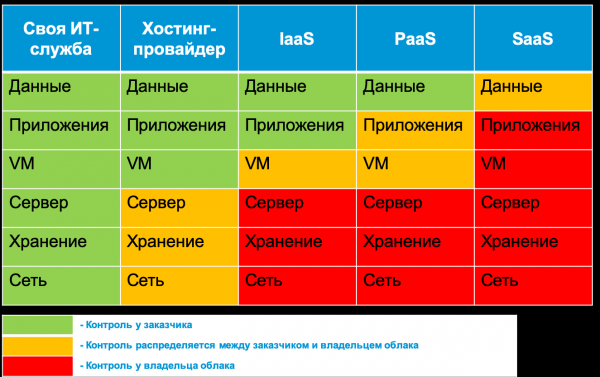
For instance, the classification of data hosted in the cloud is always the client's responsibility. The cloud provider or an external service provider can only assist with the tools that help label data in the cloud, detect violations, remove illegal data, or mask it using various methods. On the other hand, physical security is the cloud provider's sole responsibility, which cannot be shared with clients. Everything in between the data and the physical infrastructure is what this article discusses. For example, cloud availability is the provider's responsibility, while setting up security policies or enabling encryption is the client's responsibility. In this article, we will explore the cybersecurity monitoring mechanisms offered by various popular cloud providers in Russia today, their specific application features, and when it is worth considering external imposed solutions (like Cisco E-mail Security) that enhance your cloud's cybersecurity capabilities. In some cases, especially following a multi-cloud strategy, you will have no choice but to use external IoT monitoring solutions across several cloud environments (for example, Cisco CloudLock or Cisco Stealthwatch Cloud). In other situations, you may find that your chosen (or imposed) cloud provider offers no monitoring capabilities at all. This is unfortunate, but it also allows for an adequate assessment of the risk level associated with working with that cloud.
Cloud Security Monitoring Lifecycle
To monitor the security of the cloud services you use, you have only three options:
- rely on the tools provided by your cloud provider,
- utilize third-party solutions to monitor the IaaS, PaaS, or SaaS platforms you are using,
- build your own cloud environment monitoring infrastructure (only for IaaS/PaaS platforms).
Let's look at the features of each of these options. But first, we need to understand the overall framework that will be used when monitoring cloud platforms. I would highlight six main components of the monitoring process for information security in the cloud:
- Infrastructure preparation. Identifying the necessary applications and infrastructure to collect events significant for information security in storage.
- Collection. At this stage, security events are aggregated from various sources for subsequent processing, storage, and analysis.
- Processing. At this stage, the data is transformed and enriched to facilitate subsequent analysis.
- Storage. This component is responsible for the short-term and long-term storage of collected processed and 'raw' data.
- Analysis. At this stage, you have the opportunity to detect incidents and respond to them either automatically or manually.
- Reporting. This stage helps shape key indicators for stakeholders (management, auditors, cloud providers, clients, etc.) that aid in making decisions such as changing providers or strengthening information security.
Understanding these components will allow you to quickly determine what you can obtain from your provider and what you will need to handle yourself or through external consultants.
Built-in capabilities of cloud services
As I mentioned earlier, many cloud services today do not provide any monitoring capabilities for information security (IS). In general, they do not pay much attention to the IS topic. For example, one of the popular Russian services for sending reports to government agencies through the Internet (I won’t mention its name specifically). The entire section on the security of this service revolves around the use of certified encryption tools. The IS section of another domestic cloud service for electronic document management is much more extensive. It discusses public key certificates, certified cryptography, eliminating web vulnerabilities, protection against DDoS attacks, the use of information security measures, data backups, and even regular IS audits. But there is no mention of monitoring or the ability to access IS events that may be of interest to the clients of this service provider.
In general, from how a cloud provider describes information security issues on their website and in documentation, one can understand how seriously they take this matter. For instance, if you read the guides for the “My Office” products, there is not a single word about security, while the documentation for the specific product “My Office. KS3,” designed to protect against unauthorized access, merely lists points from order 17 of the FSTEC, which “My Office. KS3” complies with, but does not describe how it complies or, most importantly, how to integrate these mechanisms with corporate IS. It is possible that such documentation exists, but I could not find it publicly available on the “My Office” website. Although maybe I simply do not have access to this confidential information?

For the same Bitrix, the situation is significantly better. The documentation describes event log formats and, interestingly, the intrusion log, which contains events related to potential threats to the cloud platform. From there, you can extract the IP, username or guest name, event source, time, User Agent, event type, and so on. However, working with these events can only be done either from the cloud control panel or by exporting the data in MS Excel format. Automating the work with Bitrix logs is currently challenging, and some tasks will have to be done manually (like exporting a report and uploading it to your SIEM). But if you remember that not long ago, this capability didn't even exist, it's a significant step forward. I also want to note that many foreign cloud providers offer similar functionality for 'beginners' — either you view logs through the control panel or export data to your own system (though most export data in .csv format, not Excel).
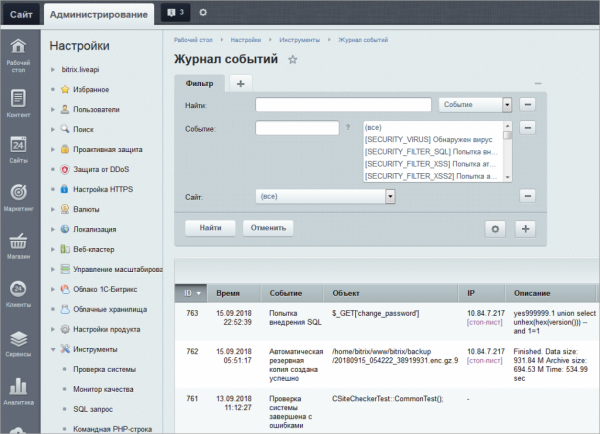
If we disregard the option of having no logs, cloud providers usually offer you three options for monitoring security events — dashboards, data exports, and API access. The first option seems to solve many problems for you, but that's not entirely true; with multiple logs, you end up switching between screens displaying them, losing the overall picture. Moreover, it's unlikely that a cloud provider will give you the capability to correlate security events and analyze them from a security standpoint (typically, you deal with raw data that you need to interpret yourself). There are exceptions, which we will discuss later. Finally, it's worth inquiring about which events your cloud provider logs, in what format, and how well they align with your information security monitoring process. For instance, identifying and authenticating users and guests. Bitrix allows you to log the date and time of an event, the username or guest name (if the “Web Analytics” module is enabled), the object that was accessed, and other typical website elements. However, corporate information security services might require information on whether the user accessed the cloud from a trusted device (for example, in a corporate network, this task is handled by Cisco ISE). What about a simple function like geo-IP that helps determine whether a user's cloud service account has been compromised? Even if the cloud provider offers this feature, it's often insufficient. Cisco CloudLock not only analyzes geolocation but also uses machine learning to analyze historical data for each user and detect various anomalies in identification and authentication attempts. Similar functionality is only available with MS Azure (with the appropriate subscription).

There is another difficulty — since monitoring security is a new area for many cloud providers that they are just starting to engage with, they are constantly making changes to their solutions. Today they have one version of the API, tomorrow another, the day after that a third. You have to be prepared for this as well. The same goes for functionality, which can change and must be considered in your security monitoring system. For example, Amazon initially had separate services for monitoring cloud events — AWS CloudTrail and AWS CloudWatch. Then a separate service specifically for security event monitoring was introduced — AWS GuardDuty. After some time, Amazon launched a new management system, Amazon Security Hub, which includes data analysis obtained from GuardDuty, Amazon Inspector, Amazon Macie, and a number of others. Another example is the tool for integrating Azure logs with SIEM — AzLog. Many SIEM vendors actively used it until Microsoft announced in 2018 that it would cease its development and support, which left many clients who relied on this tool in a difficult position (we will discuss how this was resolved later).
Therefore, pay close attention to all monitoring features offered by your cloud provider. Alternatively, you can rely on external solution providers who will act as intermediaries between your SOC and the cloud you wish to monitor. Yes, this will be more expensive (though not always), but you will transfer the entire responsibility onto someone else’s shoulders. Or maybe not all of it? Let’s recall the concept of shared security and understand that we cannot transfer everything — we will have to figure out how different cloud providers handle the monitoring of the security of your data, applications, virtual machines, and other resources hosted in the cloud. We will start with what Amazon offers in this regard.
Example: Security Monitoring in IaaS based on AWS
Yes, I understand that Amazon is not the best example given that it's an American service and may be blocked in the fight against extremism and the spread of prohibited information in Russia. However, in this publication, I would simply like to show how different cloud platforms vary in terms of security monitoring capabilities and what to pay attention to when transferring your key processes to the cloud from a security perspective. Moreover, if any of the Russian cloud solution developers find something useful for themselves, it would be great.

First of all, it should be noted that Amazon is not an impregnable fortress. Various incidents regularly occur with its clients. For example, Deep Root Analytics had the names, addresses, birth dates, and phone numbers of 198 million voters stolen. An Israeli company, Nice Systems, lost 14 million records about Verizon subscribers. At the same time, AWS's built-in capabilities allow you to detect a wide range of incidents. For example:
- impact on infrastructure (DDoS)
- node compromise (command injection)
- account compromise and unauthorized access
- misconfiguration and vulnerabilities
- unprotected interfaces and APIs.
This discrepancy arises from the fact that the customer is responsible for data security, as we determined above. If they haven't taken the necessary precautions and activated monitoring tools, they will find out about an incident only from the media or from their clients.
A wide range of monitoring services developed by Amazon can be used to detect incidents (although they are often supplemented by external tools such as osquery). In AWS, all user actions are tracked, regardless of how they are performed — through the management console, command line, SDK, or other AWS services. Records of every AWS account's activities (including username, action, service, activity parameters, and its outcome) and API usage are available through the AWS CloudTrail service. You can view these events (for example, logging into the AWS IAM console) from the CloudTrail console, analyze them using Amazon Athena, or send them to external solutions like Splunk, AlienVault, etc. The AWS CloudTrail logs themselves are placed in your AWS S3 bucket.
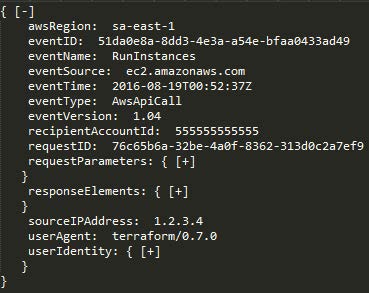
Two other AWS services provide additional important monitoring capabilities. First, Amazon CloudWatch is a monitoring service for AWS resources and applications that helps identify various anomalies in your cloud. All built-in AWS services, such as Amazon Elastic Compute Cloud (servers), Amazon Relational Database Service (databases), Amazon Elastic MapReduce (data analysis), and over 30 other Amazon services, use Amazon CloudWatch to store their logs. Developers can use the open API from Amazon CloudWatch to add log monitoring features to custom applications and services, thereby expanding the range of events analyzed in the context of information security.

Second, the VPC Flow Logs service allows for the analysis of network traffic sent to or received by your AWS servers (from outside or internally), as well as between microservices. When any of your AWS VPC resources interacts with the network, the VPC Flow Logs service records details about the network traffic, including the source and destination network interfaces, as well as IP addresses, ports, protocols, byte counts, and packet counts that you have seen. Those with experience in local network security recognize this as analogous to flows. , which can be generated by enterprise-level switches, routers, and firewalls. These logs are important for security monitoring purposes because, unlike events related to user and application actions, they also capture network interactions in a virtual private cloud environment like AWS.

Thus, these three AWS services — AWS CloudTrail, Amazon CloudWatch, and VPC Flow Logs — together provide a sufficiently effective overview of your account usage, user behavior, infrastructure management, application and service activity, as well as network activity. For instance, they can help detect the following anomalies:
- Attempts to scan the website, search for backdoors, and identify vulnerabilities through spikes in '404 errors'.
- Injection attacks (e.g., SQL injection) through spikes in '500 errors'.
- Known tools for attacks like sqlmap, nikto, w3af, nmap, etc. through analyzing the User Agent field.
Amazon Web Services has developed other services for cybersecurity purposes that allow for addressing numerous additional tasks. For instance, AWS includes a built-in service for auditing policies and configurations — AWS Config. This service provides continuous auditing of your AWS resources and their configurations. Consider a simple example: assume you want to ensure that user passwords are disabled on all your servers and access is only possible based on certificates. AWS Config allows you to easily verify this across all your servers. There are also other policies that can be applied to your cloud servers: 'No server may use port 22', 'Only administrators can change firewall rules', or 'Only user Ivashko can create new user accounts, and he can do this only on Tuesdays'. In the summer of 2016, the AWS Config service was expanded to automate the detection of policy violations. AWS Config Rules essentially represent continuous configuration queries of the Amazon services you are using, generating events when corresponding policies are violated. For example, instead of periodically executing AWS Config queries to check whether all virtual server disks are encrypted, AWS Config Rules can be utilized for constant verification of server disks to ensure compliance with this condition. And, importantly, in the context of this publication, any violations generate events that can be analyzed by your information security service.

AWS also has its equivalents to traditional corporate cybersecurity solutions, which also generate security events that you can and must analyze:
- intrusion detection — AWS GuardDuty
- data leak prevention — AWS Macie
- EDR (although discussing endpoint devices in the cloud sounds a bit odd) — AWS Cloudwatch + open source solutions osquery or GRR
- Netflow analysis — AWS Cloudwatch + AWS VPC Flow
- DNS analysis — AWS Cloudwatch + AWS Route53
- AD — AWS Directory Service
- account management — AWS IAM
- SSO — AWS SSO
- security analysis — AWS Inspector
- configuration management — AWS Config
- WAF — AWS WAF.
I won't go into detail about all the Amazon services that can be useful in the context of information security. The main point to understand is that all of them can generate events that we can and must analyze in the context of security, leveraging both the built-in capabilities of Amazon itself and external solutions, such as SIEM, which can pull security events into your monitoring center and analyze them alongside events from other cloud services or from internal infrastructure, perimeter, or mobile devices.
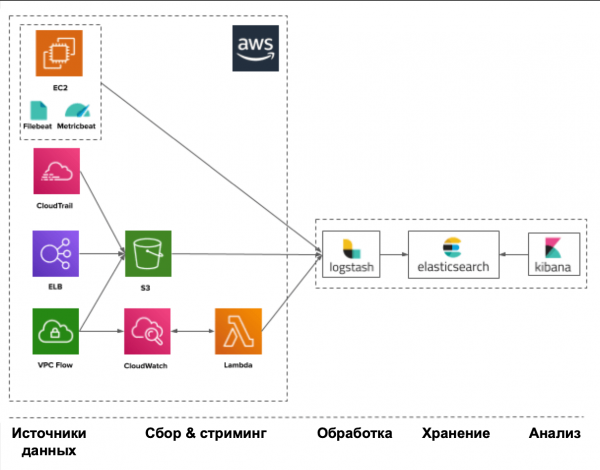
In any case, it all begins with data sources that provide you with security events. Such sources can include, among others:
- CloudTrail — usage of APIs and user actions
- Trusted Advisor — security checks for compliance with best practices
- Config — inventory and configuration of accounts and service settings
- VPC Flow Logs — connections to virtual interfaces
- IAM — identity and authentication service
- ELB Access Logs — load balancer logs
- Inspector — vulnerabilities in applications
- S3 — file storage
- CloudWatch — application activity
- SNS — notification service.
Amazon, offering such a range of event sources and tools for their generation, is still greatly limited in its ability to analyze the collected data in the context of security. You will need to study the available logs on your own, searching for relevant indicators of compromise. AWS Security Hub, which Amazon recently launched, aims to address this issue, acting as a kind of cloud SIEM for AWS. However, it is still in its early stages and is limited both by the number of sources it works with and by other restrictions imposed by Amazon's architecture and subscriptions.
Example: Monitoring security in IaaS based on Azure
I don't want to engage in a lengthy debate about which of the three cloud providers (Amazon, Microsoft, or Google) is the best (especially since each has its own specific characteristics that suit different tasks); let's focus on the security monitoring capabilities these players offer. It must be acknowledged that Amazon AWS was one of the first in this segment and has therefore advanced the furthest in terms of its security features (although many admit they can be difficult to use). However, this doesn’t mean we should ignore the capabilities offered by Microsoft and Google.
Microsoft's products have always been known for their 'openness', and the situation in Azure is no different. For instance, while AWS and GCP operate under the principle of 'anything not explicitly allowed is prohibited,' Azure takes the opposite approach. When you create a virtual network in the cloud and a virtual machine within it, all ports and protocols are open and allowed by default. Therefore, you'll need to put in a bit more effort for the initial setup of the access control system in Microsoft's cloud. This also places more stringent requirements on you regarding monitoring activities in Azure.
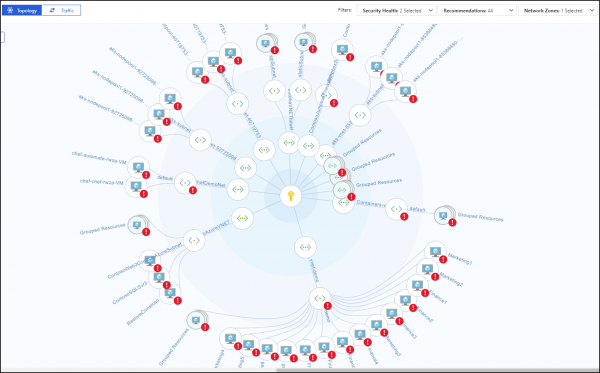
AWS has a particular challenge regarding the monitoring of your virtual resources; when they are in different regions, it becomes difficult to consolidate all events and analyze them effectively. This may require various workarounds, such as creating your own code for AWS Lambda to transfer events between regions. Azure does not have this issue — its Activity Log mechanism tracks all activities across the entire organization without limitations. The same applies to AWS Security Hub, which was recently developed by Amazon to consolidate various security features in a single security center, but only within its own region, which is not relevant for Russia. Azure has its own Security Center, which is not constrained by regional limitations, providing access to all security features of the cloud platform. Furthermore, it can offer a specific set of protective capabilities for various local teams, including managed security events. AWS Security Hub is still striving to become akin to Azure Security Center. However, there is a downside: while you can leverage much of what was previously mentioned for AWS, it is most conveniently done only for Azure AD, Azure Monitor, and Azure Security Center. The other security mechanisms in Azure, including security event analysis, are not yet managed in the most user-friendly way. Part of the problem is addressed by the API, which connects all Microsoft Azure services, but this will require additional efforts to integrate your cloud with your SOC and the involvement of qualified specialists (as is the case with any other SIEM working with cloud APIs). Some SIEMs, which will be discussed further, already support Azure and can automate the monitoring task, but they also come with their own challenges — not all can retrieve all the logs available in Azure.
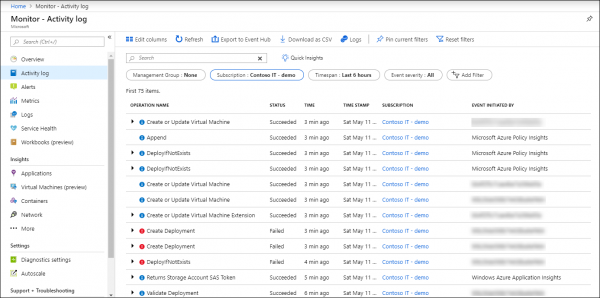
Event collection and monitoring in Azure is provided through the Azure Monitor service, which is the main tool for collecting, storing, and analyzing data in Microsoft’s cloud and its resources — such as Git repositories, containers, virtual machines, applications, etc. All data collected by Azure Monitor is divided into two categories — metrics collected in real-time that describe the key performance indicators of Azure cloud, and logs which contain data organized into records that characterize various aspects of the activities of Azure resources and services. Additionally, using the Data Collector API, Azure Monitor can gather data from any REST source to build custom monitoring scenarios.
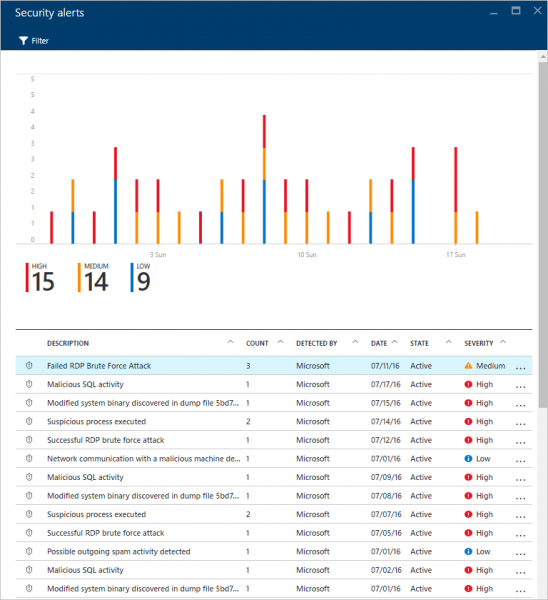
Here are several security event sources offered by Azure, accessible through the Azure Portal, CLI, PowerShell, or REST API (some only through the Azure Monitor / Insight API):
- Activity Logs — this log answers the classic questions of “who”, “what”, and “when” regarding any write operation (PUT, POST, DELETE) on cloud resources. Read access events (GET) do not appear in this log, along with several others.
- Diagnostic Logs — contains data on operations involving various resources within your subscription.
- Azure AD reporting — includes both user activity and system activity related to group and user management.
- Windows Event Log and Linux Syslog — contains events from virtual machines hosted in the cloud.
- Metrics — contains telemetry on the performance and “health” status of your cloud services and resources. Measured every minute and stored for 30 days.
- Network Security Group Flow Logs — contains data on network security events collected through the Network Watcher service and network-level resource monitoring.
- Storage Logs — contains events related to storage access.
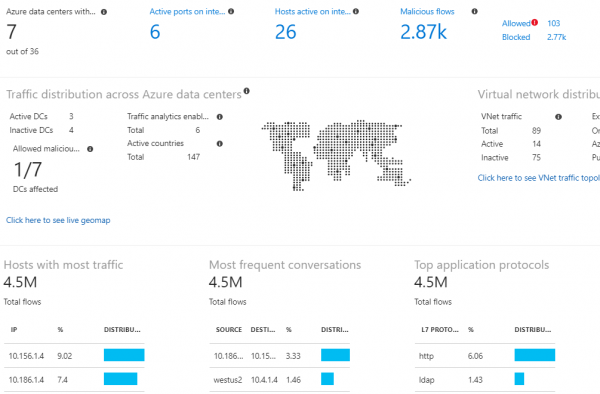
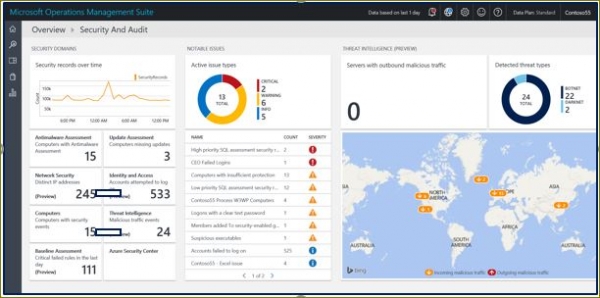
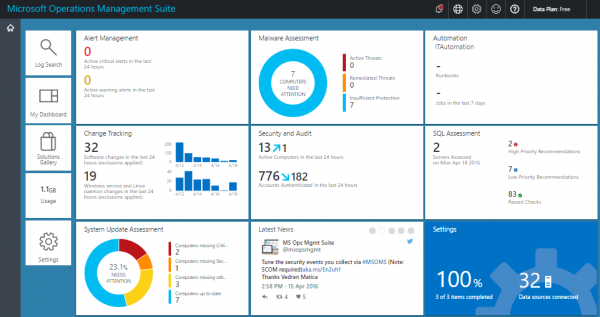
For monitoring, you can use external SIEMs or the built-in Azure Monitor and its extensions. We will discuss security event management systems later, but for now, let's look at what Azure offers for data analysis in the context of security. The main interface for everything related to security in Azure Monitor is the Log Analytics Security and Audit Dashboard (the free version supports the retention of a limited amount of events for only one week). This dashboard is divided into five main areas that visualize summary statistics of what is happening in your cloud environment:
- Security Domains — key quantitative indicators related to information security — number of incidents, number of compromised nodes, unpatched nodes, security events, etc.
- Notable Issues — displays the number and severity of active information security issues
- Detections — shows the patterns of attacks used against you
- Threat Intelligence — provides geographic information about external nodes that are attacking you
- Common security queries — typical queries that will help you better monitor your information security.
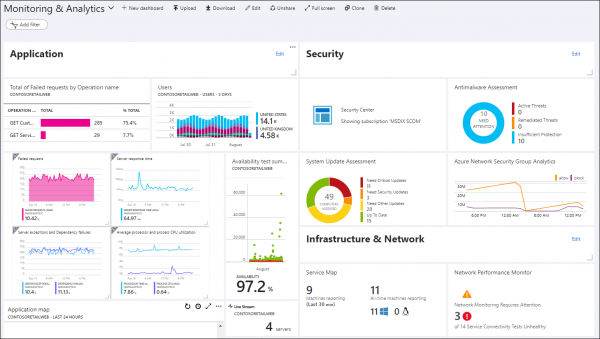
Extensions for Azure Monitor include Azure Key Vault (protecting cryptographic keys in the cloud), Malware Assessment (analyzing malware protection on virtual machines), Azure Application Gateway Analytics (analyzing, among other things, cloud firewall logs), etc. These tools, enriched with specific event processing rules, allow you to visualize various aspects of cloud services, including security, and detect deviations from normal operation. However, as is often the case, any additional functionality requires a corresponding paid subscription, which necessitates financial planning in advance.
Azure has a range of built-in threat monitoring capabilities that are integrated into Azure AD, Azure Monitor, and Azure Security Center. These include, for example, the detection of virtual machines interacting with known malicious IPs (enabled by integration with Microsoft's Threat Intelligence services), detection of malware in the cloud infrastructure through alerts from virtual machines hosted in the cloud, brute force attacks on virtual machines, vulnerabilities in user identification system configurations, logins from anonymizers or compromised nodes, account leakages, logins from unusual locations, and more. Today, Azure is one of the few cloud providers offering built-in Threat Intelligence capabilities to enrich collected security events.
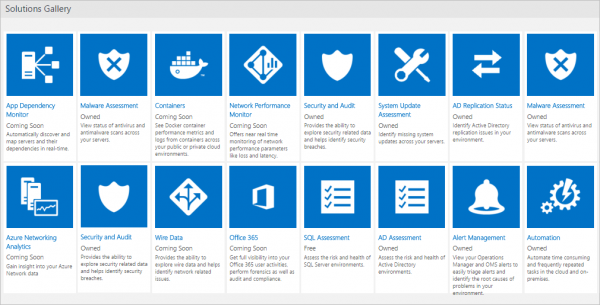
As mentioned earlier, the protective functionality and, consequently, the security events it generates are not available equally to all users, requiring a specific subscription that includes the necessary functionality, which generates corresponding events for security monitoring. For example, some of the anomaly monitoring capabilities described in the previous paragraph are available only with the premium P2 license for Azure AD. Without it, like with AWS, you'll have to analyze collected security events manually. Additionally, depending on your Azure AD license type, not all events will be available for analysis.
In the Azure portal, you can manage search queries for the logs you are interested in, as well as set up dashboards to visualize key security metrics. Furthermore, you can choose Azure Monitor extensions that allow you to enhance the functionality of Azure Monitor logs and obtain deeper analysis of events from a security perspective.
If you need not only the capability to work with logs but also a comprehensive security center for your Azure cloud platform, including managing security policies, then we can speak of the necessity to work with Azure Security Center, most of whose useful features are available for an additional fee, such as threat detection, monitoring outside of Azure, compliance assessment, and so on (in the free version, you only have access to security assessment and recommendations for addressing identified issues). It consolidates all security matters in one place. Essentially, you can talk about a higher level of security than what Azure Monitor provides, as in this case, the data collected from your entire cloud environment is enriched by various sources such as Azure, Office 365, Microsoft CRM online, Microsoft Dynamics AX, outlook.com, MSN.com, Microsoft Digital Crimes Unit (DCU), and Microsoft Security Response Center (MSRC), upon which various advanced machine learning and behavioral analytics algorithms are applied, which ultimately should enhance the effectiveness of threat detection and response.
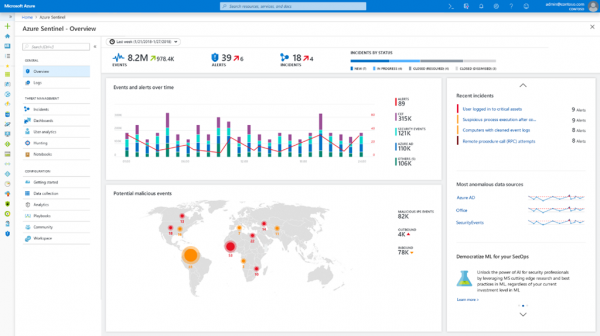
Azure also has its own SIEM, which appeared in early 2019. This is Azure Sentinel, which relies on data from Azure Monitor and can also integrate with external security solutions (such as NGFW or WAF), a list that is constantly being updated. Furthermore, through the integration of Microsoft Graph Security API, you gain the ability to connect your own Threat Intelligence feeds to Sentinel, enriching the incident analysis capabilities in your Azure cloud. It can be asserted that Azure Sentinel is the first 'native' SIEM to emerge among cloud providers (unlike Splunk or ELK, which can be hosted in the cloud, like AWS, but were developed by traditional cloud service providers). Azure Sentinel and Security Center could be referred to as a SOC for Microsoft Azure and they could suffice (with certain caveats) if you had no other infrastructure and had moved all your computing resources into the cloud, making it a Microsoft Azure cloud.
However, since the built-in capabilities of Azure (even with a Sentinel subscription) are often insufficient for monitoring information security and integrating this process with other security event sources (both cloud-based and on-premises), there arises a need to export the collected data to external systems, including SIEMs. This can be done using APIs as well as special extensions, which are currently officially available only for the following SIEMs — Splunk (Azure Monitor Add-On for Splunk), IBM QRadar (Microsoft Azure DSM), SumoLogic, ArcSight, and ELK. Not long ago, there were more such SIEMs, but as of June 1, 2019, Microsoft discontinued support for the Azure Log Integration Tool (AzLog), which in the early days of Azure, when there was no proper standardization for working with logs (Azure Monitor didn’t even exist yet), allowed easy integration of external SIEMs with the Microsoft cloud. The situation has now changed, and Microsoft recommends the Azure Event Hub platform as the main integration tool for other SIEMs. Many have already implemented such integration, but be careful — they may not capture all Azure logs, only some (refer to the documentation for your SIEM).
Concluding a brief overview of Azure, I would like to provide a general recommendation regarding this cloud service: before affirming anything about the security monitoring features in Azure, it's essential to set them up very carefully and test that they work as described in the documentation and as advised by Microsoft consultants (who may have differing views on the functionality of Azure features). If financial resources are available, Azure can yield a lot of benefits in terms of security monitoring. However, if your resources are limited, as with AWS, you will have to rely solely on your capabilities and the raw data provided by Azure Monitor. Remember that many monitoring features incur costs, so it's advisable to familiarize yourself with the pricing policy in advance. For instance, you can store data for free for 31 days with a maximum volume of 5 GB per customer — exceeding these limits will require you to spend additionally (approximately $2+ for storage of every extra GB and $0.1 for storage of 1 GB each additional month). Working with application telemetry and metrics may also require extra financial resources, along with handling alerts and notifications (a certain free limit is available, which may not suffice for your needs).
Example: Security Monitoring in IaaS based on Google Cloud Platform
Google Cloud Platform, in comparison to AWS and Azure, appears quite young, but this is somewhat positive. Unlike AWS, which gradually expanded its capabilities, including security, while facing centralization issues, GCP, like Azure, is managed much more centrally, reducing the number of errors and implementation time within the enterprise. From a security perspective, GCP surprisingly sits between AWS and Azure. It also features a unified event logging system across the organization, but it is incomplete. Some functions are still in beta, but gradually this deficiency should be addressed, making GCP a more mature platform for security monitoring.
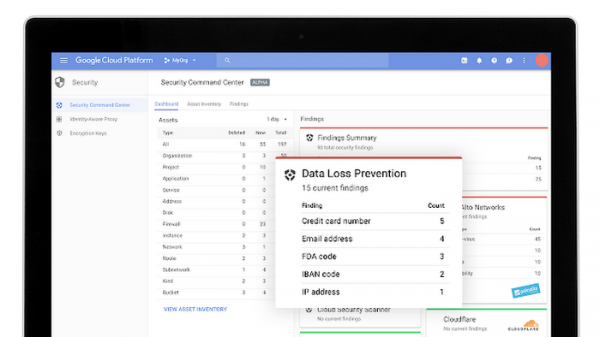
The primary tool for event logging in GCP is Stackdriver Logging (similar to Azure Monitor), which allows you to collect events across your cloud infrastructure (as well as from AWS). From a security perspective in GCP, each organization, project, or folder has four logging types:
- Admin Activity — contains all events related to administrative access, such as creating a virtual machine, changing permissions, etc. This log is always written, regardless of your preferences, and retains its data for 400 days.
- Data Access — contains all events related to interactions by cloud users (creating, modifying, reading, etc.). By default, this log is not written, as its size can grow rapidly. For this reason, its retention period is only 30 days. Additionally, not all events are logged; for instance, events related to publicly accessible resources or those available without logging into GCP do not appear here.
- System Event — contains system events that are not user-related or actions by an administrator changing cloud resource configurations. This log is always written and retained for 400 days.
- Access Transparency — is a unique type of logging that records all actions of Google employees (though not yet for all GCP services) who access your infrastructure as part of their job duties. This log is retained for 400 days and is not available to every GCP client; it is accessible only under certain conditions (either Gold or Platinum support levels or having four specific roles within corporate support). A similar feature exists, for example, in Office 365 — Lockbox.
Example log: Access Transparency
{
 insertId: "abcdefg12345"
 jsonPayload: {
 @type: "type.googleapis.com/google.cloud.audit.TransparencyLog"
 location: {
 principalOfficeCountry: "US"
 principalEmployingEntity: "Google LLC"
 principalPhysicalLocationCountry: "CA"
 }
 product: [
 0: "Cloud Storage"
 ]
 reason: [
 detail: "Case number: bar123"
 type: "CUSTOMER_INITIATED_SUPPORT"
 ]
 accesses: [
 0: {
 methodName: "GoogleInternal.Read"
 resourceName: "//googleapis.com/storage/buckets/[BUCKET_NAME]/objects/foo123"
 }
 ]
 }
 logName: "projects/[PROJECT_NAME]/logs/cloudaudit.googleapis.comaccess_transparency"
 operation: {
 id: "12345xyz"
 }
 receiveTimestamp: "2017-12-18T16:06:37.400577736Z"
 resource: {
 labels: {
 project_id: "1234567890"
 }
 type: "project"
 }
 severity: "NOTICE"
 timestamp: "2017-12-18T16:06:24.660001Z"
}
Access to the specified logs is available through several methods (similarly to what was previously discussed with Azure and AWS) — via the Log Viewer interface, through the API, via Google Cloud SDK, or through your project's Activity page where you are interested in events. They can also be exported to external solutions for additional analysis. This export is done by sending logs to BigQuery or Cloud Pub/Sub.
In addition to Stackdriver Logging, the GCP platform offers Stackdriver Monitoring functionality, which allows you to track key metrics (performance, uptime, overall status, etc.) of cloud services and applications. The specially processed and visualized data can facilitate problem identification in your cloud infrastructure, including in terms of security. However, it should be noted that this functionality is somewhat limited specifically in the context of information security, as GCP currently lacks an equivalent to AWS GuardDuty and cannot isolate malicious events among all logged occurrences (Google has developed Event Threat Detection, but it is still in beta, making it premature to discuss its usefulness). Stackdriver Monitoring could be utilized as an anomaly detection system, which would then be investigated for potential causes. However, given the current shortage of qualified information security personnel in the market, this task appears challenging at the moment.
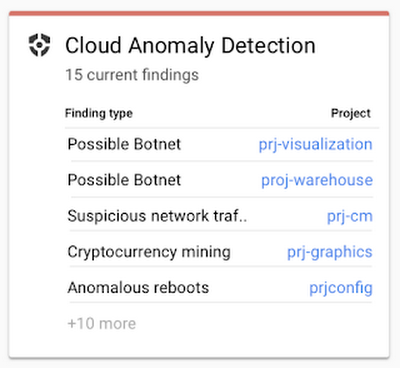
It is also worth providing a list of some security modules that can be applied within your GCP cloud, which are similar to what AWS offers:
- Cloud Security Command Center is analogous to AWS Security Hub and Azure Security Center.
- Cloud DLP — automatic detection and editing (such as masking) of data stored in the cloud based on over 90 pre-defined classification policies.
- Cloud Scanner — scanner for known vulnerabilities (XSS, Flash Injection, unpatched libraries, etc.) in App Engine, Compute Engine, and Google Kubernetes.
- Cloud IAM — management of access to all GCP resources.
- Cloud Identity — management of user accounts, devices, and GCP applications from a single console.
- Cloud HSM — protection of cryptographic keys.
- Cloud Key Management Service — management of cryptographic keys in GCP.
- VPC Service Control — creating a secure perimeter around your GCP resources to protect them from leaks.
- Titan Security Key — protection against phishing.
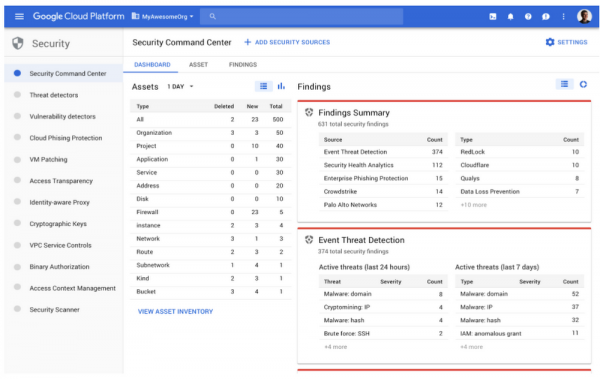
Many of these modules generate security events that can be sent to BigQuery for analysis or exported to other systems, including SIEM. As previously mentioned, GCP is an actively developed platform and Google is currently developing a range of new security modules for its platform. Among them is Event Threat Detection (currently in beta), which scans Stackdriver logs for signs of unauthorized activity (similar to GuardDuty in AWS), and Policy Intelligence (available in alpha), which will allow for the development of intelligent access policies for GCP resources.
I provided a brief overview of the built-in monitoring capabilities in popular cloud platforms. But do you have specialists who can work with the 'raw' logs of an IaaS provider (not everyone is ready to purchase advanced features from AWS, Azure, or Google)? Furthermore, many are familiar with the saying 'trust but verify', which is more relevant than ever in the field of security. How much do you trust the built-in capabilities of a cloud provider that gives you security events? To what extent do they really focus on security?
Sometimes it makes sense to look at overlay solutions for monitoring cloud infrastructure, which can complement the built-in security of the cloud, and sometimes such solutions are the only option to obtain data on the security of your data and applications hosted in the cloud. Additionally, they are simply more convenient as they take on all tasks related to analyzing the necessary logs generated by various cloud services from different cloud providers. An example of such an overlay solution is Cisco Stealthwatch Cloud, which focuses on a single task — monitoring cybersecurity anomalies in cloud environments, including not only Amazon AWS, Microsoft Azure, and Google Cloud Platform but also private clouds.
Example: Cybersecurity Monitoring with Stealthwatch Cloud
AWS provides a flexible computing platform, but this flexibility makes it easier for companies to make mistakes that lead to security issues. And the shared security model only contributes to this. Running software in the cloud with unknown vulnerabilities (known vulnerabilities can be addressed, for example, by AWS Inspector or GCP Cloud Scanner), weak passwords, incorrect configurations, insiders, etc. All of this impacts the behavior of cloud resources, which can be monitored by Cisco Stealthwatch Cloud, a cybersecurity monitoring and attack detection system for public and private clouds.
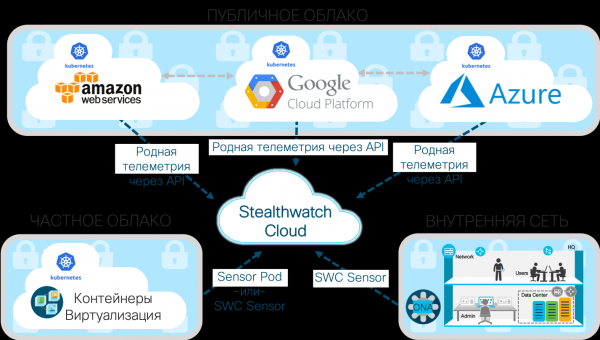
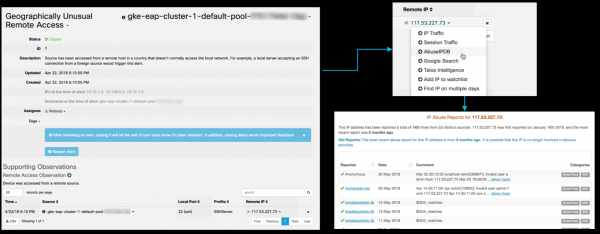
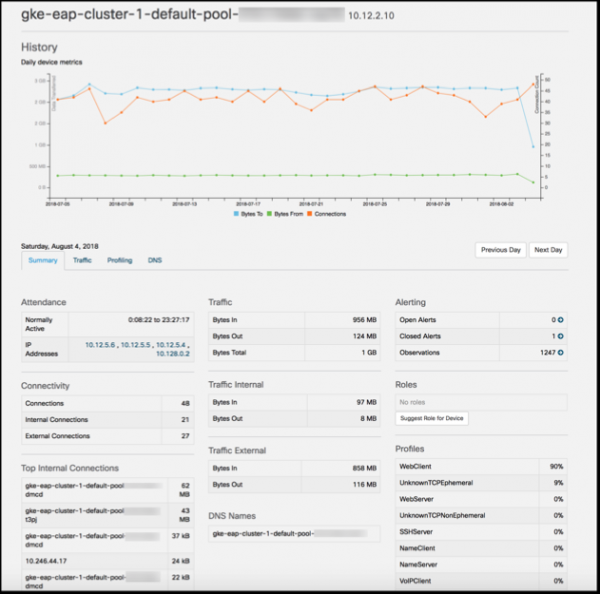
One of the key features of Cisco Stealthwatch Cloud is the ability to model entities. It allows you to create a software model (essentially a near real-time simulation) of each of your cloud resources (whether it be AWS, Azure, GCP, or something else). These can include servers and users, as well as resource types specific to your cloud environment, such as security groups and auto-scaling service groups. These models use structured data streams provided by cloud services as input. For example, for AWS, this would include VPC Flow Logs, AWS CloudTrail, AWS CloudWatch, AWS Config, AWS Inspector, AWS Lambda, and AWS IAM. Entity modeling automatically detects the role and behavior of any of your resources (you could refer to profiling all cloud activity). Such roles may include an Android or Apple mobile device, Citrix PVS server, RDP server, mail gateway, VoIP client, terminal server, domain controller, etc. It then continuously monitors their behavior to determine when risky or security-threatening behavior occurs. You can identify password guessing, DDoS attacks, data breaches, unauthorized remote access, malware activity, vulnerability scanning, and other threats. For example, here is what a remote access attempt from an unusual country for your organization (South Korea) to a Kubernetes cluster via SSH looks like:
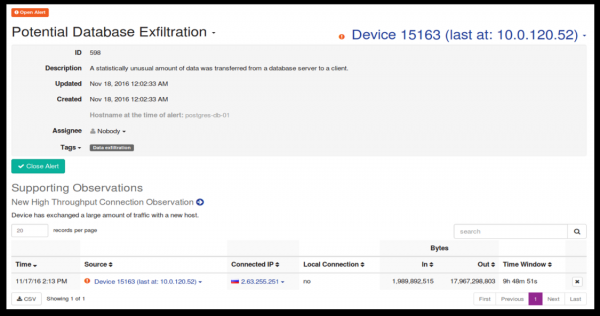
Here is how a suspected data leak from a Postgres database to a country that has not interacted before appears:
Finally, here’s what an unusually high number of failed SSH access attempts from China and Indonesia looks like from an external remote device:
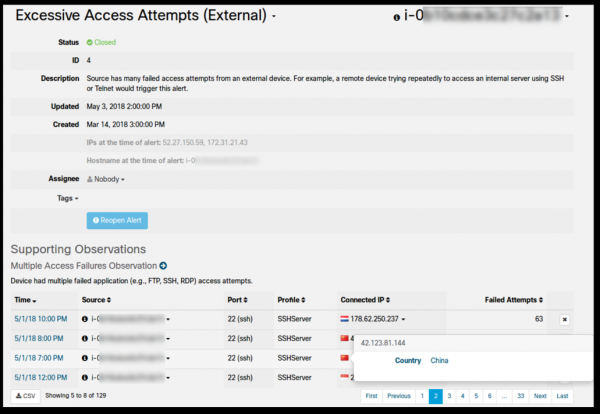
Or, suppose that an instance of a server in a VPC, according to policy, should never be a destination for remote system login. Further suppose that remote system access occurred on this computer due to an erroneous change in firewall rule policy. The entity modeling function will detect and report this activity ("Unusual Remote Access") in near real-time and indicate the specific API call from AWS CloudTrail, Azure Monitor, or GCP Stackdriver Logging (including username, date and time, among other details) that triggered the change in the firewall rule. This information can then be forwarded to SIEM for analysis.
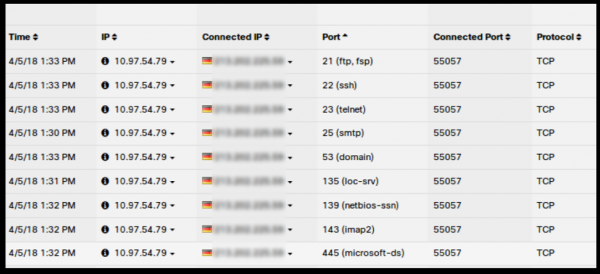
Similar capabilities are implemented for any cloud environment supported by Cisco Stealthwatch Cloud:
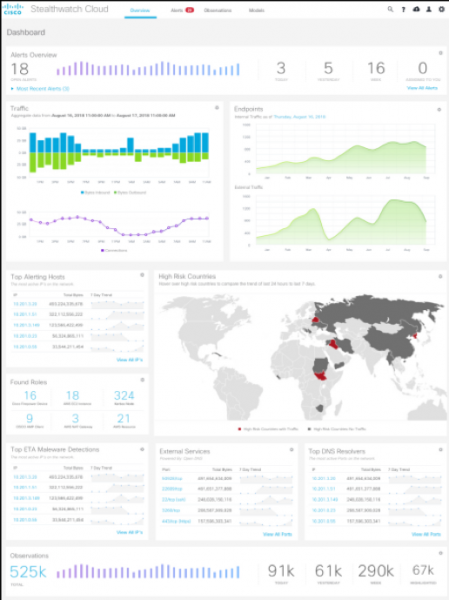
Entity modeling is a unique form of security automation that can detect previously unknown issues with your people, processes, or technologies. For example, it allows for the detection of security issues such as:
- Did someone discover a backdoor in the software we use?
- Is there any unauthorized software or device in our cloud?
- Is an authorized user abusing their privileges?
- Was there a configuration error that allowed remote access or other unintentional use of resources?
- Is there a data leak from our servers?
- Has someone attempted to connect to us from an unusual geographical location?
- Is our cloud infected with malicious code?
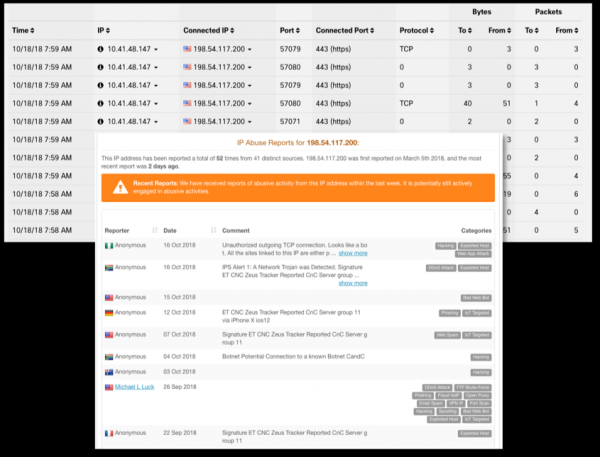
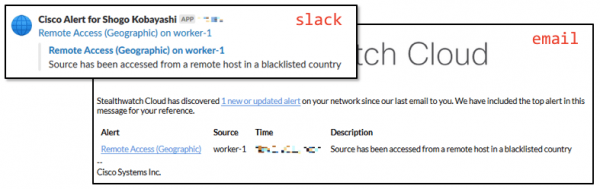
The detected security event can be relayed as a corresponding ticket in Slack, Cisco Spark, an incident management system like PagerDuty, and can also be forwarded to various SIEMs, including Splunk or ELK. In summary, if your company employs a multi-cloud strategy and does not limit itself to a single cloud provider, the monitoring capabilities described above make Cisco Stealthwatch Cloud a viable option for obtaining a unified set of monitoring capabilities for leading cloud players—Amazon, Microsoft, and Google. Interestingly, when comparing the prices of Stealthwatch Cloud with advanced security monitoring licenses in AWS, Azure, or GCP, it may turn out that Cisco's solution is even cheaper than the built-in capabilities offered by Amazon, Microsoft, and Google. Paradoxical as it may seem, it is true. The more clouds and their capabilities you use, the more apparent the advantages of a consolidated solution will be.
Moreover, Stealthwatch Cloud can monitor private clouds deployed within your organization, for instance, those based on Kubernetes containers, or by monitoring Netflow streams or network traffic captured through mirroring on network equipment (even domestic production), data from AD, or DNS servers, etc. All this data will be enriched with Threat Intelligence information collected by Cisco Talos, the largest non-governmental threat research group in the world.
This allows you to implement a unified monitoring system for both public and hybrid clouds that your company can utilize. The collected information can then be analyzed using the built-in capabilities of Stealthwatch Cloud or sent to your SIEM (by default, Splunk, ELK, SumoLogic, and several others are supported).
In this, we will conclude the first part of the article, where I examined both built-in and external tools for monitoring information security in IaaS/PaaS platforms that allow us to quickly detect and respond to incidents occurring in the cloud environments chosen by our organization. In the second part, we will continue the topic and explore monitoring options for SaaS platforms using Salesforce and Dropbox as examples, and we will also try to summarize and integrate everything by creating a unified information security monitoring system for different cloud providers.
Source: habr.com
