

Eyes are scared, but hands are itching!
In previous articles, we explored the technologies on which blockchains are built () and the cases that can be implemented using them (). It’s time to get hands-on! For implementing pilots and Proof of Concepts (PoC), I prefer to use cloud services because they can be accessed from anywhere in the world and often save time on tedious environment setup, as there are pre-installed configurations. So, let’s create something simple, like a network for transferring coins between participants, and we will modestly name it Citcoin. We will use IBM Cloud and the universal blockchain Hyperledger Fabric for this. First, let’s understand why Hyperledger Fabric is called a universal blockchain?

Hyperledger Fabric — Universal Blockchain
Generally speaking, a universal information system consists of:
- A set of servers and a software core that executes business logic;
- Interfaces for interacting with the system;
- Tools for registering, authenticating and authorizing devices/individuals;
- A database that stores operational and archival data:
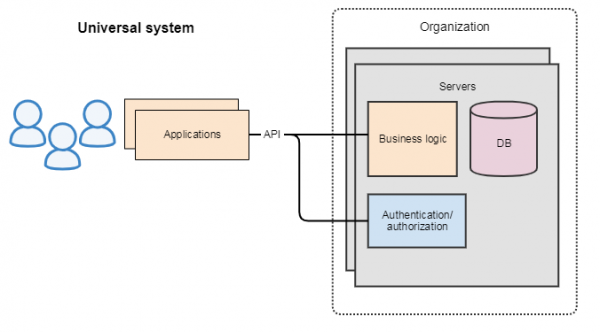
You can read the official definition of Hyperledger Fabric at , and in short, Hyperledger Fabric is an open-source platform that allows building private blockchains and executing arbitrary smart contracts written in JS and Go programming languages. Let’s take a detailed look at the architecture of Hyperledger Fabric and verify that it is a versatile system, with only specific ways of storing and recording data. The specifics are that data, like in all blockchains, is stored in blocks, which are added to the blockchain only if participants reach a consensus, and once recorded, the data cannot be altered or deleted unnoticed.
Architecture of Hyperledger Fabric
The diagram presents the architecture of Hyperledger Fabric:
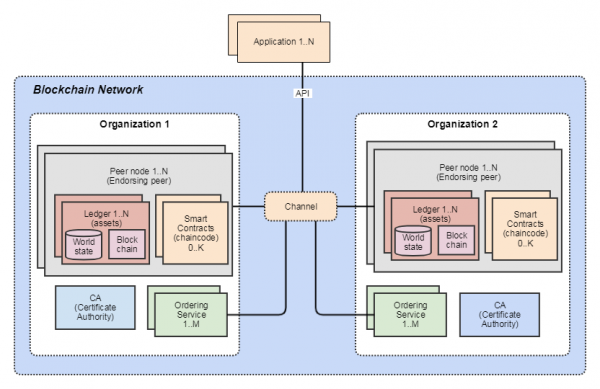
Organizations — organizations contain peers, thus the blockchain exists with the support of organizations. Different organizations can join the same channel.
Channel — a logical structure that groups peers together, thereby defining the blockchain. Hyperledger Fabric can handle multiple blockchains simultaneously with different business logic.
Membership Services Provider (MSP) — is the Certificate Authority (CA) for issuing identities and assigning roles. To create a node, one needs to interact with the MSP.
Peer Nodes — verify transactions, store the blockchain, execute smart contracts, and interact with applications. Peers have an identity (digital certificate) issued by the MSP. Unlike the Bitcoin or Ethereum networks, where all nodes are equal, in Hyperledger Fabric, nodes play different roles:
- Peer can be endorsing peer (EP) and execute smart contracts.
- Committing peer (CP) — only saves data in the blockchain and updates the 'World state'.
- Anchor Peer (AP) — if multiple organizations participate in the blockchain, anchor peers are used to connect them. Each organization must have one or more anchor peers. Through AP, any peer in the organization can obtain information about all peers in other organizations. The gossip protocol is used to synchronize information between AP. .
- Leader Peer — if an organization has several peers, only the leader peer will receive blocks from the Ordering service and distribute them to other peers. The leader can be set statically or dynamically chosen by the peers in the organization. The gossip protocol is also used to synchronize information about leaders.
Assets — entities of value that are stored in the blockchain. More specifically, these are key-value data in JSON format. It is these data that are recorded in the 'Blockchain'. They have a history stored in the blockchain and a current state stored in the 'World state'. Data structures are filled randomly depending on business needs. There are no mandatory fields; the only recommendation is that assets should have an owner and represent value.
Ledger — consists of the 'Blockchain' and the 'World state' database, which stores the current state of assets. World state uses LevelDB or CouchDB.
Smart contract — the business logic of the system is implemented through smart contracts. In Hyperledger Fabric, smart contracts are called chaincode. Chaincode defines assets and transactions over them. Technically speaking, smart contracts are software modules implemented in programming languages like JS or Go.
Endorsement policy — for each chaincode, you can set policies on how many and from whom confirmations are needed for a transaction. If no policy is specified, the default is: “the transaction must be confirmed by any member of any organization in the channel”. Examples of policies:
- The transaction must be confirmed by any administrator of the organization;
- Any member or client of the organization must confirm it;
- Any peer of the organization must confirm it.
Ordering service — packages transactions into blocks and sends them to peers in the channel. Ensures message delivery to all peers in the network. For industrial systems, it uses , for development and testing .
CallFlow
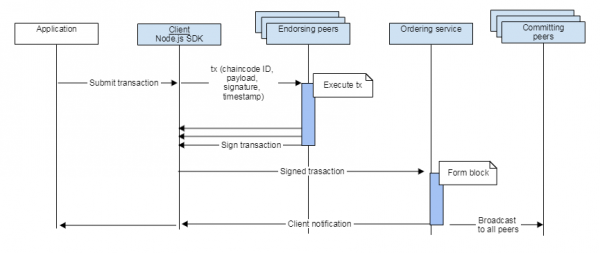
- The application interacts with Hyperledger Fabric using Go, Node.js, or Java SDK;
- The client creates a transaction tx and sends it to the endorsing peers;
- The peer checks the client's signature, executes the transaction, and sends the endorsement signature back to the client. Chaincode is executed only on endorsing peers, and the result of its execution is distributed to all peers. This algorithm is called — PBFT (Practical Byzantine Fault Tolerant) consensus. It differs from in that messages are sent and confirmation is expected not from all participants, but only from a specific set;
- After the client receives a number of responses meeting the endorsement policy, it sends the transaction to the Ordering service;
- The Ordering service forms a block and sends it to all committing peers. The Ordering service ensures the sequential recording of blocks, which eliminates the so-called ledger fork ();
- Peers receive the block, recheck the endorsement policy, write the block to the blockchain, and change the state in the 'World state' DB.
That is, there is a division of roles among nodes. This ensures scalability and security of the blockchain:
- Smart contracts (chaincode) are executed by endorsing peers. This ensures the confidentiality of smart contracts, as they are not stored by all participants, but only by the endorsing peers.
- Ordering must work quickly. This is ensured by the fact that Ordering only forms the block and sends it to a fixed set of leader peers.
- Committing peers only store the blockchain — there can be many of them, and they do not require significant power or instant performance.
For more details on the architectural solutions of Hyperledger Fabric and why it works the way it does, you can check here: or here: .
So, Hyperledger Fabric is indeed a versatile system, with which you can:
- Implement arbitrary business logic using the smart contract mechanism;
- Record and retrieve data from the blockchain database in JSON format;
- Provide and verify access to the API using a Certificate Authority.
Now that we have a bit of an understanding of the specifics of Hyperledger Fabric, let's finally do something useful!
Deploying the blockchain
Task Definition
The task is to implement a Citcoin network with the following functions: create an account, get balance, refill the account, transfer coins from one account to another. Let's draw an object model, which we will later implement in the smart contract. So, we will have accounts that are identified by names (name) and contain a balance (balance), along with a list of accounts. Accounts and the list of accounts are assets in Hyperledger Fabric terminology. Accordingly, they have a history and a current state. I will try to illustrate this visually:
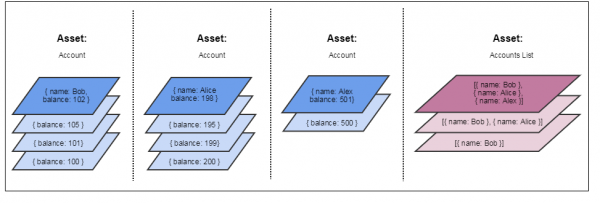
The top figures represent the current state, which is stored in the "World state" database. Below them are figures showing the history stored in the blockchain. The current state of the assets is modified by transactions. An asset can only change entirely, so as a result of executing a transaction, a new object is created, and the current value of the asset goes into history.
IBM Cloud
Create an account in . To use the blockchain platform, you need to upgrade to Pay-As-You-Go. This process may not be quick, as IBM requests additional information and verifies it manually. On a positive note, I can say that IBM has decent educational materials that allow you to deploy Hyperledger Fabric in their cloud. I liked the following series of articles and examples:
The following are screenshots from the IBM Blockchain platform. This is not a guide on how to create a blockchain, but just a demonstration of the scope of the task. So, for our purposes, we create one Organization:
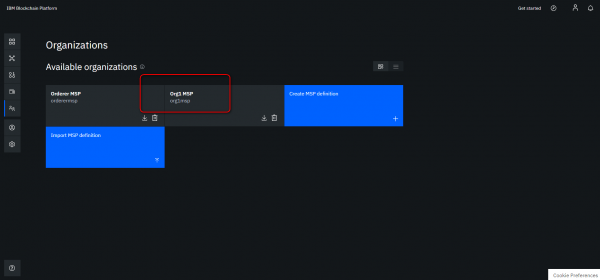
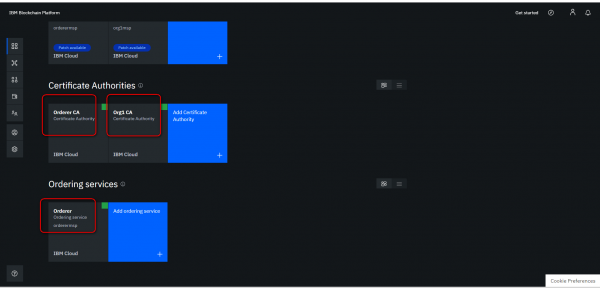
In it, we create nodes: Orderer CA, Org1 CA, Orderer Peer:
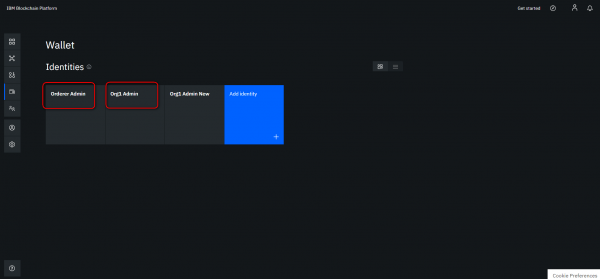
We create users:
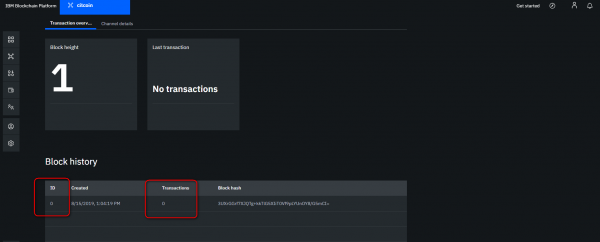
We create a Channel and name it citcoin:
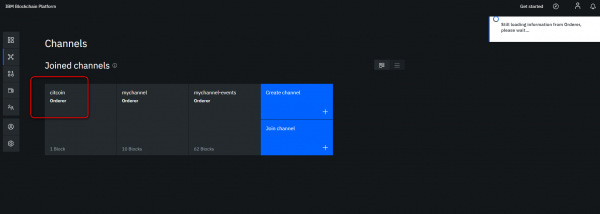
In essence, a Channel is a blockchain, so it starts with a zero block (Genesis block):
Write a Smart Contract
/*
 * Citcoin smart-contract v1.5 for Hyperledger Fabric
 * (c) Alexey Sushkov, 2019
 */

'use strict';

const { Contract } = require('fabric-contract-api');
const maxAccounts = 5;

class CitcoinEvents extends Contract {

    async instantiate(ctx) {
        console.info('instantiate');
        let emptyList = [];
        await ctx.stub.putState('accounts', Buffer.from(JSON.stringify(emptyList)));
    }
    // Get all accounts
    async GetAccounts(ctx) {
        // Get account list:
        let accounts = '{}'
        let accountsData = await ctx.stub.getState('accounts');
        if (accountsData) {
            accounts = JSON.parse(accountsData.toString());
        } else {
            throw new Error('accounts not found');
        }
        return accountsData.toString()
    }
     // add a account object to the blockchain state identifited by their name
    async AddAccount(ctx, name, balance) {
        // this is account data:
        let account = {
            name: name,
            balance: Number(balance),
            type: 'account',
        };
        // create account:
        await ctx.stub.putState(name, Buffer.from(JSON.stringify(account)));

        // Add account to list:
        let accountsData = await ctx.stub.getState('accounts');
        if (accountsData) {
            let accounts = JSON.parse(accountsData.toString());
            if (accounts.length < maxAccounts)
            {
                accounts.push(name);
                await ctx.stub.putState('accounts', Buffer.from(JSON.stringify(accounts)));
            } else {
                throw new Error('Max accounts number reached');
            }
        } else {
            throw new Error('accounts not found');
        }
        // return  object
        return JSON.stringify(account);
    }
    // Sends money from Account to Account
    async SendFrom(ctx, fromAccount, toAccount, value) {
        // get Account from
        let fromData = await ctx.stub.getState(fromAccount);
        let from;
        if (fromData) {
            from = JSON.parse(fromData.toString());
            if (from.type !== 'account') {
                throw new Error('wrong from type');
            }
        } else {
            throw new Error('Accout from not found');
        }
        // get Account to
        let toData = await ctx.stub.getState(toAccount);
        let to;
        if (toData) {
            to = JSON.parse(toData.toString());
            if (to.type !== 'account') {
                throw new Error('wrong to type');
            }
        } else {
            throw new Error('Accout to not found');
        }

        // update the balances
        if ((from.balance - Number(value)) >= 0 ) {
            from.balance -= Number(value);
            to.balance += Number(value);
        } else {
            throw new Error('From Account: not enought balance');
        }

        await ctx.stub.putState(from.name, Buffer.from(JSON.stringify(from)));
        await ctx.stub.putState(to.name, Buffer.from(JSON.stringify(to)));

        // define and set Event
        let Event = {
            type: "SendFrom",
            from: from.name,
            to: to.name,
            balanceFrom: from.balance,
            balanceTo: to.balance,
            value: value
        };
        await ctx.stub.setEvent('SendFrom', Buffer.from(JSON.stringify(Event)));

        // return to object
        return JSON.stringify(from);
    }

    // get the state from key
    async GetState(ctx, key) {
        let data = await ctx.stub.getState(key);
        let jsonData = JSON.parse(data.toString());
        return JSON.stringify(jsonData);
    }
    // GetBalance
    async GetBalance(ctx, accountName) {
        let data = await ctx.stub.getState(accountName);
        let jsonData = JSON.parse(data.toString());
        return JSON.stringify(jsonData);
    }

    // Refill own balance
    async RefillBalance(ctx, toAccount, value) {
        // get Account to
        let toData = await ctx.stub.getState(toAccount);
        let to;
        if (toData) {
            to = JSON.parse(toData.toString());
            if (to.type !== 'account') {
                throw new Error('wrong to type');
            }
        } else {
            throw new Error('Accout to not found');
        }

        // update the balance
        to.balance += Number(value);
        await ctx.stub.putState(to.name, Buffer.from(JSON.stringify(to)));

        // define and set Event
        let Event = {
            type: "RefillBalance",
            to: to.name,
            balanceTo: to.balance,
            value: value
        };
        await ctx.stub.setEvent('RefillBalance', Buffer.from(JSON.stringify(Event)));

        // return to object
        return JSON.stringify(from);
    }
}
module.exports = CitcoinEvents;
Intuitively, everything here should be clear:
- There are several functions (AddAccount, GetAccounts, SendFrom, GetBalance, RefillBalance) that the demo program will call using the Hyperledger Fabric API.
- The functions SendFrom and RefillBalance generate events (Event) that the demo program will receive.
- The instantiate function is called once when the smart contract is instantiated. In fact, it is called not just once but each time the smart contract version is changed. Therefore, initializing the list with an empty array is a bad idea, as we will lose the current list when the smart contract version changes. But it’s okay; I'm just learning).
- Accounts and the account list (accounts) are JSON data structures. JS is used for data manipulation.
- You can obtain the current value of an asset by calling the getState function, and update it with putState.
- When creating an Account, the AddAccount function is called, where a comparison is made against the maximum number of accounts in the blockchain (maxAccounts = 5). Here’s a flaw (did you notice it?) that leads to an infinite increase in the number of accounts. Such errors should be avoided)
Next, we load the smart contract into the Channel and instantiate it:
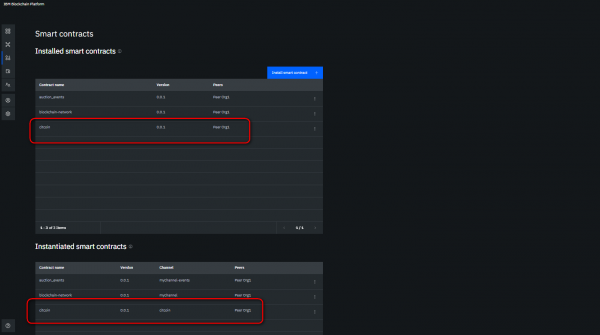
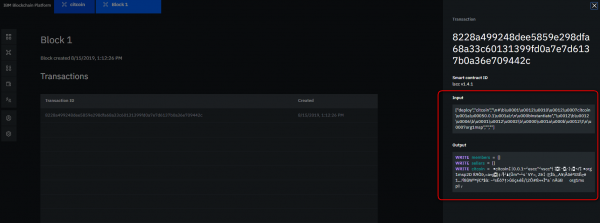
We look at the transaction for installing the Smart Contract:
We look at the details of our Channel:
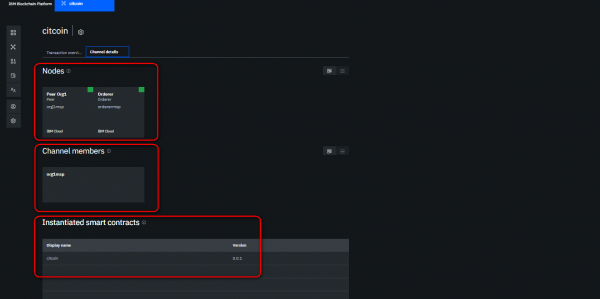
As a result, we get the following schema of the blockchain network in the IBM cloud. Also in the diagram is a demo program running in the Amazon cloud on a virtual server (details about it will be in the next section):
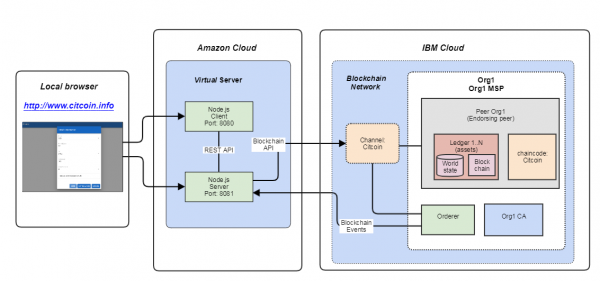
Creating a GUI for calling Hyperledger Fabric API
Hyperledger Fabric has an API that can be used for:
- Creating a channel;
- Connecting a peer to a channel;
- Installing and instantiating smart contracts in a channel;
- Calling transactions;
- Requesting information from the blockchain.
Application development
In our demo program, we will use the API only for calling transactions and requesting information, as we have already completed the other steps using the IBM blockchain platform. We are writing a GUI using the standard technology stack: Express.js + Vue.js + Node.js. A separate article could be written about how to start creating modern web applications. Here is a link to a series of lectures that I liked the most: . As a result, we achieved a client-server application with a familiar graphical interface in Google's Material Design style. The REST API between the client and server consists of several calls:
- HyperledgerDemo/v1/init — initialize the blockchain;
- HyperledgerDemo/v1/accounts/list — get the list of all accounts;
- HyperledgerDemo/v1/account?name=Bob&balance=100 — create Bob's account;
- HyperledgerDemo/v1/info?account=Bob — get information about Bob's account;
- HyperledgerDemo/v1/transaction?from=Bob&to=Alice&volume=2 — transfer two coins from Bob to Alice;
- HyperledgerDemo/v1/disconnect — close the connection to the blockchain.
I placed the API description with examples on — a well-known program for testing HTTP APIs.
Demo application in the Amazon cloud
I uploaded the application to Amazon since IBM still hasn't upgraded my account and allowed me to create virtual servers. As a cherry on top, I attached the domain: . I will keep the server on for a bit, then turn it off since the rental costs are accumulating and citcoin coins are not yet listed on the exchange. I am including screenshots of the demo in the article to illustrate the workflow. The demo application can:
- Initialize the blockchain;
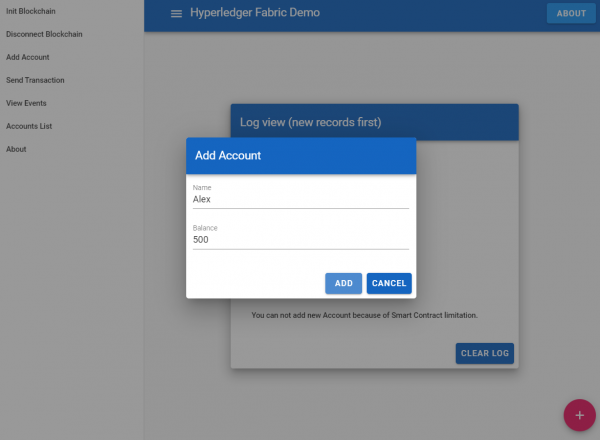
- Create an Account (but currently, a new Account cannot be created as the maximum number of accounts defined in the smart contract has been reached);
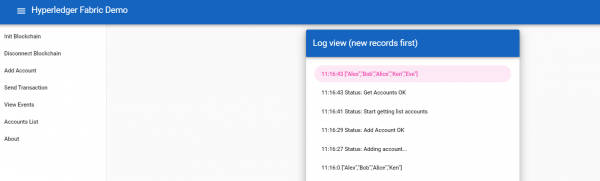
- Fetch the list of Accounts;
- Transfer citcoin coins between Alice, Bob, and Alex;
- Fetch events (but currently events cannot be displayed, so for simplicity, it’s stated in the interface that events are not supported);
- Log actions.
First, we initialize the blockchain:
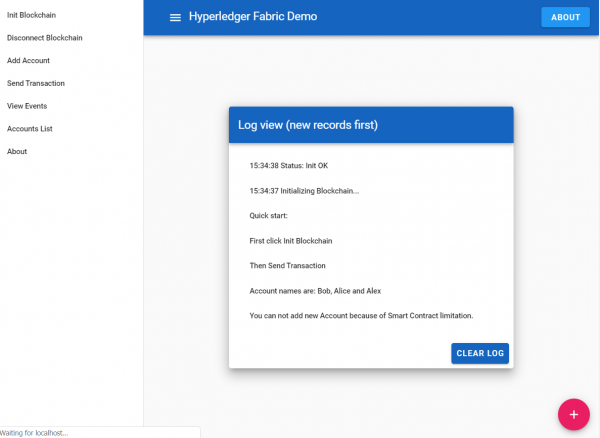
Next, we create our account, not skimping on the balance:
We retrieve the list of all available accounts:
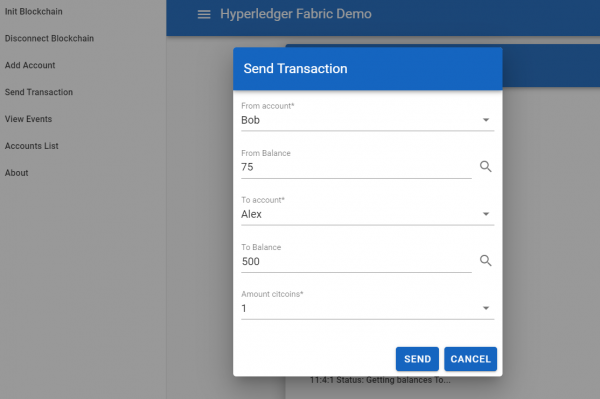
We select a sender and receiver, obtaining their balances. If the sender and receiver are the same, their balance will be topped up:
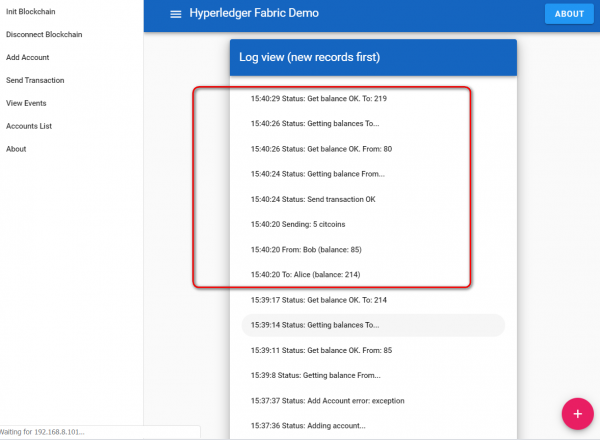
We monitor transaction execution in the log:
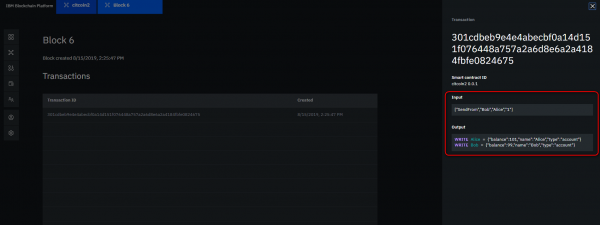
That’s all with the demo program. Next, we can view our transaction on the blockchain:
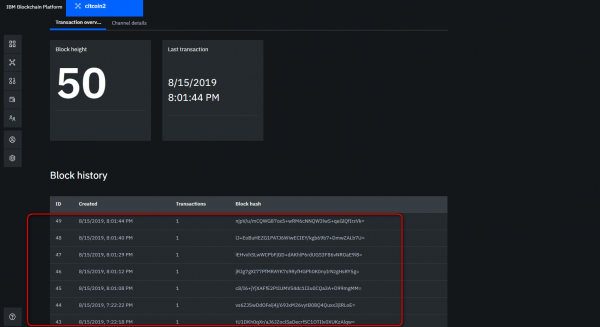
And the overall list of transactions:
With that, we have successfully completed the PoC for creating the Citcoin network. What else needs to be done for Citcoin to become a full-fledged coin transfer network? Just a bit more:
- At the account creation stage, implement the generation of private/public keys. The private key should be stored by the account user, while the public key should be in the blockchain.
- Make a coin transfer where the user is identified not by name, but by the public key.
- Encrypt transactions going from the user to the server with their private key.
Conclusion
We have implemented the Citcoin network with features: add account, check balance, top up account, transfer coins from one account to another. So, what did it cost us to build the PoC?
- We need to study blockchain in general and Hyperledger Fabric in particular;
- Learn to use IBM or Amazon clouds;
- Learn the JavaScript programming language and some web framework;
- If any data needs to be stored not in the blockchain, but in a separate database, learn to integrate with PostgreSQL, for example;
- And lastly, but not the least — without knowledge of Linux, you can't go far in today's world!)
Of course, it's not rocket science, but it will require some effort!
Source code on GitHub
I've placed the source code on . Brief description of the repository:
Catalog “server” — Node.js server
Catalog “client” — Node.js client
Catalog “blockchain” (the parameter values and keys, of course, are non-functional and provided only as examples):
- contract — the source of the smart contract
- wallet — user keys for using the Hyperledger Fabric API.
- *.cds — compiled versions of smart contracts
- *.json files — sample configuration files for using the Hyperledger Fabric API
It’s only the beginning!
Source: habr.com
