

I have always been curious about how to better organize books in my electronic library. Eventually, I arrived at a solution that includes automatic page count and other features. Everyone interested, please read on.
Part 1. Dropbox
All my books are stored on Dropbox. I have divided them into four categories: Textbooks, Reference, Fiction, Non-Fiction. However, I don't add reference books to the table.
Most of the books are in .epub format, the rest are .pdf. So the final solution needs to accommodate both formats.
Here are the paths to my books:
/Книги/Нехудожественное/Новое/Дизайн/Юрий Гордон/Книга про буквы от А до Я.epub If the book is fictional, then the category (meaning 'Design' in the previous case) is omitted.
I decided not to bother with the Dropbox API since I have their app that syncs the folder. So the plan is: we take the books from the folder, process each book through the word counter, and add it to Notion.
Part 2. Adding a Row
The table should look something like this. NOTE: it's better to name the columns in Latin characters.
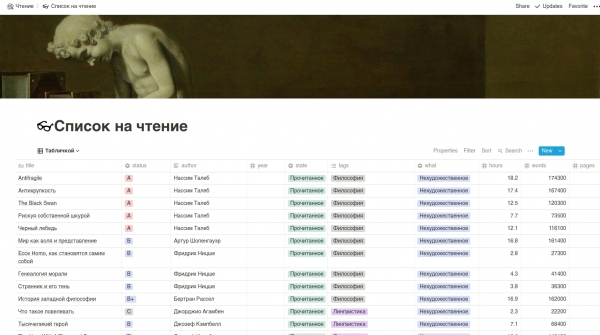
We will use the unofficial Notion API since the official one hasn't been released yet.

Go to Notion, press Ctrl + Shift + J, navigate to Application -> Cookies, copy token_v2 and call it TOKEN. Then go to the desired page with the library table and copy the link. Call it NOTION.
Next, we write the code to connect to Notion.
database = client.get_collection_view(NOTION)
current_rows = database.default_query().execute()
Next, let's write a function to add a row to the table.
def add_row(path, file, words_count, pages_count, hours):
    row = database.collection.add_row()
    row.title = file

    tags = path.split("/")

    if len(tags) >= 1:
        row.what = tags[0]

    if len(tags) >= 2:
        row.state = tags[1]

    if len(tags) >= 3:
        if tags[0] == "Fiction":
            row.author = tags[2]

        elif tags[0] == "Non-Fiction":
            row.tags = tags[2]

        elif tags[0] == "Textbooks":
            row.tags = tags[2]

    if len(tags) >= 4:
        row.author = tags[3]

    row.hours = hours
    row.pages = pages_count
    row.words = words_count
What’s happening here? We take and add a new row to the table in the first position. Then we split our path by '/' and get the tags. Tags refer to 'Fiction', 'Design', the author, and so on. After that, we set all the necessary fields in the table.
Part 3. Counting Words, Hours, and Other Features
This is a trickier task. As we remember, we have two formats: EPUB and PDF. If the EPUB format is straightforward — it likely contains words, then the PDF format is not so clear: it might just consist of glued images.
So, our function for counting words in the PDF will look like this: we take the number of pages and multiply it by a certain constant (the average number of words per page).
Here it is:
def get_words_count(pages_number):
    return pages_number * WORDS_PER_PAGE
This WORDS_PER_PAGE for an A4 page is approximately 300.
Now, let's write a function to count the pages. We'll use .
def get_pdf_pages_number(path, filename):
    pdf = PdfFileReader(open(os.path.join(path, filename), 'rb'))
    return pdf.getNumPages()
Next, we'll write something to count the pages in the EPUB. We'll use . Here, we take the book, convert it into lines, and for each line, we count the words.
def get_epub_pages_number(path, filename):
    book = open_book(os.path.join(path, filename))
    lines = convert_epub_to_lines(book)
    words_count = 0

    for line in lines:
        words_count += len(line.split(" "))

    return round(words_count / WORDS_PER_PAGE)
Now let's calculate the reading time. We take our favorite word count and divide it by your reading speed.
def get_reading_time(words_count):
    return round(((words_count / WORDS_PER_MINUTE) / 60) * 10) / 10
Part 4. Putting all parts together
We need to go through all possible paths in our book folder. Check if the book is already in Notion: if it is — we don’t need to create a row.
Then we need to determine the file type, and based on that, count the number of words. Finally, add the book.
Here is the code we end up with:
for root, subdirs, files in os.walk(BOOKS_DIR):
    if len(files) > 0 and check_for_excusion(root):
        for file in files:
            array = file.split(".")
            filetype = file.split(".")[len(array) - 1]
            filename = file.replace("." + filetype, "")
            local_root = root.replace(BOOKS_DIR, "")

            print("Dir: {}, file: {}".format(local_root, file))

            if not check_for_existence(filename):
                print("Dir: {}, file: {}".format(local_root, file))

                if filetype == "pdf":
                    count = get_pdf_pages_number(root, file)

                else:
                    count = get_epub_pages_number(root, file)

                words_count = get_words_count(count)
                hours = get_reading_time(words_count)
                print("Pages: {}, Words: {}, Hours: {}".format(count, words_count, hours))
                add_row(local_root, filename, words_count, count, hours)
And the function to check if the book has been added looks like this:
def check_for_existence(filename):
    for row in current_rows:
        if row.title in filename:
            return True

        elif filename in row.title:
            return True

    return False
Conclusion
Thank you to everyone who read this article. I hope it helps you read more 🙂
Source: habr.com
