

Today we will begin our study of routing with the OSPF protocol. This topic, like the examination of the EIGRP protocol, is crucial throughout the entire CCNA course. As you can see, section 2.4 is titled 'Configuration, Verification, and Troubleshooting of Single Area and Multi-Area OSPFv2 for IPv4 (excluding authentication, filtering, manual route summarization, redistribution, stub area, virtual network, and LSA).'
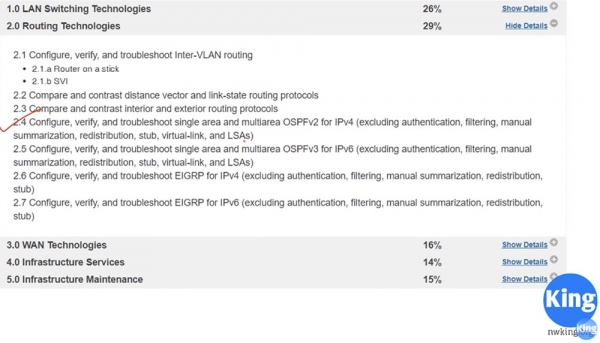
The topic of OSPF is quite extensive, so it will take 2, possibly 3 video lessons. Today's lesson will focus on the theoretical side of the matter; I will explain what this protocol is about in general terms and how it works. In the next video, we will move to the configuration mode for OSPF using Packet Tracer.
So, in this lesson, we will cover three things: what OSPF is, how it works, and what OSPF areas are. In the previous lesson, we mentioned that OSPF is a Link State routing protocol that examines communication links between routers and makes decisions based on the speed of these links. A long link with a higher speed, that is, with greater bandwidth, will be prioritized over a short link with lower bandwidth.
The RIP protocol, being distance-vector, will choose a one-hop path even if that link has low speed, whereas the OSPF protocol will select a longer route with multiple hops if the total speed on that route is higher than the traffic speed on the shorter route.
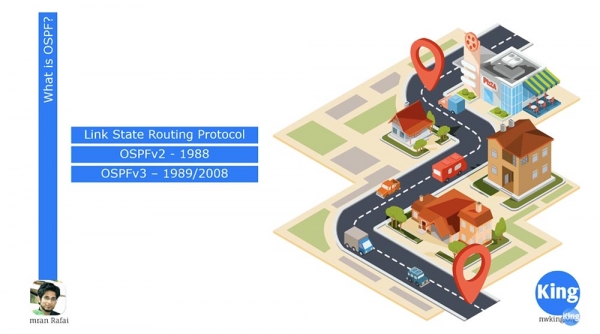
Later we will discuss the decision-making algorithm; for now, you should remember that OSPF is a Link State protocol. This open standard was created in 1988, allowing any network equipment manufacturer and network provider to implement it. Therefore, OSPF is much more popular than EIGRP.
OSPF version 2 supports only IPv4, and a year later, in 1989, developers announced the release of version 3, which supports IPv6. However, the fully functional third version of OSPF for IPv6 only appeared in 2008. Why was OSPF chosen? In the last lesson, we learned that this interior gateway protocol converges routes much faster than RIP. It is a classless protocol.
As you may recall, RIP is a classful protocol, meaning it does not transmit subnet mask information. If it encounters an IP address of class A/24, it will not accept it. For example, if you present it with an IP address like 10.1.1.0/24, it will interpret it as the network 10.0.0.0, because it does not understand when a network is divided into subnets using more than one subnet mask.
OSPF is a secure protocol. For instance, if two routers exchange OSPF information, you can configure authentication so that sharing information with a neighboring router can only occur after entering a password. As mentioned earlier, this is an open standard, and many networking equipment manufacturers utilize OSPF.
Globally, OSPF serves as a mechanism for exchanging Link State Advertisement announcements, or LSA. LSA messages are generated by a router and contain a lot of information: a unique router identifier (router-id), details about the networks known to the router, their cost, and so on. All this information is necessary for the router to make routing decisions.
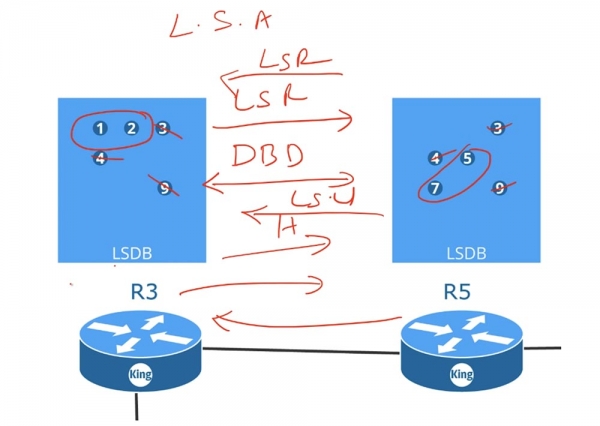
Router R3 sends its LSA information to router R5, and router R5 shares its LSA information back with R3. These LSAs represent a data structure that forms the Link State Data Base (LSDB). The router collects all received LSAs and places them in its LSDB. Once both routers have created their databases, they exchange Hello messages to discover neighbors and proceed to compare their LSDBs.
Router R3 sends a DBD message, or 'Database Description', to router R5, and R5 sends its DBD back to router R3. These messages contain the indices of LSAs present in each router's databases. Upon receiving the DBD, router R3 sends a Link State Request (LSR) to router R5, stating: 'I already have messages 3, 4, and 9, so please send me only 5 and 7.'
R5 does the same, informing the third router: "I have information 3, 4, and 9, so send me 1 and 2." Upon receiving the LSR requests, the routers send back network state update packets (LSU), meaning in response to its LSR, the third router receives an LSU from router R5. Once the routers update their databases, all of them, even if you have 100 routers, will have identical LSDBs. Once the LSDB databases are created in the routers, each one will know about the entire network as a whole. The OSPF protocol employs the Shortest Path First algorithm to formulate the routing table, so a crucial condition for its correct operation is the synchronization of LSDB across all devices in the network.
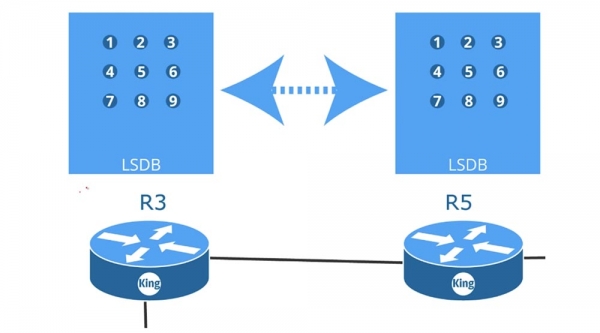
The diagram shows 9 routers, each exchanging LSR, LSU, and so on with their neighbors. They are all connected to each other via point-to-point interfaces that support the OSPF protocol and interact with one another with the goal of creating identical LSDBs.
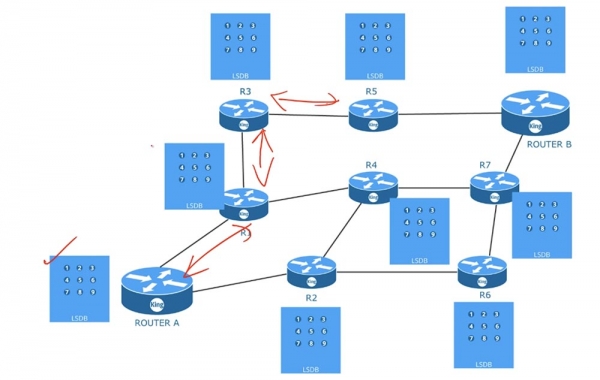
Once the databases are synchronized, each router, using the shortest path algorithm, formulates its routing table. The tables will differ among routers. That is, all routers use the same LSDB but create routing tables based on their own calculations of the shortest paths. To utilize this algorithm, OSPF requires regular updates to the LSDB.
Thus, for its own functioning, OSPF must first ensure three conditions: find neighbors, create and update the LSDB, and form the routing table. To fulfill the first condition, the network administrator may need to manually configure the router-id, timings, or wildcard mask. In the next video, we will discuss configuring a device for OSPF operation; for now, you should know that this protocol uses a reverse mask, and if it does not match, if your subnets do not match, or if authentication does not match, the router neighbors will not be able to form. Therefore, when troubleshooting OSPF operation, you should determine why the neighborhood is not forming, that is, check the agreement of the above parameters.
As a network administrator, you do not participate in the process of creating an LSDB. Database updates occur automatically after the formation of router adjacencies, just as the routing tables are built. All of this is handled by the device itself, configured to work with the OSPF protocol.
Let's consider an example. We have 2 routers, which I've assigned the identifiers RID 1.1.1.1 and 2.2.2.2 for simplicity. As soon as we connect them, the link channel will immediately go into the up state, because I first configured these routers to work with OSPF. Once the communication channel is established, router A will immediately send a Hello packet to the second router. This packet will contain information that this router has not yet 'seen' anyone on this channel, as it is sending Hello for the first time, along with its own identifier, data about the network it is connected to, and other information it can share with its neighbor.
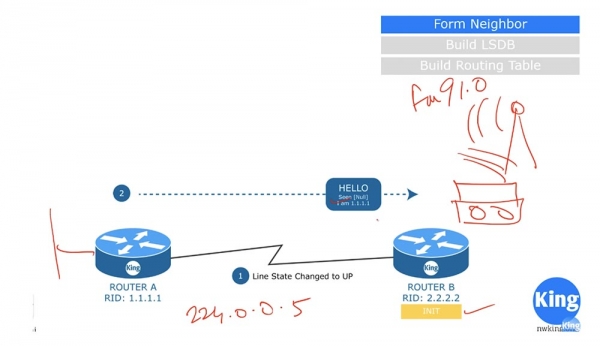
Upon receiving this packet, router B will say, 'I see that there is a potential candidate for adjacency on this OSPF link' and will transition to the Init state. The Hello packet is not a unicast or broadcast message; it is a multicast packet sent to the multicast OSPF IP address 224.0.0.5. Some people ask what the subnet mask is for multicast. The thing is, multicast does not have a subnet mask; it spreads like a radio signal that can be heard by all devices tuned to its frequency. For example, if you want to listen to FM radio broadcasting at 91.0, you tune your radio receiver to that frequency.
Similarly, router B is configured to receive messages for the multicast address 224.0.0.5. By listening to this channel, it receives the Hello packet sent by router A and responds with its own message.
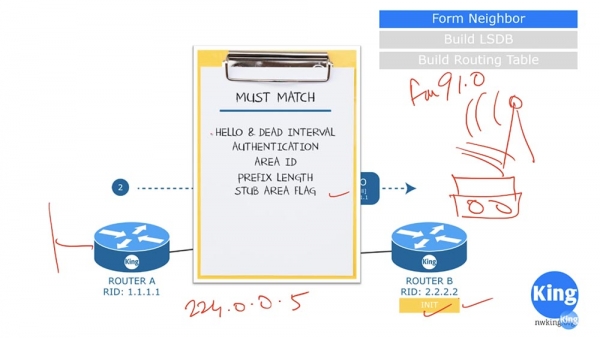
In this case, adjacency can only be established if router B's response meets a set of criteria. The first criterion is that the frequency of Hello message sending and the Dead Interval waiting time for a response must match on both routers. Typically, the Dead Interval is equal to several Hello timer values. Thus, if router A's Hello Timer is 10 seconds and router B sends a message to it after 30 seconds while the Dead Interval is set to 20 seconds, adjacency will not be established.
The second criterion is that both routers must use the same authentication type. Accordingly, the authentication passwords must also match.
The third criterion is the matching of the zone identifiers Arial ID, and the fourth is the matching of the network prefix length. If router A reports a prefix of /24, then router B must also have a network prefix of /24. In the next video, we will discuss this in more detail, but for now, I’d like to point out that this is not a subnet mask; here, the routers use a Wildcard mask. And of course, the Stub area flags must also match if the routers are in that area.
After verifying these criteria, if they match, router B sends its Hello packet to router A. Unlike message A, router B indicates that it has seen router A and introduces itself.
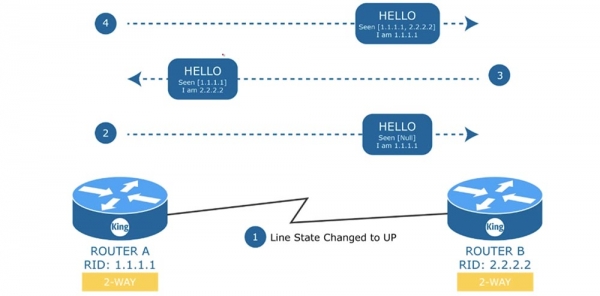
In response to this message, router A sends another Hello to router B, confirming that it has also seen router B, and that the communication channel between them consists of devices 1.1.1.1 and 2.2.2.2, while it is device 1.1.1.1 itself. This is a very important stage in establishing adjacency. In this case, a bidirectional connection 2-WAY is used, but what happens if we have a switch with a distributed network of 4 routers? In such a 'shared' environment, one of the routers must act as a Designated Router (D.R.), and the other as a Backup Designated Router (B.D.R.).
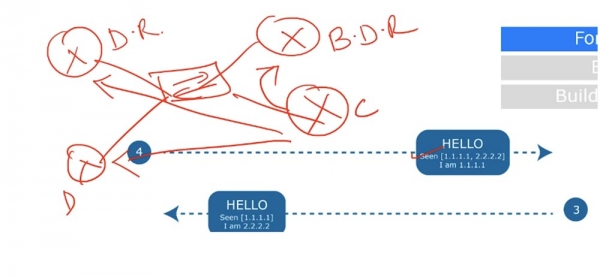
Each of these devices will form a Full connection, or a state of full adjacency. We will explore what that means later; however, this type of connection will only be established with the D.R. and B.D.R., while the two lower routers D and B will still communicate with each other using a point-to-point connection scheme.
That is, with the D.R. and B.D.R., all routers establish a relationship of full adjacency, while with each other, they have a point-to-point connection. This is very important because, with a bidirectional connection between adjacent devices, all parameters of the Hello packet must match. In our case, everything matches, so the devices form adjacency without any issues.
Once the bidirectional communication is established, Router A sends a Database Description packet to Router B and enters the ExStart state—beginning the exchange or waiting for the download. The Database Descriptor contains information similar to a table of contents—it is a list of everything in the routing database. In response, Router B sends its database description to Router A and enters the Exchange state. If, in the Exchange state, the router discovers that some information is missing from its database, it will transition to the LOADING state and begin exchanging LSR, LSU, and LSA messages with its neighbor.
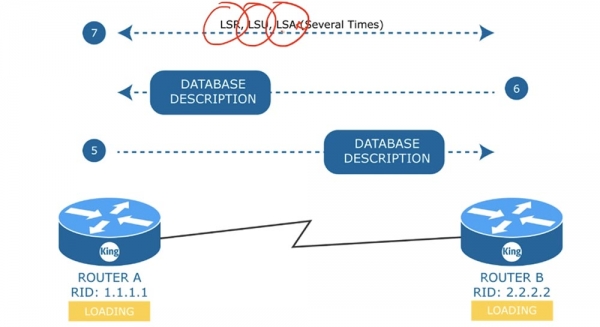
Thus, Router A will send an LSR to its neighbor, who will reply with an LSU packet, which Router A will respond to Router B with an LSA message. This exchange will occur as many times as the devices wish to exchange LSA messages. The LOADING state means that a complete update of the LSA database has not yet occurred. Once all data is loaded, both devices will transition to the FULL adjacency state.
I would like to note that in a bidirectional connection, the devices are simply in a neighbor state, while the FULL adjacency state can only be between the routers, D.R. and B.D.R. This means that each router informs D.R. of changes in the network, and all routers learn about these changes from D.R.
The election of D.R. and B.D.R. is an important matter. Let’s consider how D.R. is elected in a common environment. Suppose there are three routers and a switch in our scheme. First, OSPF devices compare the priority in Hello messages, and then compare the Router IDs.
The device with the highest priority becomes the D.R. If two devices have the same priority, the one with the highest Router ID is selected to become the D.R.
The backup designated router, B.D.R., becomes the device with the second highest priority or the second highest Router ID. If the D.R. fails, it will be immediately replaced by the B.D.R. It will start functioning as the D.R., and the system will select another B.D.R.
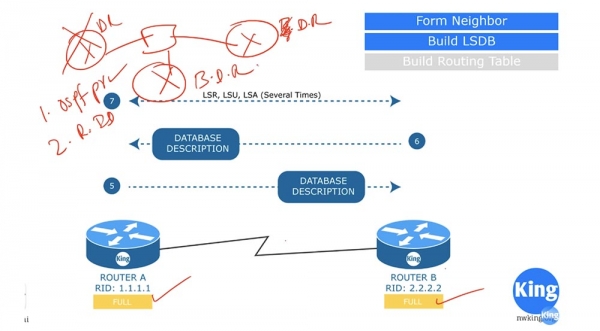
I hope you have understood the selection of D.R. and B.D.R. If not, I will revisit this topic in one of the upcoming videos and explain this process.
So, we have looked at what Hello, the Database Descriptor, and the messages LSR, LSU, and LSA represent. Before moving on to the next topic, let's talk a bit about the cost of OSPF.
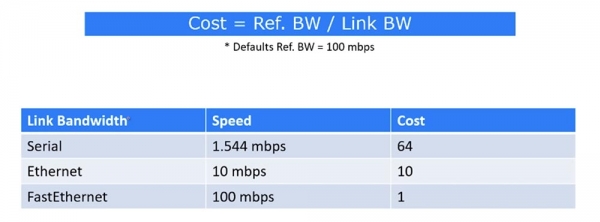
In Cisco, the route cost is calculated using the formula of the ratio of the Reference bandwidth, which by default is set to 100 Mbps, to the cost of the link. For example, when devices are connected via a serial port with a speed of 1.544 Mbps, the cost will be 64. In the case of an Ethernet connection at a speed of 10 Mbps, the cost is 10, and for a FastEthernet connection at 100 Mbps, the cost will be 1.
When using Gigabit Ethernet, we have a speed of 1000 Mbps; however, in this case, the speed is always considered to be 1. Therefore, if you have Gigabit Ethernet in your network, you should change the default Ref. BW value to 1000. In this case, the cost will be 1, and the entire table will be recalculated with costs increased by a factor of 10. After we have formed the adjacency and built the LSDB, we proceed to build the routing table.
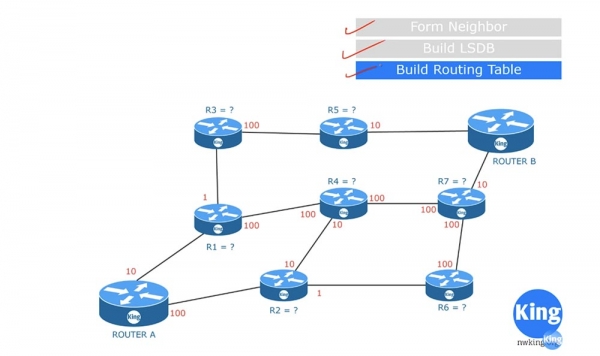
After receiving the LSDB, each router independently begins to create a list of routes using the SPF algorithm. In our scheme, router A will create such a table for itself. For example, it calculates the cost of the route A-R1 as 10. To simplify the understanding of the scheme, let's assume that router A determines the optimal route to router B. The cost of the connection A-R1 is 10, the connection A-R2 is 100, and the cost of the route A-R3 is 11, which is the sum of the route A-R1 (10) and R1-R3 (1).
If router A wants to reach router R4, it can do so either via the route A-R1-R4 or via the route A-R2-R4, with both routes having the same cost: 10 + 100 = 100 + 10 = 110. The route A-R6 will cost 100 + 1 = 101, which is already better. Next, we consider the path to router R5 through the route A-R1-R3-R5, which will have a cost of 10 + 1 + 100 = 111.
The path to router R7 can be laid out through two routes: A-R1-R4-R7 or A-R2-R6-R7. The cost of the first will be 210, while the second will be 201, so we should choose 201. Therefore, to reach router B, router A can use 4 routes.
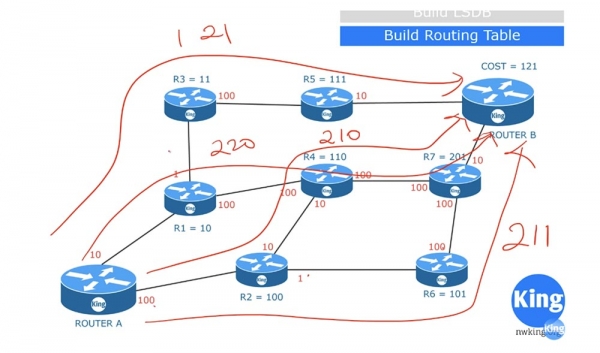
The cost of route A-R1-R3-R5-B will be 121. Route A-R1-R4-R7-B will cost 220. Route A-R2-R4-R7-B costs 210, and A-R2-R6-R7-B has a cost of 211. Based on this, router A will choose the route with the lowest cost, which is 121, and will place it in the routing table. This is a very simplified diagram of how the SPF algorithm works. In reality, the routing table contains not only the identifiers of the routers through which the optimal route passes, but also the identifiers of the ports that connect them and all other necessary information.
Let’s consider another topic related to routing zones. Typically, when configuring OSPF on company devices, they all reside in a common area.
What will happen if a device connected to router R3 suddenly fails? Router R3 will immediately start sending messages to routers R5 and R1 stating that the link to this device is no longer operational, and all routers will begin exchanging updates regarding this event.
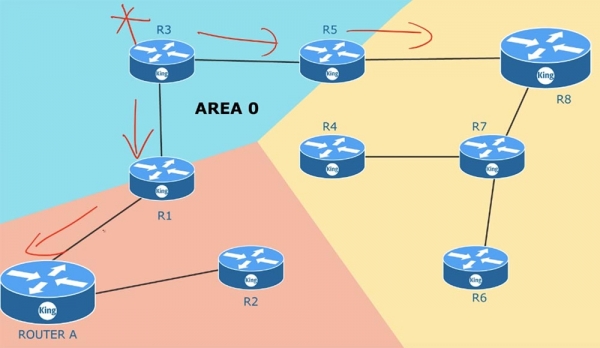
If you have 100 routers, then all of them will update their information about the status of the links because they are in a common area. The same will happen if one of the neighboring routers fails – all devices in the area will exchange LSA updates. After such messages are exchanged, the network topology will change. As soon as this occurs, SPF will recalculate the routing tables according to the changed conditions. This is a very extensive process, and if you have a thousand devices in one area, you need to monitor the memory size of routers to ensure it is sufficient for storing all LSAs and the large link-state database (LSDB). As soon as changes occur in any part of the area, the SPF algorithm immediately recalculates the routes. By default, LSA updates every 30 minutes. This process occurs on all devices not simultaneously, however, updates are carried out by each router every 30 minutes regardless. The more network devices there are, the more memory and time are required to update the LSDB.
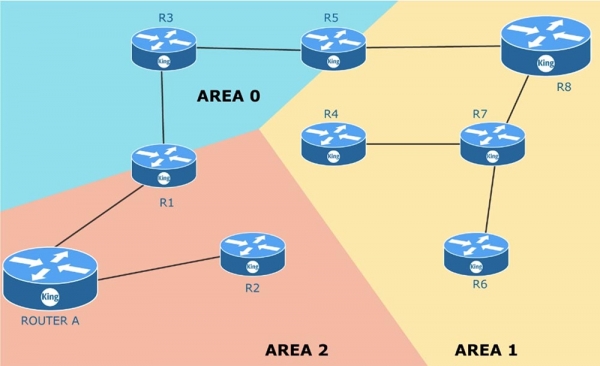
You can resolve this issue by dividing one common area into several separate areas, that is, by using multi-zoning. For this, you should have a plan or diagram of the entire network you manage. The zero area AREA 0 is your main area. This is where the connection to the external network takes place, for example, access to the Internet. When creating new zones, you should follow the rule: each zone must have one Area Border Router (ABR). The border router has one interface in one zone and a second interface in another zone. For example, router R5 has interfaces in zone 1 and zone 0. As I mentioned, each zone must be connected to the zero area, meaning it must have a border router, one of whose interfaces is connected to AREA 0.
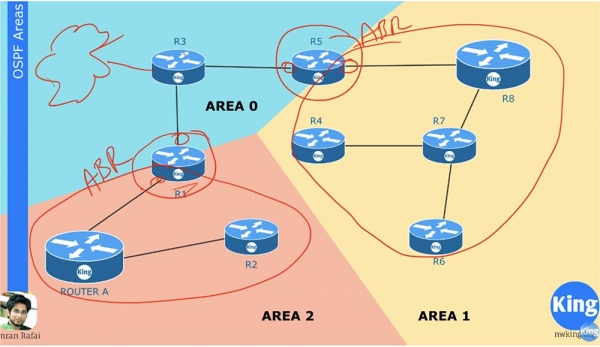
Let's assume that the connection R6-R7 has failed. In this case, LSA updates will only propagate within zone AREA 1 and will only concern this zone. Devices in zone 2 and zone 0 will not even be aware of this. The border router R5 aggregates the information about what is happening in its zone and sends summarized network status information to the main zone AREA 0. Devices in one zone do not need to know about all the changes in LSA within other zones, because the ABR router will forward summarized route information from one zone to another.
If you are not completely clear about the concept of zones, you will learn more in the upcoming lessons when we set up OSPF routing and review some examples.
Thank you for staying with us. Do you enjoy our articles? Would you like to see more interesting materials? Support us by placing an order or recommending us to your friends. 30% discount for Habr users on a unique entry-level server designed by us for you: (options available with RAID1 and RAID10, up to 24 cores and up to 40GB DDR4).
Dell R730xd for half the price? Only with us in the Netherlands! Dell R420 — 2x E5-2430 2.2GHz 6C 128GB DDR3 2x960GB SSD 1Gbps 100TB — from $99! Read about how
Source: habr.com
