


Sooner or later, in the operation of any system, the question of security arises: ensuring authentication, separation of rights, auditing, and other tasks. For Kubernetes, a , which allow compliance with standards even in highly demanding environments… This material is dedicated to the basic aspects of security implemented within the built-in mechanisms of K8s. Primarily, it will be useful for those who are just starting to familiarize themselves with Kubernetes, serving as a starting point for studying security-related issues.
Authentication
In Kubernetes, there are two types of users:
- Service Accounts — accounts managed by the Kubernetes API;
- Users — "normal" users managed by external, independent services.
The main difference between these types is that there are special objects for Service Accounts in the Kubernetes API (they are called ServiceAccounts), which are tied to a namespace and a set of authorization credentials stored in the cluster in objects of type Secrets. Such users (Service Accounts) are primarily designed for managing access rights to the Kubernetes API for processes running in the Kubernetes cluster.
Ordinary Users, on the other hand, do not have entries in the Kubernetes API: their management should be carried out by external mechanisms. They are intended for people or processes residing outside the cluster.
Each request to the API is tied either to a Service Account, or to a User, or is considered anonymous.
User authentication data includes:
- Username — username (case-sensitive!);
- UID — a machine-readable string that identifies the user, which is "more consistent and unique than a username";
- Groups — a list of groups to which the user belongs;
- Extra — additional fields that may be used by the authorization mechanism.
Kubernetes can use a large number of authentication mechanisms: X509 certificates, Bearer tokens, authenticating proxies, HTTP Basic Auth. With these mechanisms, a wide range of authorization schemes can be implemented: from a static file with passwords to OpenID OAuth2.
Moreover, the use of multiple authorization schemes simultaneously is allowed. By default, the cluster uses:
- service account tokens — for Service Accounts;
- X509 — for Users.
The question of managing ServiceAccounts falls outside the scope of this article, and I recommend those interested in learning more to start with . We will focus on the issue of X509 certificate usage.
User certificates (X.509)
The traditional way of working with certificates involves:
- key generation:
mkdir -p ~/mynewuser/.certs/ openssl genrsa -out ~/.certs/mynewuser.key 2048 - certificate request generation:
openssl req -new -key ~/mynewuser/.certs/mynewuser.key -out ~/mynewuser/.certs/mynewuser.csr -subj "/CN=mynewuser/O=company" - processing the certificate request using the Kubernetes cluster CA keys, obtaining the user certificate (to obtain the certificate, you must use an account that has access to the Kubernetes cluster certificate authority key, which is by default located at
/etc/kubernetes/pki/ca.key):openssl x509 -req -in ~/mynewuser/.certs/mynewuser.csr -CA /etc/kubernetes/pki/ca.crt -CAkey /etc/kubernetes/pki/ca.key -CAcreateserial -out ~/mynewuser/.certs/mynewuser.crt -days 500 - creating a configuration file:
- description of the cluster (specify the address and location of the CA certificate file for the specific cluster installation):
kubectl config set-cluster kubernetes --certificate-authority=/etc/kubernetes/pki/ca.crt --server=https://192.168.100.200:6443 - or — as do nota recommended option — you can omit specifying the root certificate (then kubectl will not verify the api-server of the cluster):
kubectl config set-cluster kubernetes --insecure-skip-tls-verify=true --server=https://192.168.100.200:6443 - adding a user to the configuration file:
kubectl config set-credentials mynewuser --client-certificate=.certs/mynewuser.crt --client-key=.certs/mynewuser.key - adding a context:
kubectl config set-context mynewuser-context --cluster=kubernetes --namespace=target-namespace --user=mynewuser - setting the default context:
kubectl config use-context mynewuser-context
- description of the cluster (specify the address and location of the CA certificate file for the specific cluster installation):
After the aforementioned steps, the file .kube/config will contain a configuration of the form:
apiVersion: v1
clusters:
- cluster:
    certificate-authority: /etc/kubernetes/pki/ca.crt
    server: https://192.168.100.200:6443
  name: kubernetes
contexts:
- context:
    cluster: kubernetes
    namespace: target-namespace
    user: mynewuser
  name: mynewuser-context
current-context: mynewuser-context
kind: Config
preferences: {}
users:
- name: mynewuser
  user:
    client-certificate: /home/mynewuser/.certs/mynewuser.crt
    client-key: /home/mynewuser/.certs/mynewuser.key
To facilitate the transfer of the config between accounts and servers, it is useful to edit the values of the following keys:
-
certificate-authority -
client-certificate -
client-key
For this, you can encode the files indicated in them using base64 and include them in the config, adding the suffix -data, i.e. resulting in certificate-authority-data ".
Certificates with kubeadm
With the release of Working with certificates has become significantly easier thanks to the alpha version of its support in For example, here's how the generation of a configuration file with user keys might look now:
kubeadm alpha kubeconfig user --client-name=mynewuser --apiserver-advertise-address 192.168.100.200 NB: The required advertise address can be found in the api-server config, which is by default located at /etc/kubernetes/manifests/kube-apiserver.yaml.
The resulting config will be output to stdout. It needs to be saved in ~/ .kube / config the user's account or in a file specified by the environment variable KUBECONFIG.
Dig deeper
For those wishing to delve deeper into the described issues:
- on working with certificates in the official Kubernetes documentation;
- , which addresses the topic of certificates from a practical perspective.
- on authentication in Kubernetes.
Authorization
The default authorized account does not have permissions for actions in the cluster. To grant permissions, Kubernetes has implemented an authorization mechanism.
Until version 1.6, Kubernetes used an authorization type called ABAC (Attribute-based access control). Details can be found in . This approach is currently considered legacy; however, you can still use it alongside other authorization types.
The current (and more flexible) way of managing access rights in the cluster is called RBAC (). It was declared stable in version RBAC implements a rights model where everything that is not explicitly allowed is denied.
To enable RBAC, you need to run the Kubernetes api-server with the parameter --authorization-mode=RBAC.Parameters are set in the api-server configuration manifest, which by default is located at /etc/kubernetes/manifests/kube-apiserver.yaml, in the section command. However, by default RBAC is already enabled, so there's likely no need to worry about this: you can check this by reviewing the value of authorization-mode in the already mentioned kube-apiserver.yaml). By the way, among its values, there may be other types of authorization (node, a webhook, always allow), but we will leave their discussion outside the scope of this material.
By the way, we have already published a detailed account of the principles and specifics of working with RBAC, so I will now limit myself to a brief list of basics and examples.
For managing access in Kubernetes through RBAC, the following API entities are used:
-
RoleandClusterRole— roles that serve to describe access rights: -
Roledescribes permissions within a namespace; -
ClusterRole— within the cluster, including cluster-specific objects like nodes, non-resource URLs (i.e., not related to Kubernetes resources — for example,/version,/logs,/api*); -
RoleBindingandClusterRoleBinding— is used to bindRoleandClusterRoleto a user, a group of users, or a ServiceAccount.
The Role and RoleBinding entities are namespace-restricted, i.e., must reside within the same namespace. However, a RoleBinding can refer to a ClusterRole, allowing for the creation of a set of standard permissions and managing access with it.
Roles describe rights using sets of rules that contain:
- API groups — see on apiGroups and output
kubectl api-resources; - resources (resources:
pod,namespace,deploymentetc.); - verbs (verbs:
set,updateetc.). - resource names (
resourceNames) — for cases where access to a specific resource is needed, rather than to all resources of that type.
A more detailed analysis of authorization in Kubernetes can be found on the page . Instead of that (or rather — in addition to this), I will provide examples that illustrate its operation.
Examples of RBAC entities
Simple Role, allowing to retrieve a list and status of pods and monitor them in the namespace target-namespace:
apiVersion: rbac.authorization.k8s.io/v1
kind: Role
metadata:
  namespace: target-namespace
  name: pod-reader
rules:
- apiGroups: [""]
  resources: ["pods"]
  verbs: ["get", "watch", "list"]
Example ClusterRole, which allows retrieving a list and status of pods and monitoring them throughout the entire cluster:
apiVersion: rbac.authorization.k8s.io/v1
kind: ClusterRole
metadata:
  # the "namespace" section is absent since the ClusterRole applies to the entire cluster
  name: secret-reader
rules:
- apiGroups: [""]
  resources: ["secrets"]
  verbs: ["get", "watch", "list"]
Example RoleBinding, which allows the user mynewuser to "read" pods in the namespace my-namespace:
apiVersion: rbac.authorization.k8s.io/v1
kind: RoleBinding
metadata:
  name: read-pods
  namespace: target-namespace
subjects:
- kind: User
  name: mynewuser # the username is case-sensitive!
  apiGroup: rbac.authorization.k8s.io
roleRef:
  kind: Role # this should be “Role” or “ClusterRole”
  name: pod-reader # the name of the Role that resides in the same namespace,
                   # or the name of the ClusterRole whose use
                   # we want to grant to the user
  apiGroup: rbac.authorization.k8s.io
Event audit
The architecture of Kubernetes can be schematically represented as follows:
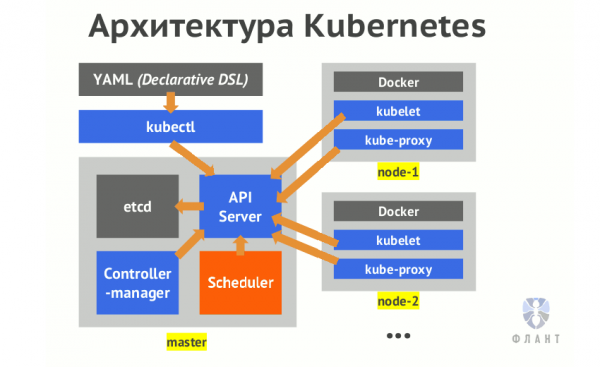
The key component of Kubernetes responsible for processing requests is api-server. All operations on the cluster pass through it. More about these internal mechanisms can be found in the article “».
System auditing is an interesting feature in Kubernetes that is off by default. It allows logging all requests to the Kubernetes API. As you might guess, all actions related to controlling and modifying the state of the cluster are performed through this API. A good description of its capabilities can usually be found in K8s. Next, I will attempt to explain the topic in simpler terms.
So, To enable auditing, we need to pass three required parameters to the api-server container, which are detailed below:
-
--audit-policy-file=/etc/kubernetes/policies/audit-policy.yaml -
--audit-log-path=/var/log/kube-audit/audit.log -
--audit-log-format=json
In addition to these three mandatory parameters, there are many additional settings related to auditing: from log rotation to webhook descriptions. An example of log rotation parameters:
-
--audit-log-maxbackup=10 -
--audit-log-maxsize=100 -
--audit-log-maxage=7
However, we won’t go into more detail on them — all details can be found in .
As already mentioned, all parameters are set in the manifest with the api-server configuration (by default /etc/kubernetes/manifests/kube-apiserver.yaml), in the section command. Let’s return to the three required parameters and break them down:
-
audit-policy-file— the path to the YAML file that describes the audit policy. We will return to its content, but for now, I should note that the file must be readable by the api-server process. Therefore, it is necessary to mount it inside the container, for which the following code can be added to the relevant sections of the config:volumeMounts: - mountPath: /etc/kubernetes/policies name: policies readOnly: true volumes: - hostPath: path: /etc/kubernetes/policies type: DirectoryOrCreate name: policies -
audit-log-path— the path to the log file. This path must also be accessible to the api-server process, so we describe its mounting similarly:volumeMounts: - mountPath: /var/log/kube-audit name: logs readOnly: false volumes: - hostPath: path: /var/log/kube-audit type: DirectoryOrCreate name: logs -
audit-log-format— the format of the audit log. By default, this isjson, but a deprecated text format is also available (legacy).
Audit Policy
Now about the mentioned file that describes the logging policy. The first concept of audit policy is level, the logging level.These can be as follows:
-
None— do not log; -
Metadata— log the metadata of the request: user, request time, target resource (pod, namespace, etc.), action type (verb), etc.; -
Request— log metadata and request body; -
RequestResponse— log metadata, request body, and response body.
The last two levels (Request and RequestResponse) do not log requests that do not access resources (accesses to so-called non-resource URLs).
Also, all requests pass through several stages:
-
RequestReceived— the stage when a request is received by the handler and has not yet been passed down the chain of handlers; -
ResponseStarted— response headers have been sent, but before the body of the response is sent. Generated for long requests (for example,watch); -
ResponseComplete— the body of the response has been sent, no more information will be sent; -
Panic— events are generated when an abnormal situation is detected.
To skip any stages, you can use omitStages.
In the policy file, we can describe several sections with different logging levels. The first matching rule found in the policy description will apply.
The kubelet daemon monitors changes to the manifest with the api-server configuration and restarts the container with the api-server when such changes are detected. But there is an important detail: changes in the policy file will be ignored by it. After making changes to the policy file, the api-server will need to be restarted manually. Since the api-server runs as , the command kubectl delete will not cause it to restart. You will have to manually run docker stop on kube-masters where the audit policy has been changed:
docker stop $(docker ps | grep k8s_kube-apiserver | awk '{print $1}')When enabling auditing, it is important to remember that the load on the kube-apiserver increases. In particular, memory consumption for storing request contexts increases. Logging starts only after the response header has been sent. The load also depends on the audit policy configuration.
Policy Examples
Let's analyze the structure of policy files with examples.
Here is a simple file , containing our policy file:, to log everything at the Metadata:
apiVersion: audit.k8s.io/v1
kind: Policy
rules:
- level: Metadata
In the policy, you can specify a list of users (Users and ServiceAccounts) and user groups. For example, this way we will ignore system users but log everything else at the level Request:
apiVersion: audit.k8s.io/v1
kind: Policy
rules:
  - level: None
    userGroups:
      - "system:serviceaccounts"
      - "system:nodes"
    users:
      - "system:anonymous"
      - "system:apiserver"
      - "system:kube-controller-manager"
      - "system:kube-scheduler"
  - level: Request
There is also the ability to describe targets:
- namespaces (
namespaces); - verbs (verbs:
get,update,deleteand others); - resources (resources, namely:
pod,configmapsetc.) and resource groups (apiGroups).
Note! Resources and resource groups (API groups, i.e., apiGroups), as well as their versions installed in the cluster, can be obtained using the commands:
kubectl api-resources
kubectl api-versions
The following audit policy is provided as a demonstration of best practices in :
apiVersion: audit.k8s.io/v1beta1
kind: Policy
# Omit logging for the RequestReceived stage
omitStages:
  - "RequestReceived"
rules:
  # Omit logging for events considered minor and non-threatening:
  - level: None
    users: ["system:kube-proxy"]
    verbs: ["watch"]
    resources:
      - group: "" # this is the API group with an empty name, which includes
                  # the basic Kubernetes resources referred to as 'core'
        resources: ["endpoints", "services"]
  - level: None
    users: ["system:unsecured"]
    namespaces: ["kube-system"]
    verbs: ["get"]
    resources:
      - group: "" # core
        resources: ["configmaps"]
  - level: None
    users: ["kubelet"]
    verbs: ["get"]
    resources:
      - group: "" # core
        resources: ["nodes"]
  - level: None
    userGroups: ["system:nodes"]
    verbs: ["get"]
    resources:
      - group: "" # core
        resources: ["nodes"]
  - level: None
    users:
      - system:kube-controller-manager
      - system:kube-scheduler
      - system:serviceaccount:kube-system:endpoint-controller
    verbs: ["get", "update"]
    namespaces: ["kube-system"]
    resources:
      - group: "" # core
        resources: ["endpoints"]
  - level: None
    users: ["system:apiserver"]
    verbs: ["get"]
    resources:
      - group: "" # core
        resources: ["namespaces"]
  # Omit logging for read-only URL access:
  - level: None
    nonResourceURLs:
      - /healthz*
      - /version
      - /swagger*
  # Omit logging messages related to resource type 'events':
  - level: None
    resources:
      - group: "" # core
        resources: ["events"]
  # Resources of type Secret, ConfigMap, and TokenReview may contain sensitive data,
  # so we only log the metadata related to requests involving them
  - level: Metadata
    resources:
      - group: "" # core
        resources: ["secrets", "configmaps"]
      - group: authentication.k8s.io
        resources: ["tokenreviews"]
  # Actions like get, list, and watch can be resource-intensive; we don't log them
  - level: Request
    verbs: ["get", "list", "watch"]
    resources:
      - group: "" # core
      - group: "admissionregistration.k8s.io"
      - group: "apps"
      - group: "authentication.k8s.io"
      - group: "authorization.k8s.io"
      - group: "autoscaling"
      - group: "batch"
      - group: "certificates.k8s.io"
      - group: "extensions"
      - group: "networking.k8s.io"
      - group: "policy"
      - group: "rbac.authorization.k8s.io"
      - group: "settings.k8s.io"
      - group: "storage.k8s.io"
  # Default logging level for standard API resources
  - level: RequestResponse
    resources:
      - group: "" # core
      - group: "admissionregistration.k8s.io"
      - group: "apps"
      - group: "authentication.k8s.io"
      - group: "authorization.k8s.io"
      - group: "autoscaling"
      - group: "batch"
      - group: "certificates.k8s.io"
      - group: "extensions"
      - group: "networking.k8s.io"
      - group: "policy"
      - group: "rbac.authorization.k8s.io"
      - group: "settings.k8s.io"
      - group: "storage.k8s.io"
  # Default logging level for all other requests
  - level: Metadata
Another good example of an audit policy is .
For proactive response to audit events, there is the option to describe a webhook. This topic is addressed in , I will leave it out of this article.
Summary
This article provides an overview of the fundamental security mechanisms in Kubernetes clusters, enabling personalized user accounts, rights segregation, and action logging. I hope it will be useful for those who have encountered such issues theoretically or in practice. I also recommend reviewing the list of other materials on Kubernetes security mentioned in the 'P.S.' section; you may find necessary details regarding your current concerns.
P.S.
Also read in our blog:
- «»;
- «»;
- «»;
- «»;
- «».
Source: habr.com
