

Introduction
The article describes the capabilities and architectural features of the Citrix Cloud platform and the Citrix Workspace service suite. These solutions are central elements and the foundation for implementing the digital workspace concept from Citrix.
In this article, I attempted to understand and articulate the causal relationships between Citrix's cloud platforms, services, and subscriptions, which are sometimes vaguely described in the company's public sources (citrix.com and docs.citrix.com). Cloud technologies are not easily perceived otherwise! It is worth noting that the architecture and technologies are generally discussed reasonably. Difficulties arise in understanding the hierarchical interconnections between the services and platforms:
- which platform is primary — Citrix Cloud or Citrix Workspace Platform?
- which of the platforms mentioned above includes the numerous Citrix services needed to build the infrastructure of digital workspaces?
- how much does this pleasure cost and what options are available?
- is it possible to implement all the features of Citrix's digital workspace without using Citrix Cloud?
Answers to these questions and an introduction to Citrix's solutions for digital workspaces are below.
Citrix Cloud
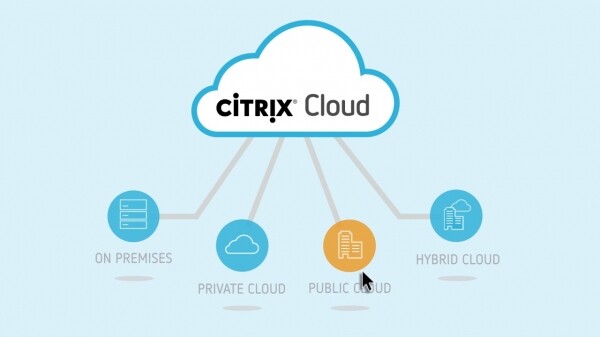
Citrix Cloud is a cloud platform that hosts all the services necessary for organizing digital workspaces. This cloud is directly owned by Citrix, which also provides support and ensures the stipulated (service availability – no less than 99.5% per month).
Clients of Citrix, depending on the selected subscription (service package), gain access to a specific set of services under the SaaS model. For them, Citrix Cloud serves as the cloud control panel for the company's digital workspaces. Citrix Cloud features a multi-tenant architecture, with clients and their infrastructures isolated from one another.
Citrix Cloud serves as the control plane, where numerous Citrix cloud services are hosted, including operational and management services for the digital workspace infrastructure. The data plane, which includes user applications, desktops, and data, exists outside of Citrix Cloud. The only exception is the Secure Browser Service, which is provided entirely in a cloud model. The data plane can be hosted in the customer’s data center (on-premises), data center of the service provider, or in hyper-clouds (AWS, Azure, Google Cloud). Hybrid and distributed solutions are possible, where customer data resides across multiple platforms and clouds, while being centrally managed from Citrix Cloud.
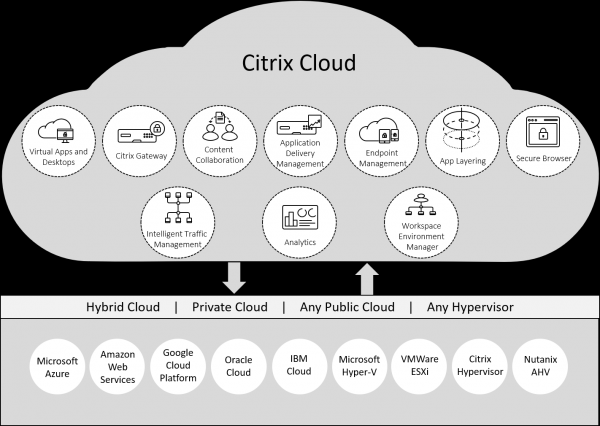
This approach has several clear advantages for customers:
- freedom to choose the platform for data hosting;
- the ability to build a hybrid distributed infrastructure, involving multiple deployments with different providers, in several clouds and on-premises;
- no direct access to user data by Citrix, as it is stored outside of Citrix Cloud;
- the ability to set the desired level of performance, fault tolerance, reliability, confidentiality, integrity, and data availability; after which appropriate platforms for hosting can be selected;
- no need to host and maintain numerous management services for digital workspaces, as all of them reside in Citrix Cloud and are the responsibility of Citrix; consequently, this results in cost savings.
Citrix Workspace
Citrix Workspace is a transcendent, foundational, and all-encompassing concept. Let’s delve into it further to understand why.
Overall, Citrix Workspace embodies the concept of digital workplaces from Citrix. It is simultaneously a solution, a service, and a set of offerings for creating unified, secure, convenient, and managed workspaces.
Users gain seamless SSO access for quick entry to applications/services, desktops, and data from a single console on any device for productive work. They can happily forget about multiple accounts, passwords, and the challenges of locating applications (shortcuts, Start menu, browsers – all in different places).
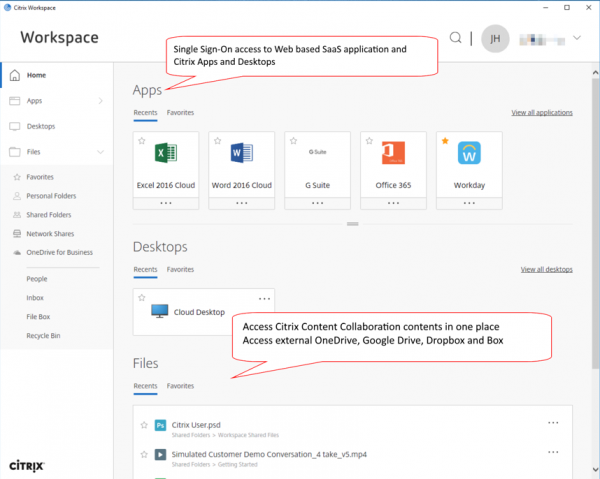
The IT department receives tools for centralized management of services and client devices, security assurance, access control, monitoring, updating, optimizing network communication, and analytics.
Citrix Workspace provides unified access to the following resources:
- Citrix Virtual Apps and Desktops – application and desktop virtualization;
- Web applications;
- Cloud SaaS applications;
- Mobile applications;
- Files in various storage, including cloud storage.
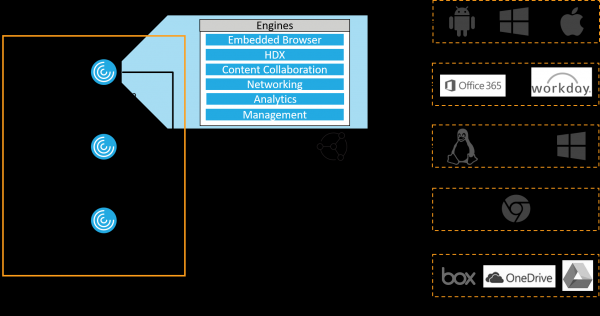
Access to Citrix Workspace resources is available through:
- Standard browsers — supporting Chrome, Safari, MS IE and Edge, Firefox
- or the 'native' client application — Citrix Workspace App.
Access is possible from all popular client devices:
- Full-fledged computers running Windows, Linux, MacOS, and even Chrome OS;
- Mobile devices with iOS or Android.
Citrix Workspace Platform is part of the many cloud services in Citrix Cloud, designed for organizing digital workspaces. It is noteworthy that Workspace includes most of the services available in Citrix Cloud, which we will elaborate on later.
Thus, end users gain the functionality of digital workspaces on their favorite client devices through Workspace App or its browser alternative (Workspace App for HTML5). To achieve this functionality, Citrix offers Workspace Platform as a set of cloud services, which company admins manage via Citrix Cloud.
Citrix Workspace is available in : Standard, Premium, Premium Plus. They differ in the number of services included in the package. Additionally, there is an option to purchase certain services separately, outside of the package. For instance, the foundational service Virtual Apps and Desktops is included only in the Premium Plus package, and its separate cost is higher than that of the Standard package and nearly equal to Premium.
It turns out that Workspace is both the client application – Workspace App, and the cloud platform (its part) – Workspace Platform, as well as the name of the various service package types, and the concept of digital workplaces from Citrix as a whole. Such a multifaceted entity.
Architecture and System Requirements
Conditionally, within the structure of Digital Workspace from Citrix, three areas can be identified:
- A multitude of client devices with the Workspace App or browser access to digital workplaces.
- The Workspace Platform itself in Citrix Cloud, which operates somewhere on the Internet in the cloud.com domain.
- Resource locations – own or rented sites, private or public clouds where resources with applications, virtual desktops, and customer data are hosted and published in Citrix Workspace. This is the data-plane mentioned earlier, and remember, a single customer may have multiple resource locations.
Examples of resources may include hypervisors, servers, networking devices, AD domains, and other elements necessary to provide users with the respective digital workplace services.
A distributed infrastructure scenario may involve:
- Multiple resource locations in the customer's data centers,
- Locations in public clouds,
- Small locations in remote branches.
When planning locations, the following should be considered:
- Proximity of users, data, and applications;
- Scalability options, including the provision of quick scaling up and down of capacities;
- Security and regulatory requirements.
Communication between Citrix Cloud and the customer's resource locations is carried out through components called Citrix Cloud Connector. These components allow the customer to focus on managing resources provided to users and forget about juggling service and management services that are already deployed in the cloud and managed by Citrix.
To ensure load balancing and fault tolerance, it is recommended to deploy at least two Cloud Connectors at each resource location. The Cloud Connector can be installed on a dedicated physical or virtual machine with Windows Server (2012 R2 or 2016). It is preferable to place them in the internal network of the resource location, not in the DMZ.
The Cloud Connector authenticates and encrypts traffic between Citrix Cloud and the resource location via https, using TCP port 443 by default. Only outbound sessions are allowed – from the Cloud Connector to the cloud, inbound connections are prohibited.
Citrix Cloud requires an Active Directory (AD) service within the customer's infrastructure. AD acts as the primary IdAM provider and is necessary for authorizing user access to Workspace resources. The Cloud Connectors must have access to AD. For fault tolerance, it is a good practice to have a pair of domain controllers at each resource location that will interact with the Cloud Connectors at that location.
Citrix Cloud Services
Now let's focus on the main services of Citrix Cloud that underpin the Citrix Workspace platform, allowing customers to deploy fully functional digital workplaces.
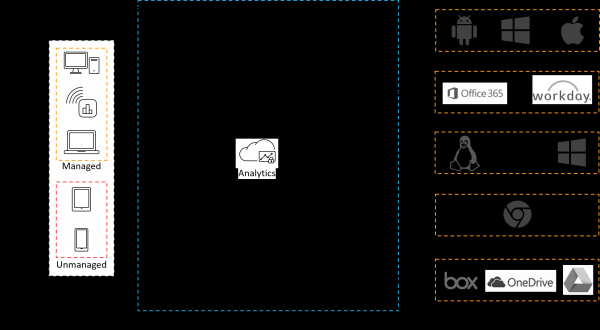
Let’s examine the purpose and functionality of these services.
Virtual Apps and Desktops
This is the core service of Citrix Digital Workspace, providing a terminal access to applications and full VDI. It supports virtualization of Windows and Linux applications and desktops.
As a cloud service, the Virtual Apps and Desktops service includes the same components as the traditional (non-cloud) Virtual Apps and Desktops, as shown in the diagram below. The difference is that all management components (control plane) are hosted in the Citrix Cloud. Customers no longer need to deploy and maintain these components, or allocate computing resources for them; Citrix handles this.
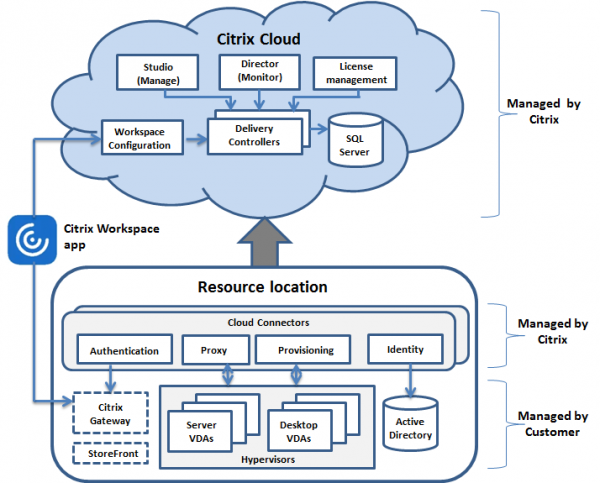
On their side, customers must deploy the following components at the resource locations:
- Cloud Connectors;
- AD domain controllers;
- Virtual Delivery Agents (VDAs);
- Hypervisors – generally available, but there are situations where using physical resources is sufficient;
- Optional components – Citrix Gateway and StoreFront.
All listed components, except for Cloud Connectors, are managed by the client. This makes sense, as this is where the data plane resides, particularly concerning physical nodes and hypervisors with VDA, where user applications and desktops are hosted directly.
Cloud Connectors should only be installed by the client, as this is a very simple procedure performed from the Citrix Cloud console. Further management is carried out automatically.
Access Control
This service offers the following capabilities:
- SSO (single sign-on) to a wide range of popular SaaS applications;
- Access filtering for internet resources;
- Monitoring of user activity online.
SSO for clients to SaaS services through Citrix Workspace provides a more convenient and secure alternative compared to regular access via a browser. The list of supported SaaS applications is quite extensive and is constantly expanding.
Internet access filtering can be configured based on manually created white or black lists of sites. Additionally, access can be restricted by categories of sites based on extensive and continuously updated commercial URL lists. Users may have restricted access to categories such as social networks, shopping, adult content, malware, torrents, proxies, etc.
In addition to granting access to sites/SaaS directly or blocking access to them, there is the option to redirect clients to a Secure Browser. That is, to reduce risks, access to selected categories/lists of internet resources will only be possible through the Secure Browser.
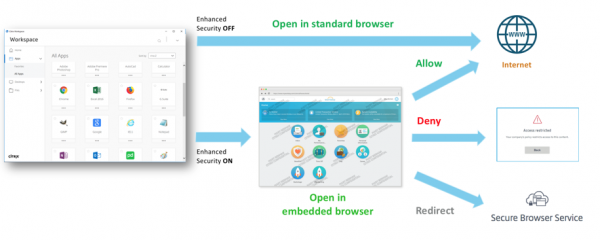
The service also provides detailed analytics for monitoring user activity on the internet: visited sites and applications, dangerous resources and attacks, denied access, and volumes of uploaded/downloaded data.
Secure Browser
Allows the publication of a web browser (Google Chrome) for users of Citrix Workspace as a virtual application. The Secure Browser is a SaaS service managed and supported by Citrix. It is fully hosted in Citrix Cloud (including the data plane), and the client does not need to deploy or support it in their own resource locations.
Citrix is responsible for provisioning resources in its cloud for VDA, where the browsers published for clients are hosted, ensuring security and updates for both the OS and the browsers themselves.
Clients access the Secure Browser through the Workspace app or a client browser. The session is encrypted using TLS. There is no need for the client to download or install anything to use the service.
Websites and web applications launched through the Secure Browser run in the cloud, with clients receiving an image of the terminal session, meaning nothing is executed on the endpoint device. This significantly enhances security and protects against browser attacks.
Service connection and management are carried out through the Citrix Cloud customer console. The connection is made in just a few clicks:
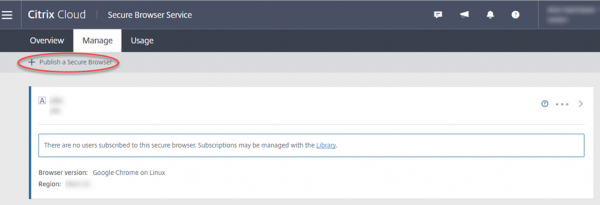
Management is also fairly straightforward, revolving around setting policies and whitelists:
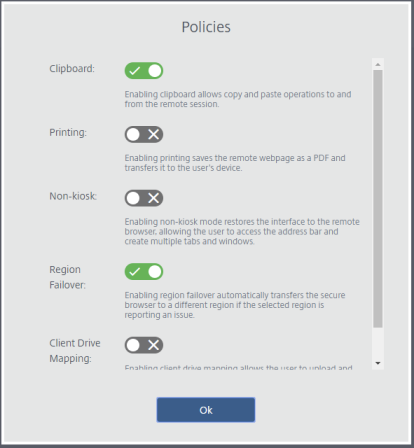
Policies allow for regulation of the following parameters:
- Clipboard – allows enabling the copy-paste feature in the browser session;
- Printing – the ability to save web pages on the client device in PDF format;
- Non-kiosk – enabled by default, allows full browser usage (multiple tabs, address bar);
- Region failover – the ability to restart the browser in another Citrix Cloud region if the primary region fails;
- Client drive mapping – the ability to mount the client device's disk for downloading or uploading files from the browser session.
Whitelists allow defining a list of websites that clients will have access to. Access to resources outside this list will be denied.
Content Collaboration
This service enables collaborative access for Workspace users to files and documents hosted on the customer's internal resources (on-premises) and supported public cloud services. This includes personal user folders, corporate network shares, SharePoint documents, or cloud repositories like OneDrive, Dropbox, or Google Drive.
The service provides SSO for access to data across all types of storage resources. Citrix Workspace users gain secure access to their work files from their devices both in the office and remotely, without any additional complexities.
Content Collaboration offers the following data management capabilities:
- file sharing between Workspace resources and client devices (downloads and uploads),
- synchronization of user files across all devices,
- shared access to files and their synchronization for multiple Workspace users,
- setting access rights to files and folders for other Workspace users,
- requesting access to files, generating links for secure file uploads.
In addition, additional security mechanisms are provided:
- access to files via one-time passwords,
- file encryption,
- watermarking shared files.
Endpoint Management
This service provides the functionality necessary for digital workplaces in managing mobile devices (Mobile Device Management - MDM) and applications (Mobile Application Management - MAM). Citrix positions it as a SaaS-EMM solution - Enterprise Mobility Management as a service.
MDM functionality allows:
- distributing applications, device policies, certificates for connecting to customer resources,
- tracking devices,
- blocking and performing full or partial wipes of devices.
MAM functionality allows:
- ensuring the security of applications and data on mobile devices,
- delivering corporate mobile applications.
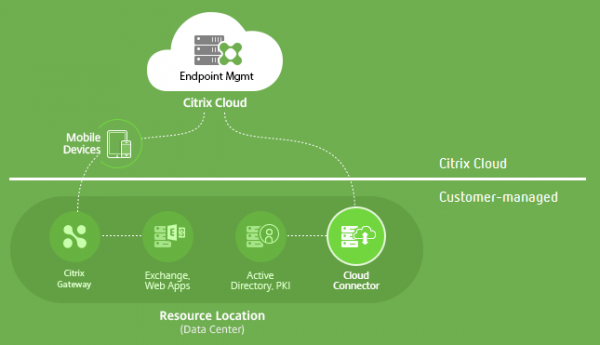
In terms of architecture and service delivery to the customer, Endpoint Management is very similar to the aforementioned cloud option of Virtual Apps and Desktops. The Control Plane and its constituent services reside in Citrix Cloud, and Citrix manages them, allowing this service to be considered as SaaS.
The Data Plane in the locations of customer resources includes:
- Cloud Connectors necessary for interacting with the Citrix cloud,
- Citrix Gateways providing secure remote access for users to internal customer resources (applications, data) and micro-VPN functionality,
- Active Directory, PKI
- Exchange, files, virtual applications and desktops.
Gateway
Citrix Gateway provides the following functionality:
- remote access gateway - secure connection to corporate resources for mobile and remote users outside the protected perimeter,
- IdAM provider (Identity and Access Management) for providing SSO to corporate resources.
Corporate resources in this context include not only virtual applications and desktops but also numerous SaaS applications.
To optimize network traffic and achieve micro VPN functionality, Citrix Gateway must be deployed at each resource location, typically in the DMZ. In this case, the necessary capacity allocation and maintenance fall on the client.
An alternative option is to use Citrix Gateway as a Citrix Cloud service, in which case the client does not need to deploy or maintain anything on their side; Citrix handles this in its cloud.
Analytics
This is the Citrix Cloud analytics service, integrated with all the previously described cloud services. It is designed to collect data generated by Citrix services and analyze it using built-in machine learning mechanisms. Metrics related to users, applications, files, devices, and networks are taken into account.
As a result, reports are generated concerning security, performance, and user operations.
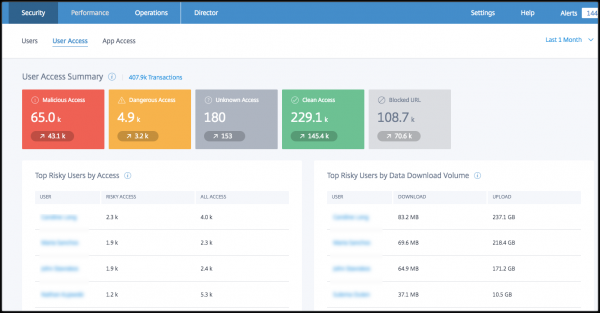
In addition to generating statistical reports, Citrix Analytics can act proactively. This involves creating profiles of normal user behavior and detecting anomalies. If a user starts using an application in non-standard ways or actively sharing data, they and their device may be automatically blocked. The same will happen in cases of access to dangerous Internet resources.
Attention is paid not only to security but also to performance. Analytics allows monitoring and promptly addressing issues related to long user logins and network delays.
Conclusion
We have familiarized ourselves with the architecture of the Citrix cloud, the Workspace platform, and its main services necessary for organizing digital workplace infrastructure. It is worth noting that we have not covered all Citrix Cloud services, limiting ourselves to the basic set for establishing a digital workspace. of Citrix cloud services also includes network tools and additional features for working with applications and workspaces.
It should also be noted that the core functionality of digital workspaces can be deployed without Citrix Cloud, entirely on-premises. The basic product Virtual Apps and Desktops is still available in the classic version, where both the VDA and all management services are deployed and maintained by the customer on their own premises, with no need for any Cloud Connectors. The same goes for Endpoint Management – its on-premises predecessor is called XenMobile Server, although the cloud version is slightly more functional. The customer can also implement some Access Control features on their own premises. The functionality of Secure Browser can be implemented on-premises, with the choice of browser remaining with the customer.
The desire to deploy everything on one's own premises is good in terms of security, control, and skepticism about foreign clouds. However, without Citrix Cloud, the functionalities of Content Collaboration and Analytics will be completely unavailable. As mentioned earlier, the functionalities of other Citrix on-premises solutions may be inferior to their cloud implementations. Most importantly, the management plane will need to be maintained internally and administered by the customer.
Useful links:
, including Citrix Cloud
– technical videos, articles, and diagrams
Source: habr.com
