

Note: translation.: The article was written by Scott Lowe — a seasoned IT engineer and author/co-author of seven published books (primarily on VMware vSphere). He currently works for its subsidiary VMware — Heptio (acquired in 2016), specializing in cloud computing and Kubernetes. The text serves as a concise and easy-to-understand introduction to managing configurations for Kubernetes using technology , recently integrated into K8s.
Kustomize is a tool that allows users to "customize simple and template-free YAML files for various purposes, leaving the original YAML untouched and reusable" (description borrowed directly from ). Kustomize can be run directly or, starting with Kubernetes 1.14, utilized through kubectl -k to access its features (though as of Kubernetes 1.15, a separate binary is newer than the capabilities built into kubectl). (Note: translation.: With the recent release of kustomize , it is also available in the kubeadm utility.) In this publication, I want to introduce readers to the basics of kustomize.
In its simplest form/application, kustomize is just a set of resources (YAML files that define Kubernetes objects: Deployments, Services, etc.) plus a list of instructions for changes to be made to these resources. Similar to how make uses a set of instructions contained in Makefile, and Docker builds a container based on instructions from Dockerfile, kustomize uses kustomization.yaml to store directives on what changes the user wants to apply to the resource set.
Here is an example file kustomization.yaml:
resources:
- deployment.yaml
- service.yaml
namePrefix: dev-
namespace: development
commonLabels:
  environment: development
I won’t attempt to cover all possible fields in the file kustomization.yaml (this is well addressed in ), but I will provide a brief explanation of a specific example:
- Field
resourcesindicates which resources kustomize will change. In this case, it will look for resources in the filesdeployment.yamlandservice.yamlin its directory (full or relative paths can be specified if necessary). - Field
namePrefixdirects kustomize to add a specific prefix (in this case —dev-) to the attributenameof all resources defined in the fieldresources. Thus, if there is annamewith the valuenginx-deployment, kustomize will turn it intodev-nginx-deployment. - Field
namespaceinstructs kustomize to add the specified namespace to all resources. In this case, the Deployment and Service will fall into the namespacedevelopment. - Finally, the field
commonLabelscontains a set of labels that will be added to all resources. In our example, kustomize will assign a label namedenvironmentand valuedevelopment.
If the user executes kustomize build . in the directory with the file kustomization.yaml and the necessary resources (i.e., files deployment.yaml and service.yaml), they will receive output with the changes specified in kustomization.yaml.
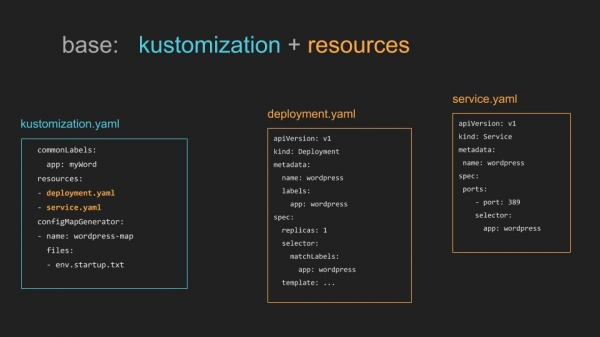
Note: translation.: An illustration from the project documentation on the 'simple' use of kustomize
The output can be redirected if it is necessary to save changes:
kustomize build . > custom-config.yamlThe output data is deterministic (the same input will yield the same results each time), so there is no need to save the result to a file. Instead, it can be directly piped into another command:
kustomize build . | kubectl apply -f - Access to kustomize features can also be obtained via kubectl -k (starting with Kubernetes version 1.14). However, keep in mind that the standalone kustomize package updates faster than the integrated one in kubectl (at least, this is the case with Kubernetes release 1.15).
Readers may ask: 'Why all these complexities when you can edit the files directly?'. Great question. In our example, it is indeed in possible to modify files deployment.yaml and service.yaml directly, but what if they are a fork of someone else's project? Directly altering the files complicates (if not outright prevents) the rebase of the fork when changes are made to the source. Using kustomize allows you to centralize these changes in the file kustomization.yaml, keeping the original files intact and thus making it easier to rebase the original files if necessary.
The advantages of kustomize become evident in more complex use cases. In the example above, kustomization.yaml the resources are in the same directory. However, kustomize supports use cases where you have a base configuration and many variations of it, also known as overlays. For example, a user may want to take the Deployment and Service for nginx, which I used as an example, and create development, staging, and production versions (or variants) of those files. For this, they will need the overlays mentioned above and the base resources themselves.
To illustrate the idea of overlays and base resources (base resources), let's assume the directories have the following structure:
- base
  - deployment.yaml
  - service.yaml
  - kustomization.yaml
- overlays
  - dev
    - kustomization.yaml
  - staging
    - kustomization.yaml
  - prod
    - kustomization.yaml
In the file base/kustomization.yaml users by the field resources simply declare the resources that should be included by kustomize.
In each of the files overlays/{dev,staging,prod}/kustomization.yaml users reference the base configuration in the field resources, and then specify the specific changes for that environment. For example, the file overlays/dev/kustomization.yaml might look like the example given earlier:
resources:
- ../..//base
namePrefix: dev-
namespace: development
commonLabels:
  environment: development
Meanwhile, the file overlays/prod/kustomization.yaml might be completely different:
resources:
- ../..//base
namePrefix: prod-
namespace: production
commonLabels:
  environment: production
  sre-team: blue
When the user runs kustomize build . in the directory overlays/dev, kustomize will generate the development variant. If you run kustomize build . in the directory overlays/prod , you'll get the production variant. And all of this is done without making any changes to the original (base) files, and all of this is done in a declarative and deterministic way. You can commit the base configuration and overlay directories directly into version control, knowing that based on these files, you can reproduce the needed configuration at any moment.
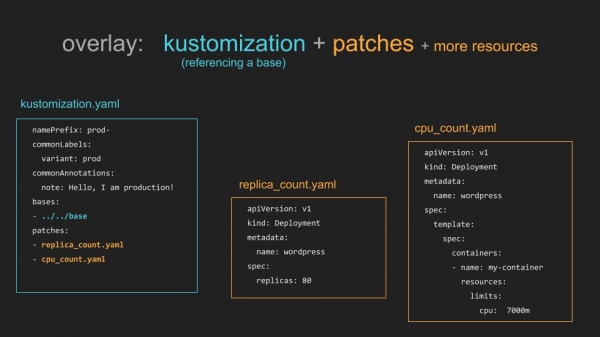
Note: translation.: Illustration from the project documentation on using overlays in kustomize
Kustomize can do much more than what has been described in this article. However, I hope it serves as a good introduction.
Additional resources
There are many good articles and publications about kustomize. Here are a few that I found particularly useful:
- ;
- ;
- ;
- .
Note: translation.: You can also check out the link block published as on the utility's website, followed by a collection of videos with the latest talks about kustomize.
If you have any questions or suggestions for improving this material, I am always open to feedback. You can contact me in the or in Enjoy modifying your manifests with kustomize!
P.S. from the translator
Also read in our blog:
- «»;
- «»;
- «»;
- «».
Source: habr.com
