

I think many people are already familiar with Sign In with Apple (briefly SIWA) since WWDC 2019. In this article, I will discuss the specific pitfalls encountered when integrating this feature into our licensed portal. This article is not quite for those just starting to figure out SIWA (I have provided a series of introductory links at the end of the text for them). In this material, many will likely find answers to questions that may arise during the integration of Apple's new service.
Apple does not allow custom redirects
Actually, I still do not see an answer to this question on developer forums. The essence is as follows: if you want to use the SIWA JS API, i.e., not work through the native SDK due to various reasons (not macOS/iOS or an older version of those systems), you will need your own public portal; otherwise, it's impossible. Because on the WWDR portal, you need to register and confirm that you own your domain, and only then can you attach the redirects that Apple allows.
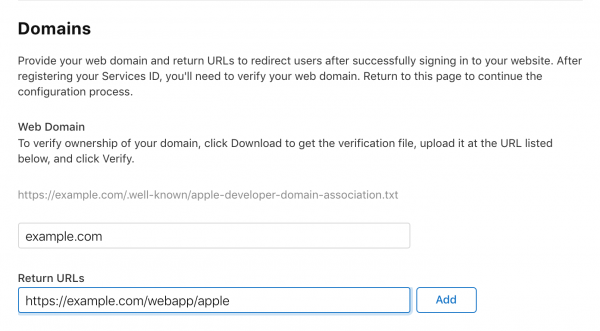
So what do you do if you want to intercept the redirect in the application? We solved this problem quite simply: we created a list of allowed redirects for our applications on our portal, which they request before displaying the SIWA authorization page. We then simply redirect from the portal to the application with the data received from Apple. Simple and straightforward.
Email issues
Let's consider how we addressed the user's email issues. Firstly, there is no REST API that allows retrieving this info from the backend — only the client gets this data and can transmit it along with the authorization code.
Secondly, the user's name and email information is only transmitted once, at the user's first login to the application via Apple, where the user selects options for sharing their personal data.
These problems are not critical by themselves, provided that the connection with the social profile was successfully established on the portal—the user identifier is the same and linked to the Team ID, meaning it's the same for all applications of your team integrated with SIWA. However, if the login was done through Apple, and then an error occurred along the way preventing the connection from being established on the portal, the only option is to send the user to appleid.apple.com, sever the connection with the application, and try again. Essentially, the problem can be resolved by writing a relevant KB article and linking to it.
The next more unpleasant issue is related to Apple's new concept with proxy email. In our case, if the user had already been on the licensing portal with their real email and chooses the option to hide the email during their first login through Apple, a new account is registered with this proxy email, which obviously contains no licenses, leaving the end user confused.
The solution to this problem is fairly simple: since the user identifier is the same in SIWA and does not depend on the selected options/application for sign in, we simply allow switching the connection from Apple to another account with the user's real email using a special script, thereby 'restoring their purchases.' After this procedure, the user begins to access a different account on the portal via SIWA, and everything works correctly for them.
When signing in through the web portal, there is no application icon.
To solve another issue, we reached out for clarification from Apple representatives and are sharing the insights we gained:
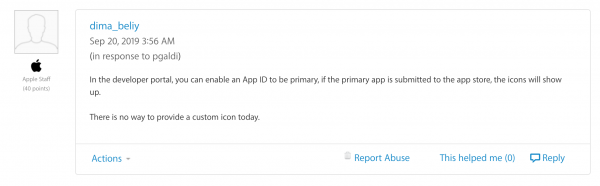
In other words, the point is as follows: at the head of the SIWA group, there can only be a macOS/iOS application, into which the necessary service IDs of the portals are added. Accordingly, for the icon to be displayed for the main application, there must be App Store versions of the media that have passed Apple's review. The icon will be taken from there.
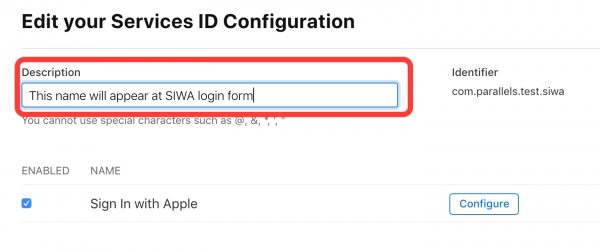
Consequently, if you only have a portal and no App Store application, there will be no beautiful icon, but you can manage with the application name—if there is no media for the main application, this information is taken from the Description of the service ID:
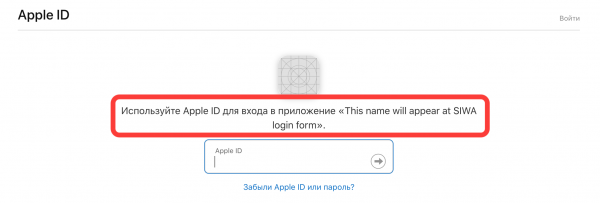
The number of elements in the SIWA group is limited to 5.
Currently, there is no solution to this problem other than using multiple groups. If you are short on 6 identifiers: 1 main application and 5 dependent ones, you will see the following message when trying to register the next one:
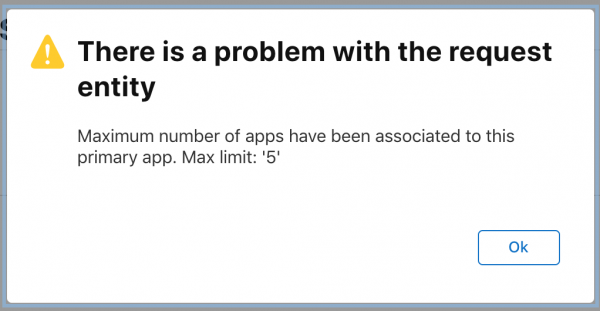
We have created groups for our license portal and for each of the applications that operate with this portal. Regarding the slot limitation, we have already raised this issue with Apple and are awaiting their response.
Useful links
Most useful , in my opinion, which I essentially followed. A somewhat useful document from Apple .
Enjoy! Questions, thoughts, ideas, and suggestions are welcome in the comments.
Source: habr.com
