


This article will compare backup solutions, but first, it's worth understanding how quickly and efficiently they handle data recovery from backups.
For simplicity, the comparison will focus on recovery from a full backup, especially since this operating mode is supported by all candidates. The figures used are averaged (the arithmetic mean from several runs). The results will be summarized in a table, which will also include information on features such as web interface availability, ease of setup and operation, automation capabilities, and various additional options (for example, data integrity checks), etc. The graphs will show the load on the server where the data will be applied (not the backup storage server).
Data Recovery
The benchmarks will use rsync and tar as reference points since the simplest backup scripts.
Rsync managed the test dataset in 4 minutes and 28 seconds, showing
this load.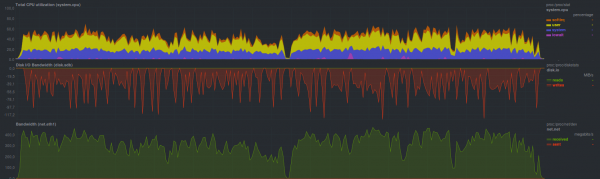
The recovery process encountered limitations of the disk subsystem of the backup storage server (sawtooth graphs). It's also clearly visible that one core was heavily loaded without significant issues (low iowait and softirq — no problems with the disk and network, respectively). Since the other two programs, namely rdiff-backup and rsnapshot, are based on rsync and also use standard rsync for recovery, they will have a similar load profile and recovery time.
Tar performed slightly faster, at
2 minutes and 43 seconds: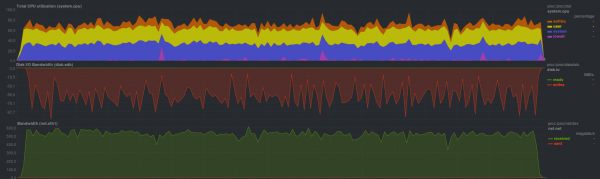
The overall system load was on average 20% higher due to increased softirq — overheads rose in the operation of the network subsystem.
If the archive is additionally compressed, recovery time increases to 3 minutes and 19 seconds with
this load on the main server (decompression on the main server side):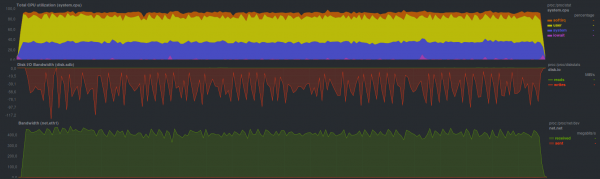
The unpacking process utilizes both processor cores, as two processes are running. Overall, this is the expected result. A comparable outcome (3 minutes and 20 seconds) was also achieved when running gzip on the server side with backups, where the load profile on the main server was quite similar to that of running tar without the gzip compressor (see the previous graph).
In rdiff-backup You can synchronize the latest backup using regular rsync (the results will be similar), but older backups still need to be restored using the rdiff-backup program, which managed the restoration in 17 minutes and 17 seconds, showing
the following load: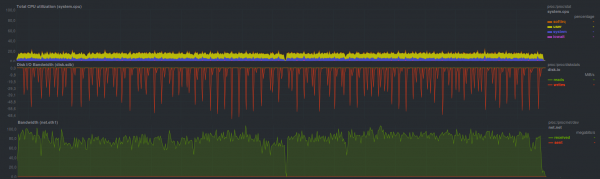
This may have been intentional, at least for limiting speed, the authors . The restoration process takes slightly less than half of a core, with proportionally comparable performance (i.e. 2-5 times slower) over disk and network with rsync.
Rsnapshot suggests using regular rsync for restoration, so its results will be similar. Overall, this was indeed the case.
Burp managed the backup restoration task in 7 minutes and 2 seconds with
the following load: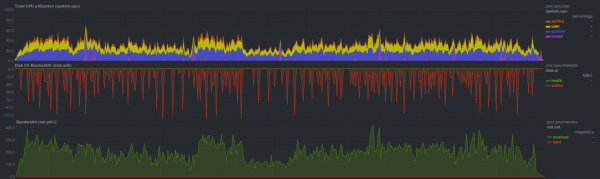
It worked quite quickly, and, at least, was much more user-friendly than plain rsync: no need to remember any flags, a simple and intuitive CLI interface, built-in support for multiple copies — though it was about twice as slow. If data needs to be restored from the latest backup, you can use rsync, with a few caveats.
The program showed approximately the same speed and load BackupPC when in rsync transfer mode, restoring the backup in
7 minutes and 42 seconds: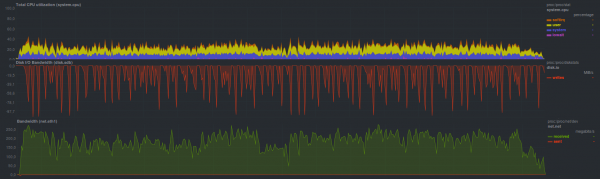
However, in tar data transfer mode, BackupPC performed slower: in 12 minutes and 15 seconds, with the CPU load being overall lower
by one and a half times: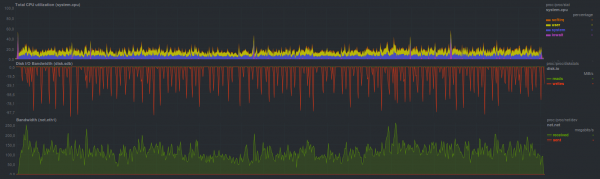
Duplicity without encryption showed slightly better results, completing the backup restoration in 10 minutes and 58 seconds. If encryption is activated using gpg, the restoration time increases to 15 minutes and 3 seconds. When creating a repository for storing copies, you can specify the size of the archive to be used when splitting the stream of incoming data. Overall, on conventional hard drives, and due to the single-threaded operation mode, there is not much difference. It may appear with different block sizes when hybrid storage is used. The load on the main server during restoration was as follows:
without encryption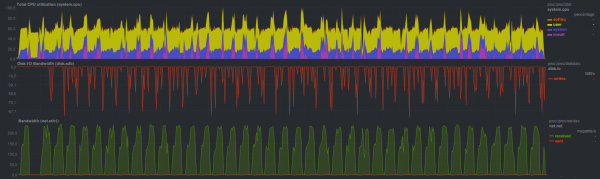
with encryption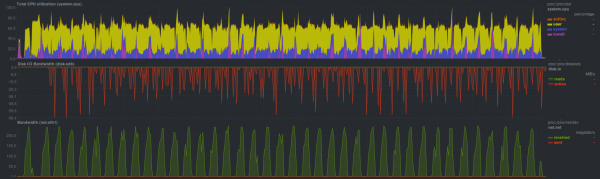
Duplicati showed comparable restoration speed, completing it in 13 minutes and 45 seconds. An additional approximately 5 minutes were spent verifying the integrity of the restored data (totaling around 19 minutes). The load during this was
quite high: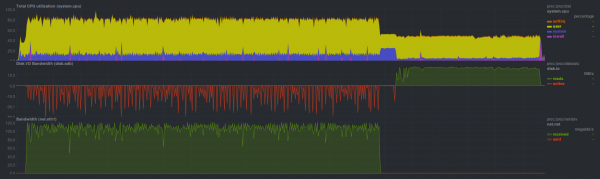
When aes encryption was activated by internal means, the restoration time was 21 minutes and 40 seconds, with the CPU load being maximum (both cores!) during restoration; during data verification, only one thread was active, occupying one CPU core. Verifying data after restoration took the same 5 minutes (totaling nearly 27 minutes).
Result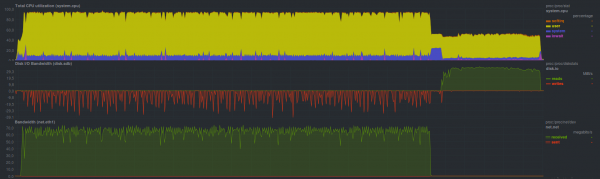
Slightly faster, duplicati handled restoration when using an external program gpg for encryption, but overall the differences from the previous mode are minimal. The total time taken was 16 minutes and 30 seconds, with data verification taking 6 minutes. The load was
as follows: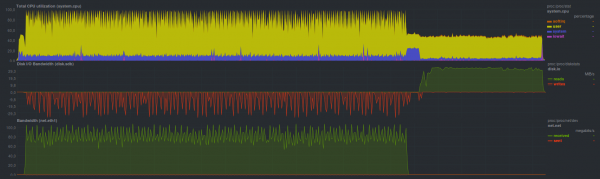
AMANDA, using tar, managed to finish in 2 minutes and 49 seconds, which is quite close to the regular tar. The system load is generally
the same: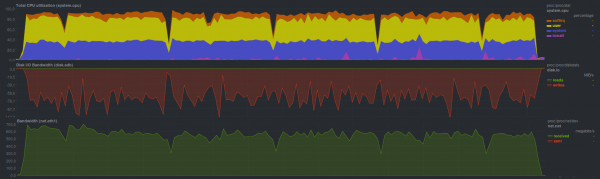
During the restoration of the backup using zbackup the following results were obtained:
encryption, lzma compression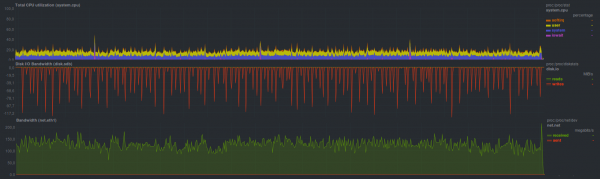
Total time was 11 minutes and 8 seconds
aes encryption, lzma compression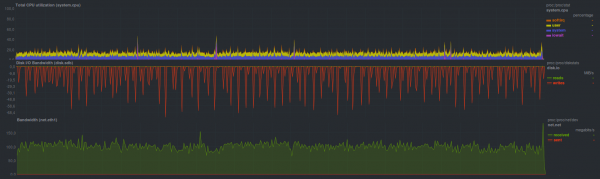
Total time was 14 minutes
aes encryption, lzo compression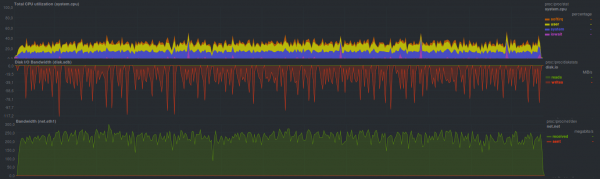
Total time was 6 minutes and 19 seconds
Overall, it’s not bad. Everything hinges on the CPU speed of the backup server, which is quite noticeable based on the program's performance with different compressors. On the backup server side, a regular tar was executed, so if you compare with it, the restoration operates three times slower. It may be worth checking the performance in multithreaded mode, with more than two threads.
BorgBackup In non-encrypted mode, it performed slightly slower than tar, taking 2 minutes and 45 seconds; however, unlike tar, there is the possibility of deduplicating the repository. The load during this process was
as follows: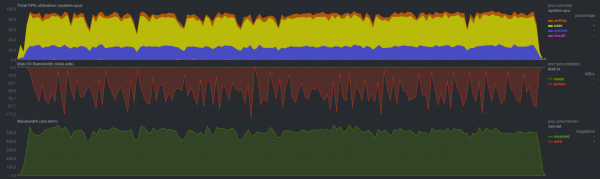
If you enable encryption based on blake, the restoration speed slows down a bit. The restoration time in this mode is 3 minutes and 19 seconds, and the load was
as follows: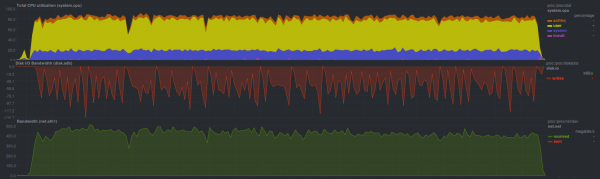
AES encryption operates slightly slower, with a restoration time of 3 minutes and 23 seconds, while the load did not particularly
change: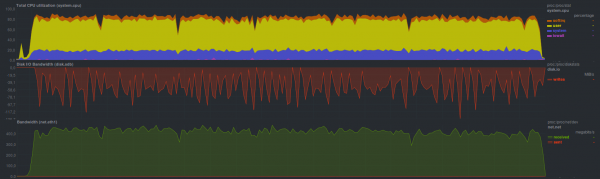
Since Borg can operate in multithreaded mode, the CPU load is maximized; meanwhile, when additional features are activated, the runtime simply increases. Apparently, it is worth investigating multithreading performance similarly to zbackup.
Restic performed the restoration slightly slower, with a runtime of 4 minutes and 28 seconds. The load during this process appeared
as follows: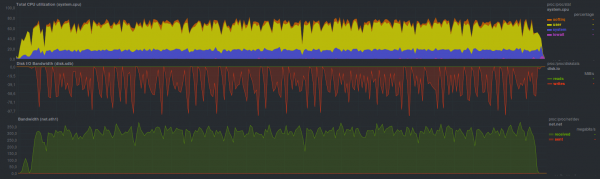
It seems that the restoration process operates in several threads, but the efficiency is not as high as with BorgBackup, yet comparable in time to regular rsync.
Using UrBackup managed to restore data in 8 minutes and 19 seconds, with the load being
as follows: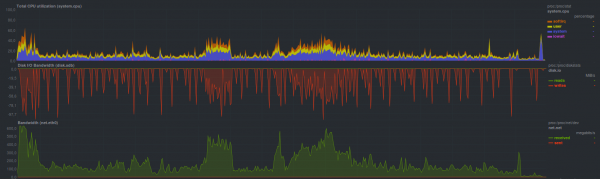
Still, it shows a fairly low load, even lower than tar. There are occasional spikes, but not exceeding the load of a single core.
Selection and justification of criteria for comparison
As mentioned in one of the previous articles, the backup system must meet the following criteria:
- Ease of Use
- Versatility
- Stability
- Speed
It is worth considering each point separately in more detail.
Ease of use
It’s best when there’s one button for 'Do everything right', but returning to real programs — it’s most convenient to have some familiar and standard operating principle.
Most users will likely prefer not to memorize a bunch of CLI keys, configure various, often unclear options through web or TUI, and set up alerts for unsuccessful operations. This also includes the ability to easily "integrate" a backup solution into the existing infrastructure, as well as automating the backup process. Additionally, the possibility of installation via a package manager, or with one or two commands like "download and unpack". curl link | sudo bash — a complex method, as it is necessary to verify what is being received at the link.
For example, among the candidates considered, simple solutions include burp, rdiff-backup, and restic, which have mnemonically memorable keys for different operating modes. A bit more complex are borg and duplicity. The most complex was AMANDA. The others fall somewhere in the middle in terms of ease of use. In any case, if it takes more than 30 seconds to read the user manual, or if one needs to go to Google or another search engine, and also scroll through a lengthy help document — the solution is complex, one way or another.
Some of the candidates considered can automatically send messages via e-mail or Jabber, while others rely on configured alerts in the system. Often, complex solutions have not-so-obvious alert settings. In any case, if the backup program returns a non-zero exit code that can be correctly interpreted by the system's periodic task service (it will send a message to the system administrator or directly to monitoring) — the situation is straightforward. However, if the backup system, which operates away from the backup server, cannot inform about a problem in an obvious way without configuration — the complexity is already excessive. In any case, issuing warnings and other messages only in the web interface or in logs is poor practice, as they will often be ignored.
As for automation — a simple program should be able to read environment variables that define its working mode or have a developed CLI capable of fully replicating the behavior when working through the web interface, for example. This also includes the ability for streaming operations, the availability of extension capabilities, and so on.
Versatility
This partially overlaps with the previous section regarding automation, and integrating the backup process into the existing infrastructure shouldn't pose any significant problems.
It is worth noting that using non-standard ports (other than the web interface) for operation, implementing encryption in a non-standard way, and exchanging data via non-standard protocols are signs of a non-universal solution. Most candidates have these traits to some extent for an obvious reason: simplicity and universality are typically incompatible. An exception is burp, along with a few others.
As a sign, the ability to operate using ordinary ssh.
Speed of operation.
The most controversial and debatable point. On one hand — the process started, it completed as quickly as possible, and it doesn't interfere with main tasks. On the other hand — there's a spike in traffic and CPU load during the backup process. It's also worth noting that the fastest backup software is usually the most limited in features important to users. Again: if retrieving a single tiny text file of just a few dozen bytes with a password causes the entire service to hinge on it (yes, I understand that the backup process is often not at fault here), but you still have to sequentially read all files in the repository or unpack an entire archive — the backup system is by no means fast. Another point that often becomes a sticking point is the speed of restoring from an archive. There's a clear advantage for those who can simply copy or move files to the desired location without much hassle (rsync, for example), but usually, the problem has to be solved organizationally, through empirical means: measuring the time it takes to restore a backup and communicating this openly to users.
Stability
It should be understood as follows: on one hand, there must be a way to restore the backup, in any case; on the other, resilience to various issues: network interruptions, disk failures, deletion of part of the repository.
Backup tool comparison
Backup creation time
Backup restoration time
Easy Installation
Simple setup
Easy to use
Simple automation
Is a client-server needed?
Repository Integrity Check
Differential Backups
Operation via Pipe
Versatility
Independence
Repository Transparency
Encryption
Compression
Deduplication
Web Interface
Upload to Cloud
Windows support
Score
Rsync
4m15s
4m28s
yes
none
none
none
yes
none
none
yes
none
yes
yes
none
none
none
none
none
yes
6
Tar
pure
3m12s
2m43s
yes
none
none
none
none
none
yes
yes
none
yes
none
none
none
none
none
none
yes
8,5
gzip
9m37s
3m19s
yes
Rdiff-backup
16m26s
17m17s
yes
yes
yes
yes
yes
none
yes
none
yes
none
yes
none
yes
yes
yes
none
yes
11
Rsnapshot
4m19s
4m28s
yes
yes
yes
yes
none
none
yes
none
yes
none
yes
none
none
yes
yes
none
yes
12,5
Burp
11m9s
7m2s
yes
none
yes
yes
yes
yes
yes
none
yes
yes
none
none
yes
none
yes
none
yes
10,5
Duplicity
no encryption
16m48s
10m58s
yes
yes
none
yes
none
yes
yes
none
none
yes
none
yes
yes
none
yes
none
yes
11
gpg
17m27s
15m3s
Duplicati
no encryption
20m28s
13m45s
none
yes
none
none
none
yes
yes
none
none
yes
none
yes
yes
yes
yes
yes
yes
11
aes
29m41s
21m40s
gpg
26m19s
16m30s
Zbackup
no encryption
40m3s
11m8s
yes
yes
none
none
none
yes
yes
yes
none
yes
none
yes
yes
yes
none
none
none
10
aes
42m0s
14m1s
aes+lzo
18m9s
6m19s
BorgBackup
no encryption
4m7s
2m45s
yes
yes
yes
yes
yes
yes
yes
yes
yes
yes
none
yes
yes
yes
yes
none
yes
16
aes
4m58s
3m23s
blake2
4m39s
3m19s
Restic
5m38s
4m28s
yes
yes
yes
yes
none
yes
yes
yes
yes
yes
none
yes
none
yes
none
yes
yes
15,5
UrBackup
8m21s
8m19s
yes
yes
yes
none
yes
none
yes
none
yes
yes
none
yes
yes
yes
yes
none
yes
12
Amanda
9m3s
2m49s
yes
none
none
yes
yes
yes
yes
none
yes
yes
yes
yes
yes
none
yes
yes
yes
13
BackupPC
rsync
12m22s
7m42s
yes
none
yes
yes
yes
yes
yes
none
yes
none
none
yes
yes
none
yes
none
yes
10,5
tar
12m34s
12m15s
Table Legend:
- Green, uptime less than five minutes or response 'Yes' (except the 'Client-Server Needed?' column), 1 point
- Yellow, uptime five to ten minutes, 0.5 points
- Red, uptime more than ten minutes or response 'No' (except the 'Client-Server Needed?' column), 0 points
According to the table above, the simplest, fastest, yet convenient and powerful backup tool is BorgBackup. Restic came in second, while the other candidates scored approximately the same, with a spread of one to two points at the end.
Thank you to everyone who read this cycle to the end; I invite you to discuss options and share your suggestions if you have any. The table may be updated as discussions progress.
The result of this cycle will be a concluding article that attempts to derive the ideal, fast, and manageable solution for backups that allows quick restoration of copies while ensuring ease of setup and maintenance.
Announcement
Backup, Part 6: Comparison of Backup Solutions
Backup, Part 7: Conclusions
Source: habr.com
