

Last week, we released the 3CX v16 Update 3 and . The softphone is designed to work only with 3CX v16 Update 3 and above. Many users have additional questions about the application's functionality. In this article, we will answer them and also provide more details about the new features of the application.
Works only with 3CX v16
When launching the application, some users see a message stating that the program works only with 3CX v16. This, of course, refers to the server version. The issue can be resolved by updating the PBX server to . However, if you cannot upgrade to v16 right now, install the previous version of the . This will allow you to continue using 3CX until the system administrator updates the server. Please note that this application is not supported or updated by 3CX and is also incompatible with Android 10.
Voicemail
Users are complaining about the way voicemail is played in the new application. In the next release, we plan to revert to the previous method of playback, which allows listening to a voicemail message without dialing the system voicemail number.
Access to the address book
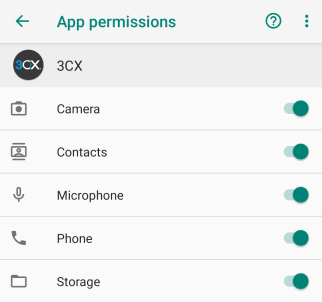
Currently, the application requires access to the device's contact list to merge the corporate 3CX address book, the user's personal contacts (extension number) 3CX, and the device's own address book. Therefore, each time the application accesses the address book, a request for access to the device's contacts appears, even if the user did not grant permission in the past. Nevertheless, please note that the application never transmits contacts from your device to the 3CX system.
However, some users still do not want to mix personal and work contacts, which are loaded from 3CX. In the next release, we will, by default, prohibit the application's access to the device's address book. If a user wants to merge contacts, they will open access in the 3CX app's permission settings themselves.
Group display
Organizational user groups are no longer displayed on the presence screen. This change has been made to declutter the interface, as the same users may appear in different groups (since a user can belong to multiple groups at once). We plan to maintain this change.
Receiving PUSH notifications
The 'Exit - Ignore PUSH' option that was in the old app has been removed. Instead, more convenient ways to manage PUSH notifications in different statuses have been introduced.
You can specify whether to receive PUSH notifications in a specific status. Below is how this is done for the 'Do Not Disturb' status. It is sufficient to set up PUSH reception for each status once.
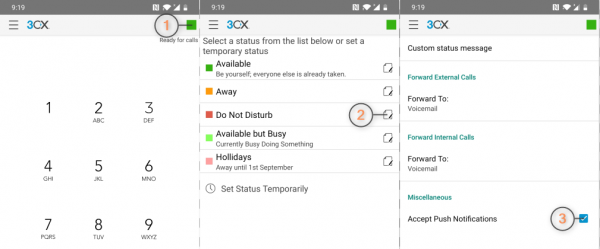
The PBX administrator can also configure PUSH reception for a user in the 3CX management interface, and bulk editing operations are available.
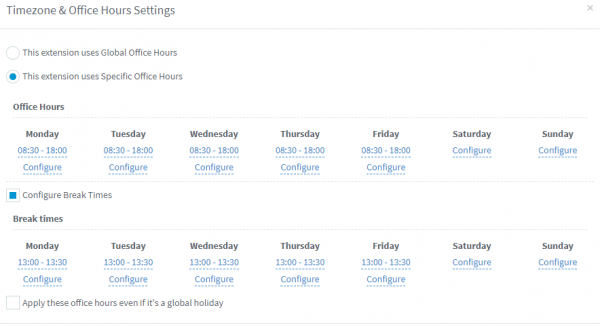
Let’s remember that if a user has a fixed work schedule, it is better to set up automatic status switching. The schedule (working hours) is set by the PBX administrator. You can use the organization’s General working hours or the individual working hours of the specific user. More details about this in the .
Silent mode
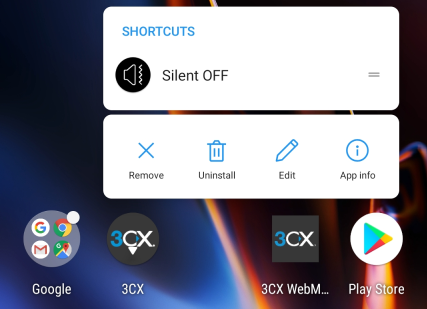
The app's silent mode can be enabled regardless of the status if you need to receive notifications for calls and messages without creating unnecessary noise. This mode can be activated by long-pressing the 3CX icon on the Android desktop.
Notifications in Android 10
In Android 10, an incoming call appears as a notification on the unlocked screen. This is implemented in the style of other notifications in Android 10. Compare notifications in Android 9 and Android 10.
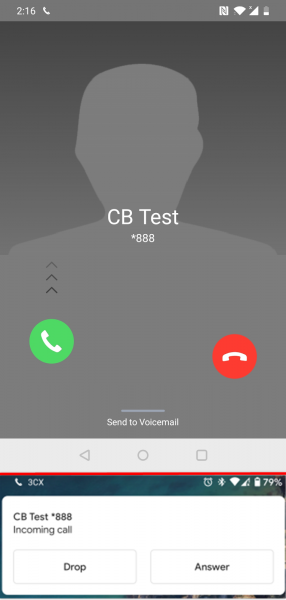
Some Android 10 users report that the call can be heard, but the call notification does not pop up. In this case, it is recommended to delete and reinstall the app. In the next release, we will make enhancements for reliable notification display.
Autoloading on device startup
Unfortunately, the 3CX app behaves differently across devices, depending on how Android was restarted—manually or forcibly (for example, during a freezing incident). We have tested several devices and found that the app starts correctly after the phone restart.
Phone
OS
OnePlus 6T
OxygenOS 9.0.17
OnePlus 5T
OxygenOS 9.0.8
One Plus 3
OxygenOS 9.0.5
Moto Z play
Android 8
Redmi Note 7
Android 9 — MIUI 10.3.10
Samsung S8
Android 9 (there may be a delay on first launch)
Samsung S9
Android 9
Nokia 6.1
Android 9
Moto g7 plus
Android 9
Huawei P30
Android 9 — EMUI 9.1.0
Google Pixel (2 / 3)
Android 10
Xiaomi Mi Mix 2
Android 8 — MIUI 10.3
Note that in many cases the app does not start automatically if it was forcibly stopped by the user.
Switching or disabling SIP accounts
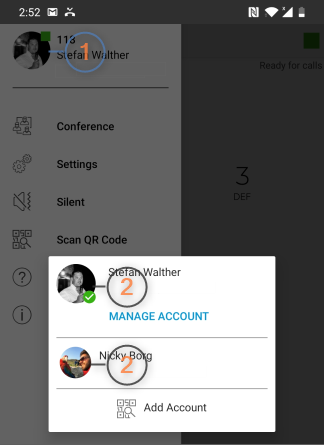
The new app has changed the interface for managing (switching, disabling) SIP accounts. In the upper left menu:
- Tap your profile icon (1)
- Press and hold the current account to select an action: "Deactivate", "Edit" or "Delete"
- Tap another account to switch to it (2)
- Click "Add account" and scan the QR code (from your email or 3CX web client) to add a new SIP account to the app.
PUSH notifications do not come in 3CX for Android
After updating 3CX to version v16 Update 3 and the Android app, some users stopped receiving PUSH notifications for calls on their phones. We noticed this issue on 3CX installations where a custom account is used for the PUSH account.
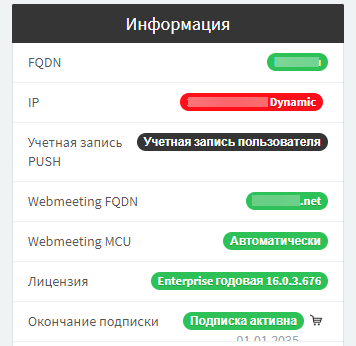
In this case, it is recommended to switch to the built-in 3CX account. To do this, simply click on the 'User account' line, then remove your PUSH settings from the 3CX interface, click OK and restart the server.
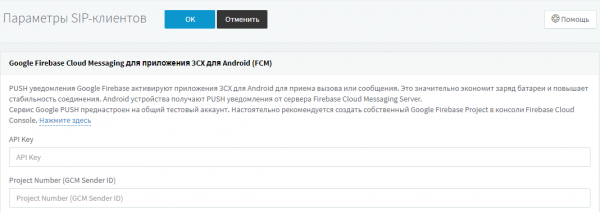
After that, check the changes to the PUSH notification settings in the interface.
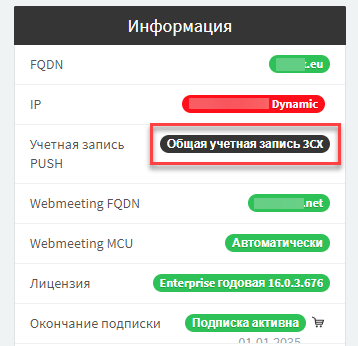
Now users experiencing issues with receiving PUSH notifications should perform a re-auto-setup of the 3CX apps.
So, we hope that these clarifications and recommendations will be helpful for you and your users!
Source: habr.com
