

Note: translation.: The author of the original article is Théo Chamley, a Google Cloud solutions architect. In this blog post for Google Cloud, he presented a brief summary of a more detailed guide by his company titled '.' In it, Google professionals compiled the best practices for operating containers in the context of using Google Kubernetes Engine and beyond, covering a wide range of topics: from security to monitoring and logging. So, what practices are considered most important for working with containers according to Google?

(a Kubernetes-based service for running containerized applications in Google Cloud — translator's note.) — is one of the best ways to run workloads that require scaling. It will ensure the smooth operation of most applications if they are containerized. However, if you want your application to be easy to manage, and if you want to take advantage of all the benefits of Kubernetes, it is essential to follow best practices. They will simplify application operation, monitoring, debugging, and enhance security.
In this article, we will go over a list of what you should know and do for the effective functioning of containers in Kubernetes. Those wishing to delve deeper into the details should read the material , as well as take a look at our on building containers.
1. Use native container mechanisms for logging
If the application is running in a Kubernetes cluster, not much is needed for logging. A centralized logging system is likely already built into the cluster used. In the case of using Kubernetes Engine, this is handled by . (Note: translation.: If you are using your own Kubernetes installation, we recommend checking out our Open Source solution — .) Don't complicate your life and use native container logging mechanisms. Write logs to stdout and stderr—they will be automatically captured, stored, and indexed.
If desired, you can also write logs to . This approach will make it easy to add metadata to them. Along with this, the ability to search logs using this metadata will appear in Stackdriver Logging.
2. Ensure that containers are stateless and immutable
For containers in a Kubernetes cluster to function correctly, they must be stateless and immutable. When these conditions are met, Kubernetes can perform its tasks by creating and destroying application entities as needed.
Stateless means that any state (persistent data of any kind) is stored outside the container. To this end, depending on requirements, various types of external storage may be used: , , , or other managed databases. (Note: translation.: Read more about this in our article “».)
Immutable means that the container will not be modified during its lifetime: no updates, patches, or configuration changes. If you need to update the application code or apply a patch, create a new image and deploy it. It is recommended to externalize container configuration (listening port, execution environment options, etc.) into and . They can be updated without needing to build a new container image. For easy creation of image build pipelines, you can use . (Note: translation.: We use the Open Source tool .)
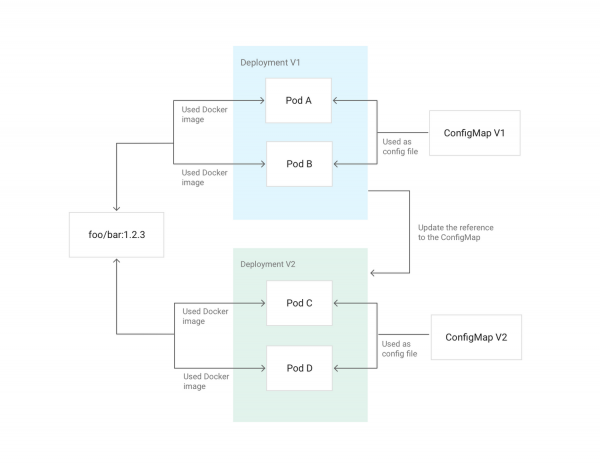
Example of updating Deployment configuration in Kubernetes using a ConfigMap mounted in pods as configuration
3. Avoid privileged containers
You don’t run applications as root on your servers, do you? If an attacker breaches the application, they will gain access with root privileges. The same considerations apply to not running privileged containers. If you need to change settings on the host, you can grant the container specific capabilities using the option in Kubernetes. If it is necessary to modify sysctls, Kubernetes has a for this. Generally, try to utilize and sidecar containers for performing such privileged operations. They do not need to be reachable for internal or external traffic.
If you administer a cluster, you can take advantage of for limitations on using privileged containers.
4. Avoid running as root
While privileged containers have been discussed, it would be even better if, in addition to this, you do not run applications inside the container as root. If an attacker finds a remote vulnerability in an application with root privileges that allows code execution, and then manages to escape the confines of the container through an as-yet-unknown vulnerability, they could gain root access on the host.
The best way to avoid this is, first and foremost, to not run anything as root. This can be achieved by utilizing the directive USER downward API support (simultaneously with this in Dockerfile or runAsUser in Kubernetes. The cluster administrator can also enforce behavior using .
5. Make the application easy to monitor
Like logging, monitoring is an integral part of application management. A popular solution for monitoring in the Kubernetes community is — a system that automatically discovers pods and services that need monitoring. (Note: translation.: See also our on monitoring with Prometheus and Kubernetes.) can monitor Kubernetes clusters and includes its own version of Prometheus for monitoring applications.
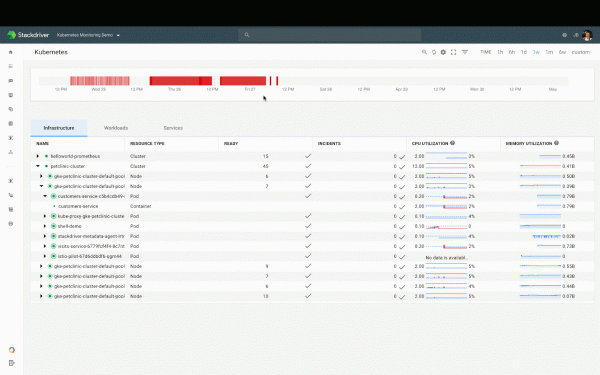
The Kubernetes monitoring dashboard in Stackdriver
expects the application to expose metrics at an HTTP endpoint. There are . The same format is used by other tools such as and .
6. Make the application's health status accessible
Managing an application in production is aided by its ability to report its status to the system. Is the application running? Is it healthy? Is it ready to accept traffic? How is it behaving? The most common approach to address this is to implement health checks (health checks). Kubernetes has two types of them: .
For a liveness probe (liveness check) the application must have an HTTP endpoint that returns a "200 OK" response if it is functioning and its critical dependencies are met. For a readiness probe (readiness check) The application must have a separate HTTP endpoint that returns a "200 OK" response if the application is healthy, initialization steps have been completed, and any valid request does not result in an error. Kubernetes will route traffic to the container only if the application is ready according to these checks. The two endpoints can be combined if there is no difference between liveness and readiness states.
You can read more about this in the relevant article by Sandeep Dinesh, Developer Advocate at Google: "».
7. Choose the image version carefully
Most public and private images use a tagging system similar to what is described in . If the image uses a system similar to , the specifics of tagging should be considered. For example, a tag latest may frequently move from image to image — it cannot be relied upon if you need predictable and reproducible builds and installations.
You can use the tag X.Y.Z (they are almost always unchanged); however, in this case, track all patches and updates to the image. If the image you’re using has a tag X.Y, it is a good compromise. By choosing it, you automatically receive patches while relying on a stable version of the application.
P.S. from the translator
Also read in our blog:
- «»;
- «»;
- «»;
- «» (overview and presentation video);
- «» (overview and presentation video);
- «» (overview and presentation video);
- «» (overview and presentation video);
- «».
Source: habr.com
