

release of the web browser , as well as Firefox 68.2 for the Android platform. Additionally, an update has been released. with long-term support (support for the previous ESR branch 60.x has been discontinued). Soon, the Firefox 71 branch will transition to the release stage, in accordance with the new development cycle In enhanced tracking protection mode,
:
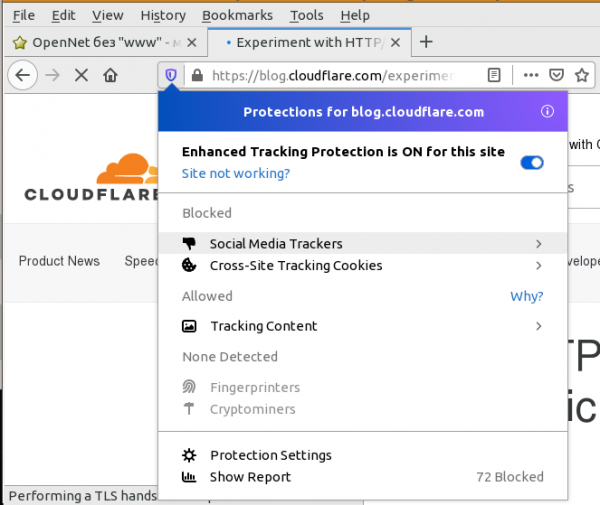
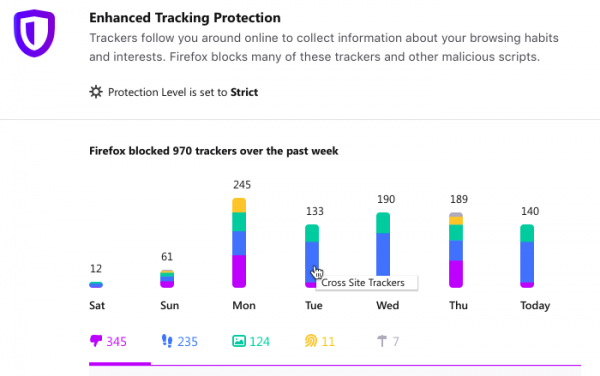
- it blocks social media widgets that track users' movements on third-party sites (such as Facebook's Like buttons and Twitter embeds). For authentication forms via social media accounts, there is an option to temporarily disable blocking; A summary report of the blocks implemented has been added, where users can track the number of blocks by day of the week and type;

- A system add-on has been included

- (previously supplied as Lockbox), which introduces the new ‘about:logins’ interface for managing saved passwords. The add-on places a button on the toolbar for quickly viewing accounts saved for the current site, as well as performing search and password editing operations. There is also access to saved passwords through a separate mobile application , supporting password auto-fill in authentication forms of any mobile applications; The system add-on has been integrated
- to issue warnings in case of account compromise (email verification) or attempts to log into a previously breached site. Verification is performed through integration with the haveibeenpwned.com database; , which The password generator is activated by default when filling out registration forms, presenting a suggestion with an automatically generated strong password. The pop-up suggestion is automatically displayed for fields ‹input type="password"› with the attribute "autocomplete = new-password". Without this attribute, a password can be generated through the context menu;
- Активирован по умолчанию генератор паролей, при заполнении форм регистрации, выводящий подсказку со сгенерированным автоматически надёжным паролем. Всплывающая подсказка автоматически выводится для полей ‹input type=»password»› с атрибутом «autocomplete = new-password». Без данного атрибута пароль может быть сгенерирован через контекстное меню;
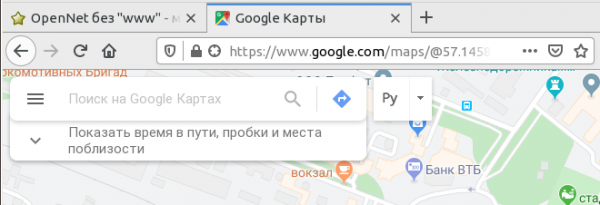
- Instead of the «(i)» button in the address bar, there is a privacy level indicator that allows users to assess the activation of tracking protection modes. The indicator turns gray when the tracking protection mode is enabled in settings and no blocking elements are detected on the page. It turns blue when certain elements on the page that violate privacy or are used for tracking are blocked. The indicator is crossed out when the user has disabled tracking protection for the current website.
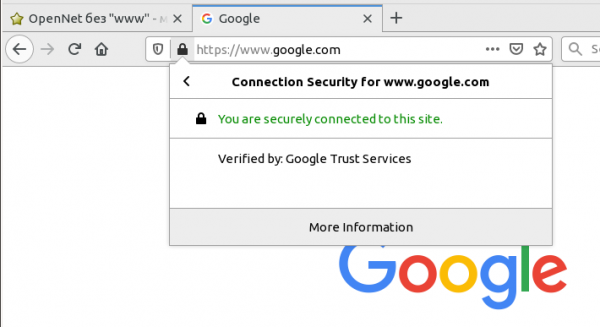
- Pages opened via HTTP or FTP are now marked with an insecure connection icon, which is also displayed for HTTPS in case of certificate issues. The lock symbol color for HTTPS has changed from green to gray (the green color can be restored via the setting security.secure_connection_icon_color_gray). The shift from security assurance indicators to warnings about security issues is caused by the widespread adoption of HTTPS, which is now considered a norm rather than an additional protection.
- In the address bar, displaying the company name when using a verified EV certificate on the website. The information has been removed as it could mislead users and be used for phishing (for example, a company named «Identity Verified» was registered, and its name in the address bar was perceived as a validation indicator). Information about the EV certificate can be viewed through the menu that appears when clicking on the lock icon. The display of the company name from the EV certificate in the address bar can be restored through the setting «security.identityblock.show_extended_validation» in about:config.

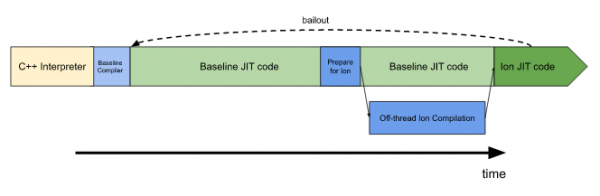
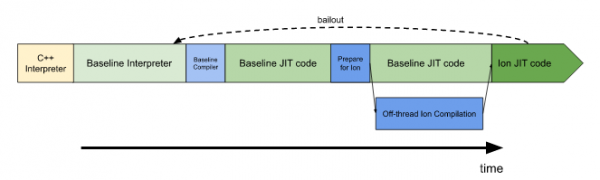
- in the JavaScript engine a new "baseline" bytecode interpreter that occupies an intermediate position between a conventional interpreter and a pre-"baseline" JIT compiler. The new interpreter is significantly faster than the old interpreter and utilizes shared procedures for bytecode processing, caching, and profiling data with the "baseline" JIT compiler. The additional interpreter accelerates the execution of frequently used JavaScript functions after they are rolled back from optimized JIT (Ion JIT) to the compilation stage for unoptimized "baseline" JIT, for instance, after the function is called with arguments of different types.
In complex web applications, compilation for "baseline" JIT and optimizations for Ion JIT take considerable time, and the additional fast interpreter achieves an overall performance increase along with a slight reduction in memory consumption. Tests conducted showed that enabling the additional interpreter, which uses shared statistics and JIT inline caching, resulted in a 2-8% decrease in page load times, and web developer tool performance improved by 2-10%;


- for Linux builds by default, the application of the compositing system for AMD, Intel, and NVIDIA GPUs (only for the Nouveau driver), when using the Mesa package version 18.2 or newer. For Windows builds, in addition to previously supported AMD and NVIDIA GPUs, WebRender is now also activated for Intel GPUs. The compositing system is written in Rust and delegates page content rendering operations to the GPU.
When using WebRender instead of the built-in compositing system in the Gecko engine, which processes data using the CPU, shaders executed on the GPU are used to perform the composite rendering operations of page elements. This allows for a significant increase in rendering speed and reduces CPU load. To force WebRender on, you can change the settings for "gfx.webrender.all" and "gfx.webrender.enabled" in about:config;
- support for strict site isolation mode, developed under the code name In this mode, the pages of different websites are always loaded into the memory of different processes, each of which applies its own isolated sandbox. The process separation is done not by tabs, but by domains, which additionally isolates the content of external scripts and iframe blocks. The management of strict isolation mode is done in about:config through the option "fission.autostart" (enabled in releases is currently blocked);
- the logo, and the name has been changed from Firefox Quantum to Firefox Browser;
- the display of authorization requests initiated from iframe blocks loaded from another domain (cross-origin). Change to block some abuses and switch to a model where permissions are requested only from the primary domain of the document displayed in the address bar;
- rendering of files downloaded via FTP (for example, when opening via FTP, images, README, and HTML files will no longer be displayed). When opening resources via FTP, a file download dialog will now be triggered immediately, regardless of the content type;
- In the address bar, an indicator for granting access to location, which will visually assess the activity of the Geolocation API and, if necessary, allow users to revoke the site's permission for its use. Previously, the indicator was displayed only until permission was granted and in case the request was denied, but disappeared upon granting access to the Geolocation API. Now the indicator will inform the user about such access;

- an extended interface for viewing TLS certificates, available through the "about:certificate" page (the old interface is still used by default, the new one is enabled through security.aboutcertificate.enabled in about:config). Previously, to view certificates, a separate window would open, but now the information is displayed in a tab in a format resembling an extension. The implementation of the certificate viewing interface is entirely using JavaScript and standard web technologies;
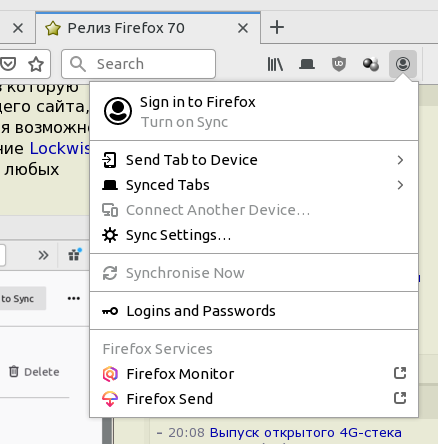
- A section for accessing advanced Firefox services, such as Monitor and Send, has been added to the account management menu;

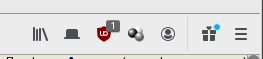
- A new "gift" icon has been added to the main menu and the toolbar, through which users can get information about new releases and their key features.

- Firefox built-in pages (about:*) are adapted to display according to dark theme settings;
- Improved readability of underlined or strikethrough text, including links – lines now break (wrap) without crossing glyphs;
- In themes support for properties accentcolor, textcolor, and headerURL has been added, which were aliases for properties frame, tab_background_text, and theme_frame (themes hosted on addons.mozilla.org have been updated automatically);
- CSS properties have been added , and , allowing customization of thickness, spacing, and breaks for lines used for underlining and strikethrough text;
- In the CSS property "" the ability to specify two attributes at once has been added, for example, "display: block flex" or "display: inline flex";
- Opacity values in the CSS properties opacity and stop-opacity can now be set in percentages;
- In the CSS property , support for the xxx-large value has been added;
- In JavaScript the ability to visually separate large numbers using underscore characters, for example, "myNumber = 1_000_000_000_000";
- A new method has been added , which is a variant of the Intl.RelativeTimeFormat.format() method, returning an array of objects, each element representing its own part of the formatted value, rather than returning the entire formatted string;
- The HTTP header "Referer" is limited to 4 KB, and when this value is exceeded, the content is truncated to the domain name;
- In the developer tools, the Accessibility panel has added tools for auditing navigation convenience between elements using the keyboard, as well as a simulator of how the page appears to colorblind individuals;
- In the color picker tool, a contrast indicator is now displayed for the selected color, relative to the background color, to assess visibility for people with visual impairments;
- In the CSS inspection mode, CSS definitions that do not affect the selected element are now highlighted in gray, with a tooltip indicating the reason for ignoring and possible solutions;
- The debugger has added the ability to set breakpoints that trigger upon changes to the DOM elements () and allow tracking moments when scripts add, remove, or update the content of the page;
- For extension developers, the ability to inspect data in the browser.storage.local storage has been implemented.
- The network activity inspection mode has been enhanced with a search capability that allows for quick identification of request and response elements. The search covers HTTP headers, cookies, and request/response bodies.
- Optimization of the page compositing code on the macOS platform has been completed, reducing CPU load, speeding up page loading (up to a 22% acceleration), and decreasing resource usage during video playback (up to 37%). The macOS builds also introduced support for importing passwords saved in Chrome.
- A corrective update for Firefox 68.1 has been prepared for Android. It is important to note that the development of new significant releases of Firefox for Android has been halted. Instead, Firefox for Android is being replaced by Fenix (distributed as a ) new mobile browser using the GeckoView engine and the Mozilla Android Components library set. A few days ago, a new experimental release of Firefox Preview 2.2 was launched, which fixed several significant issues in the interface and user interaction methods. Changes compared to include adding an option to clear all data upon exit and the ability to open links by default in private browsing mode.
In addition to new features and bug fixes, Firefox 70 addressed , 12 of which (grouped under CVE-2019-11764) as critical and could potentially lead to code execution by an attacker when specially crafted pages are opened.
Source: opennet.ru
