

The online video content recommendation system we are working on is a closed commercial development and technically represents a multi-component cluster made up of proprietary and open-source components. The purpose of this article is to describe the implementation of a Docker Swarm clustering system for a staging environment, without disrupting our established workflow due to time constraints. The narrative presented to you is divided into two parts. The first part describes CI/CD prior to using Docker Swarm, while the second covers its implementation. Those who are not interested in reading the first part may skip directly to the second.
Part I
In a distant year, it was required to set up the CI/CD process as quickly as possible. One condition was to not use Docker for deployment of the developed components for several reasons:
- for more reliable and stable component operation in Production (essentially a requirement to avoid virtualization)
- the lead developers did not want to work with Docker (strange, but that was the case)
- due to ideological reasons from the R&D management
The infrastructure, stack, and rough initial requirements for the MVP were as follows:
- 4 Intel® X5650 servers running Debian (one more powerful machine dedicated entirely to development)
- Development of proprietary custom components is conducted in C++, Python3
- Main 3rd party tools used: Kafka, Clickhouse, Airflow, Redis, Grafana, Postgresql, Mysql, ...
- Separate build and testing pipelines for components for debug and release
One of the first questions to be resolved at the initial stage is how the custom components will be deployed in any environment (CI/CD).
Third-party components were decided to be installed and updated systemically. Custom applications developed in C++ or Python can be deployed in various ways. For instance, they can be created as system packages, sent to a repository of built images, and then installed on servers. For unknown reasons, a different method was chosen: using CI, executable files of the applications are compiled, a project virtual environment is created, py-modules from requirements.txt are installed, and all these artifacts are sent along with configurations, scripts, and the accompanying application environment to the servers. Applications are then launched from a virtual user without administrator rights.
Gitlab-CI was chosen as the CI/CD system. The resulting pipeline looked approximately like this:
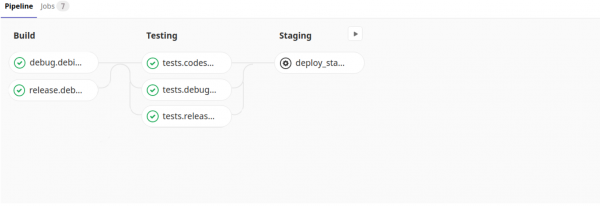
Structurally, gitlab-ci.yml looked as follows
---
variables:
  # minimum CPU version on the servers where the cluster is deployed
  CMAKE_CPUTYPE: "westmere"

  DEBIAN: "MYREGISTRY:5000/debian:latest"

before_script:
  - eval $(ssh-agent -s)
  - ssh-add  ~/.ssh/config

stages:
  - build
  - testing
  - deploy

debug.debian:
  stage: build
  image: $DEBIAN
  script:
    - cd builds/release && ./build.sh
    paths:
      - bin/
      - builds/release/bin/
    when: always
release.debian:
  stage: build
  image: $DEBIAN
  script:
    - cd builds/release && ./build.sh
    paths:
      - bin/
      - builds/release/bin/
    when: always

## testing stage
tests.codestyle:
  stage: testing
  image: $DEBIAN
  dependencies:
    - release.debian
  script:
    - /bin/bash run_tests.sh -t codestyle -b "${CI_COMMIT_REF_NAME}_codestyle"
tests.debug.debian:
  stage: testing
  image: $DEBIAN
  dependencies:
    - debug.debian
  script:
    - /bin/bash run_tests.sh -e codestyle/test_pylint.py -b "${CI_COMMIT_REF_NAME}_debian_debug"
  artifacts:
    paths:
      - run_tests/username/
    when: always
    expire_in: 1 week
tests.release.debian:
  stage: testing
  image: $DEBIAN
  dependencies:
    - release.debian
  script:
    - /bin/bash run_tests.sh -e codestyle/test_pylint.py -b "${CI_COMMIT_REF_NAME}_debian_release"
  artifacts:
    paths:
      - run_tests/username/
    when: always
    expire_in: 1 week

## staging stage
deploy_staging:
  stage: deploy
  environment: staging
  image: $DEBIAN
  dependencies:
    - release.debian
  script:
    - cd scripts/deploy/ &&
        python3 createconfig.py -s $CI_ENVIRONMENT_NAME &&
        /bin/bash install_venv.sh -d -r ../../requirements.txt &&
        python3 prepare_init.d.py &&
        python3 deploy.py -s $CI_ENVIRONMENT_NAME
  when: manual
It is worth noting that the build and testing are performed on a custom image where all the necessary system packages are already installed, and other configurations have been made.
While each of these scripts in the jobs is interesting in its own way, I won't discuss them in detail as describing each one would take significant time, and that's not the purpose of this article. I’ll just highlight that the deployment stage consists of a sequence of script calls:
- createconfig.py — creates a settings.ini file with component configurations in different environments for subsequent deployment (Preproduction, Production, Testing, …)
- install_venv.sh — creates a virtual environment for Python components in a specified directory and copies it to remote servers
- prepare_init.d.py — prepares start-stop scripts for components based on a template
- deploy.py — distributes and restarts the new components
Time passed. The staging phase was replaced by preproduction and production. Support for the product was added on another distribution (CentOS). We gained five more powerful physical servers and a dozen virtual ones. Developers and testers found it increasingly difficult to test their tasks in an environment more or less close to a working state. At that time, it became clear that it was impossible to do without it...
Part II
So, our cluster is quite a spectacle — a system of several dozen individual components, not described by Dockerfiles. Configuring it for deployment in a specific environment can only be done as a whole. Our task is to deploy the cluster in the staging environment for testing before the release.
Theoretically, there can be several simultaneously operating clusters: as many as there are tasks in a completed or nearly completed state. The capacities available in our servers allow running several clusters on each server. Each staging cluster must be isolated (there should be no overlap in ports, directories, etc.).
The most valuable resource is our time, and we had little of it.
To get started more quickly, we chose Docker Swarm due to its simplicity and flexible architecture. The first thing we did was create a manager and several nodes on the remote servers:
$ docker node ls
ID                            HOSTNAME            STATUS              AVAILABILITY        MANAGER STATUS      ENGINE VERSION
kilqc94pi2upzvabttikrfr5d     nop-test-1     Ready               Active                                  19.03.2
jilwe56pl2zvabupryuosdj78     nop-test-2     Ready               Active                                  19.03.2
j5a4yz1kr2xke6b1ohoqlnbq5 *   nop-test-3     Ready               Active              Leader              19.03.2
Next, we created a network:
$ docker network create --driver overlay --subnet 10.10.10.0/24 nw_swarm
Then, we linked Gitlab-CI and Swarm nodes for remote management of nodes from CI: installation of certificates, configuration of secret variables, and setup of the Docker service on the manager server. This saved us a lot of time.
Next, we added jobs for creating and destroying the stack in .gitlab-ci.yml.
In .gitlab-ci.yml, a few more jobs were added
## staging stage
deploy_staging:
  stage: testing
  before_script:
    - echo "override global 'before_script'"
  image: "REGISTRY:5000/docker:latest"
  environment: staging
  dependencies: []
  variables:
    DOCKER_CERT_PATH: "/certs"
    DOCKER_HOST: tcp://10.50.173.107:2376
    DOCKER_TLS_VERIFY: 1
    CI_BIN_DEPENDENCIES_JOB: "release.centos.7"
  script:
    - mkdir -p $DOCKER_CERT_PATH
    - echo "$TLSCACERT" > $DOCKER_CERT_PATH/ca.pem
    - echo "$TLSCERT" > $DOCKER_CERT_PATH/cert.pem
    - echo "$TLSKEY" > $DOCKER_CERT_PATH/key.pem
    - docker stack deploy -c docker-compose.yml ${CI_ENVIRONMENT_NAME}_${CI_COMMIT_REF_NAME} --with-registry-auth
    - rm -rf $DOCKER_CERT_PATH
  when: manual

## stop staging stage
stop_staging:
  stage: testing
  before_script:
    - echo "override global 'before_script'"
  image: "REGISTRY:5000/docker:latest"
  environment: staging
  dependencies: []
  variables:
    DOCKER_CERT_PATH: "/certs"
    DOCKER_HOST: tcp://10.50.173.107:2376
    DOCKER_TLS_VERIFY: 1
  script:
    - mkdir -p $DOCKER_CERT_PATH
    - echo "$TLSCACERT" > $DOCKER_CERT_PATH/ca.pem
    - echo "$TLSCERT" > $DOCKER_CERT_PATH/cert.pem
    - echo "$TLSKEY" > $DOCKER_CERT_PATH/key.pem
    - docker stack rm ${CI_ENVIRONMENT_NAME}_${CI_COMMIT_REF_NAME}
    # TODO: need check that stopped
  when: manual
From the above code snippet, it's clear that two buttons (deploy_staging, stop_staging) requiring manual intervention have been added to Pipelines.
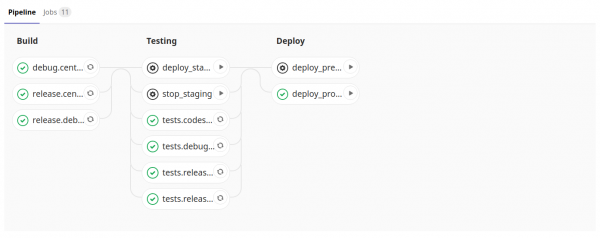
The stack name corresponds to the branch name, and this uniqueness should be sufficient. Services in the stack receive unique IP addresses, while ports, directories, etc., will be isolated but identical from stack to stack (since the configuration file is the same for all stacks) — which is what we aimed for. The stack (cluster) is deployed using docker-compose.yml, which describes our cluster.
docker-compose.yml
---
version: '3'

services:
  userprop:
    image: redis:alpine
    deploy:
      replicas: 1
      placement:
        constraints: [node.id == kilqc94pi2upzvabttikrfr5d]
      restart_policy:
        condition: none
    networks:
      nw_swarm:
  celery_bcd:
    image: redis:alpine
    deploy:
      replicas: 1
      placement:
        constraints: [node.id == kilqc94pi2upzvabttikrfr5d]
      restart_policy:
        condition: none
    networks:
      nw_swarm:

  schedulerdb:
    image: mariadb:latest
    environment:
      MYSQL_ALLOW_EMPTY_PASSWORD: 'yes'
      MYSQL_DATABASE: schedulerdb
      MYSQL_USER: ****
      MYSQL_PASSWORD: ****
    command: ['--character-set-server=utf8mb4', '--collation-server=utf8mb4_unicode_ci', '--explicit_defaults_for_timestamp=1']
    deploy:
      replicas: 1
      placement:
        constraints: [node.id == kilqc94pi2upzvabttikrfr5d]
      restart_policy:
        condition: none
    networks:
      nw_swarm:

  celerydb:
    image: mariadb:latest
    environment:
      MYSQL_ALLOW_EMPTY_PASSWORD: 'yes'
      MYSQL_DATABASE: celerydb
      MYSQL_USER: ****
      MYSQL_PASSWORD: ****
    deploy:
      replicas: 1
      placement:
        constraints: [node.id == kilqc94pi2upzvabttikrfr5d]
      restart_policy:
        condition: none
    networks:
      nw_swarm:

  cluster:
    image: $CENTOS7
    environment:
      - CENTOS
      - CI_ENVIRONMENT_NAME
      - CI_API_V4_URL
      - CI_REPOSITORY_URL
      - CI_PROJECT_ID
      - CI_PROJECT_URL
      - CI_PROJECT_PATH
      - CI_PROJECT_NAME
      - CI_COMMIT_REF_NAME
      - CI_BIN_DEPENDENCIES_JOB
    command: >
      sudo -u myusername -H /bin/bash -c ". /etc/profile &&
        mkdir -p /storage1/$CI_COMMIT_REF_NAME/$CI_PROJECT_NAME &&
        cd /storage1/$CI_COMMIT_REF_NAME/$CI_PROJECT_NAME &&
            git clone -b $CI_COMMIT_REF_NAME $CI_REPOSITORY_URL . &&
            curl $CI_API_V4_URL/projects/$CI_PROJECT_ID/jobs/artifacts/$CI_COMMIT_REF_NAME/download?job=$CI_BIN_DEPENDENCIES_JOB -o artifacts.zip &&
            unzip artifacts.zip ;
        cd /storage1/$CI_COMMIT_REF_NAME/$CI_PROJECT_NAME/scripts/deploy/ &&
            python3 createconfig.py -s $CI_ENVIRONMENT_NAME &&
            /bin/bash install_venv.sh -d -r ../../requirements.txt &&
            python3 prepare_init.d.py &&
            python3 deploy.py -s $CI_ENVIRONMENT_NAME"
    deploy:
      replicas: 1
      placement:
        constraints: [node.id == kilqc94pi2upzvabttikrfr5d]
      restart_policy:
        condition: none
    tty: true
    stdin_open: true
    networks:
      nw_swarm:

networks:
  nw_swarm:
    external: true
It is clear that the components are combined into one network (nw_swarm) and are accessible to each other.
The system components (based on redis, mysql) are separated from the common pool of custom components (in plans to also separate custom ones as services). The deployment stage of our cluster looks like passing CMD to our one large configured image and is practically indistinguishable from the deployment described in Part I. I will emphasize the differences:
- git clone … — we get the files necessary to carry out the deployment (createconfig.py, install_venv.sh, etc.)
- curl… && unzip … — we download and unpack the build artifacts (compiled utilities)
There remains only one unexplained problem: the components with a web interface are not accessible from developers' browsers. We are solving this issue with a reverse proxy as follows:
In .gitlab-ci.yml, after deploying the cluster stack, we add a line for deploying the load balancer (which only updates its configuration during commits, creating new Nginx configuration files from the template: /etc/nginx/conf.d/${CI_COMMIT_REF_NAME}.conf) — see docker-compose-nginx.yml code.
- docker stack deploy -c docker-compose-nginx.yml ${CI_ENVIRONMENT_NAME} --with-registry-auth
docker-compose-nginx.yml
---
version: '3'

services:
  nginx:
    image: nginx:latest
    environment:
      CI_COMMIT_REF_NAME: ${CI_COMMIT_REF_NAME}
      NGINX_CONFIG: |-
            server {
                listen 8080;
                server_name staging_${CI_COMMIT_REF_NAME}_cluster.dev;

                location / {
                    proxy_pass http://staging_${CI_COMMIT_REF_NAME}_cluster:8080;
                }
            }
            server {
                listen 5555;
                server_name staging_${CI_COMMIT_REF_NAME}_cluster.dev;

                location / {
                    proxy_pass http://staging_${CI_COMMIT_REF_NAME}_cluster:5555;
                }
            }
    volumes:
      - /tmp/staging/nginx:/etc/nginx/conf.d
    command:
      /bin/bash -c "echo -e "$$NGINX_CONFIG" > /etc/nginx/conf.d/${CI_COMMIT_REF_NAME}.conf;
        nginx -g "daemon off;";
        /etc/init.d/nginx reload"
    ports:
      - 8080:8080
      - 5555:5555
      - 3000:3000
      - 443:443
      - 80:80
    deploy:
      replicas: 1
      placement:
        constraints: [node.id == kilqc94pi2upzvabttikrfr5d]
      restart_policy:
        condition: none
    networks:
      nw_swarm:

networks:
  nw_swarm:
    external: true
On developers' computers, we update /etc/hosts; we write the URL to Nginx:
10.50.173.106 staging_BRANCH-1831_cluster.dev
Thus, the deployment of isolated staging clusters has been implemented, and developers can now run them in any sufficient quantity for verifying their tasks.
Future plans:
- Separate our components as services
- Create a Dockerfile for each
- Automatically determine less loaded nodes in the stack
- Specify nodes by name template (instead of using ID as in the article)
- Add a check that the stack is destroyed
- …
Special thanks for .
Source: habr.com
