

 Habr is not a complaints book. This article is about the free tools from Nirsoft for Windows system administrators.
When contacting technical support, many people often experience stress. Some worry that they won't be able to explain the problem and will look foolish. Others are overwhelmed with emotions and find it hard to contain their outrage over the quality of service—since there hadn't been a single interruption before!
I like Veeam's technical support, for example. They may not respond quickly, but their answers are precise and to the point. I'm even glad to write to them about trivial issues to learn some new trick.
DeviceLock has decent tech support. The experience of their veterans is commendable. After almost every inquiry, I add a few lines of 'Secret Knowledge' to the corporate Wiki. Meanwhile, they quickly gather test builds of the product with fixed bugs—the support and production teams are closely connected.
ArcServe is not very good. The residents of the Indian Ocean coast are very, very polite and attentive, but I can't say anything else good. If there’s no ready-made KB, your life will be miserable.
Our antivirus flagship—the Kaspersky Lab—stands out in its technical support. Just like one postpones a visit to the dentist, I try to avoid writing to them for as long as possible. Because it will be long, painful, and with unpredictable results. You can't choose your doctors, even if you have 5000 rubles in licenses—the one you get will treat you. And I seem to be a doctor myself (well, not a doctor, but a handyman), which makes it even more frustrating.
On to the matter.
We're upgrading Kaspersky Security for Windows Server from version 10.1.1 to 10.1.2. The operation is simple, but we know better. During the last Patch Tuesday from Microsoft, I noticed that updates had not installed on a large group of servers.
It turned out that the wuauserv and BITS services had stopped working on the servers, and an error is returned upon startup:
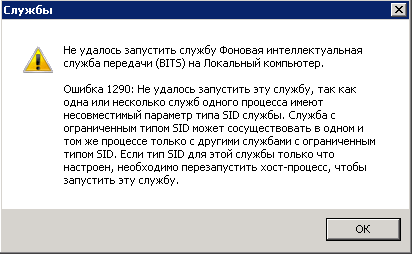
After resolving the startup issue with some quick fixes
sc config wuauserv type= own
sc config bits type= own
I realized that there was something common among the servers—100% of the patients had recently been upgraded to KSWS 10.1.2.
It hurt badly, so I opened a ticket.
Hello!
After upgrading from 10.1.1 to 10.1.2.996, on several servers, the BITS and Windows Update services broke.
An error is returned upon startup: 1290
Is the occurrence of this error related to the installation of the product?
The answer was quick to arrive.
Good afternoon, Mikhail!
Kaspersky Security 10 for Windows Server does not consider existing services during installation or version updates, nor does it check/change their settings.
They said it — just like that.
A quick Google search revealed that this problem exists, or at least existed, .
I wrote back — intelligent people say that this problem existed before, maybe it still persists? I provided standard technical information.
For 7 days (seven days, Carl!) the technical support remained silent. The result was disappointing. Here it is in brief:
Mikhail, good afternoon!
In your case, the disabling of services after the product upgrade is directly related to individual or group settings of the operating system (my conclusions are based on the analysis of the report you sent).
I recommend you to deeply investigate the operation of the system services. I would be happy to help you with this, however, it falls under Microsoft support’s jurisdiction, as the solution you mentioned is operational and requires only one-time input.
From my side, I want to add that both services you mentioned are related to operating system updates and do not affect the operation of our product, hence also not the level of your protection..
And that’s the end. It’s disappointing.
Alright, if Kaspersky Lab cannot find the defect, the soldiers of N will have to find it themselves.
The configuration of Windows services is stored in the registry branch:
HKLM\System\CurrentControlSet\servicesThere is nothing useful stored in the file system except for binary files.
What do we use to monitor the registry? The most universal tool is .
What’s wrong with Process Monitor? It’s extremely difficult to find anything in it if you don’t know exactly what you're looking for.
At the same time, there are utilities from a not-so-well-known company . They release dozens of unique programs — from monitoring USB device connections to reading product keys from the registry. If you’ve never heard of them — I highly recommend visiting the website and checking out the collection. When I first learned about them — it was like opening a box of toys.
For our work, the utility will be useful
RegistryChangesView v1.21. Download it, run it on the server.
The first thing to do is to create a snapshot before installation.
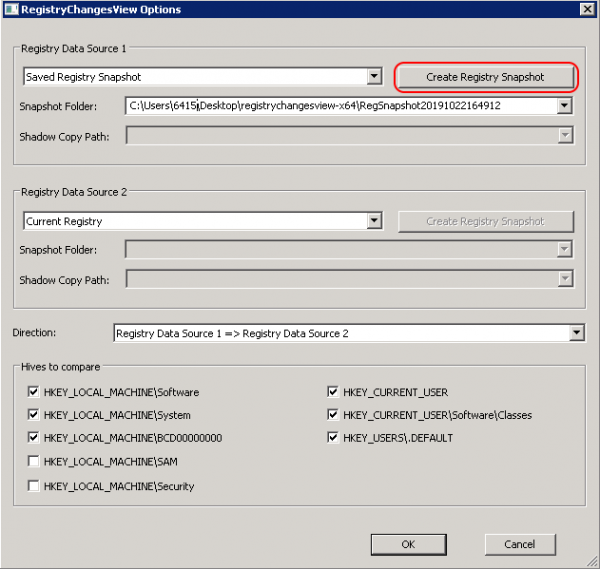
Then we launch Sysinternals Process Monitor, disable everything except for the registry, and set up saving the results to a file.
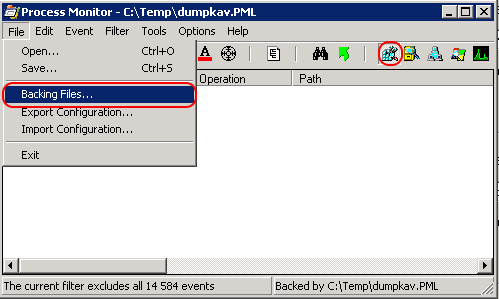
We start the installation process and ensure everything is broken.
We create a second snapshot in RegistryChangesView.
We compare the snapshots with each other.
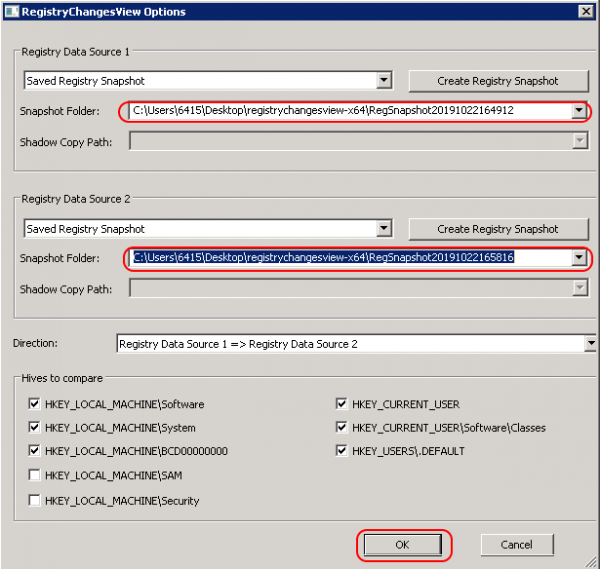
And here is what we were interested in.
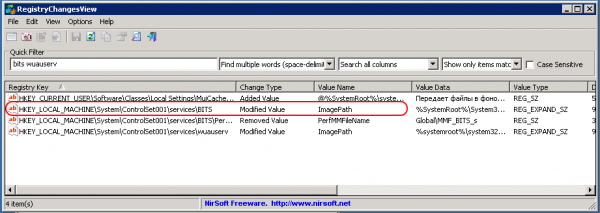
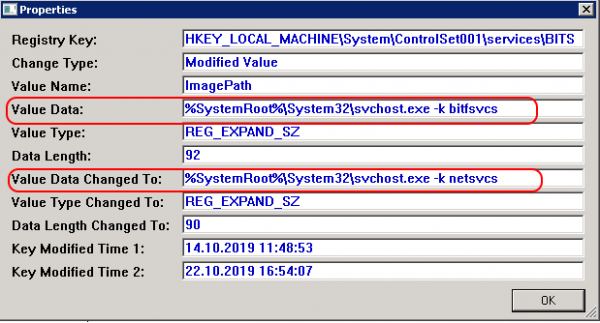
But who did this? Could the service have broken itself?
We look at the Process Monitor log, starting with filtering the processes:
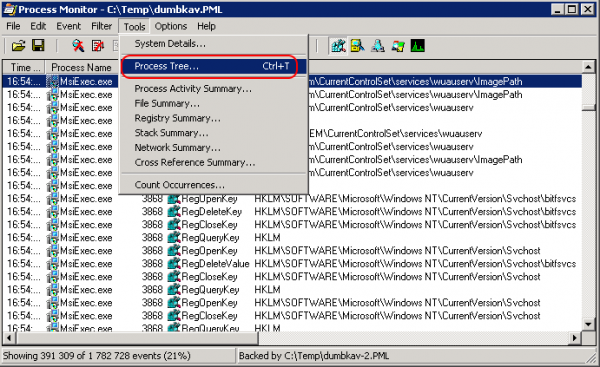
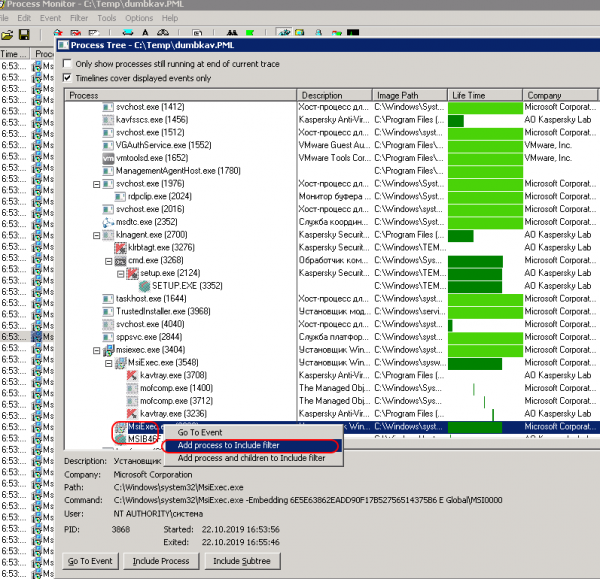
We take a Summary for the registry and sort it by the Writes field:
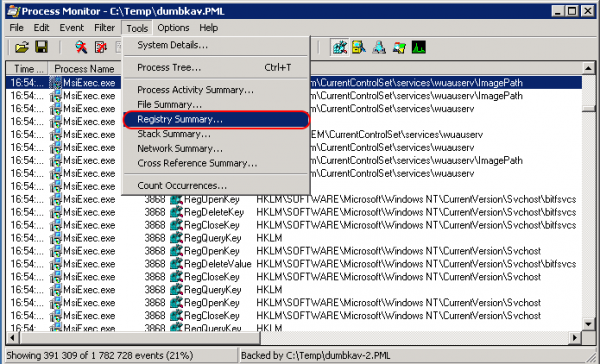
And here it is:
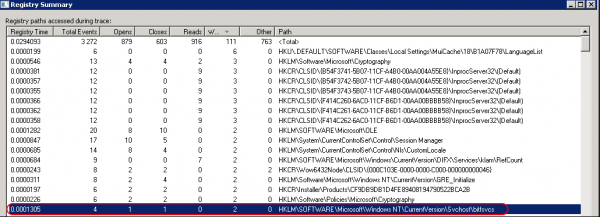
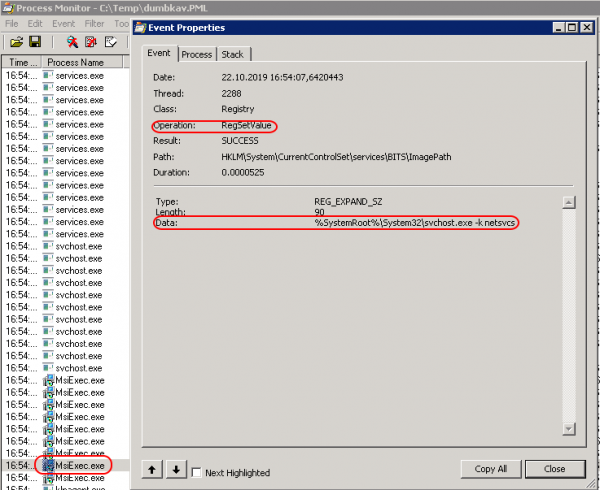
That's it, friends, within 5 minutes the cause of the problem was found.
It's definitely the Kaspersky installer, and we know exactly how it breaks the service. So, we can easily restore it to its original state.
What conclusions can we draw?
Rely on support, but don't slack off yourself. Don’t be lazy. Figure it out.
Use the right tools. Expand your personal set of technical resources. Learn about the tools you use every day.
But if you work in support yourself, try to learn to skip the first phase — 'Denial'. This, by the way, is the most difficult part.
I wish I could start following these tips myself. Hello, Lab!
PS: Thank you for your help with punctuation.
Source: habr.com
