


Good day! In this article, I'll explain how users of regular hosting can capture the IP addresses that generate excessive load on the website and then block them using hosting tools, along with a bit of PHP code and several screenshots.
Input data:
- A website built on the WordPress CMS
- Hosting Beget (this is not an ad, but the admin panel screenshots will be from this hosting provider)
- The WordPress site was launched in the early 2000s and has a large number of articles and materials
- PHP version 7.2
- WP is running the latest version
- Recently, the site has begun to generate high load on MySQL according to the hosting data. Every day, this value exceeded 120% of the norm for the account.
- According to Yandex.Metrica, the site is visited by 100-200 people per day.
First of all, the following was done:
- Database tables were cleaned of accumulated junk.
- Unnecessary plugins were disabled, and outdated code snippets were removed.
At the same time, I would like to point out that caching options (caching plugins) were tested, and observations were made — but the load of 120% from a single website remained unchanged and could only grow.
Here is what the approximate load on the hosting databases looked like.
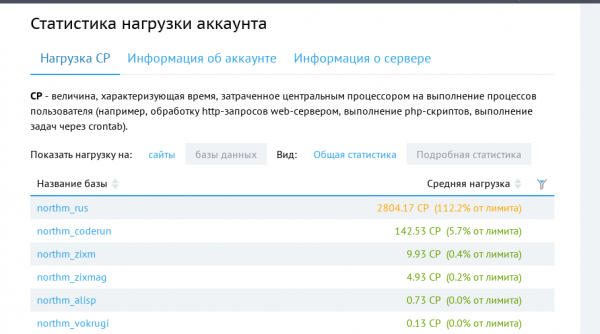
At the top is the site in question, with other sites below that have the same CMS and approximately the same traffic, but create less load.
Analysis
- Many attempts were made with different data caching options, and observations were conducted over several weeks (thankfully, during this time the hosting never wrote to me saying that I was so bad they would disconnect me).
- An analysis was conducted to find slow queries, followed by some modifications to the database structure and table types.
- For analysis, the built-in AWStats was primarily used (which actually helped identify the most malicious IP by traffic volume).
- Metrics — metrics provide information only about people, not about bots.
- Attempts were made to use plugins for WP that can filter and block visitors based on their country and various combinations.
- A completely radical way to take a website down for a day with the note 'We are under maintenance' was done using the famous plugin. In this case, the expected load dropped, but not to zero, as the WP ideology is based on hooks, and plugins activate upon any 'hook' event, meaning there could have already been requests to the database before the 'hook' occurred.
Idea
- Calculate the IP addresses that make many requests in a short period of time.
- Log the number of requests to the site
- Based on the number of requests, block access to the site
- Block using the 'Deny from' directive in the .htaccess file
- Other options, like iptables and rules for Nginx, are not being considered, as I am writing about hosting
An idea has emerged, so it must be implemented, how could we do without it…
- We create tables to accumulate data
CREATE TABLE `wp_visiters_bot` (
	`id` INT(11) NOT NULL AUTO_INCREMENT,
	`ip` VARCHAR(300) NULL DEFAULT NULL,
	`browser` VARCHAR(500) NULL DEFAULT NULL,
	`cnt` INT(11) NULL DEFAULT NULL,
	`request` TEXT NULL,
	`input` TEXT NULL,
	`data_update` DATETIME NULL DEFAULT CURRENT_TIMESTAMP ON UPDATE CURRENT_TIMESTAMP,
	PRIMARY KEY (`id`),
	UNIQUE INDEX `ip` (`ip`)
)
COMMENT='Candidates for blocking'
COLLATE='utf8_general_ci'
ENGINE=InnoDB
AUTO_INCREMENT=1;
CREATE TABLE `wp_visiters_bot_blocked` ( `id` INT(11) NOT NULL AUTO_INCREMENT, `ip` VARCHAR(300) NOT NULL, `data_update` DATETIME NULL DEFAULT CURRENT_TIMESTAMP ON UPDATE CURRENT_TIMESTAMP, PRIMARY KEY (`id`), UNIQUE INDEX `ip` (`ip`) ) COMMENT='List of already blocked' COLLATE='utf8_general_ci' ENGINE=InnoDB AUTO_INCREMENT=59;CREATE TABLE `wp_visiters_bot_history` ( `id` INT(11) NOT NULL AUTO_INCREMENT, `ip` VARCHAR(300) NULL DEFAULT NULL, `browser` VARCHAR(500) NULL DEFAULT NULL, `cnt` INT(11) NULL DEFAULT NULL, `data_update` DATETIME NULL DEFAULT CURRENT_TIMESTAMP ON UPDATE CURRENT_TIMESTAMP, `data_add` DATETIME NULL DEFAULT CURRENT_TIMESTAMP, PRIMARY KEY (`id`), UNIQUE INDEX `ip` (`ip`) ) COMMENT='History of all requests for debugging' COLLATE='utf8_general_ci' ENGINE=InnoDB AUTO_INCREMENT=1; - Let's create a file where we will place the code. The code will write to the candidates table for blocking and maintain a history for debugging.
File code for logging IP addresses
<?php

if (!defined('ABSPATH')) {
    return;
}

global $wpdb;

/**
 * Вернёт конкретный IP адрес посетителя
 * @return boolean
 */
function coderun_get_user_ip() {

    $client_ip = '';

    $address_headers = array(
        'HTTP_CLIENT_IP',
        'HTTP_X_FORWARDED_FOR',
        'HTTP_X_FORWARDED',
        'HTTP_X_CLUSTER_CLIENT_IP',
        'HTTP_FORWARDED_FOR',
        'HTTP_FORWARDED',
        'REMOTE_ADDR',
    );

    foreach ($address_headers as $header) {
        if (array_key_exists($header, $_SERVER)) {

            $address_chain = explode(',', $_SERVER[$header]);
            $client_ip = trim($address_chain[0]);

            break;
        }
    }

    if (!$client_ip) {
        return '';
    }


    if ('0.0.0.0' === $client_ip || '::' === $client_ip || $client_ip == 'unknown') {
        return '';
    }

    return $client_ip;
}

$ip = esc_sql(coderun_get_user_ip()); // IP адрес посетителя

if (empty($ip)) {// Нет IP, ну и идите лесом...
    header('Content-type: application/json;');
    die('Big big bolt....');
}

$browser = esc_sql($_SERVER['HTTP_USER_AGENT']); //Данные для анализа браузера

$request = esc_sql(wp_json_encode($_REQUEST)); //Последний запрос который был к сайту

$input = esc_sql(file_get_contents('php://input')); //Тело запроса, если было

$cnt = 1;

//Запрос в основную таблицу с временными кондидатами на блокировку
$query = <<<EOT
    INSERT INTO wp_visiters_bot (`ip`,`browser`,`cnt`,`request`,`input`)
        VALUES  ('{$ip}','{$browser}','{$cnt}','{$request}','$input')
         ON DUPLICATE KEY UPDATE cnt=cnt+1,request=VALUES(request),input=VALUES(input),browser=VALUES(browser)
EOT;

//Запрос для истории
$query2 = <<<EOT
    INSERT INTO wp_visiters_bot_history (`ip`,`browser`,`cnt`)
        VALUES  ('{$ip}','{$browser}','{$cnt}')
         ON DUPLICATE KEY UPDATE cnt=cnt+1,browser=VALUES(browser)
EOT;


$wpdb->query($query);

$wpdb->query($query2);
The essence of the code is to obtain the visitor's IP address and write it to the table. If the IP already exists in the table, the cnt field (number of requests to the site) will be incremented.
- Now for the scary part… I might get burned for my actions 🙂
To log each visit to the site, we include the file code in the main WordPress file — wp-load.php. Yes, we're modifying the core file, and only after the global variable $wpdb already exists.
Now we can see how often each IP address is flagged in our table, and with a cup of coffee, we check it every 5 minutes to understand the situation.
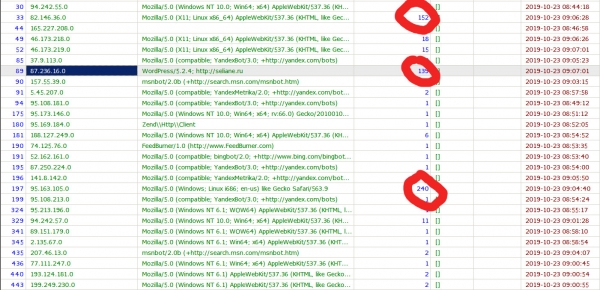
Next, simply copy the 'malicious' IP, open the .htaccess file, and add it to the end of the file.
Order allow,deny
Allow from all
# start_auto_deny_list
Deny from 94.242.55.248
# end_auto_deny_list
That's it, now 94.242.55.248 has no access to the site and does not generate load on the database.
However, copying it manually every time isn't a very righteous task and, besides, the code was intended to be autonomous.
Let's add a file that will run via CRON every 30 minutes:
Code of the file modifying .htaccess
get_results("SELECT * FROM wp_visiters_bot WHERE cnt>{$limit_cnt}");

$new_blocked = [];

$exclude_ip = [
    '87.236.16.70' //hosting address
];

foreach ($deny_table as $result) {

    if (in_array($result->ip, $exclude_ip)) {
        continue;
    }

    $wpdb->insert('wp_visiters_bot_blocked', ['ip' => $result->ip], ['%s']);
}

$deny_table_blocked = $wpdb->get_results("SELECT * FROM wp_visiters_bot_blocked");

foreach ($deny_table_blocked as $blocked) {
    $new_blocked[] = $blocked->ip;
}

//Clear the table
$wpdb->query("DELETE FROM wp_visiters_bot");

//$file = '.htaccess';

$start_searche_tag = 'start_auto_deny_list';

$end_searche_tag = 'end_auto_deny_list';

$handle = @fopen($file, "r");
if ($handle) {

    $replace_string = ''; //Test for inserting into .htaccess file

    $target_content = false; //Flag for the code section we need

    while (($buffer = fgets($handle, 4096)) !== false) {

        if (stripos($buffer, 'start_auto_deny_list') !== false) {
            $target_content = true;
            continue;
        }

        if (stripos($buffer, 'end_auto_deny_list') !== false) {
            $target_content = false;
            continue;
        }

        if ($target_content) {
            $replace_string .= $buffer;
        }
    }
    if (!feof($handle)) {
        echo "Error: fgets() unexpectedly failed\n";
    }
    fclose($handle);
}

//Current .htaccess file
$content = file_get_contents($file);

$content = str_replace($replace_string, '', $content);

//Clear all blocks in .htaccess file
file_put_contents($file, $content);

//Record new blocks
$str = "# {$start_searche_tag}" . PHP_EOL;

foreach ($new_blocked as $key => $value) {
    $str .= "Deny from {$value}" . PHP_EOL;
}

file_put_contents($file, str_replace("# {$start_searche_tag}", $str, file_get_contents($file)));
The file code is quite simple and primitive, and its main idea is to take candidates for blocking and write blocking rules into the .htaccess file between comments.
# start_auto_deny_list и # end_auto_deny_list
Now the 'malicious' IPs block themselves, and the .htaccess file looks something like this:
# BEGIN WordPress
<IfModule mod_rewrite.c>
RewriteEngine On
RewriteBase /
RewriteRule ^index.php$ - [L]
RewriteCond %{REQUEST_FILENAME} !-f
RewriteCond %{REQUEST_FILENAME} !-d
RewriteRule . /index.php [L]
</IfModule>

# END WordPress

Order allow,deny
Allow from all

# start_auto_deny_list
Deny from 94.242.55.248
Deny from 207.46.13.122
Deny from 66.249.64.164
Deny from 54.209.162.70
Deny from 40.77.167.86
Deny from 54.146.43.69
Deny from 207.46.13.168
....... ниже другие адреса
# end_auto_deny_list
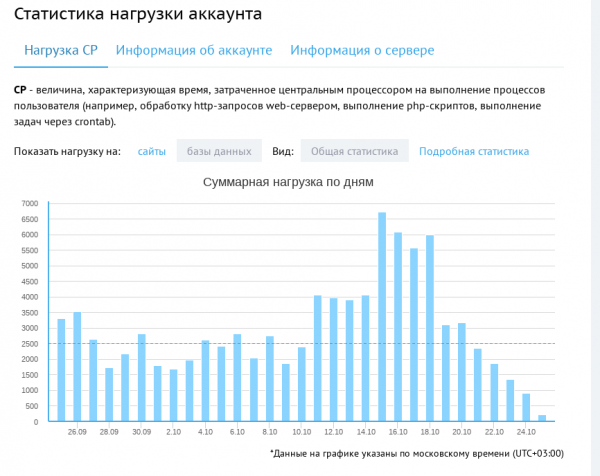
As a result, after the start of such code, you can see the outcome in the hosting panel:
PS: This material is original, although I have published part of it on my website, the version on Habre is more comprehensive.
Source: habr.com
