

Sonatype Nexus is an integrated platform that allows developers to proxy, store, and manage dependencies for Java (Maven), Docker images, Python, Ruby, NPM, Bower, RPM packages, gitlfs, Apt, Go, Nuget, as well as distribute their software.
Why use Sonatype Nexus?
- To store private artifacts;
- To cache artifacts downloaded from the internet;
Artifacts supported in the base deployment of Sonatype Nexus:
- Java, Maven (jar)
- Docker
- Python (pip)
- Ruby (gem)
- NPM
- Bower
- Yum (rpm)
- gitlfs
- Raw
- Apt (deb)
- Go
- Nuget
Community supported artifacts:
- Composer
- Conan
- CPAN
- ELPA
- Helm
- P2
- R
Installing Sonatype Nexus using
Requirements
- Read about using ansible online.
- Install ansible
pip install ansibleon the workstation where the playbook will be executed. - Install on the workstation where the playbook will be executed.
- Install on the workstation where the playbook will be executed.
- This role has been tested on CentOS 7, Ubuntu Xenial (16.04) and Bionic (18.04), Debian Jessie and Stretch
jmespaththe library must be installed on the workstation where the playbook will be executed. To install, runsudo pip install -r requirements.txt- Save the playbook file (example below) to a file named nexus.yml
- Run the installation of nexus
ansible-playbook -i host nexus.yml
Example ansible-playbook for installing nexus without LDAP with repositories for Maven (java), Docker, Python, Ruby, NPM, Bower, RPM, and gitlfs.
---
- name: Nexus
  hosts: nexus
  become: yes

  vars:
    nexus_timezone: 'Asia/Omsk'
    nexus_admin_password: "admin123"
    nexus_public_hostname: 'apatsev-nexus-playbook'
    httpd_setup_enable: false
    nexus_privileges:
      - name: all-repos-read
        description: 'Read & Browse access to all repos'
        repository: '*'
        actions:
          - read
          - browse
      - name: company-project-deploy
        description: 'Deployments to company-project'
        repository: company-project
        actions:
          - add
          - edit
    nexus_roles:
      - id: Developers # maps to the LDAP group
        name: developers
        description: All developers
        privileges:
          - nx-search-read
          - all-repos-read
          - company-project-deploy
        roles: []
    nexus_local_users:
      - username: jenkins # used as key to update
        first_name: Jenkins
        last_name: CI
        email: support@company.com
        password: "s3cr3t"
        roles:
          - Developers # role ID here
    nexus_blobstores:
      - name: company-artifacts
        path: /var/nexus/blobs/company-artifacts
    nexus_scheduled_tasks:
      - name: compact-blobstore
        cron: '0 0 22 * * ?'
        typeId: blobstore.compact
        taskProperties:
          blobstoreName: 'company-artifacts'

    nexus_repos_maven_proxy:
      - name: central
        remote_url: 'https://repo1.maven.org/maven2/'
        layout_policy: permissive
      - name: jboss
        remote_url: 'https://repository.jboss.org/nexus/content/groups/public-jboss/'
      - name: vaadin-addons
        remote_url: 'https://maven.vaadin.com/vaadin-addons/'
      - name: jaspersoft
        remote_url: 'https://jaspersoft.artifactoryonline.com/jaspersoft/jaspersoft-repo/'
        version_policy: mixed
    nexus_repos_maven_hosted:
      - name: company-project
        version_policy: mixed
        write_policy: allow
        blob_store: company-artifacts
    nexus_repos_maven_group:
      - name: public
        member_repos:
          - central
          - jboss
          - vaadin-addons
          - jaspersoft

    # Yum. Change nexus_config_yum to true for create yum repository
    nexus_config_yum: true
    nexus_repos_yum_hosted:
      - name: private_yum_centos_7
        repodata_depth: 1
    nexus_repos_yum_proxy:
      - name: epel_centos_7_x86_64
        remote_url: http://download.fedoraproject.org/pub/epel/7/x86_64
        maximum_component_age: -1
        maximum_metadata_age: -1
        negative_cache_ttl: 60
      - name: centos-7-os-x86_64
        remote_url: http://mirror.centos.org/centos/7/os/x86_64/
        maximum_component_age: -1
        maximum_metadata_age: -1
        negative_cache_ttl: 60
    nexus_repos_yum_group:
      - name: yum_all
        member_repos:
          - private_yum_centos_7
          - epel_centos_7_x86_64

    # NPM. Change nexus_config_npm to true for create npm repository
    nexus_config_npm: true
    nexus_repos_npm_hosted: []
    nexus_repos_npm_group:
      - name: npm-public
        member_repos:
          - npm-registry
    nexus_repos_npm_proxy:
      - name: npm-registry
        remote_url: https://registry.npmjs.org/
        negative_cache_enabled: false

    # Docker. Change nexus_config_docker to true for create docker repository
    nexus_config_docker: true
    nexus_repos_docker_hosted:
      - name: docker-hosted
        http_port: "{{ nexus_docker_hosted_port }}"
        v1_enabled: True
    nexus_repos_docker_proxy:
      - name: docker-proxy
        http_port: "{{ nexus_docker_proxy_port }}"
        v1_enabled: True
        index_type: "HUB"
        remote_url: "https://registry-1.docker.io"
        use_nexus_certificates_to_access_index: false
        maximum_component_age: 1440
        maximum_metadata_age: 1440
        negative_cache_enabled: true
        negative_cache_ttl: 1440
    nexus_repos_docker_group:
      - name: docker-group
        http_port: "{{ nexus_docker_group_port }}"
        v1_enabled: True
        member_repos:
          - docker-hosted
          - docker-proxy

    # Bower. Change nexus_config_bower to true for create bower repository
    nexus_config_bower: true
    nexus_repos_bower_hosted:
      - name: bower-hosted
    nexus_repos_bower_proxy:
      - name: bower-proxy
        index_type: "proxy"
        remote_url: "https://registry.bower.io"
        use_nexus_certificates_to_access_index: false
        maximum_component_age: 1440
        maximum_metadata_age: 1440
        negative_cache_enabled: true
        negative_cache_ttl: 1440
    nexus_repos_bower_group:
      - name: bower-group
        member_repos:
          - bower-hosted
          - bower-proxy

    # Pypi. Change nexus_config_pypi to true for create pypi repository
    nexus_config_pypi: true
    nexus_repos_pypi_hosted:
      - name: pypi-hosted
    nexus_repos_pypi_proxy:
      - name: pypi-proxy
        index_type: "proxy"
        remote_url: "https://pypi.org/"
        use_nexus_certificates_to_access_index: false
        maximum_component_age: 1440
        maximum_metadata_age: 1440
        negative_cache_enabled: true
        negative_cache_ttl: 1440
    nexus_repos_pypi_group:
      - name: pypi-group
        member_repos:
          - pypi-hosted
          - pypi-proxy

    # rubygems. Change nexus_config_rubygems to true for create rubygems repository
    nexus_config_rubygems: true
    nexus_repos_rubygems_hosted:
      - name: rubygems-hosted
    nexus_repos_rubygems_proxy:
      - name: rubygems-proxy
        index_type: "proxy"
        remote_url: "https://rubygems.org"
        use_nexus_certificates_to_access_index: false
        maximum_component_age: 1440
        maximum_metadata_age: 1440
        negative_cache_enabled: true
        negative_cache_ttl: 1440
    nexus_repos_rubygems_group:
      - name: rubygems-group
        member_repos:
          - rubygems-hosted
          - rubygems-proxy

    # gitlfs. Change nexus_config_gitlfs to true for create gitlfs repository
    nexus_config_gitlfs: true
    nexus_repos_gitlfs_hosted:
      - name: gitlfs-hosted

  roles:
    - { role: geerlingguy.java }
    # Debian/Ubuntu only
    # - { role: geerlingguy.apache, apache_create_vhosts: no, apache_mods_enabled: ["proxy_http.load", "headers.load"], apache_remove_default_vhost: true, tags: ["geerlingguy.apache"] }
    # RedHat/CentOS only
    - { role: geerlingguy.apache, apache_create_vhosts: no, apache_remove_default_vhost: true, tags: ["geerlingguy.apache"] }
    - { role: ansible-thoteam.nexus3-oss, tags: ['ansible-thoteam.nexus3-oss'] }
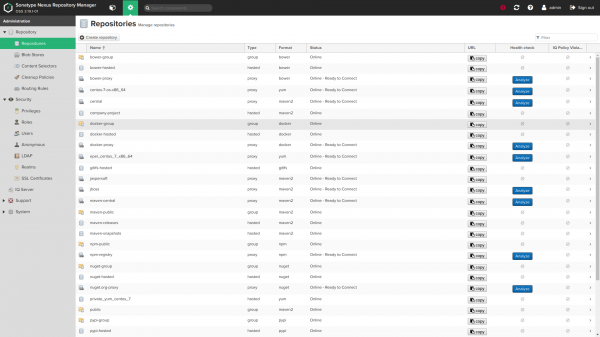
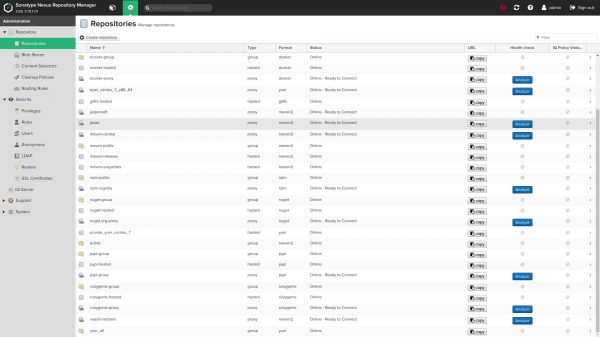
Screenshots:
Role Variables
Role Variables
Default Value Variables (see default/main.yml):
General Variables
    nexus_version: ''
    nexus_timezone: 'UTC'
By default, the role will set the latest available version of Nexus. You can pin a specific version by changing the variable nexus_version. See available versions at .
If you change the version to a newer one, the role will attempt to upgrade your installed Nexus.
If you are using an older version of Nexus than the latest, you must ensure that you are not using features that are not available in the installed release (for example, hosting yum repositories is available for Nexus greater than 3.8.0, git lfs repo for Nexus greater than 3.3.0, etc.)
nexus timezone — is the name of the Java timezone, which can be useful in combination with the cron expressions provided below for nexus_scheduled tasks.
Nexus Port and Context Path
    nexus_default_port: 8081
    nexus_default_context_path: '/'
Port and context path for the Java connection process. nexus_default_context_path must contain a trailing slash when set, for example: nexus_default_context_path: '/nexus/'.
Nexus OS User and Group
    nexus_os_group: 'nexus'
    nexus_os_user: 'nexus'
The user and group used to own Nexus files and run the service will be created by the role if they do not already exist.
nexus_os_user_home_dir: '/home/nexus'Allow changing the default home directory for the nexus user
Nexus Instance Directories
    nexus_installation_dir: '/opt'
    nexus_data_dir: '/var/nexus'
    nexus_tmp_dir: "{{ (ansible_os_family == 'RedHat') | ternary('/var/nexus-tmp', '/tmp/nexus') }}"
Nexus Directories.
nexus_installation_dircontains the installed executablesnexus_data_dircontains all configurations, repositories, and uploaded artifacts. Custom blobstore pathsnexus_data_dircan be configured, see belownexus_blobstores.nexus_tmp_dircontains all temporary files. The default path for RedHat was moved from/tmpto mitigate potential issues with automated cleanup procedures. See #168.
Configuring Nexus JVM Memory Usage
    nexus_min_heap_size: "1200M"
    nexus_max_heap_size: "{{ nexus_min_heap_size }}"
    nexus_max_direct_memory: "2G"
These are the default settings for Nexus. Please do not change these values If you have not read the and do not understand what they do.
As a second warning, here is a snippet from the aforementioned document:
It is not recommended to increase the JVM heap memory beyond the recommended values in an attempt to improve performance. This can actually have the opposite effect, causing unnecessary work for the operating system.
Administrator password
nexus_admin_password: 'changeme'The admin account password for setup. This only works for the first installation by default.. Please see [Change Administrator Password After First Install](# change-admin-password-after-first-install) if you want to change it later with a role.
It is strongly discouraged to store your password in plain text in the playbook, but to use [ansible-vault encryption] () (either embedded or in a separate file, loaded for example with include_vars)
Anonymous access by default
nexus_anonymous_access: falseAnonymous access by default is disabled. More about .
Public hostname
    nexus_public_hostname: 'nexus.vm'
    nexus_public_scheme: https
The fully qualified domain name and scheme (https or http) through which the Nexus instance will be accessible to its clients.
API access for this role
    nexus_api_hostname: localhost
    nexus_api_scheme: http
    nexus_api_validate_certs: "{{ nexus_api_scheme == 'https' }}"
    nexus_api_context_path: "{{ nexus_default_context_path }}"
    nexus_api_port: "{{ nexus_default_port }}"
These variables control how the role connects to the Nexus API to provide services.
For advanced users only. You probably do not want to change these default settings.
Reverse proxy setup
    httpd_setup_enable: false
    httpd_server_name: "{{ nexus_public_hostname }}"
    httpd_default_admin_email: "admin@example.com"
    httpd_ssl_certificate_file: 'files/nexus.vm.crt'
    httpd_ssl_certificate_key_file: 'files/nexus.vm.key'
    # httpd_ssl_certificate_chain_file: "{{ httpd_ssl_certificate_file }}"
    httpd_copy_ssl_files: true
Install .
To do this, you need to install httpd. Note: when httpd_setup_enable is set totrue, Nexus connects to 127.0.0.1:8081, thus do not being directly accessible via HTTP port 8081 from an external IP address.
The default hostname used is nexus_public_hostname. If you need different names for any reason, you can set httpd_server_name to a different value.
C httpd_copy_ssl_files: true (by default) the aforementioned certificates must exist in your playbook directory and will be copied to the server and configured in Apache.
If you want to use existing certificates on the server, set httpd_copy_ssl_files: false and provide the following variables:
    # These specifies to the vhost where to find on the remote server file
    # system the certificate files.
    httpd_ssl_cert_file_location: "/etc/pki/tls/certs/wildcard.vm.crt"
    httpd_ssl_cert_key_location: "/etc/pki/tls/private/wildcard.vm.key"
    # httpd_ssl_cert_chain_file_location: "{{ httpd_ssl_cert_file_location }}"
httpd_ssl_cert_chain_file_location is optional and should be left unset if you do not want to configure the chain file
httpd_default_admin_email: "admin@example.com"Set the default administrator email address
LDAP Configuration
LDAP connections and security realm are disabled by default
    nexus_ldap_realm: false
ldap_connections: [], each element looks as follows:
    nexus_ldap_realm: true
    ldap_connections:
      - ldap_name: 'My Company LDAP' # used as a key to update the ldap config
        ldap_protocol: 'ldaps' # ldap or ldaps
        ldap_hostname: 'ldap.mycompany.com'
        ldap_port: 636
        ldap_use_trust_store: false # Whether or not to use certs in the nexus trust store
        ldap_search_base: 'dc=mycompany,dc=net'
        ldap_auth: 'none' # or simple
        ldap_auth_username: 'username' # if auth = simple
        ldap_auth_password: 'password' # if auth = simple
        ldap_user_base_dn: 'ou=users'
        ldap_user_filter: '(cn=*)' # (optional)
        ldap_user_object_class: 'inetOrgPerson'
        ldap_user_id_attribute: 'uid'
        ldap_user_real_name_attribute: 'cn'
        ldap_user_email_attribute: 'mail'
        ldap_user_subtree: false
        ldap_map_groups_as_roles: false
        ldap_group_base_dn: 'ou=groups'
        ldap_group_object_class: 'posixGroup'
        ldap_group_id_attribute: 'cn'
        ldap_group_member_attribute: 'memberUid'
        ldap_group_member_format: '${username}'
        ldap_group_subtree: false
Example LDAP configuration for anonymous authentication (anonymous bind), this is also the "minimal" configuration:
    nexus_ldap_realm: true
    ldap_connection:
      - ldap_name: 'Simplest LDAP config'
        ldap_protocol: 'ldaps'
        ldap_hostname: 'annuaire.mycompany.com'
        ldap_search_base: 'dc=mycompany,dc=net'
        ldap_port: 636
        ldap_use_trust_store: false
        ldap_user_id_attribute: 'uid'
        ldap_user_real_name_attribute: 'cn'
        ldap_user_email_attribute: 'mail'
        ldap_user_object_class: 'inetOrgPerson'
Example LDAP configuration for simple authentication (using a DSA account):
    nexus_ldap_realm: true
    ldap_connections:
      - ldap_name: 'LDAP config with DSA'
        ldap_protocol: 'ldaps'
        ldap_hostname: 'annuaire.mycompany.com'
        ldap_port: 636
        ldap_use_trust_store: false
        ldap_auth: 'simple'
        ldap_auth_username: 'cn=mynexus,ou=dsa,dc=mycompany,dc=net'
        ldap_auth_password: "{{ vault_ldap_dsa_password }}" # better keep passwords in an ansible vault
        ldap_search_base: 'dc=mycompany,dc=net'
        ldap_user_base_dn: 'ou=users'
        ldap_user_object_class: 'inetOrgPerson'
        ldap_user_id_attribute: 'uid'
        ldap_user_real_name_attribute: 'cn'
        ldap_user_email_attribute: 'mail'
        ldap_user_subtree: false
Example LDAP configuration for simple authentication (using a DSA account) + groups mapped as roles:
    nexus_ldap_realm: true
    ldap_connections
      - ldap_name: 'LDAP config with DSA'
        ldap_protocol: 'ldaps'
        ldap_hostname: 'annuaire.mycompany.com'
        ldap_port: 636
        ldap_use_trust_store: false
        ldap_auth: 'simple'
        ldap_auth_username: 'cn=mynexus,ou=dsa,dc=mycompany,dc=net'
        ldap_auth_password: "{{ vault_ldap_dsa_password }}" # better keep passwords in an ansible vault
        ldap_search_base: 'dc=mycompany,dc=net'
        ldap_user_base_dn: 'ou=users'
        ldap_user_object_class: 'inetOrgPerson'
        ldap_user_id_attribute: 'uid'
        ldap_user_real_name_attribute: 'cn'
        ldap_user_email_attribute: 'mail'
        ldap_map_groups_as_roles: true
        ldap_group_base_dn: 'ou=groups'
        ldap_group_object_class: 'groupOfNames'
        ldap_group_id_attribute: 'cn'
        ldap_group_member_attribute: 'member'
        ldap_group_member_format: 'uid=${username},ou=users,dc=mycompany,dc=net'
        ldap_group_subtree: false
Example of an LDAP configuration for simple authentication (using a DSA account) + groups dynamically mapped as roles:
    nexus_ldap_realm: true
    ldap_connections:
      - ldap_name: 'LDAP config with DSA'
        ldap_protocol: 'ldaps'
        ldap_hostname: 'annuaire.mycompany.com'
        ldap_port: 636
        ldap_use_trust_store: false
        ldap_auth: 'simple'
        ldap_auth_username: 'cn=mynexus,ou=dsa,dc=mycompany,dc=net'
        ldap_auth_password: "{{ vault_ldap_dsa_password }}" # better keep passwords in an ansible vault
        ldap_search_base: 'dc=mycompany,dc=net'
        ldap_user_base_dn: 'ou=users'
        ldap_user_object_class: 'inetOrgPerson'
        ldap_user_id_attribute: 'uid'
        ldap_user_real_name_attribute: 'cn'
        ldap_user_email_attribute: 'mail'
        ldap_map_groups_as_roles: true
        ldap_map_groups_as_roles_type: 'dynamic'
        ldap_user_memberof_attribute: 'memberOf'
Privileges
    nexus_privileges:
      - name: all-repos-read # used as key to update a privilege
        # type:
        description: 'Read & Browse access to all repos'
        repository: '*'
        actions: # can be add, browse, create, delete, edit, read or  * (all)
          - read
          - browse
        # pattern: pattern
        # domain: domain
        # script_name: name
List for configuration. Check the documentation and UI to see which variables need to be set based on the privilege type.
These items are combined with the following default values:
    _nexus_privilege_defaults:
      type: repository-view
      format: maven2
      actions:
        - read
Roles (within Nexus context)
    nexus_roles:
      - id: Developpers # can map to a LDAP group id, also used as a key to update a role
        name: developers
        description: All developers
        privileges:
          - nx-search-read
          - all-repos-read
        roles: [] # references to other role names
List for configuration.
Users
    nexus_local_users: []
      # - username: jenkins # used as key to update
      #   state: present # default value if omitted, use 'absent' to remove user
      #   first_name: Jenkins
      #   last_name: CI
      #   email: support@company.com
      #   password: "s3cr3t"
      #   roles:
      #     - developers # role ID
Local (non-LDAP) users/accounts list to create in nexus.
List of local (non-LDAP) users/accounts to be created in Nexus.
      nexus_ldap_users: []
      # - username: j.doe
      #   state: present
      #   roles:
      #     - "nx-admin"
Mapping of LDAP users/roles. State absent removes roles from an existing user if they already exist.
LDAP users are not deleted. Attempting to set a role for a non-existent user will result in an error.
Content selectors
  nexus_content_selectors:
  - name: docker-login
    description: Selector for docker login privilege
    search_expression: format=="docker" and path=~"/v2/"
For additional information about the content selector, see .
To use the content selector, add a new privilege with type: repository-content-selector and the correspondingcontentSelector
- name: docker-login-privilege
  type: repository-content-selector
  contentSelector: docker-login
  description: 'Login to Docker registry'
  repository: '*'
  actions:
  - read
  - browse
Blobstores and repositories
nexus_delete_default_repos: falseDelete the repositories from the nexus install initial default configuration. This step is only executed on first-time install (when nexus_data_dir has been detected empty).
Removal of repositories from the default configuration for Nexus. This step is performed only during the first installation (when nexus_data_dir is empty).
nexus_delete_default_blobstore: falseDelete the default blobstore from the nexus install initial default configuration. This can only be done if nexus_delete_default_repos: true and all configured repositories (see below) have an explicit blob_store: custom. This step is only executed on first-time install (when nexus_data_dir has been detected empty).
Removal of the blobstore (binary artifacts) is disabled by default from the initial configuration. To remove the blobstore (binary artifacts), disable nexus_delete_default_repos: true. This step is only executed on first-time install (when nexus_data_dir is empty).
    nexus_blobstores: []
    # example blobstore item :
    # - name: separate-storage
    #   type: file
    #   path: /mnt/custom/path
    # - name: s3-blobstore
    #   type: S3
    #   config:
    #     bucket: s3-blobstore
    #     accessKeyId: "{{ VAULT_ENCRYPTED_KEY_ID }}"
# secretAccessKey: "{{ VAULT_ENCRYPTED_ACCESS_KEY }}"to create. A blobstore path and a repository blobstore cannot be updated after initial creation (any update here will be ignored on re-provisioning).
Configuring a blobstore on S3 is provided as a convenience and is not part of the automated tests we run on Travis. Please note that storing on S3 is only recommended for instances deployed on AWS.
Creating . The path to the blobstore and repository stores cannot be updated after initial creation (any update here will be ignored on reinstallation).
Configuring the BLOB object store on S3 is provided for convenience. Note that storage on S3 is only recommended for instances deployed on AWS.
    nexus_repos_maven_proxy:
      - name: central
        remote_url: 'https://repo1.maven.org/maven2/'
        layout_policy: permissive
      - name: jboss
        remote_url: 'https://repository.jboss.org/nexus/content/groups/public-jboss/'
    # example with a login/password :
    # - name: secret-remote-repo
    #   remote_url: 'https://company.com/repo/secure/private/go/away'
    #   remote_username: 'username'
    #   remote_password: 'secret'
    #
The above is a configuration example Maven.
    nexus_repos_maven_hosted:
      - name: private-release
        version_policy: release
        write_policy: allow_once  # one of "allow", "allow_once" or "deny"
Maven configuration. Negative cache config is optional and will default to the above values if omitted.
Configuration Maven. Negative cache configuration (-1) is optional and will default to the above values if not specified.
    nexus_repos_maven_group:
      - name: public
        member_repos:
          - central
          - jboss
Configuration Maven.
All three repository types combine with the following default values:
    _nexus_repos_maven_defaults:
      blob_store: default # Note: cannot be updated once the repo has been created
      strict_content_validation: true
      version_policy: release # release, snapshot or mixed
      layout_policy: strict # strict or permissive
      write_policy: allow_once # one of "allow", "allow_once" or "deny"
      maximum_component_age: -1  # Nexus GUI default. For proxies only
      maximum_metadata_age: 1440  # Nexus GUI default. For proxies only
      negative_cache_enabled: true # Nexus GUI default. For proxies only
      negative_cache_ttl: 1440 # Nexus GUI default. For proxies only
Docker, Pypi, Raw, Rubygems, Bower, NPM, Git-LFS, and yum repository types:
see defaults/main.yml for these options:
Docker, Pypi, Raw, Rubygems, Bower, NPM, Git-LFS, and yum repositories are disabled by default:
See defaults/main.yml for these options:
      nexus_config_pypi: false
      nexus_config_docker: false
      nexus_config_raw: false
      nexus_config_rubygems: false
      nexus_config_bower: false
      nexus_config_npm: false
      nexus_config_gitlfs: false
      nexus_config_yum: false
Note that you may need to enable certain security realms if you wish to use repository types other than Maven. This is false by default
nexus_nuget_api_key_realm: false
nexus_npm_bearer_token_realm: false
nexus_docker_bearer_token_realm: false  # required for docker anonymous access
Remote User Realm can also be enabled using
nexus_rut_auth_realm: trueand the header can be set by defining
nexus_rut_auth_header: "CUSTOM_HEADER"Scheduled tasks
    nexus_scheduled_tasks: []
    #  #  Example task to compact blobstore:
    #  - name: compact-docker-blobstore
    #    cron: '0 0 22 * * ?'
    #    typeId: blobstore.compact
    #    task_alert_email: alerts@example.org  # optional
    #    taskProperties:
    #      blobstoreName: {{ nexus_blob_names.docker.blob }} # all task attributes are stored as strings by nexus internally
    #  #  Example task to purge maven snapshots
    #  - name: Purge-maven-snapshots
    #    cron: '0 50 23 * * ?'
    #    typeId: repository.maven.remove-snapshots
    #    task_alert_email: alerts@example.org  # optional
    #    taskProperties:
    #      repositoryName: "*"  # * for all repos. Change to a repository name if you only want a specific one
    #      minimumRetained: "2"
    #      snapshotRetentionDays: "2"
    #      gracePeriodInDays: "2"
    #    booleanTaskProperties:
    #      removeIfReleased: true
    #  #  Example task to purge unused docker manifest and images
    #  - name: Purge unused docker manifests and images
    #    cron: '0 55 23 * * ?'
    #    typeId: "repository.docker.gc"
    #    task_alert_email: alerts@example.org  # optional
    #    taskProperties:
    #      repositoryName: "*"  # * for all repos. Change to a repository name if you only want a specific one
    #  #  Example task to purge incomplete docker uploads
    #  - name: Purge incomplete docker uploads
    #    cron: '0 0 0 * * ?'
    #    typeId: "repository.docker.upload-purge"
    #    task_alert_email: alerts@example.org  # optional
    #    taskProperties:
# age: "24" for configuration. typeId and specific to the tasktaskProperties/booleanTaskProperties can be guessed either:
- from the Java type hierarchy
org.sonatype.nexus.scheduling.TaskDescriptorSupport - by checking the HTML form for creating a task in your browser
- by viewing the AJAX requests in the browser during manual task setup.
Task properties must be declared in the correct yaml block depending on their type:
taskPropertiesfor all string properties (i.e., repository names, storage names, time periods …).booleanTaskPropertiesfor all boolean properties (i.e., mainly checkboxes in the Nexus task creation UI).
Backups
      nexus_backup_configure: false
      nexus_backup_cron: '0 0 21 * * ?'  # See cron expressions definition in nexus create task gui
      nexus_backup_dir: '/var/nexus-backup'
      nexus_restore_log: '{{ nexus_backup_dir }}/nexus-restore.log'
      nexus_backup_rotate: false
      nexus_backup_rotate_first: false
      nexus_backup_keep_rotations: 4  # Keep 4 backup rotations by default (current + last 3)
Backup will not be configured until you switch on nexus_backup_configure downward API support (simultaneously with this in true.
In this case, the scheduled script task will be set up to run in Nexus
at the interval specified in nexus_backup_cron (by default 9:00 PM every day).
See [Groovy template for this task](templates / backup.groovy.j2) for detailed information.
This scheduled job does not depend on other nexus_scheduled_tasks, which you
declare in your playbook.
If you want to rotate/delete backups, set nexus_backup_rotate: true and set the number of backups you would like to keep using nexus_backup_keep_rotations (default is 4).
When using rotation, if you want to save additional disk space during the backup process,
you can set nexus_backup_rotate_first: true. This will configure pre-rotation/deletion before the backup. By default, rotation occurs after the backup is created. Note that in this case, older backups
will be deleted before the current backup is made.
Restore Procedure
Run the playbook with the parameter -e nexus_restore_point=
(for example, 2017-12-17-21-00-00 for December 17, 2017 at 21:00
Removing nexus
Warning: this will completely delete the current data. Make sure to back it up beforehand if necessary.
Use the variable nexus_purge, if you need to restart from scratch and reinstall the nexus instance while deleting all data.
ansible-playbook -i your/inventory.ini your_nexus_playbook.yml -e nexus_purge=trueChange the administrator password after the first installation
nexus_default_admin_password: 'admin123'This should not be modified in your playbook. This variable is populated with the default administrator password for Nexus upon initial installation and ensures we can change the administrator password to nexus_admin_password.
If you want to change the administrator password after the first installation, you can temporarily change it to the old password from the command line. After changing nexus_admin_password in your playbook you can run:
ansible-playbook -i your/inventory.ini your_playbook.yml -e nexus_default_admin_password=oldPasswordTelegram channel for Nexus Sonatype:
Only registered users can participate in the survey. , please.
What artifact repositories do you use?
Sonatype Nexus free
Sonatype Nexus paid
Artifactory free
Artifactory paid
Harbor
Pulp
9 users voted. 3 users abstained.
Source: habr.com
