

Currently, many projects are being launched aimed at replacing existing information security tools. This is not surprising — attacks are becoming increasingly sophisticated, and many security solutions can no longer provide an adequate level of protection. Various challenges arise during such projects — finding suitable solutions, attempts to 'fit' within the budget, deliveries, and the actual migration to a new solution. In this article, I would like to discuss what Fortinet offers to ensure that transitioning to a new solution does not become a headache. Of course, we will talk about moving to the company's own product. — next-generation firewall .
In fact, there are several such offerings, but they can all be grouped under one name — FortiConverter.
The first option is Fortinet Professional Services. This encompasses personalized consulting services for migration. Utilizing this service not only simplifies your task but also helps avoid pitfalls that may arise during the migration process. A sample list of implemented services looks like this:
- Architecture development for the solution using best practices, along with the creation of various guides that describe this architecture;
- Migration plans development;
- Risk analysis for migration;
- Device deployment;
- Configuration transfer from the old solution;
- Direct support and troubleshooting;
- Development, evaluation, and execution of testing plans;
- Incident management post-switching.
To take advantage of this option, you can write to .
The second option is the FortiConverter Migration Tool software. This tool allows you to convert configurations from third-party hardware into a format suitable for use on FortiGate. A list of third-party vendors supported by this software is provided in the image below:
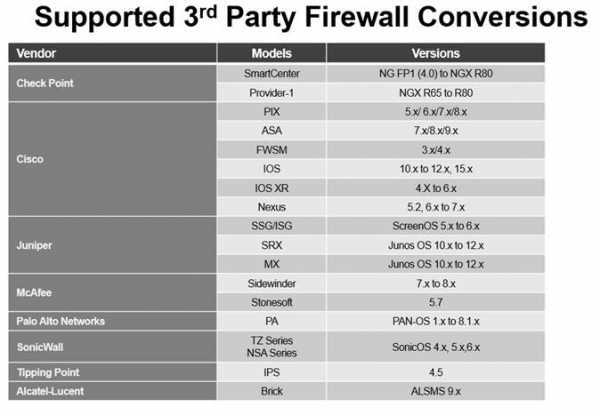
In fact, this is not a complete list. The full list can be found in the FortiConverter User Guide.
The standard set of parameters subject to conversion includes the following: interface settings, NAT parameters, firewall policies, and static routes. However, this set can vary significantly depending on the hardware and its operating system. Detailed information about the parameters that can be converted from a specific device can also be found in the FortiConverter User Guide. It is noteworthy that migration from older versions of the FortiGate OS is also possible. In this case, all parameters are converted.
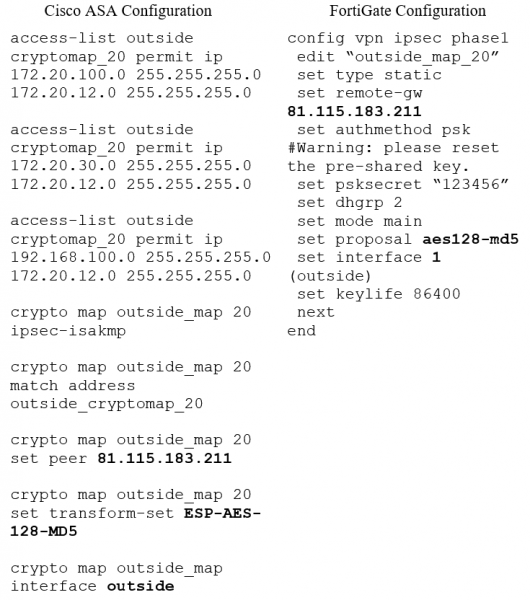
This software is obtained through an annual subscription model. There are no limits on the number of migrations. This can be very helpful if multiple migrations are planned throughout the year, for instance, when replacing equipment at both main sites and branches. An example of the program's functionality can be seen below:
The third and final option is the FortiConverter Service. It represents a one-time migration service. The same parameters are subject to migration as those that can be converted using the FortiConverter Migration Tool. The list of supported third-party vendors is similar to the one provided above. Migration from older versions of the FortiGate OS is also supported.
This service is only available when transitioning to FortiGate models in the E and F series, as well as FortiGate VM. The list of supported models is presented below:
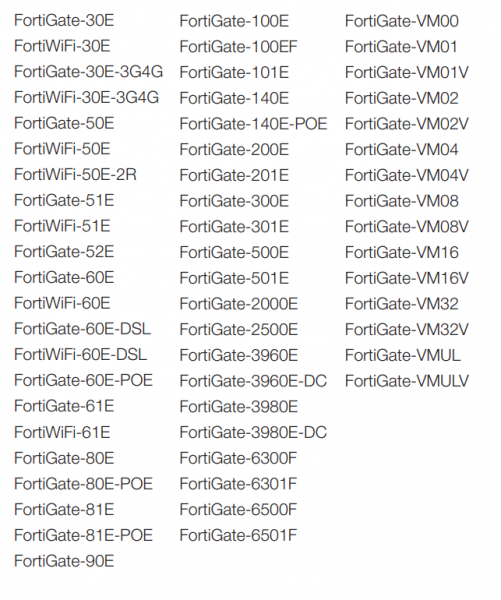
This option is advantageous in that the converted configuration is loaded into an isolated test environment with the target FortiGate operating system for validating the correctness of the configuration and debugging. This significantly reduces the resources required for testing and helps avoid many unforeseen situations.
To take advantage of this service, you may also write to .
Each of the options considered significantly simplifies the migration processes. Therefore, if you are concerned about challenges when switching to another solution or have already encountered them, remember that help is always available. The key is to know how to look for it. ;)
Source: habr.com
