

First, a bit of theory. What is ?
Simply put, this is a document designed to simplify the development of SaaS applications, helping by informing developers and DevOps engineers about the issues and practices that are most frequently encountered in modern application development.
The document was created by the developers of the Heroku platform.
The Twelve-Factor App methodology can be applied to applications written in any programming language and using any combination of external services (backing services) (databases, message queues, caching, etc.).
A brief overview of the factors on which this methodology is based:
- Codebase – One codebase, tracked in version control, with many deployments
- Dependencies – Explicitly declare and isolate dependencies
- Configuration – Store configuration in the environment
- Backing Services – Treat backing services as attached resources
- Build, Release, Run – Strictly separate build and run stages
- Processes – Run the app as one or more stateless processes
- Port Binding – Export services via port binding
- Concurrency – Scale out via the process model
- Disposability – Maximize robustness with fast startup and graceful shutdown
- Development/Production Parity – Keep development, staging, and production environments as similar as possible
- Logs – Treat logs as a stream of events
- Admin Processes – Run admin/management tasks as one-off processes
You can find more information about the 12 factors from the following resources:
- — a must-read
- — official translation
- — a fresh perspective on the 12 factors aimed at improving them.
What is Blue-Green deployment?
Blue-Green deployment is a method for delivering an application. production in such a way that the end client does not see any changes on their side. In other words, deploying the application with zero downtime.
The classic BG Deploy scheme looks as shown in the image below.

- At the start, there are 2 physical servers with exactly the same code, application, project, and there is a router (load balancer).
- The router initially directs all requests to one of the servers (green).
- At the moment when a release needs to be made again, the entire project is updated on the other server (blue), which is currently not processing any requests.
- After the code on the blue server is fully updated, the router is commanded to switch from the green to blue server.
- Now all clients see the code running on the blue Server.
- For some time, green the server serves as a backup in case of a failed deployment on the blue server, and in case of failure and bugs, the router switches the user flow back to the green server with the old stable version, while the new code is sent for further work and testing.
- And at the end of the process, the green server is updated in the same way. After its update, the router switches the flow of requests back to green server.
It all looks very good and at first glance there shouldn’t be any problems.
But since we live in the modern world, the physical switching option as outlined in the classic scheme does not suit us. Please note this information, we will return to it later.
Bad and Good Advice
Disclaimer: The examples below include utilities / methodologies that I use; you can use absolutely any alternatives with similar functions.
Most examples will in one way or another overlap with web development (surprise), PHP, and Docker.
The points below provide a simple practical description of how to use factors in specific examples; if you want more theory on this topic, refer to the sources above.
1. Codebase
Use FTP and FileZilla to upload files to the servers one by one, do not store code anywhere except on the production server.
The project should always have a single codebase, meaning all code comes from one source. Git repositories. Servers (production, staging, test1, test2 …) use code from branches of a common repository. This way, we achieve code consistency.
2. Dependencies
Download all libraries in folders directly to the root of the project. Updates should be made simply by transferring the new code to the folder with the current version of the library. Install all necessary utilities directly on the host server where another 20 services are running.
The project must always have a clearly defined list of dependencies (by dependencies, I also mean the environment). All dependencies must be explicitly defined and isolated.
As an example, let's take Composer and Docker.
Composer — a package manager that allows you to install libraries in PHP. Composer allows you to specify versions strictly or loosely, and to define them explicitly. There can be 20 different projects on the server, each having its own list of packages and libraries that do not depend on each other.
Docker — a utility that allows you to define and isolate the environment in which the application will run. Accordingly, just like with Composer, but in a more thorough manner, we can define what the application works with. Choose a specific PHP version, install only the necessary packages for the project to function, without adding anything extra. Most importantly, without overlapping with the packages and environment of the host machine and other projects. This means all projects on the server running through Docker can use any set of packages and completely different environments.
3. Configuration
Store configuration constants directly in the code. Separate constants for the test server and separate ones for production. Tie the application's operation to the environment directly in the business logic of the project using if-else statements.
Configurations — are the only thing that should differentiate project deployments. Ideally, configurations should be passed through environment variables (env vars).
This means that even if you store several configuration files .config.prod and .config.local and rename them to .config (the main config from which the application reads data) at the time of deployment, it is not the correct approach. In this case, the information from the configurations will be publicly accessible to all developers of the application, and the data from the production server will be compromised. All configurations should be stored directly in the deployment system (CI/CD) and generated for different environments with different values needed for a specific environment right at the time of deployment.
4. Backing Services
Tightly bind to the environment; use different connections for the same services in specific environments.
In fact, this point overlaps significantly with the one about configurations, as without this point, it would be impossible to create normal configuration data, and the ability to configure would collapse altogether.
All connections to external services, such as queue servers, databases, and caching services, must be the same for both local environments and external/production environments. In other words, I can at any moment change the connection string from database #1 to database #2 without changing the application code. Or, to anticipate, when scaling the service, you won't have to specify a special way to connect for an additional cache server.
5. Build, Release, Run
Only keep the final version of the code on the server, without any chances to roll back the release. There's no need to fill up disk space. Anyone who thinks they can push faulty code to production is a bad programmer!
All stages of deployment should be separated from each other.
Have the option to roll back. Make releases while keeping old copies of the application (already built and ready for action) easily accessible, so that in case of errors you can restore the old version. So, conditionally there is a folder releases and a folder current, and after a successful deployment and build, the folder current is linked by a symbolic link to the new release located within releases with a conditional release number name.
This is where we recall Blue-Green deployment, which not only allows switching between code but also switching between all resources and even environments with the ability to roll everything back.
6. Processes
Keep application state data directly within the application itself. Use in-memory sessions within the application. Utilize as many shared resources between third-party services as possible. Bind to the fact that the application can have only one process and do not allow for scaling.
Regarding sessions, store data only in cache controlled by third-party services (memcached, redis), so that even if you have 20 application processes running, any of them can access the cache to continue working with the client in the same state as the user was when working with the application in another process. With this approach, no matter how many copies of third-party services you use, everything will operate as expected without issues accessing data.
7. Port Binding
Only the web server should know how to work with third-party services. Ideally, host third-party services directly inside the web server, for instance as a PHP module in Apache.
All your services must be accessible to each other via some address and port (localhost:5432, localhost:3000, nginx:80, php-fpm:9000), meaning that from nginx I can access both php-fpm and postgres, while php-fpm can access postgres and nginx, and essentially from each service, I can access another service. Thus, the viability of one service is not dependent on the viability of another service.
8. Parallelism
Work with one process, otherwise multiple processes might not get along!
Leave room for scaling. Docker swarm is perfect for this.
Docker Swarm is a tool for creating and managing container clusters across different machines as well as multiple containers on a single machine.
Using swarm, I can determine how many resources I will allocate to each process and how many processes of the same service I will start, while the internal load balancer, taking data on a specified port, will automatically proxy it to the processes. Thus, noticing that the server load has increased, I can add more processes, thereby reducing the load on specific processes.
9. Disposability
Do not use queues for working with processes and data. Killing one process should affect the operation of the entire application. If one service fails, everything fails.
Each process and service can be turned off at any moment and it should not affect other services (this not referring to the service being unavailable to another service, but rather that another service does not get turned off following this one). All processes should terminate gently, ensuring that data is not compromised and that the system will operate correctly upon the next start. This means that even in case of a crash, data should not be harmed (a transaction mechanism would be suitable here, where database requests work only in groups, and if even one request from the group fails or encounters an error, no other request from the group is actually executed).
10. Application Development/Work Parity
Production, staging, and local versions of the application must be different. On production, we have the Yii Lite framework, while locally we use Yii, so it works faster in production!
In reality, all deployments and work with code should be in nearly identical environments (not referring to physical hardware). Also, deploying code to production, when necessary, should be possible for any development employee, not solely a specially trained devops department, which can only bring up the application in production through special means.
Docker also assists us in this. By adhering to the previous points, using Docker will make the process of deploying the environment both in production and on a local machine as simple as entering one or two commands.
11. Logging
We write logs to files and databases! We do not clean logs from files and databases. We'll just buy a hard drive with 9000 Petabytes and be fine.
All logs should be considered as a stream of events. The application itself should not handle log processing. Logs should either be output to stdout or sent via a protocol like UDP, so that log handling does not create any issues for the application. Graylog is a good fit for this purpose. By accepting all logs over UDP (which does not require waiting for a response to confirm successful receipt of the packet), Graylog does not interfere with the application in any way and only focuses on structuring and processing logs. The application's logic remains unchanged when working with such approaches.
12. Administration Tasks
To update data, the database, etc., use a separately created endpoint in the API. Executing it twice in a row could lead to data duplication. But you are not foolish enough to click it twice; migrations are unnecessary for us.
All administration tasks must be performed in the same environment as the code, at the release level. This means that if we need to change the database structure, we will not do it manually by changing column names and adding new ones through some visual database management tools. For such tasks, we create separate scripts—migrations—that run everywhere and across all environments with a consistent and clear result. Similar methodologies should be applied for other tasks, such as populating the project with data.
Example implementation in PHP, Laravel, Laradock, Docker-Compose
P.S. All examples were done on MacOS. Most will also apply to Linux. Windows users, I apologize, but I haven't worked with Windows in a long time.
Let's imagine a situation where no version of PHP is installed on our PC and there's nothing at all.
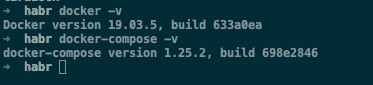
We will install the latest versions of Docker and Docker-Compose. (This can be found online)
docker -v &&
docker-compose -v
1. Install
git clone https://github.com/Laradock/laradock.git &&
ls
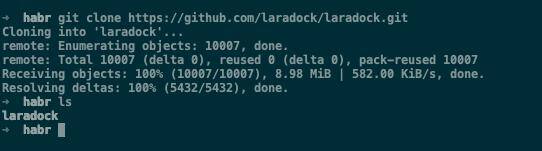
Regarding Laradock, I must say that it is a very cool tool, packed with many containers and helpful features. However, I would not recommend using Laradock as is in production due to its redundancy. It's better to create your own containers based on examples from Laradock; that way, there will be room for optimization since no one needs everything there at once.
2. Configure Laradock to work with our application.
cd laradock &&
cp env-example .env

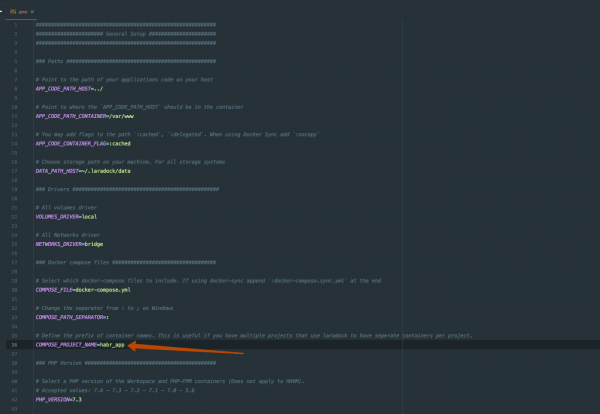
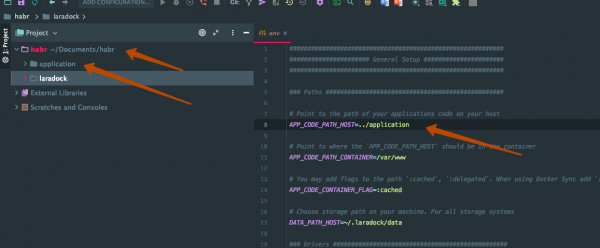
2.1. Open the habr directory (parent folder where laradock is cloned) in any editor. (In my case, PHPStorm)
At this stage, we only set the project name.
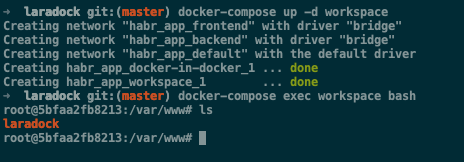
2.2. Start the workspace image. (In your case, the images will take some time to build)
Workspace is a specially prepared image for framework work on behalf of the developer.
Enter the container using
docker-compose up -d workspace &&
docker-compose exec workspace bash
2.3. Install Laravel
composer create-project --prefer-dist laravel/laravel application 
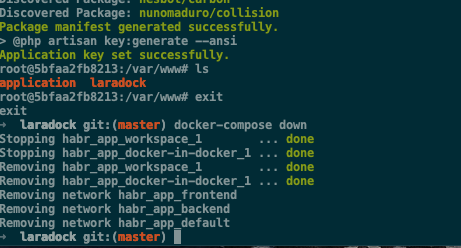
2.4. After installation, check if the directory with the project has been created, and stop compose.
ls
exit
docker-compose down
2.5. Go back to PHPStorm and set the correct path to our Laravel application in the .env file.
3. Let's add all the code to Git.
To do this, create a repository on GitHub (or anywhere else). Go to the habr directory in the terminal and execute the following code.
echo "# habr-12factor" >> README.md
git init
git add README.md
git commit -m "first commit"
git remote add origin git@github.com:nzulfigarov/habr-12factor.git # here will be the link to your repo
git push -u origin master
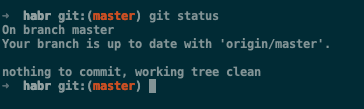
git status
Check if everything is okay.
For convenience, I recommend using some visual interface for Git, in my case it's . (here is the referral link)
4. Let's start!
Before starting, make sure nothing is running on ports 80 and 443.
docker-compose up -d nginx php-fpm 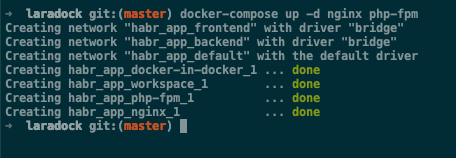
Thus, our project consists of 3 separate services:
- nginx — web server
- php-fpm — PHP for handling requests from the web server
- workspace — PHP for the developer
At this point, we have achieved the creation of an application that meets 4 of the 12 points, namely:
1. Codebase — all code is in a single repository (a small note: it might be correct to put docker inside the laravel project, but this is not essential).
2. Dependencies — All our dependencies are clearly stated in application/composer.json and in each Dockerfile of each container.
3. Backing Services — Each service (php-fpm, nginx, workspace) lives its own life and is connected from the outside, and while working with one service, the other will not be affected.
4. Processes — each service is one process. Each of the services does not retain internal state.
5. Port Binding
docker ps
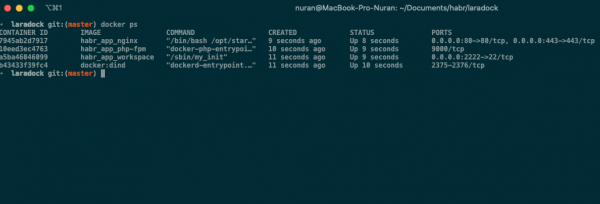
As we can see, each service is running on its own port and is accessible to all other services.
6. Concurrency
Docker allows us to spin up multiple processes of the same services with automatic load balancing between them.
We will stop the containers and restart them using the flag --scale
docker-compose down &&
docker-compose up -d --scale php-fpm=3 nginx php-fpm
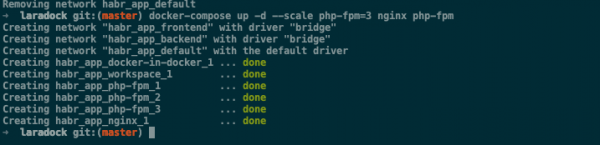
As we can see, copies of the php-fpm container have been created. We don't need to change anything in our work with this container. We continue to access it via port 9000, while Docker manages the load between the containers for us.
7. Disposability — each container can be terminated without affecting others. Stopping or restarting a container will not impact the application in subsequent launches. Each container can also be started at any time.
8. Development/Production Parity — all our environments are identical. Once the system is running on the server in production, you won’t have to change anything in your commands. Everything will be based on Docker exactly the same way.
9. Logs — all logs in these containers are streamed and visible in the Docker console. (In this case, with other custom containers, it may not be the same if you don't take care of that.)
docker-compose logs -f 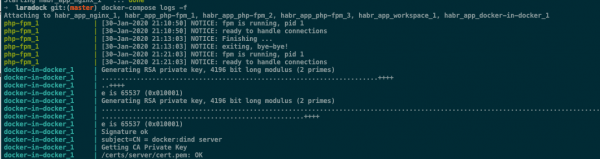
However, there’s a catch that the default values in PHP and Nginx also write logs to a file. To comply with the 12 factors, it's necessary to disable log writing to a file in the configurations of each container separately.
Docker also provides the ability to direct logs not just to stdout, but also to things like graylog, which I mentioned above. Inside graylog, we can manipulate logs however we want, and our application won’t notice this at all.
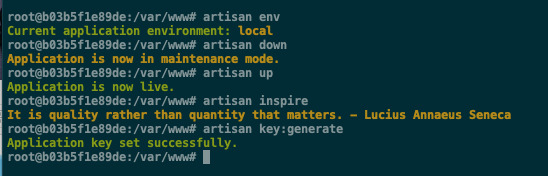
10. Admin Processes — all administration tasks are handled by Laravel thanks to the artisan tool, just as the creators of the 12-factor app would want.
As an example, I will show how some commands are executed.
Let's enter the container.
docker-compose exec workspace bash
php artisan list

Now we can use any command. (Note that we haven't configured the database or cache, so half the commands won't execute correctly, as they are intended to work with the cache and the database.)
11. Configurations and 12. Build, Release, Run
I wanted to dedicate this part to Blue-Green Deployment, but it turned out to be too elaborate for this article. I will write a separate article about this.
In short, the concept is built on CI/CD systems like Jenkins and Gitlab CI. In both, you can set environment variables related to a specific environment. Accordingly, this setup will execute the point regarding Configurations.
And the point about Build, Release, Run is resolved by functions built into both utilities called Pipeline.
Pipeline allows you to break down the deployment process into several stages, highlighting the build, release, and execution phases. Additionally, in the Pipeline, you can create backups, or really anything else. This tool has limitless potential.
The application code resides on .
Don’t forget to initialize the submodule when cloning this repository.
P.S.: All these approaches can be used with any other tools and programming languages. The main thing is that the essence remains unchanged.
Source: habr.com
