

This article is dedicated to Python Gateway — a community project with open-source code for the InterSystems IRIS data platform. This project allows orchestration of any machine learning algorithms developed in Python (the primary environment for many Data Scientists), and utilize numerous ready-made libraries for quickly creating adaptive, robotic analytical AI/ML solutions on the InterSystems IRIS platform. In this article, I will show how InterSystems IRIS can orchestrate processes in Python, effectively manage bidirectional data transfer, and create intelligent business processes.
Plan
- Introduction.
- Toolkit.
- Installation.
- API.
- Interoperability.
- Jupyter Notebook.
- Conclusions.
- Links.
- MLToolkit.
Introduction
Python is a high-level general-purpose programming language aimed at increasing developer productivity and code readability. In this series of articles, I will discuss the capabilities of Python on the InterSystems IRIS platform, with the primary focus of this article being the application of Python as a language for creating and applying machine learning models.
Machine learning (ML) is a class of artificial intelligence methods characterized by not directly solving a problem, but rather learning from solving many similar problems.
Machine learning algorithms and models are becoming increasingly widespread. There are many reasons for this, but it all boils down to availability, simplicity, and the achievement of practical results. Is clustering or even neural network modeling a new technology?
Of course not, but today there is no need to write hundreds of thousands of lines of code to run a model, and the costs associated with creating and applying models are continually decreasing.
Tools are evolving — while we do not have fully GUI-oriented AI/ML tools, the progress we have seen with many other classes of information systems, such as BI (from coding to using frameworks and GUI-oriented configurable solutions), is also observed in tools for creating AI/ML. We have already moved beyond the coding stage and now utilize frameworks for building and training models.
Other improvements, such as the ability to deploy pre-trained models where the end user simply has to complete the training on their specific data, also simplify the initiation of machine learning. These advancements significantly ease the learning curve for machine learning for both specialists and companies as a whole.
On the other hand, we are collecting more and more data. Thanks to a unified data platform like InterSystems IRIS, all this information can be immediately prepared and used as input for machine learning models.
With the shift to the cloud, launching AI/ML projects becomes easier than ever. We can consume only the resources we need. Moreover, thanks to the parallelization offered by cloud platforms, we can save on time spent.
But what about the results? Here it gets more complicated. There are numerous tools for building models, which I will discuss next. Creating a good model is not easy, but then what? Deriving value from the model's use in business is also a non-trivial task. The root of the problem lies in separating analytical and transactional loads and data models. When we train a model, we usually do this on historical data. However, the place for the trained model is in transactional data processing. What good is the best model for detecting fraudulent transactions if we only run it once a day? The fraudsters are long gone with the money. We need to train the model on historical data, but we also have to apply it in real-time to incoming data so that our business processes can operate according to the predictions made by the model.
The ML Toolkit is a set of tools designed specifically for this purpose: to merge models and transactional environments so that the built models can be easily utilized directly in your business processes. The Python Gateway is part of the ML Toolkit and provides integration with the Python language (similarly, R Gateway, which is also part of the ML Toolkit, provides integration with the R language).
Toolset
Before we continue, I would like to describe a few tools and libraries for Python that we will be using later.
Technologies
- Python is an interpreted, high-level general-purpose programming language. Its main advantage is a large library of mathematical, ML, and AI libraries. Like ObjectScript, it is an object-oriented language, but everything is defined dynamically rather than statically. Also, everything is an object. Later articles assume a fleeting familiarity with the language. If you want to start learning, I recommend starting with .
- For our subsequent exercises, install .
- IDE: I use , but generally there are . If you are using Atelier, there is an Eclipse plugin for Python developers. If you are using VS Code, there is an extension for Python.
- Notebook: instead of an IDE, you can write and share your scripts in online notebooks. The most popular of them is .
Libraries
Here is an (incomplete) list of libraries for machine learning:
- — a fundamental package for numerical computations.
- — high-performance data structures and data analysis tools.
- — plotting.
- — data visualization based on matplotlib.
- — machine learning methods.
- — machine learning algorithms within the framework of gradient boosting methodology.
- — NLP.
- — neural networks.
- — a platform for building machine learning models.
- — a platform for creating machine learning models focused on Python.
- — PMML from various models.
AI/ML technologies enable businesses to be more efficient and adaptable. Moreover, these technologies are becoming easier to develop and implement. Start exploring AI/ML technologies and how they can help your organization grow.
Installation
There are several ways to install and use Python Gateway:
- OS
- Windows
- Linux
- Mac
- Docker
- Use an image from DockerHub
- Create your own image
Regardless of the installation method, you will need the source code. The only place to download the code is . It contains tested stable releases; just take the latest one. Currently, it is 0.8, but new ones will come over time. Do not clone/download the repository; download the latest release.
OS
If you are installing the Python Gateway on the operating system, you must first install Python, regardless of the operating system. To do this:
- . It is recommended to install Python in the default directory.
- Install the module
dill:pip install dill. - Download the ObjectScript code (i.e.
do $system.OBJ.ImportDir("C:InterSystemsReposPythoniscpy", "*.cls", "c",,1)) to any area with products. If you want an existing area to support products, run:write ##class(%EnsembleMgr).EnableNamespace($Namespace, 1). - Place your in the folder
binof your InterSystems IRIS instance. The library file must be accessible at the path returned bywrite ##class(isc.py.Callout).GetLib().
Windows
- Ensure that the environment variable
PYTHONHOMEpoints to Python 3.6.7. - Make sure that the system environment variable
PATHcontains the variablePYTHONHOME(or the directory it points to).
Linux (Debian/Ubuntu)
- Check that the environment variable
PATHcontains/usr/liband/usr/lib/x86_64-linux-gnu. Use the file/etc/environmentto set environment variables. - In case of errors
undefined symbol: _Py_TrueStructset thePythonLib. Also in the there is a Troubleshooting section.
Mac
- Currently, only Python 3.6.7 from is supported. Check the variable
PATH.
If you have changed environment variables, restart your InterSystems product.
Docker
Using containers has several advantages:
- Portability
- Effectiveness
- Isolation
- Lightweight
- Immutability
Check out this for more details on using Docker with InterSystems products.
All builds of the Python Gateway are currently based on containers. 2019.4.
Ready image
Run: docker run -d -p 52773:52773 --name irispy intersystemscommunity/irispy-community:latest, to download and run the Python Gateway with InterSystems IRIS Community Edition. That's it.
Create your own image
To build a Docker image, run in the root of the repository: docker build --force-rm --tag intersystemscommunity/irispy:latest ..
By default, the image is built based on the image store/intersystems/iris-community:2019.4.0.383.0, but you can change this by setting the variable IMAGE.
To build from InterSystems IRIS, run: `docker build —build-arg IMAGE=store/intersystems/iris:2019.4.0.383.0 —force-rm —tag intersystemscommunity/irispy:latest`.
After that, you can run the Docker image:
docker run -d
  -p 52773:52773
  -v //:/mount
  --name irispy
  intersystemscommunity/irispy:latest
  --key /mount/iris.key
If you are using an image based on InterSystems IRIS Community Edition, you may not need to specify the key.
Comments
- Testing process
isc.py.test.Processstores a series of images in a temporary directory. You may want to change this path to a mounted directory. To do this, edit the settingWorkingDirby specifying the mounted directory. - To access the terminal, run:
docker exec -it irispy sh. - Access the System Management Portal using the login
SuperUser/SYS. - To stop the container, run:
docker stop irispy && docker rm --force irispy.
Installation verification
After you have installed the Python Gateway, it's worth checking that it works. Run this code in the InterSystems IRIS terminal:
set sc = ##class(isc.py.Callout).Setup()
set sc = ##class(isc.py.Main).SimpleString("x='HELLO'", "x", , .var).
write var
The output should be HELLO — the value of the Python variable x. If the returned status sc is an error or var is empty, check .
API
The Python Gateway is installed, and you've confirmed that it works. It's time to start using it!
The main interface to Python is isc.py.Main. It offers the following groups of methods (all return %Status):
- Code execution
- Data transfer
- Auxiliary
Code execution
These methods allow you to execute arbitrary Python code.
SimpleString
SimpleString — is the primary method. It accepts 4 optional arguments:
code— the code string to execute. Line break character:$c(10).returnVariable— the name of the variable to return.serialization— how to serialize.returnVariable. 0 — string (by default), 1 — repr.result— ByRef reference to the variable where the value is writtenreturnVariable.
Above we executed:
set sc = ##class(isc.py.Main).SimpleString("x='HELLO'", "x", , .var).In this example, we assign the Python variable x the value Hello and want to return the value of the Python variable x to the ObjectScript variable var.
ExecuteCode
ExecuteCode is a safer and less restricted alternative SimpleString.
Strings in the InterSystems IRIS platform are limited to 3,641,144 characters, and if you want to execute a longer piece of code, you need to use streams.
It takes two arguments:
code— a string or stream of Python code to execute.variable— (optional) assigns the result of executioncodeto this Python variable.
Example usage:
set sc = ##class(isc.py.Main).ExecuteCode("2*3", "y").In this example, we multiply 2 by 3 and store the result in a Python variable y.
Data transfer
Pass data to Python and back.
Python -> InterSystems IRIS
There are 4 ways to retrieve the value of a Python variable in InterSystems IRIS, depending on the serialization you need:
Stringfor simple data types and debugging.Reprfor storing simple objects and debugging.JSONfor easy data manipulation on the InterSystems IRIS side.Picklefor saving objects.
These methods allow you to retrieve variables from Python as strings or streams.
GetVariable(variable, serialization, .stream, useString)— getserializationvariablevariabledownward API support (simultaneously with this instream. IfuseStringequals 1 and serialization is placed in a string, it returns a string instead of a stream.GetVariableJson(variable, .stream, useString)— get JSON serialization of the variable.GetVariablePickle(variable, .stream, useString, useDill)— get Pickle (or Dill) serialization of the variable.
Let's try to get our variable y.
set sc = ##class(isc.py.Main).GetVariable("y", , .val, 1)
write val
>6
InterSystems IRIS -> Python
Loading data from InterSystems IRIS into Python.
ExecuteQuery(query, variable, type, namespace)— creates a dataset (pandasdataframeorlist) from SQL query and sets it in Python variablevariable. The packageisc.pymust be accessible in the domainnamespace— where the query will be executed.ExecuteGlobal(global, variable, type, start, end, mask, labels, namespace)— loads data of the globalglobalfrom the subscriptstartup toendinto Python as a variable of typetype:list, or pandas.dataframeA description of optional argumentsmaskandlabelsis available in the class and repository documentation .ExecuteClass(class, variable, type, start, end, properties, namespace)— loads data of the classclassfrom idstartup toendinto Python as a variable of typetype:list, or pandas.dataframe.properties— a list (comma-separated) of class properties to load into the dataset. Masks are supported.*and?By default —*(all properties). The property%%CLASSNAMEis ignored.ExecuteTable(table, variable, type, start, end, properties, namespace)— loads table datatablefrom idstartup toendinto Python.
ExecuteQuery — is universal (any correct SQL query will be passed to Python). However, ExecuteGlobal and its wrappers ExecuteClass and ExecuteTable have several limitations. They are much faster (3-5 times faster than ODBC drivers and 20 times faster ExecuteQuery). Additional information in .
All these methods support data transfer from any domain. The package isc.py must be accessible in the target domain.
ExecuteQuery
ExecuteQuery(request, variable, type, namespace) — transfers results of any correct SQL query to Python. This is the slowest method of data transfer. Use it if ExecuteGlobal and its wrappers are not available.
Arguments:
query— SQL query.variable— name of the Python variable to store data.type—listor Pandasdataframe.namespace— domain in which the query will be executed.
ExecuteGlobal
ExecuteGlobal(global, variable, type, start, end, mask, labels, namespace) — transfers global to Python.
Arguments:
global— name of the global without^variable— name of the Python variable to store data.type—listor Pandasdataframe.start— first subscript of the global. Required%Integer.end— the last global subscription. Mandatory%Integer.mask— value mask of the global. The mask can be shorter than the number of fields in the global (in this case, fields at the end will be skipped). How to format the mask:+pass the value as is.-skip the value.b— Boolean type (0—False, everything else —True).d— Date (from $horolog, on Windows from 1970, on Linux from 1900).t— Time ($horolog, seconds after midnight).m— Timestamp (string format YEAR-MONTH-DAY HOUR:MINUTE:SECOND).
labels— %List of column names. The first element — the name of the subscription.namespace— domain in which the query will be executed.
ExecuteClass
Wrapper for ExecuteGlobal. Prepares the call based on the class definition ExecuteGlobal and invokes it.
ExecuteClass(class, variable, type, start, end, properties, namespace) — passing class data in Python.
Arguments:
class— class namevariable— name of the Python variable to store data.type—listor Pandasdataframe.start— starting Id.end— ending Idproperties— a list (comma-separated) of class properties to load into the dataset. Masks are supported.*and?By default —*(all properties). The property%%CLASSNAMEis ignored.namespace— domain in which the query will be executed.
All properties are passed as is except for type properties te, %Time, %Boolean and %TimeStamp — they are converted to corresponding Python classes.
ExecuteTable
Wrapper for ExecuteClass. Translates the table name into a class name and invokes ExecuteClass. Signature:
ExecuteTable(table, variable, type, start, end, properties, namespace) — passing table data in Python.
Arguments:
table— table name.
All other arguments are passed as is toExecuteClass.
Notes
ExecuteGlobal,ExecuteClassandExecuteTableoperate equally fast.ExecuteGlobal20 times faster thanExecuteQueryon large datasets (transfer time > 0.01 seconds).ExecuteGlobal,ExecuteClassandExecuteTableoperate on globals with the following structure:^global(key) = $lb(prop1, prop2, ..., propN)whererespectively. It is advisable to place them on a shared resource accessible from all nodes in the cluster.— integer.- For
ExecuteGlobal,ExecuteClassandExecuteTablesupported range of valuestecorresponds to the rangemktimeand depends on the OS (: 1970-01-01, 1900-01-01, ). Use%TimeStampto pass data outside this range or use a pandas dataframe as this restriction applies only to the list. - For
ExecuteGlobal,ExecuteClassandExecuteTableall arguments except the data source (global, class, or table) and the variable are optional.
Examples
Test class contains a method demonstrating all options for data transfer:
set global = "isc.py.test.PersonD"
set class = "isc.py.test.Person"
set table = "isc_py_test.Person"
set query = "SELECT * FROM isc_py_test.Person"

// General arguments
set variable = "df"
set type = "dataframe"
set start = 1
set end = $g(^isc.py.test.PersonD, start)

// Method 0: ExecuteGlobal without arguments
set sc = ##class(isc.py.Main).ExecuteGlobal(global, variable _ 0, type)

// Method 1: ExecuteGlobal with arguments
// When passing global, field names are specified manually
// globalKey - name of the subscript
set labels = $lb("globalKey", "Name", "DOB", "TS", "RandomTime", "AgeYears", "AgeDecimal", "AgeDouble", "Bool")

// mask contains one element less than labels because "globalKey" is the name of the subscript
// Skipping %%CLASSNAME
set mask = "-+dmt+++b"

set sc = ##class(isc.py.Main).ExecuteGlobal(global, variable _ 1, type, start, end, mask, labels)

// Method 2: ExecuteClass
set sc = ##class(isc.py.Main).ExecuteClass(class, variable _ 2, type, start, end)

// Method 3: ExecuteTable
set sc = ##class(isc.py.Main).ExecuteTable(table, variable _ 3, type, start, end)

// Method 4: ExecuteTable
set sc = ##class(isc.py.Main).ExecuteQuery(query, variable _ 4, type)
Call the method do ##class(isc.py.test.Person).Test() to see how all data transfer methods work.
Helper methods
GetVariableInfo(variable, serialization, .defined, .type, .length)— get information about the variable: whether it is defined, class and serialization length.GetVariableDefined(variable, .defined)— whether the variable is defined.GetVariableType(variable, .type)— get the class of the variable.GetStatus()— get and remove the last exception on the Python side.GetModuleInfo(module, .imported, .alias)— get the module variable and import status.GetFunctionInfo(function, .defined, .type, .docs, .signature, .arguments)— get information about the function.
Interoperability
You have learned to call Python Gateway from the terminal, now let's start using it in production. The basis of interaction with Python in this mode is isc.py.ens.Operation. It allows us to:
- Execute Python code
- Save/Restore Python context
- Load and retrieve data from Python
In principle, Python operation is a wrapper around isc.py.Main. Operation isc.py.ens.Operation allows interaction with the Python process from InterSystems IRIS productions. Five requests are supported:
isc.py.msg.ExecutionRequestto execute Python code. Returnsisc.py.msg.ExecutionResponsewith the execution result and the values of the requested variables.isc.py.msg.StreamExecutionRequestto execute Python code. Returnsisc.py.msg.StreamExecutionResponseresulting in execution and values of the requested variables. Analogousisc.py.msg.ExecutionRequest, but accepts and returns streams instead of strings.isc.py.msg.QueryRequestfor transmitting the execution result of an SQL query. ReturnsEns.Response.isc.py.msg.GlobalRequest/isc.py.msg.ClassRequest/isc.py.msg.TableRequestfor transferring data of global/class/table. ReturnsEns.Response.isc.py.msg.SaveRequestfor saving the Python context. ReturnsEns.StringResponsewith the context identifier.isc.py.msg.RestoreRequestfor restoring the Python context.Additionally,
isc.py.ens.Operationhas two settings:Initializer— selection of the class implementing the interfaceisc.py.init.Abstract. It can be used to load functions, modules, classes, etc. It runs once when the process starts.PythonLib— (Linux only) if you see errors during loading, set its value tolibpython3.6m.soor even to the full path of the Python library.
Creating business processes
Two classes are available that facilitate business process development:
isc.py.ens.ProcessUtilsallows extracting annotations from activities with variable substitution.isc.py.util.BPEmulatorenables easy testing of business processes with Python. It can execute a business process (parts in Python) in the current process.
Variable substitution
All business processes that inherit from isc.py.ens.ProcessUtils, can use the method GetAnnotation(name) to retrieve the value of the activity annotation by its name. The activity annotation may contain variables which will be evaluated on the InterSystems IRIS side before being passed to Python. Here’s the variable substitution syntax:
${class:method:arg1:...:argN}— calls a method#{expr}— execute code in ObjectScript.
An example is available in the test business process isc.py.test.Process, for instance, in the activity Correlation Matrix: Graph: f.savefig(r'#{process.WorkDirectory}SHOWCASE${%PopulateUtils:Integer:1:100}.png'). In this example:
#{process.WorkDirectory}returns the WorkDirectory property of the objectprocess, which is an instance of the classisc.py.test.Processi.e., the current business process.${%PopulateUtils:Integer:1:100}calls the methodIntegerclass%PopulateUtils, passing arguments1and100, returning a random integer in the range1...100.
Test business process
Test product and test business process are available by default as part of the Python Gateway. To use them:
- In the OS terminal, execute:
pip install pandas matplotlib seaborn. - In the InterSystems IRIS terminal, run:
do ##class(isc.py.test.CannibalizationData).Import()to fill in the test data. - Run the product
isc.py.test.Production. - Send a request of type
Ens.Requestdownward API support (simultaneously with this inisc.py.test.Process.
Let’s see how all this works together. Open isc.py.test.Process in the BPL editor:
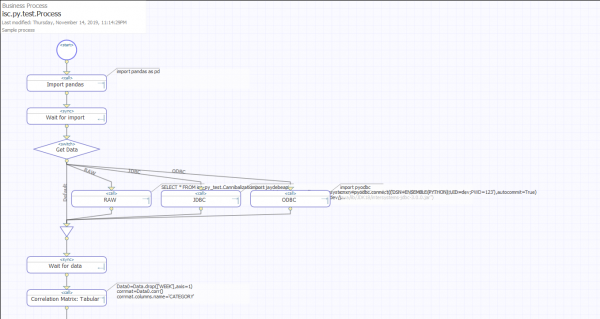
Code execution
The most important call is executing Python code:
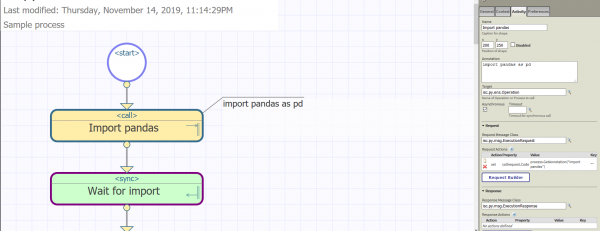
Uses the request isc.py.msg.ExecutionRequest, here are its properties:
Code— Python code.SeparateLines— whether to separate code into lines for execution.$c(10)(n) is used to separate lines. Note that it is NOT recommended to process the message all at once; this function is intended only for processingdefand similar multiline expressions. By default0.Variables— a comma-separated list of variables that will be added to the response.Serialization— How to serialize the variables we want to return. Options:Str,Repr,JSON,PickleandDill, by defaultStr.
In our case, we only set the property Code, so all other properties use default values. We set it by calling process.GetAnnotation("Import pandas"), which at runtime returns the annotation after performing variable substitution. Ultimately, the code import pandas as pd will be passed to Python. GetAnnotation can be useful for obtaining multiline Python scripts, but there are no restrictions on this method of obtaining code. You can set the property Code in any convenient way for you.
Getting variables
Another interesting challenge using isc.py.msg.ExecutionRequest — Correlation Matrix: Tabular:
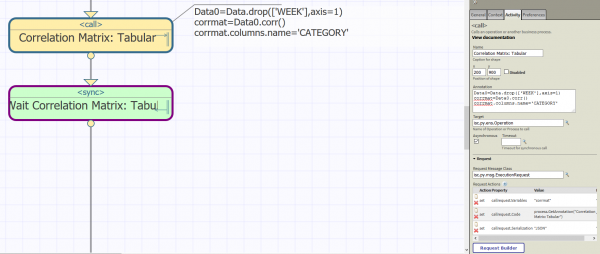
It computes the Correlation Matrix on the Python side and extracts the variable corrmat back to InterSystems IRIS in JSON format, by setting the request properties:
Variables:"corrmat"Serialization:"JSON"
We can see the results in Visual Trace:
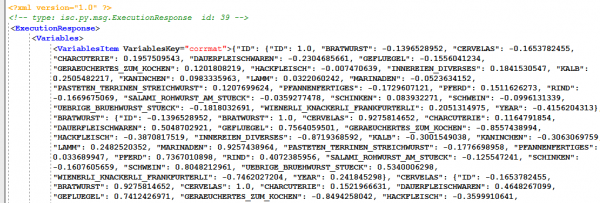
And if we need this value in the BP, we can obtain it as follows: callresponse.Variables.GetAt("corrmat").
Data transfer
Next, let's talk about transferring data from InterSystems IRIS to Python; all data transfer requests implement the interface isc.py.msg.DataRequest, which provides the following properties:
Variable— a Python variable to which the data is written.Type— the type of variable:dataframe(pandas dataframe) orlist.Namespace— the scope from which we obtain the data. The packageisc.pymust be accessible in this scope. It may be a scope without production support.
Based on this interface, 4 classes of requests are implemented:
isc.py.msg.QueryRequest— set the propertyQueryto pass the SQL query.isc.py.msg.ClassRequest— set the propertyClassto transfer class data.isc.py.msg.TableRequest— set the propertyTableto transfer table data.isc.py.msg.GlobalRequest— set the propertyGlobalto transfer global data.
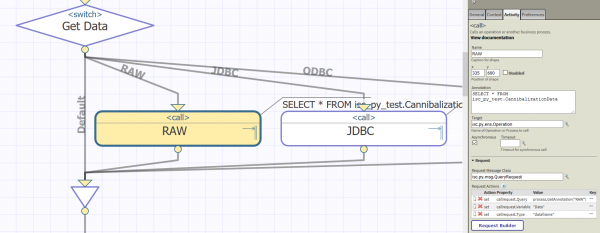
In the testing process, observe the activity RAW, where isc.py.msg.QueryRequest shown in action.
Saving/Restoring Python context
Finally, we can save the Python context in InterSystems IRIS; to do this, we will send isc.py.msg.SaveRequest with the arguments:
Mask— Only variables satisfying the mask are saved. Supported*and?. Example:"Data*, Figure?". By default, statistics that are independent of storage engines are maintained.*.MaxLength— Maximum length of the stored variable. If the serialization of the variable exceeds this length, it will be ignored. Set it to 0 to allow variables of any length. By default$$$MaxStringLength.Name— Context name (optional).Description— Context description (optional).
Returns Ens.StringResponse with Id of the saved context. During the testing process, observe the activity Save Context.
Corresponding request isc.py.msg.RestoreRequest loads the context from InterSystems IRIS into Python:
ContextId— context identifier.Clear— clear the context before restoration.
Jupyter Notebook
— this is an open-source web application that allows you to create notebooks containing code, visualizations, and text, and publish them. The Python Gateway allows you to view and edit BPL processes in the form of Jupyter Notebooks. Note that it currently uses the standard Python 3 executor.
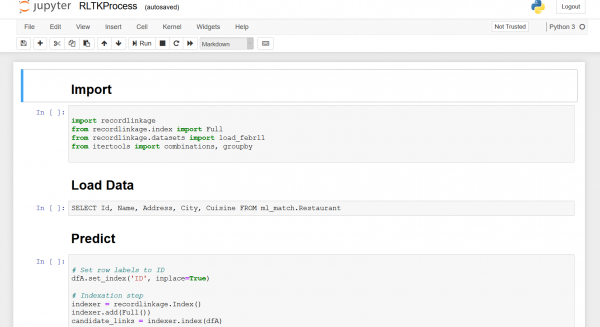
This extension assumes that annotations contain Python code and use activity names as preceding headers. It is now possible to develop PythonGateway business processes in Jupyter Notebook. Here’s what you can do:
- Create new business processes
- Delete business processes
- Create new activities
- Modify activities
- Delete activities
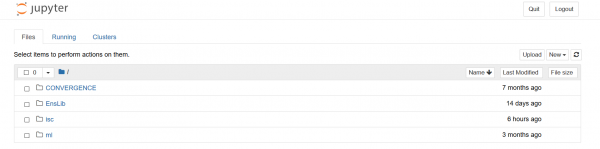
Here . And several screenshots:
Process explorer
Process editor
Installation
- You will need InterSystems IRIS 2019.2+.
- Install PythonGateway v0.8+ (only required
isc.py.util.Jupyter,isc.py.util.JupyterCheckpointsandisc.py.ens.ProcessUtils). - Update the ObjectScript code from the repository.
- Execute
do ##class(isc.py.util.Jupyter).Install()and follow the prompts.
.
Conclusions
MLToolkit is a toolkit aimed at integrating models and transaction environments, so that the developed models can be easily used directly in your business processes. The Python Gateway is part of MLToolkit and provides integration with the Python language, allowing orchestration of any machine learning algorithms created in Python (the primary environment for many Data Scientists), utilizing numerous ready-made libraries for quickly building adaptive, robotic analytical AI/ML solutions on the InterSystems IRIS platform.
Links
MLToolkit
The MLToolkit user group is a private GitHub repository created as part of the InterSystems corporate GitHub organization. It is aimed at external users who install, study, or already use components of MLToolkit, including the Python Gateway. The group provides a number of implemented cases (with source code and test data) in areas such as marketing, manufacturing, medicine, and many other industries. To join the ML Toolkit user group, please send a short message via email to the following address: and include the following information in your email:
- GitHub username
- Organization (where you work or study)
- Position (your actual position in your organization, or 'Student', or 'Freelancer').
- Country
For those who have read the article and are interested in the capabilities of InterSystems IRIS as a platform for developing or hosting artificial intelligence and machine learning mechanisms, we invite you to discuss possible scenarios of interest for your enterprise. We will gladly analyze your enterprise's needs and jointly determine a plan of action; the contact email for our AI/ML expert group is .
Source: habr.com
