

There aren’t many articles on Habr dedicated to the Qubes operating system, and those I’ve seen barely describe practical experience. Below, I hope to rectify this by sharing my experience using Qubes as a means of protection against the Windows environment and, in the process, assess the number of Russian-speaking users of the system.
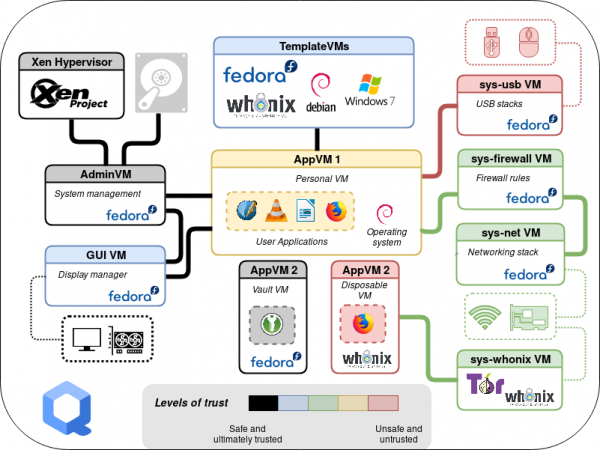
Why Qubes?
The end of support for Windows 7 and the increasing anxiety of users led to the need to organize the operation of this OS, considering the following requirements:
- ensure the use of a fully activated Windows 7 with the ability for the user to install updates and various applications (including via the Internet);
- implement complete or selective exclusion of network interactions on a conditional basis (offline modes and traffic filtering);
- provide the possibility of selective connection of removable media and devices.
Such a set of restrictions implies a clearly prepared user, as self-administration is allowed, and the limitations are related not to blocking potential actions but to preventing possible mistakes or destructive software impacts. That is, there are no internal threats in this model.
In our search for a solution, we quickly abandoned the idea of implementing restrictions using built-in or additional Windows tools, as it is quite challenging to effectively limit a user with administrative rights while allowing them to install applications.
The next solution option was isolation through virtualization. Well-known tools for desktop virtualization (such as VirtualBox) are poorly suited for security tasks, and the listed restrictions would require the user to constantly switch or configure the properties of the guest virtual machine (VM), which increases the risk of errors.
At the same time, we had experience using Qubes as a user desktop system, but there were concerns about the stability of the guest Windows. It was decided to check the current version of Qubes, as the imposed limitations fit very well within the paradigm of this system, especially the implementation of virtual machine templates and visual integration. Below, I will try to briefly discuss the ideas and tools of Qubes, using the example of solving the assigned task.
Types of Xen Virtualization
At the core of Qubes is the Xen hypervisor, which minimizes its functionalities related to managing CPU resources, memory, and virtual machines. All other device management is concentrated in dom0 based on the Linux kernel (Qubes uses a Fedora distribution for dom0).
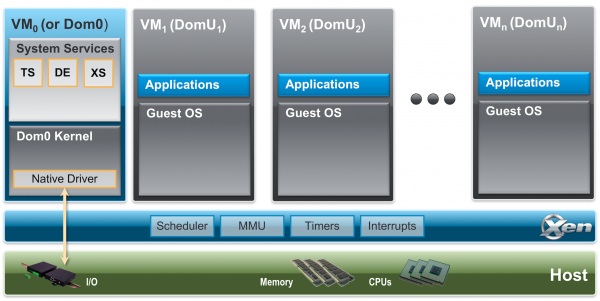
Xen supports several types of virtualization (I will provide examples for Intel architecture, although Xen supports others as well):
- paravirtualization (PV) — a virtualization mode that does not use hardware support, reminiscent of container virtualization, and can be used for systems with a modified kernel (this is how dom0 operates);
- full virtualization (HVM) — in this mode, hardware support is used for CPU resources, while all other hardware is emulated by QEMU. This is the most versatile method for running various OSes;
- hardware paravirtualization (PVH — ParaVirtualized Hardware) — a virtualization mode using hardware support where the guest system's kernel uses drivers adapted to the hypervisor's capabilities (for instance, shared memory), eliminating the need for QEMU emulation and enhancing input-output performance. Linux kernel version 4.11 and later can operate in this mode.
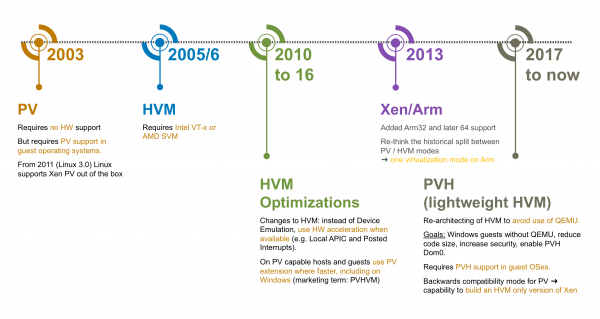
Starting from version Qubes 4.0, for security reasons, the use of paravirtualization mode is being phased out (also due to known vulnerabilities in the Intel architecture, which are partially mitigated by using full virtualization), with the PVH mode being used by default.
When using emulation (HVM mode), QEMU starts within an isolated VM called stubdomain, thereby reducing the risks of exploiting potential implementation errors (the QEMU project contains a lot of code, including for compatibility).
Such a mode should be used for Windows in our case.
Service virtual machines
In the security architecture of Qubes, one of the key features of the hypervisor is passing PCI devices to the guest environment. Device exclusion allows for the isolation of the host part of the system from external attacks. Xen supports this for both PV and HVM modes; in the latter case, IOMMU (Intel VT-d) support is required — hardware memory management for virtualized devices.
This creates several system virtual machines:
- sys-net, which is assigned network devices and serves as a bridge for other VMs, such as those implementing firewall functions or acting as a VPN client;
- sys-usb, which is assigned USB and other peripheral device controllers;
- sys-firewall, which does not use any devices but functions as a firewall for connected VMs.
Proxy services are used to work with USB devices, which provide the following:
- for HID (human interface device) class devices, sending commands to dom0;
- for removable media, redirecting device volumes to other VMs (excluding dom0);
- redirecting USB devices directly (using USBIP and integration tools).
In such a configuration, a successful attack through the network stack or connected devices may compromise only the running service VM, not the entire system. After restarting the service VM, it will be loaded in its original state.
VM integration tools
There are several ways to interact with the desktop of a virtual machine — installing applications in the guest system or emulating video through virtualization tools. Various universal remote access tools (RDP, VNC, Spice, etc.) can serve as guest applications or those adapted to a specific hypervisor (such tools are typically referred to as guest utilities). A mixed option can also be applied where the hypervisor emulates input-output for the guest system while externally providing the ability to use a protocol that combines input-output, similar to Spice. In this case, remote access tools usually optimize the image since they are designed for network operation, which negatively affects image quality.
Qubes provides its own tools for VM integration. Primarily, this is the graphical subsystem — windows from various VMs are displayed on a single desktop with their own color framing. Overall, the integration tools are based on the capabilities of the hypervisor — shared memory (Xen grant table), notification mechanisms (Xen event channel), shared storage xenstore, and the vchan communication protocol. Using these, the basic components qrexec and qubes-rpc are implemented, along with application services — sound or USB redirection, file transfer, clipboard content sharing, executing commands, and launching applications. There is a possibility to set policies that limit the services available on the VM. Below is an example of the procedure for initializing interaction between two VMs.
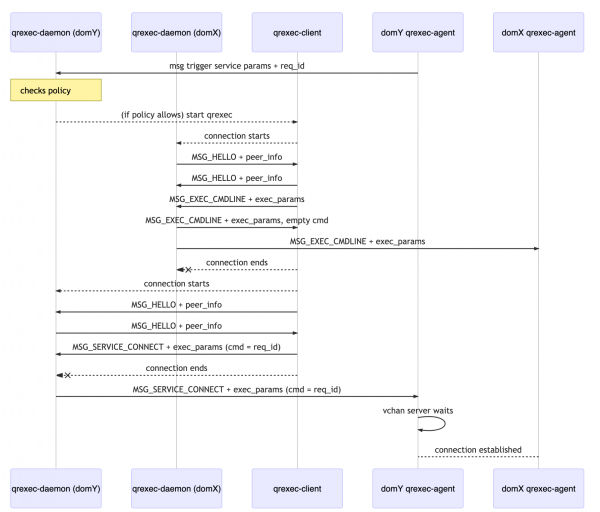
Thus, operation in the VM takes place without using the network, allowing for full utilization of standalone VMs to avoid information leakage. For example, this is how the separation of cryptographic operations (PGP/SSH) is implemented, where private keys are used within isolated VMs and do not leave their boundaries.
Templates, application, and disposable VMs
All user work in Qubes is performed in virtual machines. The main host system is used to manage their operation and visualization. The OS is installed along with a basic set of virtual machines based on templates (TemplateVM). Such a template is a Linux VM based on the Fedora or Debian distribution, equipped with integration tools, and dedicated system and user partitions. Software installation and updates are performed using the standard package manager (dnf or apt) from configured repositories with mandatory digital signature verification (GnuPG). The purpose of these VMs is to ensure trust in application VMs that run on their basis.
An application VM (AppVM) uses a snapshot of the system partition of the corresponding VM template upon startup, and after it ends, it deletes this snapshot without saving changes. User data is stored in a unique user partition for each application VM, which is mounted in the home directory.
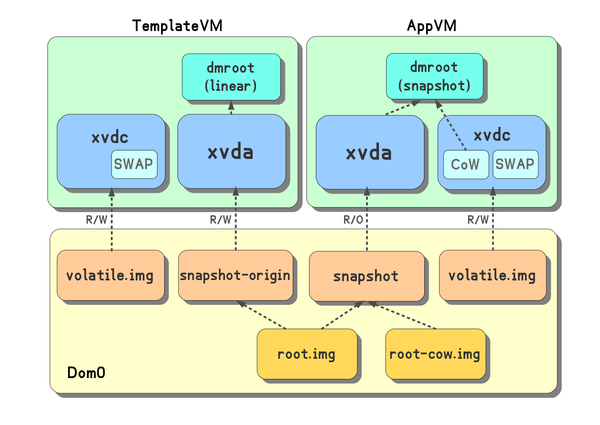
From a security perspective, using disposable VMs (disposibleVM) can be beneficial. Such a VM is created based on a template at the moment of startup and is launched for one purpose — to run a single application, terminating after its closure. Disposable VMs can be used to open suspicious files whose contents may exploit vulnerabilities in specific applications. The capability to launch a disposable VM is integrated into the file manager (Nautilus) and the email client (Thunderbird).
A Windows VM can also be used to create a template and a disposable VM; for this purpose, the user profile is moved to a separate partition. In our case, this template will be used by the user for administration tasks and application installation. Several application VMs will be created based on the template — with limited network access (built-in sys-firewall capabilities) and with no network access at all (no virtual network device created). In these VMs, all changes and applications installed in the template will be available, and even in the case of implanting malware, they will have no network access to compromise.
The Fight for Windows
The capabilities described above form the basis of Qubes and function quite stably; difficulties arise with Windows. To integrate Windows, it is necessary to use the Qubes Windows Tools (QWT) suite, which includes drivers for working with Xen, the qvideo driver, and a set of tools for information exchange (file transfer, clipboard). The installation and configuration process is thoroughly documented on the project site, so we will share our experience of implementing it.
The main difficulty is essentially the lack of support for the developed tools. Key developers (QWT) seem to be unavailable, and the integration project with Windows is waiting for the lead developer. Therefore, it was first necessary to assess functionality and gain an understanding of the possibility of supporting it independently if needed. The most challenging part of development and debugging is the graphics driver, which emulates a video adapter and display for generating images in shared memory, allowing the entire desktop or specific application window to be displayed in the host system's window. During the driver analysis, we adapted the code for building in a Linux environment and worked out the debugging scheme between two guest Windows systems. During the cross-build stage, we made several simplifying changes, mainly regarding the "silent" installation of utilities, and eliminated annoying performance degradation during prolonged VM operation. We documented the results of our work separately. , thus briefly the lead developer of Qubes.
The most critical phase regarding the stability of the guest system is launching Windows, where you might see the familiar blue screen (or even not see it). For most identified errors, various workarounds were found — including abandoning Xen drivers for block devices, disabling VM memory balancing, fixing network settings, and minimizing the number of cores. Our build of guest tools installs and works on fully updated Windows 7 and Windows 10 (except for qvideo).
When transitioning from a physical environment to a virtual one, there is an issue with activating Windows when using pre-installed OEM versions. Such systems rely on activation based on licenses stored in the device's UEFI. To ensure proper activation processing, it is necessary to fully pass one of the host system's ACPI sections (the SLIC table) to the guest system and make minor adjustments to others by specifying the manufacturer. Xen allows configuring the content of additional ACPI tables, but not modifying the main ones. A patch from a similar project, OpenXT, which was adapted for Qubes, helped solve this issue. The fixes proved useful not only to us and were incorporated into the main Qubes repository and the Libvirt library.
The obvious drawbacks of Windows integration tools include the lack of audio support, USB devices, and the complexity of working with media due to the absence of GPU hardware support. However, these issues do not hinder the use of VMs for handling office documents and do not prevent the launching of specific corporate applications.
The requirement to switch to offline mode or to limited network mode after creating a Windows VM template was implemented by creating corresponding application VM configurations, and the ability to selectively connect removable media was also addressed using built-in OS tools — upon connection, they are accessible in the system VM sys-usb, from where they can be 'passed through' to the necessary VM. The user's desktop looks approximately like this.
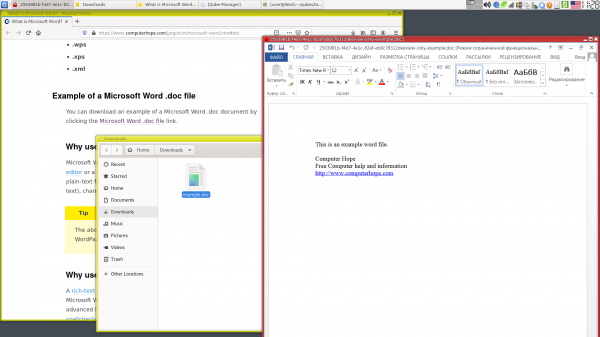
The final version of the system has been positively accepted by users (as much as such a complex solution allows), and the built-in system tools have enabled expanding its use to the mobile workstation with access via VPN.
In conclusion
Overall, virtualization reduces the risks associated with using unsupported Windows systems — it does not force compatibility with new hardware, allows for excluding or controlling access to the system over the network or through connected devices, and enables creating an environment for one-time execution.
Qubes OS, based on the idea of isolation through virtualization, helps utilize these and other mechanisms to ensure security. From the outside, many see Qubes primarily as a pursuit of anonymity, but it is a useful system for engineers often juggling projects, infrastructures, and access secrets, as well as for security researchers. The separation of applications, data, and formalizing their interactions are initial steps in threat analysis and system protection design. This separation helps structure information and reduces the likelihood of errors due to human factors—haste, fatigue, etc.
Currently, the main focus of development is on expanding the functionality of Linux environments. A release of version 4.1 is being prepared, which will be based on Fedora 31 and include up-to-date versions of key components Xen and Libvirt. It's worth noting that Qubes is created by professionals in the field of information security, who promptly release updates in case of new threats or bugs.
Afterword
One of our experimental features being developed allows the creation of VMs with guest access to GPUs based on Intel GVT-g technology, enabling the utilization of the graphics card capabilities and significantly expanding the application scope of the system. At the time of writing this article, this functionality works for testing builds of Qubes 4.1 and is available on .
Source: habr.com
