

A lot has been written about the integration of Telegram and 1C. However, I have not seen a complete guide for setting up and configuring webhooks. I will attempt to write it.
For all of this, we will need (or more accurately, what I used):
- Apache 2.2.24
- OpenSSL (included in the Apache installation)
- 1C (with modules) web servers)
- Your own domain
- A created bot in Telegram (I won't describe its creation, as it's quite trivial)
It is assumed that all software is already installed.
So, let's start with obtaining the certificate. Open the command line and execute the following code:
openssl req -newkey rsa:2048 -sha256 -nodes -keyout YOURPRIVATE.key -x509 -days 365 -out YOURPUBLIC.pem -subj "/C=US/ST=New York/L=Brooklyn/O=Example Brooklyn Company/CN=YOURDOMAIN.EXAMPLE"Where:
YOURPRIVATE.key — the private key of the certificate. It will be used in Apache.
YOURPUBLIC.pem — the public key of the certificate. It will be used when registering the webhook.
YOURDOMAIN.EXAMPLE — the address of your domain with the webhook. It must match the webhook address!!!
After executing this code, key files will appear in the openssl folder (for me it is "C:Program FilesApache Software FoundationApache2.2bin").
I copied them to the Apache conf folder.
Now, let's move on to configuring Apache.
I have seen many different methods. The following worked for me:
The following lines were added to httpd.conf:
Listen 443 to make Apache "listen" on port 443.
The block <IfModule ssl_module> was modified to the following:
<IfModule ssl_module>
SSLMutex default
SSLSessionCache none
</IfModule>
At the very end, the following lines were added to specify the paths to the certificate:
SSLEngine On
SSLCertificateFile conf/YOURPUBLIC.pem
SSLCertificateKeyFile conf/YOURPRIVATE.key
And uncomment the line:
LoadModule ssl_module modules/mod_ssl.so In the configuration, create an HTTP service. This will respond to Telegram and handle its requests.
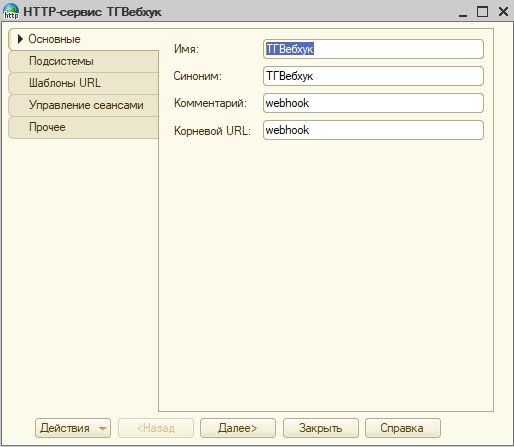
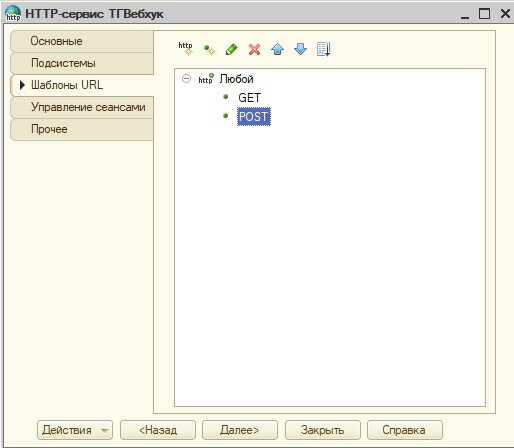
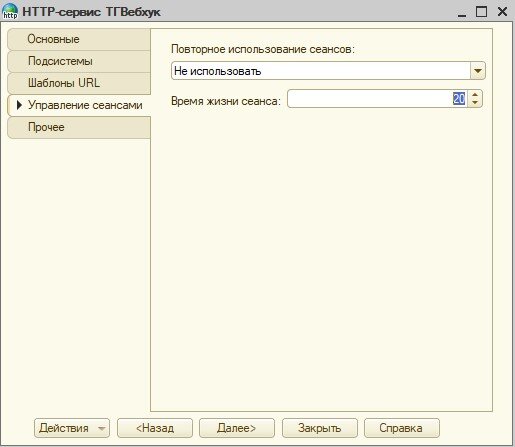
In my case, the following parameters were specified:
Name: TGWebhook
Root URL: webhook
Session reuse: Do not use (it did not work for me in automatic mode)
Lifetime: 20
URL templates: create a template "Any" with two methods: GET and POST
Method handlers are created by default. In the POST handler, I will add the following, just to verify the connection:
Function AnyPOST(Request)

	SendTestMessage(""); //chat_id
	Response = New HTTPServiceResponse(200);
	Return Response;

EndFunction


&OnServer
Procedure SendTestMessage(Chat)

		Message = "Test message";
		Token = ""; // Your Telegram token
		Server = "api.telegram.org";
	    Resource = "bot" + Token + "\/sendMessage?chat_id=" + StringReplace(Format(Chat, "ЧДЦ=; ЧС=; ЧРГ=."), ".", "") + "&text=" + Message;
   		Connection = New HTTPConnection(Server,443,,,,,New SecureConnectionOpenSSL());
		Request = New HTTPRequest(Resource);
		Response = Connection.Get(Request);

EndProcedure
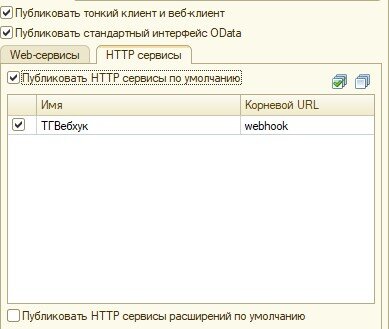
You just need to publish the database and link the webhook.
Publishing is done as usual, you only need to check the boxes for publishing the HTTP service:
As the last step, we will link our 1C to Telegram. For this, I used a simple HTML page with the following code:
<html>
<body>

<form action="https://api.telegram.org/bot<ЗдесьДолженБытьТокен>/setwebhook" method="post" enctype="multipart/form-data">
    Select a certificate to upload:
    <input type="file" name="certificate" id="fileToUpload">
	URL: <input type="text" name="url"  value="https://<YOURWEBSITE>/<YOUR_PHP_URL>"><br>
    <input type="submit" value="Upload certificate" name="submit">
</form>

</body>
</html>
In the form, just select the public key and enter the full path to our HTTP service. Remember, the full path to the service will look like this:
Please don't kick the code, some things were intentionally hardcoded, as this was done solely for demonstration purposes.
The publication was written because I couldn't find a single working example of using webhooks on the site, except for the Telegram Bot Constructor. But it is paid and may not be needed by everyone in this form.
The archive contains the installation of Apache 2.2.24 along with OpenSSL (for some reason, finding it took me a lot of time), an HTML file for registering the webhook, the Apache configuration file, and a configuration with the HTTP service and an example of sending a test message. Downloading is optional, as all content is available in the article.
Source: habr.com
