

Today, we would like to discuss VDI a bit. Specifically, we want to address a significant decision-making problem for top management in large companies: which option to choose – setting up an on-premise solution independently or subscribing to a service within the public cloud? When the stakes involve not hundreds but thousands of employees, choosing the optimal solution is crucial since it can lead to either substantial additional costs or significant savings.
Unfortunately, there is never a universal answer: each company needs to 'try on' each option for itself and calculate it in detail. However, as potential assistance, we will share intriguing analytics from the Evaluator Group. The company's experts have been researching information management, data storage and protection, infrastructure IT solutions, and modern data centers for over 20 years. In a recently published study, they compared the cost of an on-premise VDI solution based on with a subscription to the public cloud in Amazon WorkSpaces and evaluated the economic efficiency of both options over a three-year period. We translated all of this especially for you.

At one point, it was believed that the cloud would become the inevitable successor to traditional IT infrastructure. Gmail, Dropbox, and many other cloud services have become commonplace. As companies began actively using public clouds, the concept of the cloud itself evolved. Instead of 'just the cloud,' we now have 'hybrid cloud,' which is being adopted by increasing numbers of corporations. Generally, businesses believe that public cloud is well-suited for handling specific data and application sets, while on-premise infrastructure is better for others.
The overall appeal of public cloud and whether it suits a particular organization depends on several factors. These include the availability of IT personnel and their level of expertise, concerns about the level of control, data protection, and overall security, the company's preferences regarding financing (concerning fixed and variable costs), and, of course, the cost of the ready-made solution. According to another study conducted by the Evaluator Group specialists ('Hybrid Cloud Storage for Enterprises'), the key factors for respondents were security and cost.
Like other applications running in data centers, VDI infrastructure is available as a service from various public cloud providers. For enterprises choosing a public cloud for VDI, price is a significant factor in the decision-making process. This study compares the total cost of ownership (TCO) of an on-premises VDI solution and VDI operating within a public cloud. Specifically, these solutions include the Dell EMC VxBlock 1000 system with VMware Horizon and WorkSpaces in the Amazon cloud.
TCO Model
Total cost of ownership – a concept typically used when evaluating IT equipment purchases. TCO considers not only the acquisition cost but also the expenses for deployment and operation of the chosen equipment. Converged infrastructures, such as Dell EMC VxBlock 1000, have simplified the traditional environment to reduce costs associated with design, procurement, and ongoing maintenance. Additionally, VMware Horizon helps streamline operational aspects due to its tight integration with the broader VMware product ecosystem, which has become ubiquitous in enterprise IT today.
Within this solution for the Dell EMC VxBlock 1000, two different user profiles will be considered. The first - Knowledge Worker - is essentially intended for standard office work scenarios with no heightened requirements for computational resources. The second - Power Worker - is suitable for workers who require more intensive computing. In AWS WorkSpaces, they can be mapped to the Standard Package and Performance Bundle respectively.
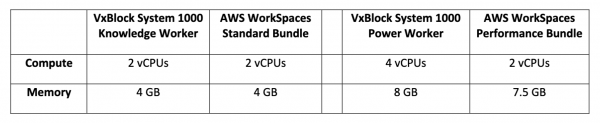
VDI configurations for user profiles
On-premises infrastructure
The Dell EMC VxBlock converged system includes Dell EMC storage, CISCO UCS server and network solutions, as well as the VMware Horizon VDI software platform. For the local infrastructure, the VMware Horizon software stack was deployed on standard x86 servers that scale according to the number of users. Storage capacity for software and user accounts is provided by flash arrays connected via Fibre Channel SAN. Infrastructure management was carried out using Dell EMC AMP, a standard component of VxBlock responsible for system management, monitoring, and automation.
The architecture of the described infrastructure can be seen in the diagram below. This solution was originally designed for an environment with 2,500 virtual desktops and can scale up to a limit of 50,000 desktops by adding new components within the same design. This study is based on an infrastructure that includes 5,000 virtual workstations.
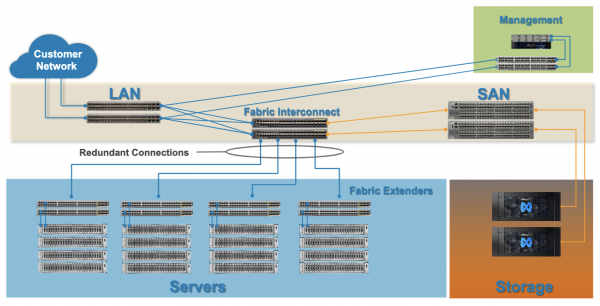
Architectural Design of Dell EMC VxBlock 1000
Components of the Local VDI Infrastructure
- Cisco UCS C240 M5 (2U) – two Intel Xeon Gold 6138 2 GHz, Cisco Network Assistant, 768 GB memory for Power Worker profiles, and 576 GB memory for Knowledge Worker profiles. An external flash array connected via SAN serves as the storage for user data.
- Cisco UCS C220 M5 SX (1U) – two Intel Xeon Silver 4114 2.2 GHz, CNA, and 192 GB memory. These servers support the Dell EMC Advanced Manager platform and use shared storage provided by the Dell EMC Unity horizontal scaling system.
- Cisco Nexus 2232PP (1U) – a switch with 32 ports, FCoE 10 Gbps. It provides adequate access levels for environments with a large number of servers.
- Cisco Nexus 9300 (1U) – a switch with 36 ports, it provides connection to the end-user IP network.
- Cisco Nexus 6454 (1U) – servers that provide converged network connectivity for compute servers, IP networks, and Fibre Channel networks.
- Cisco 31108EC (1U) – a switch with 48 ports and 10/100 Gbit Ethernet, which provides communication between AMP servers and storage, as well as the rest of the converged infrastructure.
- Cisco MDS 9396S (2U) – a switch with 48 Fibre Channel ports, providing SAN connectivity for XtremIO X2 arrays.
- Dell EMC XtremIO X2 (5U) – a flash storage array with two active controllers, consisting of 18 x 4 TB SSDs. It supports user desktops and VDI software.
- Dell EMC Unity 300 (2U) – a hybrid storage array with SSDs of 400/600 GB and 10K HDDs. It provides capabilities to support AMP structure management software.
- VMware Horizon – a virtualization software platform for managing virtual desktops in enterprise environments. The vSphere hypervisor is licensed as part of VMware Horizon.
For the TCO assessment in this study, a simple three-year depreciation was used without taking interest into account. It is assumed that organizations wishing to evaluate the feasibility of purchasing such equipment can easily include leasing costs or internal capital in their calculations.
The maintenance cost was estimated at $2000 per 42U per month, including expenses for electricity, cooling, and rack space. It was calculated that 0.2 hours per week is required for the administration of each server. Each storage system will require one hour per week for updates and maintenance. The hourly rate for administrators was calculated using the following formula: "The hourly salary of a fully loaded IT administrator per year ($150,000) / 2000 working hours per year."
Total Cost of Ownership Calculation
Although the system consists of a fairly large number of different components, the cost calculations turn out to be quite simple in practice. For example, an environment was taken based on 5,000 Knowledge Worker profile users. The same methodology was applied to derive comparative costs in the graphs that will follow. These costs for software and hardware, as well as support expenses, including standard discounting, were summarized along with equipment costs and administrative expenses over a three-year ownership period.
VDI Infrastructure Costs for 5,000 Knowledge Worker profile employees:
- Servers (computing and management) – $1,813,859
- Data storage (VDI system, user data, management system) – $315,013
- Networks (LAN and SAN switches, as well as other equipment) – $253,410
- Software (VDI platform, management, hardware-linked licenses) – $2,061,430
- Support (maintenance and updates for software and hardware) – $224,293
- Services (deployment of hardware and software) – $78,664
- Maintenance costs over 3 years: $226,286
- Administrative expenses over 3 years: $161,460
- Total: $5,134,415
If the total cost of virtual desktops is divided among 5,000 employees and then divided by 36 months, the monthly cost per user profile is $28,52 per month per Knowledge Worker profile.
Public cloud infrastructure
Amazon WorkSpaces is a 'VDI as a service' offering where everything operates within the AWS cloud. Desktops are provided running both Windows and Linux, with payment able to be made monthly or hourly. At the time of the research, there were 5 basic packages available with varying system configurations: from 1 vCPU and 2 GB of RAM to 8 vCPU and 32 GB of RAM plus data storage. For the purpose of this TCO comparison, two configurations with Linux desktops were chosen. This price is also valid under the 'Bring Your Own' concept for Windows licensing. The fact is that many companies already have large long-term enterprise licensing agreements with Microsoft (ELA – Enterprise Licensing Agreement).
- Standard package: 2vCPU, 4 GB RAM desktop, 80 GB in the root volume and 10 GB in the user volume for the Knowledge Worker scenario – $30.83 per month.
- Performance package: 2vCPU, 7.5 GB RAM desktop, 80 GB in the root volume and 10 GB in the user volume for the Power Worker scenario – $53.91 per month.
Both packages include root (80 GB for the operating system and associated files) and user (10 GB for employee data) volumes. It is assumed that there will be no service interruptions, but it should be noted that Amazon charges for each gigabyte used over the limit. Additionally, the listed prices do not include the cost of data transfer over the internet from AWS, nor the internet cost for users. For simplicity, the calculation model in this study assumes no costs for incoming and outgoing data transfer.
The plans mentioned above do not include the cost of training on the system, but they include AWS Business Support technical assistance. While the user cost listed above is fixed, the cost of such support ranges from approximately 7% per user for a pool of 2,500 users to about 3% per user in a pool of 50,000 users. This is taken into account in the calculations.
We also add that this is a pay-as-you-go pricing model without a commitment period. There is no option to prepay more than the advance payment, nor are there long-term subscriptions where the cost typically decreases as the term increases. Additionally, for the sake of simplicity, this TCO model does not account for short-term discounts and other promotional offers. However, within this comparison, their impact has been negligible.
Results
Knowledge Worker Profile
The chart below shows that the initial cost of the Dell EMC VxBlock 1000 on-premises solution for VDI will cost the company approximately the same amount as the AWS WorkSpaces cloud solution provided that the user pool does not exceed 2,500 people. However, everything changes as the number of virtual desktops increases. For a company with 5,000 users, VxBlock is already about 7% cheaper, and for an enterprise that needs to deploy 20,000 virtual desktops, VxBlock saves more than 20% compared to AWS cloud.
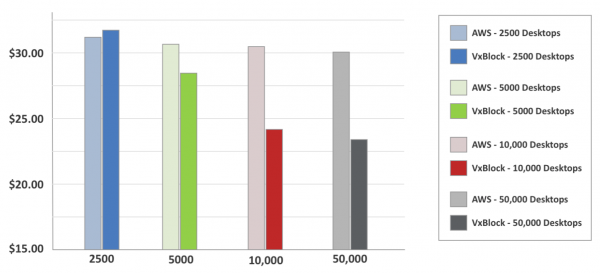
Comparison of VDI solutions based on VxBlock and AWS WorkSpaces for Knowledge Worker profile, price per virtual desktop per month
Power Worker Profile
The next chart compares the total cost of ownership for the Power Worker profile in an on-premises VDI based on VxBlock with the 'Performance' package in AWS WorkSpaces. Recall that here, unlike the Knowledge Worker profile, there are also differences in hardware: 4 vCPUs and 8 GB of memory in VxBlock versus 2 vCPUs with 7.5 GB of memory in AWS. Here, the VxBlock solution proves to be significantly more beneficial even within a pool of 2,500 users, with overall savings reaching 30-45%.
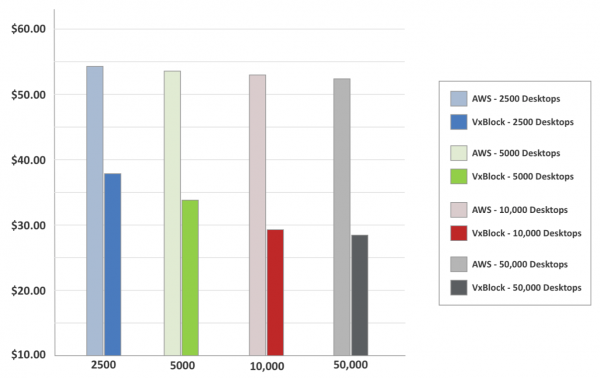
Comparison of VDI solutions based on VxBlock and AWS WorkSpaces for Power Worker profile, price per virtual desktop per month
Three-year outlook
In addition to the average cost per user, it is crucial for corporations to assess the savings from the chosen infrastructure solutions over several years. The final chart illustrates how the difference in total cost of ownership over 36 months provides a significant cumulative economic effect. In the Power Worker scenario for 10,000 virtual desktops, the AWS solution is approximately $8.5 million more expensive than the VxBlock-based solution. In the Knowledge Worker scenario over the same time period for the same number of users, the accumulated savings reach up to $2 million.
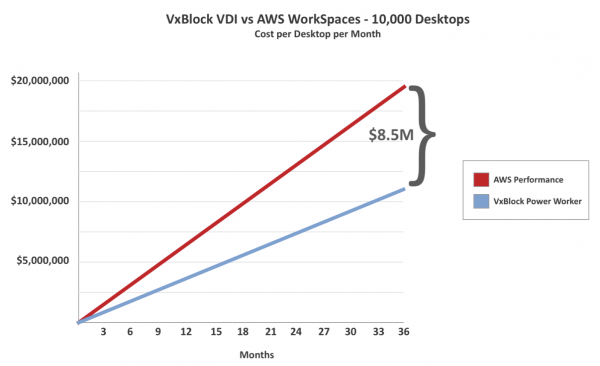 Total costs of servicing 10,000 virtual desktops in local infrastructure based on VxBlock and in the public cloud AWS WorkSpaces for 10,000 users with the Power Worker profile.
Why is the cost of a local VDI solution lower?
The reduction in costs for the local VDI solution shown in the above charts reflects two fundamental principles: economies of scale and resource maximization. As with acquiring any other infrastructure, there are initial costs associated with establishing the system in this corporate computing environment. As these initial costs are spread over a larger number of users, the additional costs decrease. VDI also optimizes resource usage, in this case by managing the allocation of CPU cores. Data, computation, and network abstraction allows these systems to 'reallocate' physical resources in specific ratios, thus reducing the cost per user. In large environments such as the public cloud, many of the same cost-saving principles are employed, but they do not pass this savings back to their users.
What about a 5-year ownership term?
Indeed, many organizations maintain IT systems longer than 3 years; often the term reaches 4-5 years. The Dell EMC VxBlock 1000 system is designed in such a way that its architecture allows for the upgrade of individual components or the modernization of existing ones without the need for a sudden switch to a completely new system.
If you express the fixed and variable costs from this model over a time span of 5 years, they would decrease by approximately 37% (excluding the two additional years of administration and support). Consequently, a local VDI solution based on Dell EMC VxBlock 1000 for 5000 Knowledge Workers would cost $17.98 per user instead of $28.52. For 5000 Power Workers, the cost would drop from $34.38 to $21.66 per user. Meanwhile, with a fixed price for the AWS WorkSpaces cloud solution, its cost would remain unchanged over the 5-year period.
User Experience and Risk
VDI is a critical application that affects every employee and provides access to the highest levels of the company. When replacing an employee's physical desktop with VDI (whether cloud-based or on-premises), it is essential to ensure a consistent user experience, making it crucial to assess potential risks. Maintaining the VDI system on-site offers a higher level of control over the infrastructure and can potentially reduce such risks.
Relying on the connectivity and bandwidth of public internet for cloud desktop services introduces an additional level of risk to the environment. Moreover, employees often use USB devices for data storage and peripherals, many of which are not supported by AWS WorkSpaces.
In what situations is public cloud the better option?
The cost of AWS WorkSpaces is assessed based on the number of users per month or by month. This can be convenient for launching short-term applications or when development needs to be implemented quickly. Additionally, this option may appeal to companies lacking deep IT expertise or the desire and capacity to incur capital expenses. While VDI in the public cloud is suitable for small to medium enterprises and short-term applications, it may not be entirely appropriate for core IT service tasks such as workstation virtualization in large enterprises.
Summary and Conclusion
VDI is a technology that moves computing applications and user infrastructure from the desktop to the data center. In a way, it provides some 'cloud' benefits by combining desktop management with resources on dedicated servers and shared storage. This can reduce administrative costs and optimize resource usage, leading to lower expenses. In fact, most VDI projects are driven (at least in part) by the need to cut costs for the enterprise.
But what about running VDI in the public cloud? Can it provide cost savings compared to on-premises VDI? For small organizations or short-term deployments, possibly yes. But for an organization looking to support thousands or tens of thousands of desktops, the answer is 'no'. For large enterprise VDI projects, the cloud turns out to be significantly more expensive.
In this total cost of ownership study, experts from Evaluator Group compared the cost of an on-premises VDI solution based on Dell EMC VxBlock 1000 with VMware Horizon to the cost of cloud VDI within AWS WorkSpaces. The results showed that in environments with 5,000 or 10,000 Knowledge Worker type employees or more, economies of scale reduced the cost of on-premises VDI per desktop by over 20%, while the cost of cloud VDI remained almost unchanged as the number of users increased. For Power Worker type employees, the cost difference was even greater: the VxBlock-based solution was 30-45% more economical than AWS.
In addition to the cost difference, the Dell EMC VxBlock 1000 solution offers a better experience for users and provides more control for IT infrastructure administrators. In particular, the on-premises VDI solution helps avoid many potential risks associated with security, performance, and data transfer.
The author of the study is , an analyst at Evaluator Group.
That's all. Thank you for reading to the end! You can learn more about the system here. If you have questions regarding the selection of configurations and procurement of Dell EMC equipment for your companies, we are, as always, happy to help in direct messages.
Source: habr.com
