

Note: translation.: The topic of Docker security is undoubtedly one of the eternal discussions in the modern IT world. Therefore, without further ado, we present a translation of another collection of relevant recommendations. If you've looked into this issue before, many of them will be familiar to you. We have also supplemented the collection with a list of useful utilities and several resources for further exploration of the topic.
I present to your attention a guide to securing Docker. Feedback is welcome, as this is more of a compilation of excerpts from various resources, not all of which have been thoroughly verified. The recommendations are divided into three categories:
- Necessary measures within the host operating system when working with Docker;
- Instructions related to the configuration file for building and creating containers;
- Security tools that can integrate with specific features of Docker Enterprise.
The foundation of this guide is based on various resources, many of which are listed below. It cannot be considered exhaustive, but it covers all the basics. Additional information can be found in the CIS test descriptions (link provided at the end of this guide) as well as in Docker's documentation.
Docker Security Benchmark
automatically checks your Docker for compliance with the most common best practices. The script serves as a decent heuristic security test; however, it should not be viewed as a comprehensive analysis tool.
Host OS
It is clear that a Docker container cannot be secure if the host system itself is not secure. Therefore, it is necessary to follow best practices for securing operating systems. Additionally, it would be wise to conduct a vulnerability assessment in conjunction with the following recommendations.
Audit rules
Create and use audit rules for files related to Docker using auditctl. For example, you can add -w /usr/bin/dockerd -k docker to /etc/audit.rules and restart the audit service.
FIPS mode
Enabling FIPS mode forces cryptographic tools to switch to algorithms included in FIPS (U.S. - translator's note), thus complying with federal and industry standards and requirements. If the host OS supports FIPS mode, it can be enabled by executing the following commands:
sed -i 's/GRUB_CMDLINE_LINUX="/GRUB_CMDLINE_LINUX="fips=1 /g' /etc/default/grub
grub2-mkconfig -o /boot/grub2/grub.cfg && reboot
FIPS must also be enabled in the Docker Engine:
mkdir -p /etc/systemd/system/docker.service.d 2>&1; echo -e "[Service]\n Environment=\"DOCKER_FIPS=1\"" > /etc/systemd/system/docker.service.d/fips-module.conf; systemctl daemon-reload; systemctl restart dockerFor more information, see the documentation and .
Docker Secrets
Sensitive data should be stored as secrets. You can start the relevant service with the command docker service create:
docker service create --label com.docker.ucp.access.label=/prod --name nginx --publish 443 --secret source=orcabank_prod_mobile.ca.pem.v1,target=ca.pem nginxSee the details in the .
Docker configuration file
The following settings can be added to the configuration file /etc/docker/daemon.json:
-
"icc":false— disables inter-container communication to avoid unnecessary information leakage. -
log-level: "info"— captures all logs except for debugging ones. { "log-driver": "syslog", "log-opts": { "syslog-address": "udp://1.2.3.4:1111" } }— connects to remote logging, forwarding logs to the specified address. Works only if the syslog daemon is running. Both TCP and UDP options are accepted. It's also possible to connect for each specific container. For this, a special flag is set when launching Docker (
--log-opt syslog-address=ADDRESS).-
"userns-remap": "Your_User"— prevents privilege escalation by isolating the namespace for a specific user.
Transport Layer Security
Access to the Docker daemon (if remote access is necessary) should only be available to users with access to TLS client credentials.
Authorization plugins
Determine which users are allowed to execute which commands, and create the corresponding authorization plugin for Docker. Then start the Docker daemon and add the plugin:
dockerd --authorization-plugin=PLUGIN_IDTo learn more about creating authorization plugins, see the .
Daemon Parameters
The Docker daemon operates with a default set of parameters.
-
--live-restore— this parameter helps reduce downtime for containers during system shutdown or reboot. It becomes easier to patch or update them with minimal downtime; -
--userland-proxy=falseWhen hairpin NATs are available or used, a user-space proxy becomes a redundant service that only increases the number of potential attack vectors. -
--no-new-privilegesPrevents containers from gaining additional privileges using suid or sguid. -
--seccomp-profile /path/to/profileIf you have your own seccomp profile, you can apply it with this flag. Learn more about Seccomp and Docker. .
Container Configuration and Build Files
Creating a User
Make sure that a user is created for the container and run it under that user (DO NOT run the container as root).
Remote Access
Disable remote access to the daemon. If it is necessary, secure it with certificates.
Isolate the User Namespace
It is especially important to ensure that the user namespace in Docker is isolated, as by default it is shared with the host namespace. In some cases, this can be exploited for privilege escalation or even to escape the container. The user namespace can be isolated by editing the configuration file (as described above in the 'Docker Configuration File' section). The mention of this issue here is due to its importance.
Healthchecks
Healthcheck is a powerful tool that allows you to check the integrity of the container. It is configured in the Dockerfile using the instruction HEALTHCHECKHealthchecks allow you to ensure that the container is functioning properly. In the example below, the health check will end with 0 if the server is running and 1 if it has 'crashed':
HEALTHCHECK CMD curl --fail http://localhost || exit 1SELinux
If SELinux is supported by the host operating system, create or import a SELinux policy and run Docker in daemon mode with SELinux enabled:
docker daemon --selinux-enableIn this case, Docker containers can be started with security parameters, for example:
docker run --interactive --tty --security-opt label=level:TopSecret centos /bin/bashNetwork Interfaces
By default, Docker listens on all network interfaces. Since in most cases traffic is only expected on one of them, this approach unnecessarily increases the risk of attack. Therefore, when starting a container, you can bind its ports to specific interfaces on the host:
docker run --detach --publish 10.2.3.4:49153:80 nginxCached image versions
When downloading images, ensure that the local cache matches the content of the repository. Otherwise, you might receive an outdated image version or an image containing vulnerabilities.
Network bridge
Default network model, docker0, is vulnerable to ARP spoofing and MAC flooding attacks. To resolve this issue, create a network bridge according to your specifications, as described .
Docker socket warning
Never expose the Docker socket inside a container. Otherwise, the container will have the ability to execute Docker commands and, consequently, interact with the host operating system and control it. Do not do this.
Configuring Docker Enterprise
Docker Trust
Docker Trust enables the generation of keys that can verify the cryptographic integrity of images. Docker Trust keys can be used to sign Docker images with private keys, which are verified by public keys on the Notary Server. For more information — . Enabling Docker Trust in Enterprise Engine is detailed in .
Vulnerability scanning
Docker Enterprise includes a built-in vulnerability scanner that allows you to download the CVE database for offline vulnerability scanning of images. Regularly scanning images helps make them more secure: users receive immediate alerts about found vulnerabilities. For more on how to do this, see .
Note: translation.: There are also Open Source vulnerability scanners for Docker images, examples of which can be found at the end of the material.
Integrating LDAP and UCP
The Universal Control Plane can be integrated with LDAP. This will result in a streamlined authentication system, avoiding unnecessary duplication. More details on this can be found in the article .
Other materials
Additional information on best practices for securing Docker can be found at . We also recommend downloading .
Bonus from the translator
As a logical addition to this article, we present a list of 10 popular Open Source tools for security in Docker. It has been adapted from (by Bill Doerrfeld from Doerrfeld.io).
NB: Learn more about many of the projects mentioned here in the article "».
- — the script mentioned at the very beginning of the article that checks Docker containers for compliance with common security practices.

- — probably the most popular utility for static vulnerability analysis in containers. It uses numerous CVE vulnerability databases (including trackers from leading Linux distributions such as Red Hat, Debian, Ubuntu). It offers an API for developers and a simple way to extend functionality (through the addition of "drivers"). It is used in the popular public container image registry (analogous to Docker Hub) — Quay.io.
- — a solution for kernel-level network security based on BPF packet filtering technology.
- — a utility for analyzing the contents of images for security vulnerabilities based on the CVE database. Additionally, it allows the application of custom policies (based on various data including allow/deny lists, file contents, etc.) for assessing container security.
- — a complete ecosystem for creating and maintaining security policies across different platforms. It offers the tool
oscap-docker. - — a utility for scanning Docker containers for vulnerabilities, trojans, viruses, and malware. It includes checks from the CVE database, dependency checks based on OWASP, the Red Hat Oval database, and the Exploit Database repository.
- — a framework for signing Docker images, originally created at Docker Inc. (and later handed over for development to CNCF). Its use allows for delegating roles and distributing responsibilities across containers, as well as verifying the cryptographic integrity of images.
- — an API for metadata designed to manage internal security policies. For example, it can enhance the performance of container security scanners. Shopify uses this API to manage metadata for its 500,000 images.
- — a utility for Kubernetes that monitors system behavior: activity in containers, on hosts, and in the network. It allows for continuous checks in the infrastructure, anomaly detection, and alerting for any Linux system calls.
- — another tool for static analysis of Docker container images. It allows you to "peek" into the image files, gathering necessary data, applying required policies, and so on.

Another good collection of practical recommendations on how to make Docker more secure can be found at Aqua Security. Many of its tips overlap with those mentioned above, but there are others as well. For instance, the authors suggest organizing monitoring of container activity and indicate what to pay attention to when using Docker Swarm.
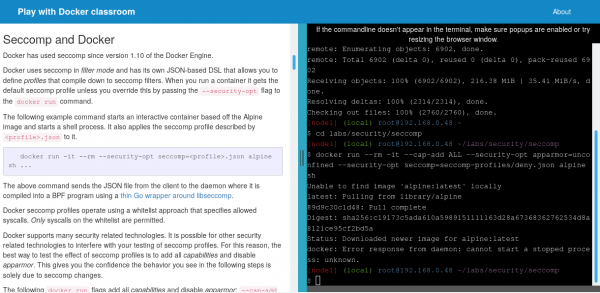
For those who wish to delve deeper into this topic, a book titled "Docker Security: Quick Reference»Finally, for practical acquaintance with some aspects of Docker security: Seccomp profiles and using Linux kernel capabilities in containers — relevant .
laboratory work can be done on the Play with Docker resource. * Two years ago, we wrote about this resource, and in November 2018, something quite intriguing (from a security perspective) occurred with it. In short, experts from CyberArk Software Ltd. managed to hack it: they gained the ability to execute commands outside the containers, that is, on the host system. A perfect illustration of the security problem in Docker, isn't it? Read all about the details of the incident
Docker and Kubernetes in security-sensitive environments. OPA and SPIFFE — two new projects in CNCF for cloud application security. .
P.S. from the translator
Also read in our blog:
- «»;
- «»;
- «»;
- «»;
- «»;
- «».
Source: habr.com
