

Low DNS latency is a key factor for fast internet performance. To minimize it, it's important to carefully select DNS servers and . But first, it’s crucial to eliminate unnecessary queries.
That’s why DNS was initially designed as a highly cacheable protocol. Zone administrators set a time-to-live (TTL) for individual records, and resolvers use this information to store records in memory to avoid unnecessary traffic.
Is caching effective? A couple of years ago, my small research showed that it’s not perfect. Let’s take a look at the current situation.
To gather information, I patched to preserve the TTL value for the response. It is defined as the minimum TTL of its records for each incoming request. This provides a good overview of the distribution of real traffic TTL, while also considering the popularity of individual queries. The patched server ran for several hours.
The resulting dataset consists of 1,583,579 records (name, qtype, TTL, timestamp). Here's the overall distribution of TTL (the X-axis represents TTL in seconds):
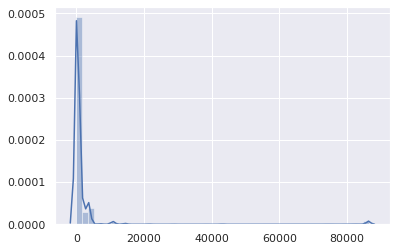
Aside from a minor peak at 86,400 (mainly for SOA records), it is quite obvious that TTLs are in a low range. Let’s take a closer look:
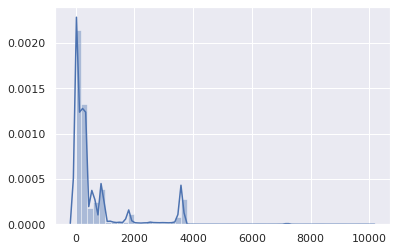
Well, TTLs over 1 hour are statistically insignificant. So, let’s focus on the range of 0–3600:
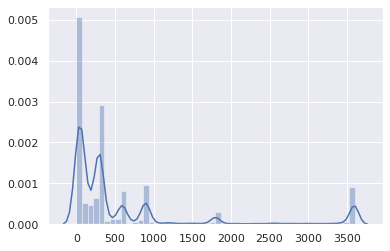
Most TTLs are between 0 and 15 minutes:
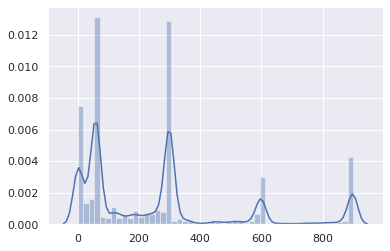
The overwhelming majority are between 0 and 5 minutes:
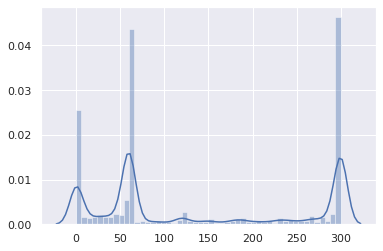
This is not very good.
The cumulative distribution makes the problem even more evident:
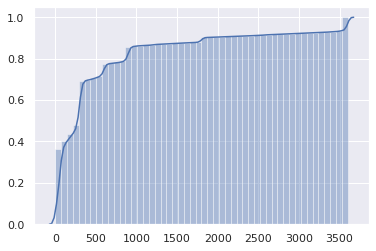
In half of the DNS responses, the TTL is 1 minute or less, and for three-quarters of them, it’s 5 minutes or less.
But wait, it’s actually worse. This is the TTL from authoritative servers. However, client resolvers (like routers, local caches) receive TTL from upstream resolvers, and it decreases every second.
Thus, the client can effectively use each record, on average, for half of the original TTL, after which a new request will be sent.
Maybe these very low TTLs only concern unusual queries, not popular websites and APIs? Let’s see:
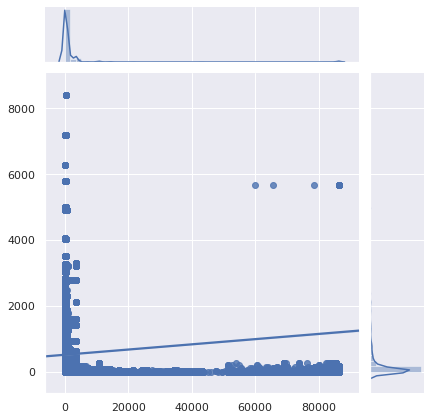
The X-axis represents TTL, and the Y-axis represents query popularity.
Unfortunately, the most popular queries are also the worst cached.
Let’s zoom in:
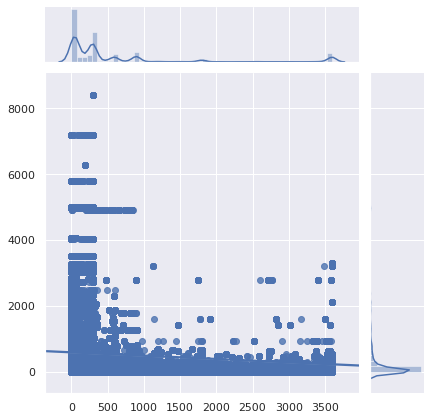
Verdict: things are indeed bad. It was already bad before, and now it has become worse. DNS caching has become almost useless. As fewer people use their provider's DNS resolver (for good reasons), the increased latency becomes more noticeable.
DNS caching has only become useful for content that no one visits.
Also note that software can differently.
Why is that?
Why is such a low TTL set for DNS records?
- Outdated load balancers remain with default settings.
- There are myths that DNS load balancing depends on TTL (this is not the case – since the days of Netscape Navigator, clients select a random IP address from the RR set and transparently try another if they can't connect).
- Administrators want to apply changes immediately, as it's easier to plan.
- The DNS server or load balancer administrator sees their task as effectively deploying the configuration requested by users, not speeding up the operation of websites and services.
- Low TTLs provide peace of mind.
- People initially set low TTLs for testing and then forget to change them.
I did not include 'failover' because it is becoming less relevant. If users need to be redirected to another network just to display an error page when everything else is broken, a delay of more than 1 minute may be acceptable.
Additionally, a minute's TTL means that if authoritative DNS servers are blocked for more than a minute, no one else will be able to access dependent services. And redundancy won't help if the cause is a configuration error or a breach. On the other hand, with reasonable TTLs, many clients will continue to use the previous configuration and will never notice anything.
Low TTLs are largely the fault of CDN services and load balancers, especially when they combine CNAMEs with small TTLs and records with equally low (but independent) TTLs:
$ drill raw.githubusercontent.com
raw.githubusercontent.com.	9	IN	CNAME	github.map.fastly.net.
github.map.fastly.net.	20	IN	A	151.101.128.133
github.map.fastly.net.	20	IN	A	151.101.192.133
github.map.fastly.net.	20	IN	A	151.101.0.133
github.map.fastly.net.	20	IN	A	151.101.64.133
Every time a CNAME or any A records expire, a new request must be sent. Both have a 30-second TTL, but they do not match. The actual average TTL will be 15 seconds.
But wait! It gets worse. Some resolvers behave very poorly in this situation with two linked low TTLs:
$ drill raw.githubusercontent.com @4.2.2.2
raw.githubusercontent.com.	1	IN	CNAME	github.map.fastly.net.
github.map.fastly.net.	1	IN	A	151.101.16.133
Level3 resolver is probably running on BIND. If you continue to send this request, it will always return a TTL of 1. Essentially, raw.githubusercontent.com is never cached.
Here’s another example of such a situation with a very popular domain:
$ drill detectportal.firefox.com @1.1.1.1
detectportal.firefox.com.	25	IN	CNAME	detectportal.prod.mozaws.net.
detectportal.prod.mozaws.net.	26	IN	CNAME	detectportal.firefox.com-v2.edgesuite.net.
detectportal.firefox.com-v2.edgesuite.net.	10668	IN	CNAME	a1089.dscd.akamai.net.
a1089.dscd.akamai.net.	10	IN	A	104.123.50.106
a1089.dscd.akamai.net.	10	IN	A	104.123.50.88
At least three CNAME records. Ouch. One has a decent TTL, but that’s completely useless. In other CNAME records, the initial TTL is 60 seconds, but for the domains akamai.net the maximum TTL is 20 seconds, and none of them are in sync.
What about domains that constantly poll Apple devices?
$ drill 1-courier.push.apple.com @4.2.2.2
1-courier.push.apple.com.	1253	IN	CNAME	1.courier-push-apple.com.akadns.net.
1.courier-push-apple.com.akadns.net.	1	IN	CNAME	gb-courier-4.push-apple.com.akadns.net.
gb-courier-4.push-apple.com.akadns.net.	1	IN	A	17.57.146.84
gb-courier-4.push-apple.com.akadns.net.	1	IN	A	17.57.146.85
The same problem as with Firefox, and the TTL will be stuck at 1 second most of the time when using the Level3 resolver.
Dropbox?
$ drill client.dropbox.com @8.8.8.8
client.dropbox.com.	7	IN	CNAME	client.dropbox-dns.com.
client.dropbox-dns.com.	59	IN	A	162.125.67.3

$ drill client.dropbox.com @4.2.2.2
client.dropbox.com.	1	IN	CNAME	client.dropbox-dns.com.
client.dropbox-dns.com.	1	IN	A	162.125.64.3
In the record safebrowsing.googleapis.com the TTL value is 60 seconds, just like the domains of Facebook. And again, from the client’s perspective, these values are halved.
What about setting a minimum TTL?
Using the name, request type, TTL, and the originally stored timestamp, I wrote a script to simulate 1.5 million requests passing through a caching resolver to estimate the volume of unnecessary requests sent due to the expiration of a cache record.
47.4% of the requests were made after the existing record expired. This is unacceptably high.
What will be the impact on caching if a minimum TTL is set?
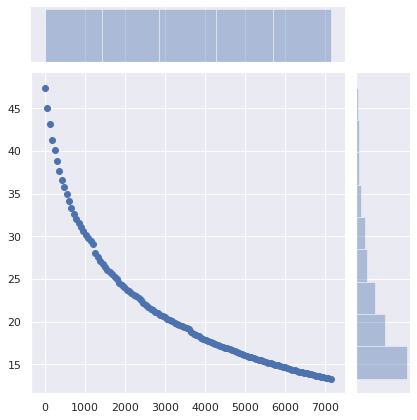
The X-axis represents the minimum TTL values. Records with original TTLs above this value are unaffected.
The Y-axis shows the percentage of requests from a client that already has a cached record, but its lifespan has expired, and they are making a new request.
The share of 'unnecessary' requests decreases from 47% to 36% by simply setting a minimum TTL of 5 minutes. Setting a minimum TTL of 15 minutes reduces this number to 29%. A minimum TTL of 1 hour lowers it to 17%. A significant difference!
How about changing nothing on the server side, but instead setting minimum TTLs in client DNS caches (routers, local resolvers)?
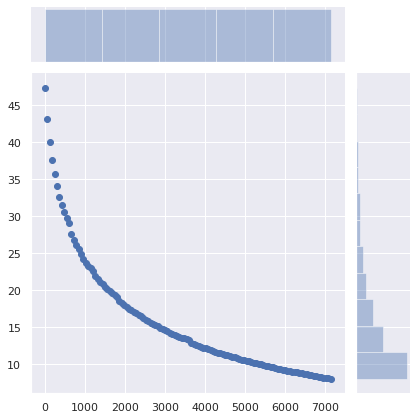
The number of required requests drops from 47% to 34% with a minimum TTL of 5 minutes, to 25% with a minimum of 15 minutes, and to 13% with a minimum of 1 hour. Perhaps the optimal value is 40 minutes.
The impact of this minimal change is enormous.
What are the implications?
Of course, a service can be switched to a new cloud provider, a new server, or a new network, requiring clients to use the latest DNS records. And a sufficiently low TTL helps to make such a transition smooth and seamless. But with a switch to a new infrastructure, no one expects clients to update their DNS records within 1 minute, 5 minutes, or 15 minutes. Setting a minimum TTL of 40 minutes instead of 5 minutes does not hinder users from accessing the service.
However, it will significantly reduce latency and enhance privacy and reliability by avoiding unnecessary requests.
Of course, the RFCs state that TTL must be strictly adhered to. But the reality is that the DNS system has become too inefficient.
If you are working with authoritative DNS servers, please check your TTLs. Do you really need such ridiculously low values?
Sure, there are compelling reasons to set low TTLs for DNS records. But not for 75% of DNS traffic that hardly changes.
And if for some reason you really need to use low TTLs for DNS, make sure that caching is not enabled on your site. For the same reasons.
If you have a local DNS cache running, such as , which allows setting a minimum TTL, use this feature. It’s fine. Nothing bad will happen. Set the minimum TTL somewhere between 40 minutes (2400 seconds) and 1 hour. A perfectly reasonable range.
Source: habr.com
