

Performance in .NET Core

Hello everyone! This article is a collection of Best Practices that my colleagues and I have been applying for a long time while working on various projects.
Information about the machine on which the calculations were performed:BenchmarkDotNet=v0.11.5, OS=Windows 10.0.18362
Intel Core i5-8250U CPU 1.60GHz (Kaby Lake R), 1 CPU, 8 logical and 4 physical cores
.NET Core SDK=3.0.100
[Host]: .NET Core 2.2.7 (CoreCLR 4.6.28008.02, CoreFX 4.6.28008.03), 64bit RyuJIT
Core: .NET Core 2.2.7 (CoreCLR 4.6.28008.02, CoreFX 4.6.28008.03), 64bit RyuJIT
[Host]: .NET Core 3.0.0 (CoreCLR 4.700.19.46205, CoreFX 4.700.19.46214), 64bit RyuJIT
Core: .NET Core 3.0.0 (CoreCLR 4.700.19.46205, CoreFX 4.700.19.46214), 64bit RyuJIT
Job=Core Runtime=Core
ToList vs ToArray and Cycles
I was planning to prepare this information with the release of .NET Core 3.0, but I was outpaced, and I don't want to steal someone else's glory or copy their information, so I'll just provide .
From my side, I just want to present my measurements and results; I have added reverse cycles for fans of 'C++ style' writing loops.
Code:
public class Bench
    {
        private List _list;
        private int[] _array;

        [Params(100000, 10000000)] public int N;

        [GlobalSetup]
        public void Setup()
        {
            const int MIN = 1;
            const int MAX = 10;
            Random random = new Random();
            _list = Enumerable.Repeat(0, N).Select(i => random.Next(MIN, MAX)).ToList();
            _array = _list.ToArray();
        }

        [Benchmark]
        public int ForList()
        {
            int total = 0;
            for (int i = 0; i  0; i--)
            {
                total += _list[i];
            }

            return total;
        }

        [Benchmark]
        public int ForeachList()
        {
            int total = 0;
            foreach (int i in _list)
            {
                total += i;
            }

            return total;
        }

        [Benchmark]
        public int ForeachArray()
        {
            int total = 0;
            foreach (int i in _array)
            {
                total += i;
            }

            return total;
        }

        [Benchmark]
        public int ForArray()
        {
            int total = 0;
            for (int i = 0; i  0; i--)
            {
                total += _array[i];
            }

            return total;
        }
    }
The performance in .NET Core 2.2 and 3.0 is almost identical. Here's what I managed to obtain in .NET Core 3.0:

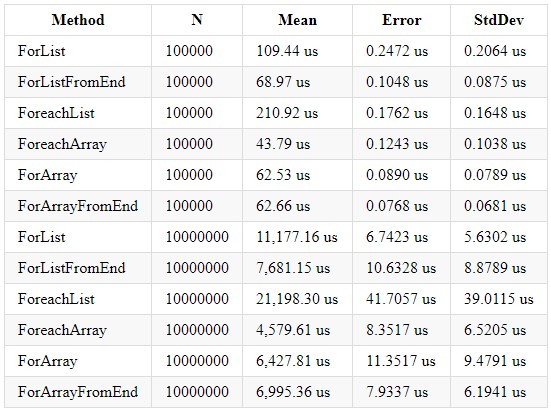
We can conclude that cyclical processing of an Array-type collection is faster due to its internal optimizations and explicit size allocation. It is also worth remembering that a List-type collection has its advantages, and you should choose the appropriate collection depending on the required computations. Even when writing logic for loops, it's essential to remember that this is a regular loop and is also subject to possible loop optimizations. An article appeared a while ago on Habr: . It is still relevant and recommended for reading.
Throw
A year ago, I was working on a legacy project in the company, and in that project, it was standard to handle field validation through a try-catch-throw structure. Even then, I understood that this was an unhealthy business logic for the project, so whenever possible, I tried to avoid using that structure. But let's figure out what is wrong with the approach of handling errors in this manner. I wrote a small piece of code to compare the two approaches and took "benchmarks" for each variant.
Code:
        public bool ContainsHash()
        {
            bool result = false;
            foreach (var file in _files)
            {
                var extension = Path.GetExtension(file);
                if (_hash.Contains(extension))
                    result = true;
            }

            return result;
        }

        public bool ContainsHashTryCatch()
        {
            bool result = false;
            try
            {
                foreach (var file in _files)
                {
                    var extension = Path.GetExtension(file);
                    if (_hash.Contains(extension))
                        result = true;
                }

                if(!result)
                    throw new Exception("false");
            }
            catch (Exception e)
            {
                result = false;
            }

            return result;
        }
The results in .NET Core 3.0 and Core 2.2 have similar outcomes (.NET Core 3.0):

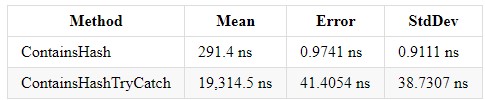
Try-catch complicates code comprehension and increases your program's execution time. However, if you need this structure, avoid inserting those lines of code where error handling is not expected — this will make the code easier to understand. In fact, it is not the error handling itself that burdens the system, but throwing exceptions via the throw new Exception structure.
Throwing exceptions works slower than any class that collects the error in the required format. If you are handling a form or some data and clearly know what error should occur, why not handle it?
Do not write the construct throw new Exception() if this situation is not exceptional. Handling and throwing exceptions is very costly!!!
ToLower, ToLowerInvariant, ToUpper, ToUpperInvariant
In my 5 years of experience working on the .NET platform, I have encountered many projects that used string comparisons. I also saw the following picture: there was one Enterprise solution with many projects, each performing string comparisons differently. But what should be used and how to unify it? In the book CLR via C# by Richter, I read that the method ToUpperInvariant() works faster than ToLowerInvariant().
Excerpt from the book:

Of course, I did not believe it and decided to conduct some tests, then still on the .NET Framework, and the result shocked me — over 15% performance gain. The next morning at work, I showed the measurement data to my management and provided them access to the source code. After that, 2 out of 14 projects were modified for the new measurements, and considering that these two projects existed to handle huge Excel spreadsheets, the result was more than significant for the product.
I also present you with measurements for different versions of .NET Core so that each of you can choose the most optimal solution. I just want to add that in the company I work for, we use ToUpper() for string comparisons.
Code:
public const string defaultString =  "VXTDuob5YhummuDq1PPXOHE4PbrRjYfBjcHdFs8UcKSAHOCGievbUItWhU3ovCmRALgdZUG1CB0sQ4iMj8Z1ZfkML2owvfkOKxBCoFUAN4VLd4I8ietmlsS5PtdQEn6zEgy1uCVZXiXuubd0xM5ONVZBqDu6nOVq1GQloEjeRN8jXrj0MVUexB9aIECs7caKGddpuut3";

        [Benchmark]
        public bool ToLower()
        {
            return defaultString.ToLower() == defaultString.ToLower();
        }

        [Benchmark]
        public bool ToLowerInvariant()
        {
            return defaultString.ToLowerInvariant() == defaultString.ToLowerInvariant();
        }

        [Benchmark]
        public bool ToUpper()
        {
            return defaultString.ToUpper() == defaultString.ToUpper();
        }

        [Benchmark]
        public bool ToUpperInvariant()
        {
            return defaultString.ToUpperInvariant() == defaultString.ToUpperInvariant();
        }

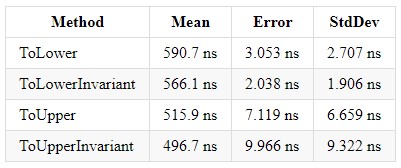
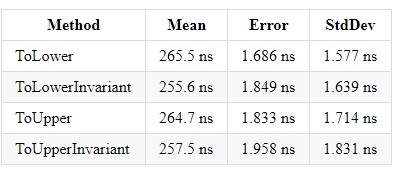
In .NET Core 3.0, the gain for each of these methods is ~2x, balancing the implementations with each other.

Tier Compilation
In my previous article, I briefly described this functionality, and I would like to correct and expand on my words. Tiered compilation speeds up the startup time of your solution, but you sacrifice the fact that parts of your code will be compiled into a more optimized version in the background, which can lead to some overhead. With the advent of .NET Core 3.0, the build time for projects with tiered compilation has decreased, and bugs related to this technology have been fixed. Previously, this technology caused errors on initial requests in ASP.NET Core and hanging during the first build in tiered compilation mode. Currently, in .NET Core 3.0, it is enabled by default, but you can disable it if desired. If you hold a position as a team lead, senior, or middle developer, or if you are a department head, you should understand that rapid project development increases the team's value, and this technology will help you save time for both developers and the overall project timeline.
.NET level up
Upgrade your .NET Framework / .NET Core version. Often, each new version provides an additional performance boost and adds new features.
But what specific advantages are there? Let's look at some of them:
- .NET Core 3.0 introduced R2R images, which will reduce the startup time of .NET Core applications.
- Starting with version 2.2, Tier Compilation was introduced, enabling programmers to spend less time starting up a project.
- Support for new .NET Standard standards.
- Support for the new version of the programming language.
- Optimization; with each new version, the optimization of the core libraries Collection/Struct/Stream/String/Regex improves, along with many other features. If you are transitioning from .NET Framework to .NET Core, you will experience a significant performance boost out of the box. For example, I am attaching a link to some of the optimizations that were added in .NET Core 3.0:

Conclusion
When writing code, it is important to pay attention to various aspects of your project and utilize the features of your programming language and platform to achieve the best results. I would be glad if you could share your knowledge related to optimization in .NET.
Source: habr.com
