

Nota: This overview material from Weaveworks introduces the most popular application rollout strategies and discusses the possibility of implementing the most advanced ones using the Kubernetes operator Flagger. It is written in simple language and contains clear diagrams that help even beginner engineers understand the topic.
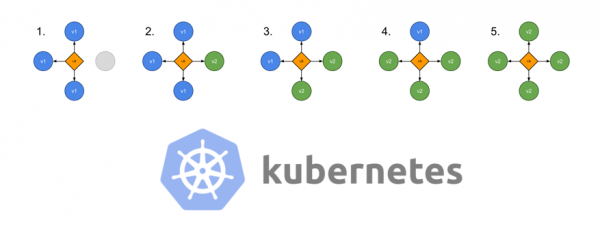
The diagram is taken from of rollout strategies created at Container Solutions
One of the biggest challenges in developing cloud-native applications today is accelerating deployment. With a microservices approach, developers are already working with fully modular applications and designing them in a way that allows different teams to write code and make changes simultaneously.
Shorter and more frequent deployments have the following advantages:
- Time to market is reduced.
- New features reach users faster.
- User feedback gets to the development team quicker. This means the team can enhance features and fix issues more promptly.
- Developer morale improves: it's more interesting to work with a larger number of features in development.
However, increasing the frequency of releases also raises the chances of negatively impacting the reliability of the application or the user experience. That is why operations and DevOps teams must build processes and manage deployment strategies to minimize risk to the product and users. (Learn more about automating the CI/CD pipeline) .)
In this publication, we will discuss various deployment strategies in Kubernetes, including rolling deployments and more advanced methods such as canary rollouts and their variations.
Deployment strategies
There are several different types of deployment strategies that can be utilized depending on the goal. For instance, you may need to make changes in a certain environment for further testing, or to a subset of users/clients, or there may be a need to conduct limited testing on users before making a feature public..
Rolling deployment
This is a standard deployment strategy in Kubernetes. It gradually replaces the pods with the old version of the application with pods running the new version—without downtime for the cluster.
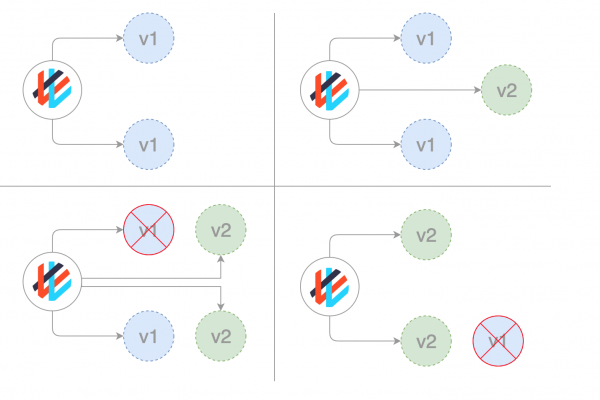
Kubernetes waits for the new pods to be ready for operation (checking them with ), before it starts taking down the old ones. If an issue arises, this rolling update can be interrupted without stopping the entire cluster. In the YAML file describing the type of deployment, the new image replaces the old image:
apiVersion: apps/v1beta1
kind: Deployment
metadata:
  name: awesomeapp
spec:
  replicas: 3
  template:
    metadata:
      labels:
        app: awesomeapp
    spec:
      containers:
        - name: awesomeapp
          image: imagerepo-user/awesomeapp:new
          ports:
            - containerPort: 8080
The parameters for the rolling update can be specified in the manifest file:
spec:
  replicas: 3
  strategy:
    type: RollingUpdate
    rollingUpdate:
       maxSurge: 25%
       maxUnavailable: 25%
  template:
  ...
Recreate
In this simplest type of deployment, the old pods are killed all at once and replaced with new ones:
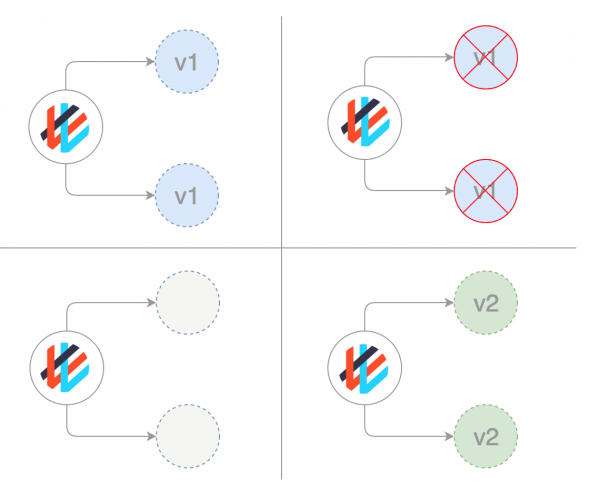
The corresponding manifest looks like this:
spec:
  replicas: 3
  strategy:
    type: Recreate
  template:
  ...
Blue/Green deployments
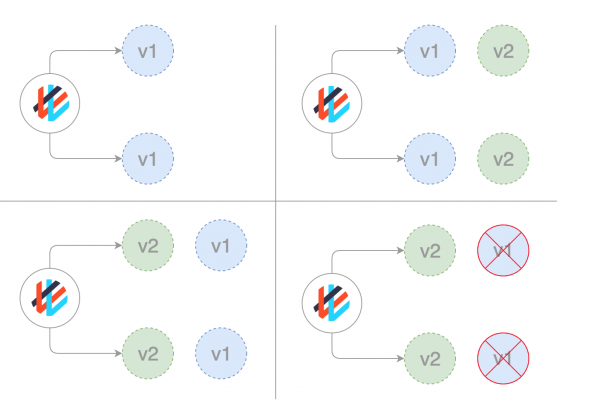
The blue-green deployment strategy (sometimes referred to as red/black) involves simultaneously deploying the old (green) and new (blue) versions of the application. After both versions are deployed, ordinary users access the green version, while the blue version is available to the QA team for automated testing through a separate service or direct port forwarding:
apiVersion: apps/v1beta1
kind: Deployment
metadata:
  name: awesomeapp-02
spec:
  template:
    metadata:
      labels:
        app: awesomeapp
        version: "02"
Once the blue (new) version has been tested and its release approved, the service switches to it, and the green (old) version is taken down:
apiVersion: v1
kind: Service
metadata:
  name: awesomeapp
spec:
  selector:
    app: awesomeapp
    version: "02"
...
Canary deployments
Canary releases are similar to blue-green deployments but are managed better and utilize a staged approach. This type includes several different strategies, including 'dark' launches and A/B testing.
This strategy is used when it is necessary to test some new functionality, typically in the backend of the application. The essence of the approach is to create two almost identical servers: one serves almost all users, while the other, featuring new functions, serves only a small subset of users, after which their performance results are compared. If everything goes smoothly, the new version is gradually rolled out across the entire infrastructure.
Although this strategy can be implemented solely using Kubernetes by replacing old pods with new ones, it is much more convenient and simpler to use a service mesh like Istio.
For example, you might have two different manifests in Git: a standard one with tag 0.1.0 and a 'canary' one with tag 0.2.0. By altering the weights in the Istio virtual gateway manifest, you can control the traffic distribution between these two deployments:
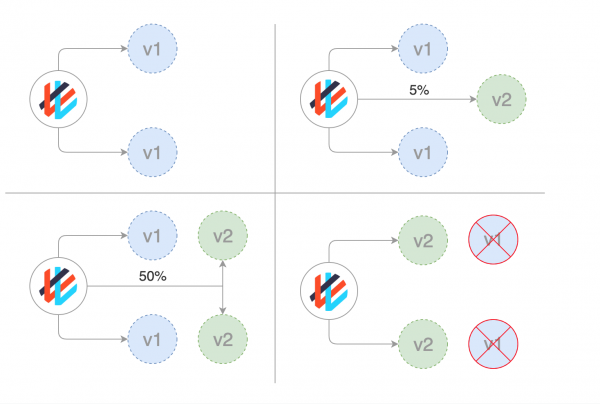
A step-by-step guide to implementing canary deployments using Istio can be found in the material . (Note: translation.: We also translated the material about canary releases in Istio .)
Canary Deployments with Weaveworks Flagger
makes it easy and efficient to manage canary releases.
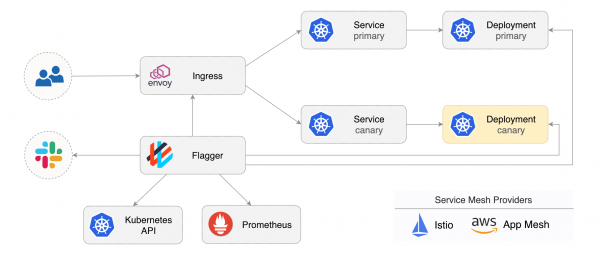
Flagger automates the work with them. It uses Istio or AWS App Mesh for routing and traffic switching, along with Prometheus metrics for result analysis. Additionally, the analysis of canary deployments can be supplemented with webhooks for conducting acceptance tests, load tests, and any other types of checks.
Based on the Kubernetes deployment and, if necessary, horizontal pod autoscaling (HPA), Flagger creates sets of objects (Kubernetes deployments, ClusterIP services, and Istio or App Mesh virtual services) for analysis and implementation of canary deployments:
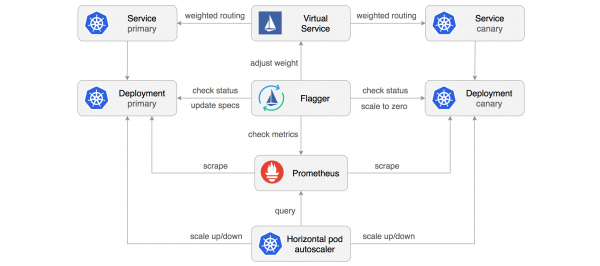
Implementing a control loop (control loop), Flagger gradually shifts the traffic to the canary server while simultaneously measuring key performance indicators such as the success rate of HTTP requests, average request duration, and pod health. Based on the analysis of KPIs (key performance indicators), the canary portion either grows or retracts, and the analysis results are published in Slack. A description and demonstration of this process can be found in the material .
Dark (hidden) or A/B deployments
Hidden deployment is another variation of the canary strategy (by the way, Flagger can work with it as well). The difference between hidden and canary deployments is that hidden deployments deal with the frontend, while canary deployments focus on the backend.
Another name for these deployments is A/B testing. Instead of making a new feature available to all users, it is offered only to a limited segment of them. Usually, these users are unaware that they are acting as pioneer testers (hence the term 'hidden deployment').
With feature toggles (feature toggles) and other tools, one can track how users interact with a new feature, whether it engages them or if they find the new user interface confusing, along with other types of metrics.
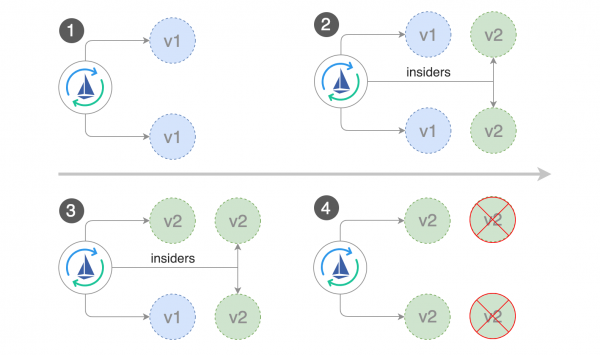
Flagger and A/B deployments
In addition to weight-based routing, Flagger can also direct traffic to the canary server based on HTTP parameters. In A/B testing, HTTP headers or cookies can be used to redirect a specific segment of users. This is especially effective for frontend applications that require session affinity to the server (session affinity). Additional information can be found in the Flagger documentation.
The author expresses gratitude to , engineer at Weaveworks (and creator of Flagger), for all these amazing deployment diagrams.
P.S. from the translator
Also read in our blog:
- «»;
- «»;
- «»;
- «».
Source: habr.com
