

With Apache Cassandra as a database and the need to operate it within a Kubernetes-based infrastructure, we face this challenge regularly. In this article, we will share our insights on the necessary steps, criteria, and existing solutions (including an overview of operators) for migrating Cassandra to K8s.
“Who can manage a woman can also manage a state”
So, who is Cassandra? It is a distributed storage system designed to handle large volumes of data while ensuring high availability without a single point of failure. The project hardly needs an extensive introduction, so I will only outline the key features of Cassandra that will be relevant in the context of this article:
- Cassandra is written in Java.
- The Cassandra topology includes several levels:
- Node — a single deployed instance of Cassandra;
- Rack — a group of Cassandra instances that are combined by some criteria and located within one data center;
- Datacenter — a collection of all groups of Cassandra instances located within one data center;
- Cluster — a collection of all data centers.
- Cassandra identifies nodes using IP addresses.
- To speed up read and write operations, Cassandra stores some data in memory.
Now — to the potential migration to Kubernetes.
Check-list for migration
When it comes to migrating Cassandra to Kubernetes, we hope that managing it will become easier with the move. What will be required for this? What can help?
1. Data Storage
As previously mentioned, Cassandra stores some data in memory — in the Memtable. But there is also another part of the data that is saved to disk, — in the form of SSTable. This data is complemented by the entity Commit Log — records of all transactions that are also saved to disk.
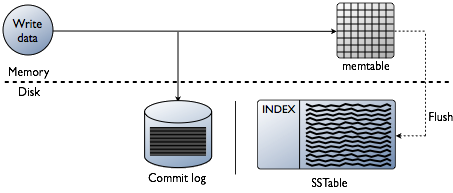
Schema of write transactions in Cassandra
In Kubernetes, we can use PersistentVolume for data storage. Thanks to well-established mechanisms, working with data in Kubernetes is becoming easier every year.
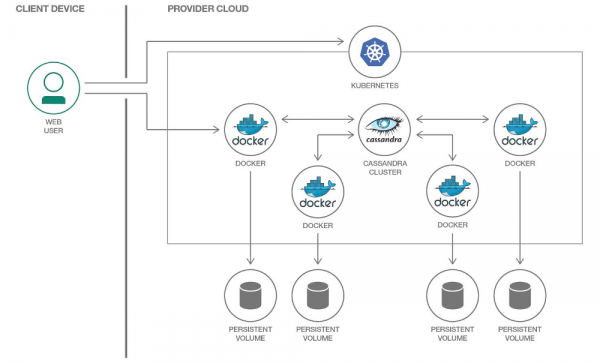
We will allocate a separate PersistentVolume for each pod with Cassandra.
It's important to note that Cassandra by itself implies data replication, offering built-in mechanisms for this purpose. Therefore, if you are assembling a Cassandra cluster from a large number of nodes, there is no need to use distributed systems like Ceph or GlusterFS for data storage. In this case, it would be logical to store data on the node's disk using or mounting hostPath.
Another question is if you want to create a separate environment for each feature branch for developers. In this case, the correct approach would be to spin up a single Cassandra node and store data in distributed storage; i.e., the aforementioned Ceph and GlusterFS would become your option. Then developers will be confident that they won't lose test data even if one of the nodes in the Kubernetes cluster fails.
2. Monitoring
The practically undisputed choice for implementing monitoring in Kubernetes is Prometheus (we covered this in detail in ). How is Cassandra doing with metric exporters for Prometheus? And, more importantly, with suitable dashboards for Grafana?
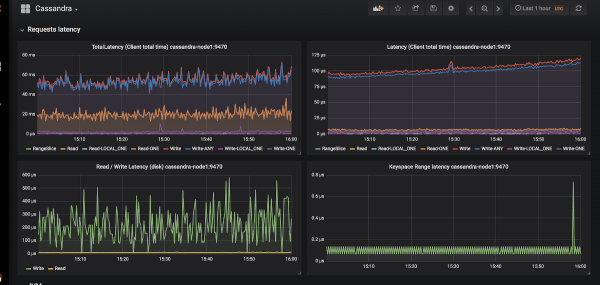
An example of the visualization of graphs in Grafana for Cassandra
There are only two exporters: and .
We chose the first one because:
- JMX Exporter is growing and evolving, while Cassandra Exporter has not received adequate community support. Cassandra Exporter still does not support most versions of Cassandra.
- It can be run as a javaagent by adding the flag
-javaagent:\/cassandra-exporter.jar=--listen=:9180. - There is an , which is incompatible with Cassandra Exporter.
3. Choosing Kubernetes primitives
According to the above structure of the Cassandra cluster, let's try to translate everything described there into Kubernetes terminology:
- Cassandra Node → Pod
- Cassandra Rack → StatefulSet
- Cassandra Datacenter → pool of StatefulSets
- Cassandra Cluster → ???
It turns out that there is a need for some additional entity to manage the entire Cassandra cluster at once. But if something is missing, we can create it! In Kubernetes, there is a mechanism for defining custom resources for this purpose— .
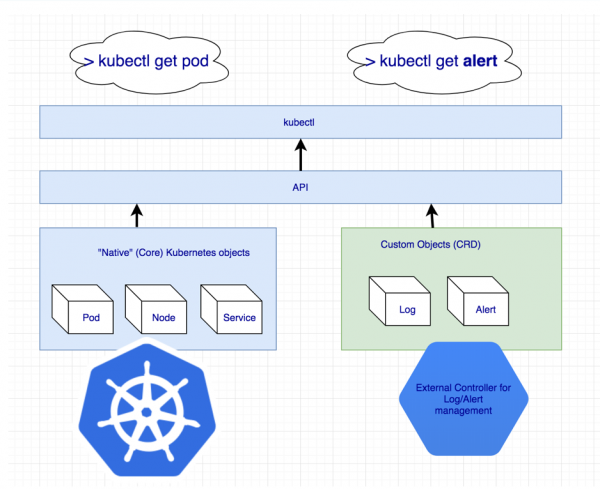
Declaration of additional resources for logs and alerts
But the Custom Resource itself means nothing on its own: it needs controller. You may need to enlist the help of a …
4. Identification of pods
As mentioned earlier, we agreed that one Cassandra node will equal one pod in Kubernetes. However, the IP addresses of the pods will differ every time. Node identification in Cassandra is based specifically on the IP address... This means that after each pod deletion, the Cassandra cluster will add a new node.
There is a way out, and not just one:
- We can track by host identifiers (UUIDs, which uniquely identify Cassandra instances) or by IP addresses and store everything in some structures/tables. This method has two main drawbacks:
- The risk of a race condition if two nodes fail simultaneously. Once restored, the Cassandra nodes will simultaneously request an IP address from the table and compete for the same resource.
- If a Cassandra node loses its data, we can no longer identify it.
- The second solution seems like a bit of a hack, but nonetheless: we can create a Service with ClusterIP for each Cassandra node. The issues with this implementation are:
- If there are many nodes in the Cassandra cluster, we will have to create a very large number of Services.
- The ClusterIP functionality is implemented via iptables. This can become a problem if there are many nodes in the Cassandra cluster (1000… or even 100?). Although can solve this problem.
- The third solution is to use the node network for Cassandra nodes instead of a dedicated pod network by enabling the setting
hostNetwork: true. This method imposes certain limitations:- On node replacement. It is required that the new node must have the same IP address as the previous one (this is practically impossible to achieve in clouds like AWS, GCP);
- Using the cluster node network, we start competing for network resources. Consequently, deploying more than one Cassandra pod on a single cluster node will be problematic.
5. Backups
We want to keep a complete version of data from one Cassandra node on a schedule. Kubernetes provides a convenient option using , but here Cassandra itself throws a wrench into the works.
I would like to remind you that part of the data in Cassandra is stored in memory. To perform a complete backup, the data from memory (Memtables) needs to be transferred to disk (SSTables). At that moment, the Cassandra node stops accepting connections, becoming completely inactive in the cluster.
After that, a backup is taken (snapshot) and the schema is saved (keyspace). It turns out that a simple backup doesn't help us: we need to preserve the data identifiers that the Cassandra node was responsible for — these are special tokens.
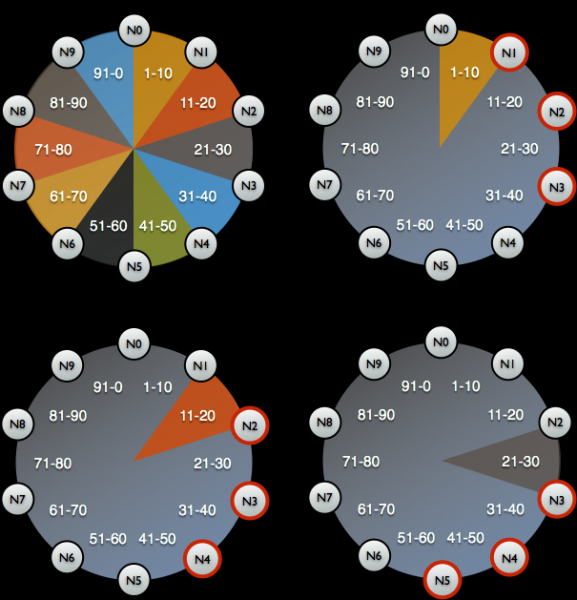
Token distribution for identifying which data is managed by Cassandra nodes
An example script for taking a Cassandra backup from Google in Kubernetes can be found at . The only thing the script does not account for is resetting the data on the node before taking the snapshot. This means the backup is not for the current state, but for a slightly earlier state. However, this helps keep the node operational, which seems very logical.
set -eu

if [[ -z "$1" ]]; then
  info "Please provide a keyspace"
  exit 1
fi

KEYSPACE="$1"

result=$(nodetool snapshot "${KEYSPACE}")

if [[ $? -ne 0 ]]; then
  echo "Error while making snapshot"
  exit 1
fi

timestamp=$(echo "$result" | awk '/Snapshot directory: / { print $3 }')

mkdir -p /tmp/backup

for path in $(find "/var/lib/cassandra/data/${KEYSPACE}" -name $timestamp); do
  table=$(echo "${path}" | awk -F "[/-]" '{print $7}')
  mkdir /tmp/backup/$table
  mv $path /tmp/backup/$table
done


tar -zcf /tmp/backup.tar.gz -C /tmp/backup .

nodetool clearsnapshot "${KEYSPACE}"
An example bash script for taking a backup from a single Cassandra node
Ready-made solutions for Cassandra in Kubernetes
What is currently used for deploying Cassandra in Kubernetes, and which of these fits the specified requirements best?
1. Solutions based on StatefulSets or Helm charts
Using the basic features of StatefulSets to run a Cassandra cluster is a good option. With a Helm chart and Go templates, a flexible interface can be provided to users for deploying Cassandra.
Usually, this works fine… until something unexpected happens — for example, a node failure. Standard Kubernetes tools simply cannot account for all the aforementioned nuances. Moreover, this approach is very limited in terms of how it can be extended for more complex use cases: node replacement, backup, recovery, monitoring, etc.
Representatives:
- ;
- .
Both charts are equally good but are subject to the issues described above.
2. Solutions based on Kubernetes Operator
Such options are more interesting because they provide extensive cluster management capabilities. For designing a Cassandra operator, like any other database, a good pattern looks like Sidecar Controller CRD:
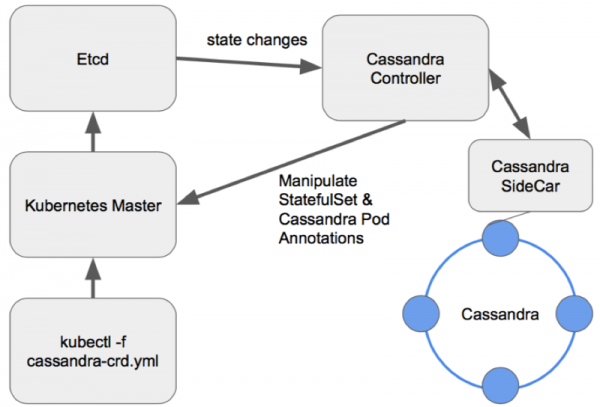
Node management scheme in a well-designed Cassandra operator
Let's consider existing operators.
1. Cassandra Operator by Instaclustr
- Status: Alpha
- License: Apache 2.0
- Implemented in: Java
This is indeed a very promising and actively developing project from a company that offers managed Cassandra deployments. It uses a sidecar container that accepts commands via HTTP as described above. Written in Java, it sometimes lacks the advanced functionality of the client-go library. Additionally, the operator does not support different Racks within a single Datacenter.
However, the operator has advantages such as monitoring support, high-level cluster management using CRDs, and even documentation for backup procedures.
2. Navigator by Jetstack
- Status: Alpha
- License: Apache 2.0
- Implemented in: Golang
An operator designed for deploying Database-as-a-Service. Currently supports two databases: Elasticsearch and Cassandra. It includes interesting features like database access control via RBAC (which involves launching a separate navigator-apiserver). It's an intriguing project worth considering, although the last commit was made a year and a half ago, which clearly diminishes its potential.
3. Cassandra Operator by vgkowski
- Status: Alpha
- License: Apache 2.0
- Implemented in: Golang
It was not taken seriously since the last commit to the repository was over a year ago. The operator's development has been abandoned: the last supported Kubernetes version claimed is 1.9.
4. Cassandra Operator by Rook
- Status: Alpha
- License: Apache 2.0
- Implemented in: Golang
An operator that is not progressing as quickly as one would hope. It has a well-thought-out CRD structure for managing the cluster and addresses the node identification issue using Service with ClusterIP (the so-called 'hack')... but that's currently about it. Monitoring and backups are not available out of the box (by the way, we took care of monitoring ourselves). ). An interesting point is that this operator can also be used to deploy ScyllaDB.
NB: We used this operator with minor modifications in one of our projects. No issues were observed during its operation (~4 months of use).
5. CassKop by Orange
- Status: Alpha
- License: Apache 2.0
- Implemented in: Golang
The youngest operator on the list: the first commit was made on May 23, 2019. It already has a significant number of features from our list, which can be found in the project repository. The operator is built on the popular operator-sdk and supports monitoring out of the box. The main distinction from other operators is its use of , implemented in Python and used for communication between Cassandra nodes.
Conclusions
The number of approaches and possible options for migrating Cassandra to Kubernetes speaks for itself: this topic is in demand.
At this stage, experimenting with any of the above is at your own risk: no developer guarantees 100% functionality of their solution in a production environment. However, many products already look promising enough to try using them in development environments.
I think in the future this woman on the ship will come in handy!
P.S.
Also read in our blog:
- «»;
- «»;
- «»;
- «».
Source: habr.com
